
1. Inleiding
Dankie vir die aankoopasing the XO F41 Mirror Bluetooth Speaker. This device combines a digital clock display with a portable Bluetooth speaker, offering multiple playback options including Bluetooth, TF card, and FM radio. Please read this manual carefully before use to ensure proper operation and to maximize your experience with the product.

Image 1.1: The XO F41 Mirror Bluetooth Speaker in use, showing its digital clock display.
2. Produkkenmerke
- Bluetooth 5.3-verbinding: For stable and efficient wireless audio streaming.
- Spieëlvertoning: Clear digital time display with adjustable brightness.
- Veelvuldige afspeelmodusse: Supports Bluetooth, TF card, and FM radio.
- Geïntegreerde mikrofoon: Vir handvrye oproepe.
- Lang speeltyd: Up to 8 hours at 50% volume, 5 hours at 100% volume.
- Kompakte en draagbare ontwerp: Easy to carry and place anywhere.
- USB-C Laai: Moderne en gerieflike laaipoort.
3. Pakketinhoud
Kontroleer asseblief die pakket vir die volgende items:
- XO F41 Mirror Bluetooth Speaker
- USB-C-laaikabel
- Gebruikershandleiding

Image 3.1: The XO F41 Mirror Bluetooth Speaker packaging.
4. Toesteluitleg en -kontroles
Maak jouself vertroud met die luidspreker se knoppies en poorte:
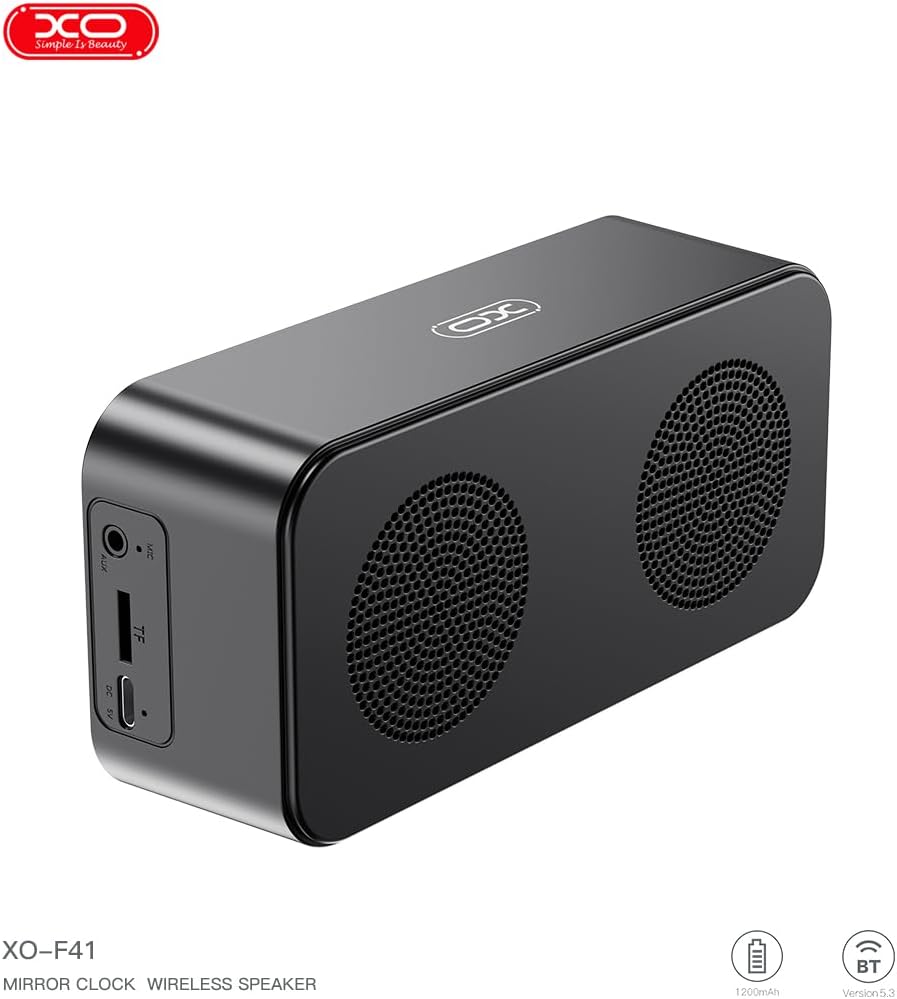
Beeld 4.1: Sykant view of the XO F41 with ports labeled.
- Kragknoppie: Druk en hou in om aan/af te skakel. Druk kort om van modus te wissel.
- Speel/Pause-knoppie: Speel of onderbreek oudio. Beantwoord/beëindig oproepe.
- Volume op/Volgende snit: Druk kort vir volume op, druk lank vir die volgende snit.
- Volume af/vorige snit: Druk kort om volume te verlaag, druk lank vir die vorige snit.
- USB-C-poort: Vir die laai van die toestel.
- TF-kaartgleuf: Plaas 'n TF (MicroSD) kaart in vir plaaslike musiekweergawe.
- AUX-poort: Vir bedrade klankinvoer.
5. Opstelling
5.1 Laai die luidspreker
- Koppel die meegeleverde USB-C-kabel aan die laaipoort op die luidspreker.
- Koppel die ander kant van die kabel aan 'n USB-kragadapter (nie ingesluit nie) of 'n rekenaar se USB-poort.
- The charging indicator will illuminate. It takes approximately 3 hours for a full charge.
- The indicator will turn off or change color once fully charged.
5.2 Krag aan/af
- Om aan te skakel: Press and hold the Power button for approximately 3 seconds. You will hear an audible prompt.
- Om af te skakel: Press and hold the Power button for approximately 3 seconds. You will hear an audible prompt.
6. Bedryfsinstruksies
6.1 Bluetooth -koppeling
- Ensure the speaker is powered on and in Bluetooth mode. If not, short press the Power button to cycle through modes until "BT" or a Bluetooth icon appears on the display.
- Aktiveer Bluetooth op jou mobiele toestel en soek vir beskikbare toestelle.
- Select "XO-F41" from the list of devices.
- Sodra dit gekoppel is, sal die luidspreker 'n suksesvolle verbinding aandui, en jy kan klank vanaf jou toestel begin speel.
6.2 TF Card Mode
- Plaas 'n TF (MicroSD) kaart met MP3-klank in files in die TF-kaartgleuf.
- The speaker will automatically switch to TF card mode and begin playing music. If not, short press the Power button to cycle to TF card mode.
- Use the Volume Up/Down buttons for track navigation and the Play/Pause button for playback control.
6.3 FM-radiomodus
- Short press the Power button to switch to FM radio mode. The display will show the FM frequency.
- Long press the Play/Pause button to automatically scan and save available FM stations.
- Short press the Volume Up/Down buttons to switch between saved stations.
6.4 Klok- en alarminstellings
The XO F41 features a digital clock display. Specific instructions for setting the time and alarm are typically found in the detailed manual included with the product. Generally, a dedicated 'M' (Mode) or 'Set' button is used to enter time/alarm setting mode, and volume buttons are used to adjust values.

Image 6.1: The XO F41 speaker functioning as a bedside clock.
6.5 Aanpassing van die skermhelderheid
The display brightness is adjustable. Look for a dedicated button (often labeled with a sun icon or similar) or a combination of button presses (e.g., double-pressing the Power button) to cycle through brightness levels. Refer to the included quick start guide for exact steps.
7. Onderhoud
- Skoonmaak: Gebruik 'n sagte, droë lap om die luidspreker se oppervlak skoon te maak. Moenie skuurmiddels of oplosmiddels gebruik nie.
- Berging: Bêre die luidspreker op 'n koel, droë plek weg van direkte sonlig en uiterste temperature wanneer dit nie vir lang tye gebruik word nie.
- Waterweerstand: Hierdie toestel is nie waterdig nie. Vermy blootstelling aan water of oormatige vog.
- Batterysorg: Om die batterylewe te verleng, vermy om die battery gereeld heeltemal te ontlaai. Laai die toestel gereeld, selfs al word dit nie voortdurend gebruik nie.
8. Probleemoplossing
| Probleem | Moontlike oorsaak | Oplossing |
|---|---|---|
| Luidspreker skakel nie aan nie. | Lae battery. | Laai die luidspreker vir ten minste 30 minute. |
| Kan nie via Bluetooth koppel nie. | Speaker not in pairing mode; Bluetooth disabled on device; too far from device. | Ensure speaker is in Bluetooth mode. Enable Bluetooth on your device. Move speaker closer to your device (within 10 meters). |
| No sound from TF card. | TF card not inserted correctly; unsupported file format; no audio files on card. | Plaas die TF-kaart weer in. Maak seker files are in MP3 format. Verify audio files are present on the card. |
| Swak FM-radio-ontvangs. | Swak sein; omgewingsinmenging. | Move the speaker to a different location. Re-scan for stations. |
9. Spesifikasies
| Kenmerk | Detail |
|---|---|
| Modelnommer | XO-F41 |
| Bluetooth weergawe | Bluetooth V5.3 |
| Bluetooth frekwensie | 2.402GHz-2.480GHz |
| Battery kapasiteit | 1200mAh |
| Laai-invoer | USB-C, DC5V/0.5A |
| Laai tyd | Ongeveer 3 uur |
| Speel Tyd | 8H (50% volume); 5H (100% volume) |
| Effektiewe afstand | Minder as 10 meter |
| Maksimum krag | 5W |
| Luidsprekereenheid | 52 mm |
| Sein-tot-geraas verhouding | > 80dB |
| Produk afmetings | 15 x 3.81 x 11 cm (ongeveer 150 x 45 x 72 mm) |
| Produk Gewig | 320 g (approx. 0.28 kg) |
| Materiaal | Plastiek |
| Spesiale kenmerk | Verstelbare helderheid |

Image 9.1: Detailed product parameters.
10. Waarborginligting
The XO F41 Mirror Bluetooth Speaker comes with a standard manufacturer's warranty. Please refer to the warranty card included in your package for specific terms, conditions, and duration. Keep your purchase receipt as proof of purchase for any warranty claims.
11. Kliëntediens
For further assistance, technical support, or inquiries regarding your XO F41 Mirror Bluetooth Speaker, please contact the retailer or manufacturer's customer service department. Contact details are typically provided on the product packaging or the official brand webwebwerf.