
1. Inleiding
This manual provides essential information for the proper setup, operation, maintenance, and troubleshooting of your Meizu mblu 21 4G LTE smartphone. Please read this manual thoroughly before using your device to ensure optimal performance and longevity.
The Meizu mblu 21 features a 6.79-inch HD display, a 13MP dual camera system, and runs on Android 14. It is designed for efficient performance and reliable connectivity.
2. Opstelling
2.1 Pakketinhoud
Verifieer dat jou pakket die volgende items bevat:
- Meizu mblu 21 Smartphone
- Kragadapter
- Vinnige Begingids (indien ingesluit)
2.2 SIM-kaart en MicroSD-kaartinstallasie
The Meizu mblu 21 supports Dual Nano SIM cards and a MicroSD card for expandable storage.
- Vind die SIM-laai aan die kant van jou toestel.
- Insert the SIM ejector tool (not included, use a thin pin if necessary) into the small hole on the SIM tray to eject it.
- Place your Nano SIM card(s) and/or MicroSD card into the designated slots on the tray, ensuring proper orientation.
- Plaas die SIM-kaartlaai versigtig terug in die foon totdat dit vasklik.
2.3 Aanvanklike aanskakeling en netwerkkonfigurasie
- Press and hold the power button until the Meizu logo appears.
- Volg die aanwysings op die skerm om die aanvanklike opstelling te voltooi, insluitend taalkeuse, Wi-Fi-verbinding en Google-rekeningopstelling.
- For cellular connectivity, ensure your SIM card is active. This device is an international version and in the USA market, it operates exclusively on T-Mobile's 4G LTE network. Outside the USA, it is compatible with various carriers worldwide.
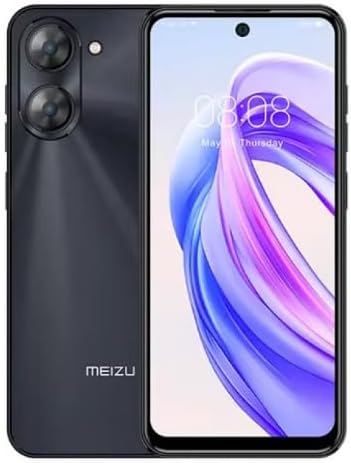
Prent 2.3.1: Voor en agter view of the Meizu mblu 21 smartphone. The front displays the screen with a punch-hole camera, while the rear shows the dual camera module and the Meizu branding.
3. Bedryfsinstruksies
3.1 Basiese Navigasie (Android 14)
Your Meizu mblu 21 runs on Android 14, offering an intuitive user experience. Use gestures or on-screen navigation buttons to move between apps, access settings, and manage notifications.
3.2 Kameragebruik
The device features a 13MP Smart Camera on the rear and an 8MP front camera. Open the Camera app to capture photos and videos. Utilize various modes and settings for optimal results.
3.3 Veiligheidsfunksies
Unlock your device using the side-mounted fingerprint sensor for instant access or the 8MP front camera for Smart Face Unlock.
3.4 Konnektiwiteit
- Wi-Fi: Supports Dual-Band Wi-Fi (2.4GHz and 5GHz) for stable internet access.
- Bluetooth: Bluetooth 5.0 for connecting to wireless accessories.
- VoLTE: Enjoy clearer voice calls with VoLTE HD Calls.

Prent 3.4.1: Visual representation of key connectivity and operating system features, including Android 14, Dual-Band Wi-Fi, Bluetooth 5.0, and VoLTE HD Calls.
4. Onderhoud
4.1 Algemene sorg
- Hou u toestel droog en weg van ekstreme temperature.
- Maak die skerm en liggaam skoon met 'n sagte, pluisvrye lap. Vermy harde chemikalieë.
- Protect the screen with a screen protector and the body with a protective case to prevent scratches and damage.
4.2 Batterybestuur
The 4900mAh battery is designed for all-day performance. To prolong battery life:
- Vermy om die battery gereeld heeltemal te ontlaai.
- Use the provided power adapter for charging.
- Optimize background app usage and screen brightness in settings.

Prent 4.2.1: 'n interne view of the Meizu mblu 21 smartphone highlighting the 4900mAh battery, emphasizing its capacity for extended use.
5. Probleemoplossing
5.1 Algemene kwessies en oplossings
- Toestel skakel nie aan nie: Maak seker dat die battery gelaai is. Koppel aan die kragadapter en probeer weer.
- Netwerkverbindingsprobleme: Check if your SIM card is properly inserted and active. Verify network settings and ensure you are within T-Mobile's coverage area in the USA.
- Stadige werkverrigting: Maak onnodige agtergrondtoepassings toe. Maak kasgeheue en tydelike toepassings skoon. files. Restart the device.
- Battery raak vinnig leeg: Reduce screen brightness, disable unused features like Bluetooth or GPS, and check for power-intensive apps.
If problems persist, consider performing a factory reset (back up your data first) or contacting customer support.
6. Spesifikasies
| Modelnommer | M416L |
| Bedryfstelsel | Android 14 |
| Vertoon | 6.79 Inches HD, 2340 x 1080 Resolution, 90Hz Adaptive Refresh Rate |
| Verwerker | Octa Core 1.6GHz ARM Mali-G57 |
| Geheue | 64 GB Internal Storage, 4 GB RAM |
| Battery | 4900mAh (4.9E+3 Milliamp Hours) Lithium Polymer |
| Agterste kamera | 13MP Smart Camera, 5P Precision Lens |
| Voorste kamera | 8MP |
| Sellulêre Tegnologie | 4G LTE FDD: 2,3,4,5,7,8,12,17,26,28,66; 3G WCDMA: 2/4/5/8; 2G Quad Band |
| SIM Tipe | Dual Nano SIM + MicroSD |
| Wi-Fi | Dubbelband (2.4GHz en 5GHz) |
| Bluetooth | 5.0 |
| Klankaansluiting | USB Tipe C |
| Item gewig | 14 onse |
| FCC ID | 2ANQ6-M416L |

Prent 6.1: The Meizu mblu 21 smartphone presented in its Titan Black color variant, showcasing sy ontwerp.
7. Waarborg en Ondersteuning
For warranty information, please refer to the warranty card included with your product or consult the retailer where the device was purchased. Meizu provides support for its products. For further assistance, please visit the official Meizu webwebwerf of kontak hul kliëntediens.