
IPASON G-SLIM
IPASON G-SLIM tafelrekenaar gebruikershandleiding
Model: G-SLIM | Handelsmerk: IPASON
1. Produk verbyview
The IPASON G-SLIM Desktop PC is a high-performance, space-saving computer designed for both personal and business use. It features a slim tower design, powered by a 12th Gen Intel Core i3 processor, and equipped with a high-speed NVMe M.2 SSD for rapid data access and system responsiveness. This PC comes pre-installed with Windows 11, offering the latest operating system features and security.

Figuur 1: Voorkant view of the IPASON G-SLIM Desktop PC, showcasing sy kompakte en slanke ontwerp.
Key features include a functional slim design with conveniently located front USB and headphone jacks, eliminating the need for extended cables. It boasts robust performance suitable for multi-tasking, thanks to its ample memory and the high-speed NVMe SSD, which offers significantly faster transfer speeds compared to traditional SATA SSDs.
2. Key Features and Design
2.1 Slim and Functional Design
The G-SLIM PC is engineered with a focus on functional beauty and space efficiency. Its compact dimensions make it ideal for various environments, from home offices to business settings, without compromising on performance.

Figure 2: Detailed dimensions of the IPASON G-SLIM Desktop PC, illustrating its compact form factor (100mm width x 336mm depth x 350mm height).
2.2 High Performance for Business and Personal Use
Equipped with a balanced CPU (Intel Core i3 12th Gen) and ample memory, the G-SLIM ensures stable high performance for various applications, from daily productivity tasks to more demanding business scenarios. The large capacity memory allows for comfortable multi-tasking, handling numerous applications simultaneously with ease.

Figure 3: The IPASON G-SLIM Desktop PC integrated into a business environment, demonstrating its suitability for professional use.
2.3 Advanced Storage and Operating System
The PC utilizes a PCIe Gen3 NVMe SSD, providing significantly faster data transfer speeds compared to traditional SATA SSDs, ensuring quick boot times and application loading. It comes with the latest Windows 11 operating system, offering a refreshed user interface, enhanced multitasking features like Snap Layouts, and improved widget functionality.
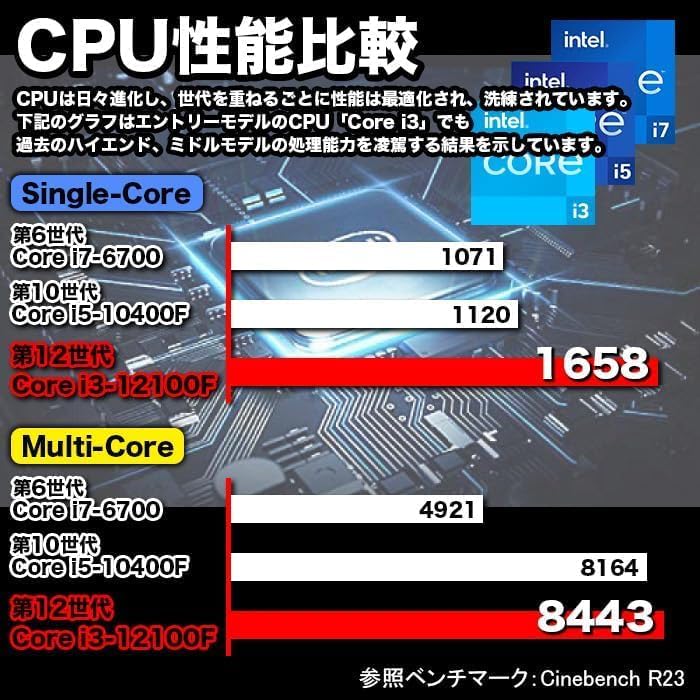
Figure 4: A visual representation of the Windows 11 operating system, highlighting its modern interface and features.
2.4 Performance Benchmarks and Quality Assurance
The G-SLIM's CPU performance is optimized for efficiency. IPASON ensures product reliability through rigorous testing, including 3C Certification, 6-sided drop tests, compatibility tests, degradation/durability tests, and high-load temperature control and noise tests, all conducted under strict standards.

Figure 5: A chart comparing CPU performance (Single-Core and Multi-Core) across different generations of Intel Core processors, demonstrating the G-SLIM's capabilities.

Figure 6: Visual representation of the strict quality control tests the IPASON G-SLIM undergoes, ensuring reliability and stability.
3. Opstelgids
Follow these steps to set up your IPASON G-SLIM Desktop PC:
- Uitpak: Carefully remove the PC and all accessories from the packaging. Ensure all components listed in the packing list are present.
- Plasing: Place the PC on a stable, flat surface with adequate ventilation. Avoid placing it in direct sunlight or near heat sources.
- Koppel randapparatuur:
- Connect your monitor to the appropriate video output port (e.g., HDMI, DisplayPort) on the back of the PC.
- Koppel jou sleutelbord en muis aan die beskikbare USB-poorte.
- If using a wired network, connect an Ethernet cable to the LAN port.
- Koppel luidsprekers of oorfone aan die klankuitvoeraansluiting.
- Kragverbinding: Connect the provided power cable to the power input on the back of the PC, then plug the other end into a power outlet.
- Eerste selflaai: Press the power button on the front of the PC. The system will boot into Windows 11. Follow the on-screen instructions for initial setup, including language, region, and network configuration.
Let wel: The PC comes with Windows 11 pre-installed and WPS Office for productivity tasks, offering high compatibility with Microsoft Office formats.
4. Bedryfsinstruksies
Your IPASON G-SLIM PC is ready for use after initial setup. Here are some general operating guidelines:
- Krag aan/af: Press the power button to turn on the PC. To shut down, click the Start button in Windows 11, then select Power > Shut down.
- Voorpaneelpoorte: Utilize the conveniently located USB ports and headphone jack on the front panel for easy access to connect external devices like USB drives, external hard drives, or headphones.
- Multitasking: Neem voordeeltage of Windows 11's enhanced multitasking features, such as Snap Layouts, to efficiently arrange multiple application windows on your screen.
- WPS Office: The pre-installed WPS Office suite provides essential word processing, spreadsheet, and presentation tools. It is fully compatible with Microsoft Office file formate.
- Internet konneksie: Connect to the internet via the wired LAN port for stable and high-speed network access.
5. Onderhoud
Regular maintenance helps ensure the longevity and optimal performance of your IPASON G-SLIM PC:
- Skoonmaak:
- Keep the PC case and vents free from dust. Use a soft, dry cloth to wipe external surfaces.
- For dust accumulation in vents, use compressed air to gently clear them. Ensure the PC is powered off before cleaning.
- Sagteware-opdaterings: Kontroleer gereeld vir en installeer Windows-opdaterings om te verseker dat jou stelsel die nuutste sekuriteitsopdaterings en prestasieverbeterings het.
- Antivirusbeskerming: Maintain up-to-date antivirus software to protect against malware and other security threats.
- Data-rugsteun: Rugsteun gereeld belangrike data na 'n eksterne skyf of wolkberging om dataverlies te voorkom.
- Ventilasie: Ensure the PC has adequate airflow around it. Do not block the ventilation openings.
6. Probleemoplossing
If you encounter issues with your IPASON G-SLIM PC, refer to the following common troubleshooting steps:
| Probleem | Moontlike oorsaak | Oplossing |
|---|---|---|
| Rekenaar skakel nie aan nie. | Power cable loose; power outlet issue. | Kontroleer die kragkabelverbindings. Probeer 'n ander kragaansluiting. |
| Geen vertoon op monitor nie. | Monitor cable loose; monitor off; incorrect input. | Ensure monitor is powered on and connected. Check monitor input source. |
| Die stelsel is stadig of reageer nie. | Too many programs running; low disk space. | Close unnecessary applications. Free up disk space. Restart the PC. |
| Geen internet konneksie nie. | Ethernet cable disconnected; network driver issue. | Check Ethernet cable connection. Restart router/modem. Update network drivers. |
If the issue persists after trying these steps, please contact IPASON customer support for further assistance.
7. Spesifikasies
| Kenmerk | Detail |
|---|---|
| Handelsmerk | IPASON |
| Modelreeks | G-SLIM |
| Bedryfstelsel | Windows 11 |
| SVE-handelsmerk | Intel (12th Gen Core i3) |
| SVE-spoed | 2.5 GHz |
| RAM kapasiteit | 16 GB DDR4 |
| Berging Tipe | NVMe M.2 SSD |
| Berging kapasiteit | 500 GB |
| Grafiese versneller | Intel UHD Grafika 620 (Geïntegreerd) |
| Maksimum resolusie | 1920 x 1080 |
| USB 2.0-poorte | 3 |
| USB 3.0-poorte | 5 |
| Bedrade LAN-poort | Ja |
| Optiese aandrywing | Nie ingesluit nie |
| Kragtoevoer | 300W SFX |
| Afmetings (B x D x H) | 100 mm x 336 mm x 350 mm |
8. Waarborg en Ondersteuning
IPASON is committed to providing high-quality products. This product is manufactured in an ISO9001 certified factory, ensuring stringent quality control.
Waarborg: Jou IPASON G-SLIM tafelrekenaar word voorsien met 'n 1 jaar waarborg teen vervaardigingsdefekte vanaf die aankoopdatum. Bewaar asseblief u bewys van aankoop vir waarborgeise.
Ondersteuning: For technical assistance, troubleshooting beyond this manual, or warranty inquiries, please contact IPASON customer support through the vendor's official channels or the platform where the product was purchased. Refer to your purchase documentation for specific contact information.
Let wel: Die waarborg dek nie skade wat veroorsaak word deur misbruik, ongelukke, ongemagtigde wysigings of natuurrampe nie.
Ask a question about this manual
Ask about setup, troubleshooting, compatibility, parts, safety, or missing instructions. Manuals+ will review the question and use this page’s manual context to help answer it.