
1. Inleiding
Thank you for choosing the GROWATT INFINITY 2000 PRO Portable Power Station with 200W Solar Panel. This comprehensive user manual provides essential information for the safe and efficient operation, maintenance, and troubleshooting of your new power station. Please read this manual thoroughly before use and retain it for future reference.
The GROWATT INFINITY 2000 PRO is a versatile and powerful energy solution, featuring a 2048Wh LiFePO4 battery and 2200W AC output, designed to meet your power needs for home backup, outdoor adventures, RV travel, and emergency situations.
2. Veiligheidsinstruksies
- Moenie die eenheid uitmekaar haal, herstel of wysig nie. Verkeerde hermontering kan brand of elektriese skok veroorsaak.
- Moenie die eenheid naby vuur plaas of aan hitte blootstel nie. Hou weg van direkte sonlig.
- Moenie die eenheid laai, gebruik of bêre in 'n badkamer of in 'n area wat aan reën of vog blootgestel is nie.
- Use only the original or certified charging cables and accessories.
- Keep the unit clean and dry. Do not use or store in dusty or dirty environments.
- Verseker behoorlike ventilasie tydens gebruik en laai om oorverhitting te voorkom.
- The LiFePO4 battery is designed for safety and longevity, but avoid puncturing or severe impact.
3. Pakketinhoud
Maak asseblief seker dat al die volgende items in u pakket ingesluit is:
- GROWATT INFINITY 2000 PRO draagbare kragstasie
- 200W opvoubare sonpaneel
- Wisselstroomkabel
- Motor laai kabel
- Sonkraglaaikabel (MC4 na XT60)
- Gebruikershandleiding
4. Produk verbyview
The GROWATT INFINITY 2000 PRO is engineered for robust performance and user convenience, featuring multiple output ports and a clear display for monitoring. Its compact design ensures portability while delivering substantial power.

Figure 4.1: GROWATT INFINITY 2000 PRO Power Station and included 200W Solar Panel.
The unit features a comprehensive set of ports including AC outlets, USB-A and USB-C ports, DC outputs, a car outlet, and specialized TT-30 (for RVs) and Anderson ports. The front display provides real-time information on battery level, input/output wattage, and remaining charge/discharge time.

Figuur 4.2: Gedetailleerd view of the power station's front panel with various power output options.
The INFINITY 2000 PRO utilizes an EV-grade LiFePO4 battery, known for its safety, reliability, and long lifespan of over 4000 cycles, ensuring more than 10 years of service. It also supports expandable capacity up to 6kWh with additional battery packs.
Figure 4.3: Illustration highlighting the durable LiFePO4 battery with a 10-year lifespan and 4000+ cycles.
5. Opstelling
5.1 Aanvanklike laai
Before first use, fully charge your GROWATT INFINITY 2000 PRO. You can use the included AC charging cable for the fastest charge. Connect the AC charging cable to the AC Input port on the unit and then to a standard wall outlet. The display will show the charging status.
5.2 Connecting Solar Panel
To charge using solar power, unfold the 200W solar panel and position it in direct sunlight. Connect the solar panel to the power station using the provided Solar Charging Cable (MC4 to XT60) via the dedicated solar input port. Ensure connections are secure.
5.3 MyGro App Setup
For enhanced control and monitoring, download the MyGro App from your smartphone's app store. Follow the in-app instructions to connect your power station via Wi-Fi or Bluetooth. The app allows for customized energy management, quiet charge mode settings, and real-time status updates.
6. Bedryfsinstruksies
6.1 Aan-/afskakel
Druk en hou die hoof-aan/af-knoppie vir 'n paar sekondes in om die eenheid aan of af te skakel. Die skerm sal verlig wanneer dit aangeskakel word.
6.2 Using Outputs
To activate specific output groups (AC, DC, USB), press the corresponding button next to the ports. The indicator light for the activated output will turn on. Connect your devices to the appropriate ports. The power station can deliver 2400W continuous output and up to 3400W with the Watt+ feature for higher-demand devices.

Figure 6.1: The power station offers 15 outlets including AC, USB-A, USB-C, DC, Car, TT-30, and Anderson ports.
6.3 Vertoon inligting
The LCD display provides critical information:
- Batteryvlak: Percenttage oorbly.
- Invoerkrag: Huidige wattage being drawn for charging.
- Uitset krag: Huidige wattage being discharged to devices.
- Oorblywende tyd: Estimated time until full charge or empty, based on current power flow.
- Status aanwysers: Icons for Wi-Fi, Bluetooth, fan status, and error warnings.
7. Laaimetodes
The GROWATT INFINITY 2000 PRO supports multiple fast-charging methods:
- AC laai: Up to 1800W, fully charges in approximately 1.6 hours.
- Sonkrag laai: Up to 1200W, fully charges in approximately 2.3 hours (with sufficient sunlight).
- AC + Solar Combined: Up to 2300W, fully charges in approximately 1.5 hours.
- Motor laai: Via 12V/24V car outlet (8A max).

Figuur 7.1: oorview of charging speeds and methods including AC, Solar, and combined charging.

Figure 7.2: AC charging setup for the GROWATT INFINITY 2000 PRO.

Figure 7.3: Solar charging setup for the GROWATT INFINITY 2000 PRO.
8. Aansoeke
8.1 Home Backup Power
The INFINITY 2000 PRO serves as a reliable emergency power supply (EPS) for your home. With a fast switch time of less than 20ms, it ensures critical appliances continue to run seamlessly during unexpected grid outages. It can power essential devices like refrigerators, microwaves, coffee makers, and lights.
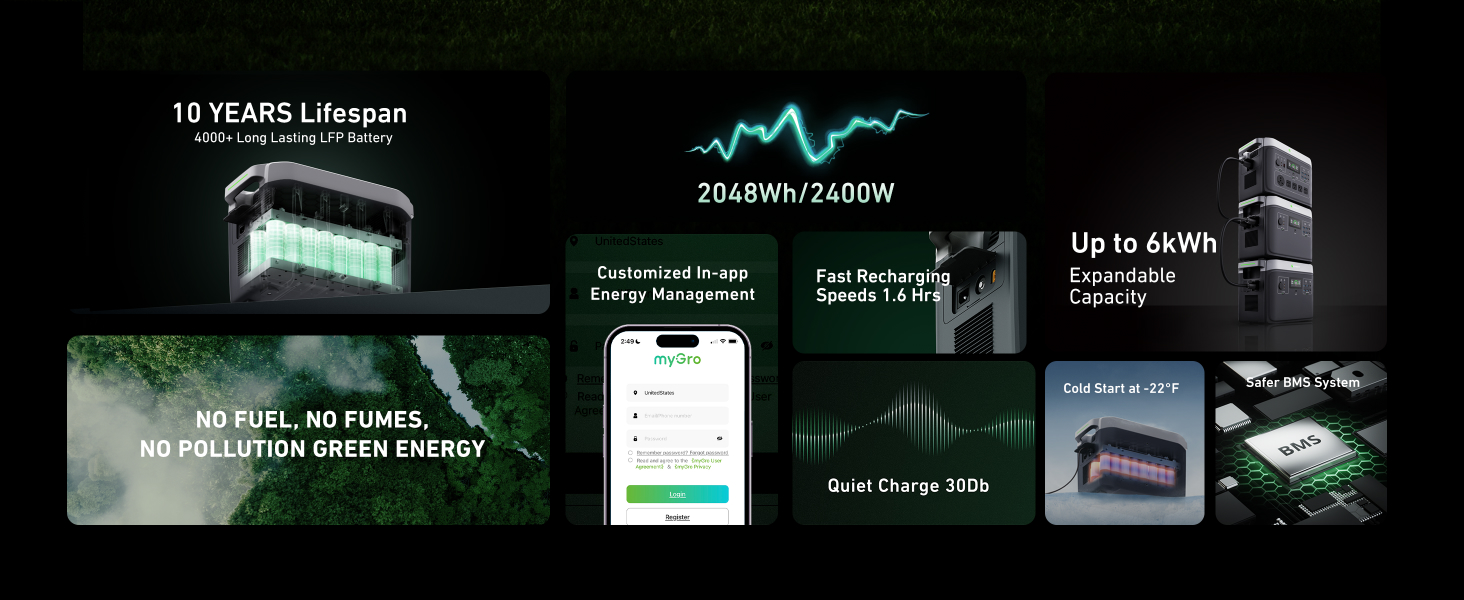
Figure 8.1: The power station providing backup power for common household appliances.
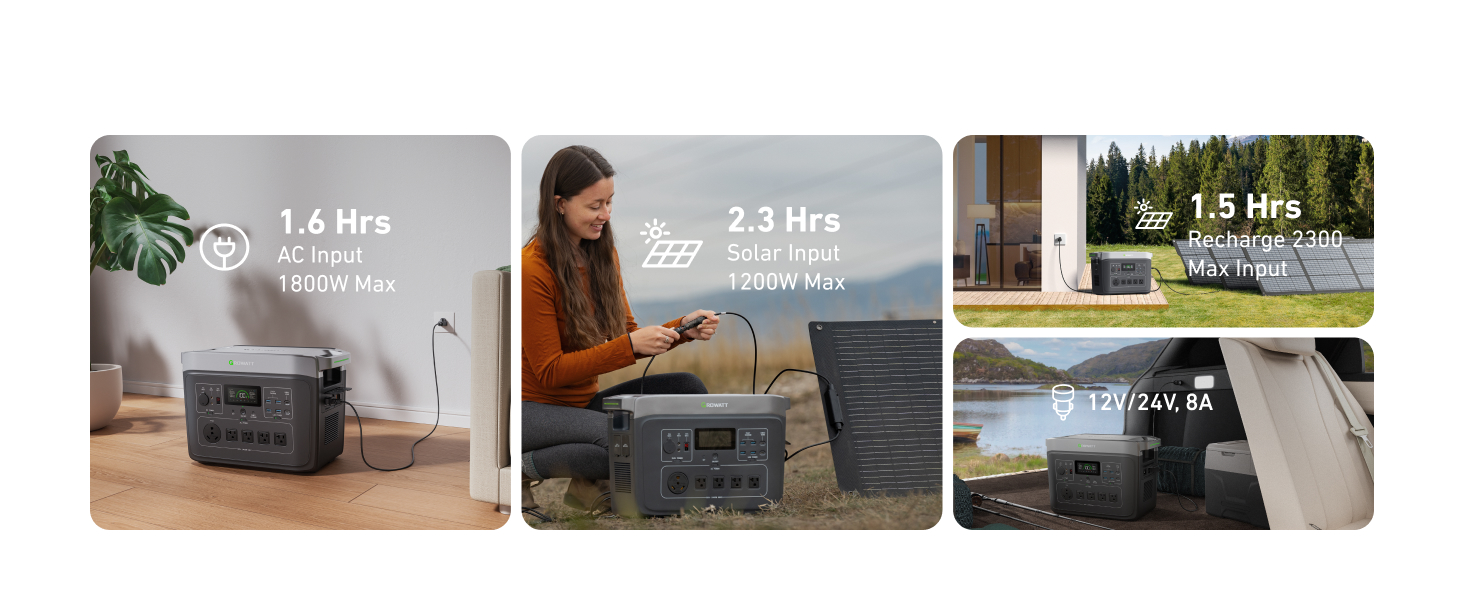
Figure 8.2: Ensuring continuous power for critical devices with less than 20ms switch time.
8.2 Buiteluggebruik
Ideaal vir camping, tailgating, and other outdoor activities, the INFINITY 2000 PRO provides reliable power for all your portable electronics and small appliances. Its robust design allows for operation in cold environments, starting at temperatures as low as -22°F (-30°C).

Figure 8.3: Powering cellphones, laptops, electric grills, and Bluetooth speakers for outdoor adventures.

Figure 8.4: Cold startup capability ensures reliable power even in freezing conditions.
8.3 DIY Power
With its high output capacity and Watt+ feature, the INFINITY 2000 PRO is suitable for powering various DIY tools. It can handle continuous output of 2400W and boost to 3400W, allowing you to run electric drills, chainsaws, cutting machines, and string trimmers.

Figure 8.5: Powering electric drills, chainsaws, and cutting machines for various DIY tasks.

Figure 8.6: The Watt+ feature allows the power station to run higher-demand devices up to 3400W.
8.4 RV Use
Equipped with a dedicated TT-30 RV outlet, the GROWATT INFINITY 2000 PRO is an excellent power source for recreational vehicles. It can power mini-fridges, portable freezers, air fryers, and rice cookers, making it an essential companion for your RV adventures.

Figure 8.7: Powering essential appliances for comfortable RV living.
9. Onderhoud
- Skoonmaak: Use a dry, soft cloth to wipe the surface of the unit. Do not use harsh chemicals or abrasive materials.
- Berging: Store the unit in a cool, dry place away from direct sunlight and extreme temperatures. For long-term storage, charge the battery to 50-80% every 3-6 months to maintain battery health.
- Batterysorg: Avoid fully discharging the battery frequently. While the LiFePO4 battery is robust, maintaining a charge above 20% when possible can extend its overall lifespan.
- Ventilasie: Ensure the ventilation vents are clear of obstructions during operation and charging.
10. Probleemoplossing
| Probleem | Moontlike oorsaak | Oplossing |
|---|---|---|
| Eenheid skakel nie aan nie | Battery fully discharged; Power button not pressed long enough | Charge the unit; Press and hold the power button for 3-5 seconds |
| Geen uitset vanaf AC/DC/USB-poorte nie | Output not activated; Overload protection triggered; Device not compatible | Press the corresponding output button; Reduce load; Check device power requirements |
| Stadige laai | Low input power; Solar panel not in direct sunlight; High ambient temperature | Ensure charger is rated for full power; Reposition solar panel; Move to a cooler environment |
| Eenheid oorverhit | Poor ventilation; Excessive load | Ensure vents are clear; Reduce connected load; Allow unit to cool down |
If the problem persists after attempting the above solutions, please contact GROWATT customer support for assistance.
11. Spesifikasies
| Kenmerk | Spesifikasie |
|---|---|
| Handelsmerk | GROWATT |
| Modelnommer | INFINITY 2000 PRO |
| Battery Tipe | LiFePO4 |
| Kapasiteit | 2048Wh |
| AC-uitset (gegradeer) | 2200W (suiwer sinusgolf) |
| AC Output (Peak/Watt+) | 4000W / 3400W |
| Totale kragpunte | 15 |
| WS-inset (maks.) | 1800 W |
| Sonkraginvoer (Maks) | 1200 W |
| Afmetings (L x B x H) | 16.5 x 9.1 x 11.3 duim |
| Gewig | Ongeveer. 51 pond (23 kg) |
| Bedryfstemperatuur | -22°F tot 113°F (-30°C tot 45°C) |
12. Waarborg en Ondersteuning
The GROWATT INFINITY 2000 PRO Portable Power Station is backed by a 5-year limited warranty, covering defects in materials and workmanship under normal use. Please retain your proof of purchase for warranty claims.
For technical support, warranty service, or general inquiries, please contact GROWATT customer service through their official website or the contact information provided with your purchase. Our dedicated support team is ready to assist you.