
1. Inleiding
This manual provides essential information for the installation, operation, and maintenance of your new Vetroo 850W 80 Plus Gold Full Modular ATX 3.1 Power Supply. Please read this manual thoroughly before installation and keep it for future reference.

Figure 1: Vetroo 850W Power Supply (White)
2. Produkkenmerke
- PCIe Gen 5.1 Gereed: Meets the latest PCIE 5.1 standards for improved performance and efficiency. Backward compatible with both PCIE 4.0 and 3.0.
- Fully ATX 3.1 Compliant: Designed to meet the newest, most advanced power supply standards.
- Premium 105°C Capacitors: High-quality materials and construction ensure stable, low-temperature operation.
- 80 Plus Goud Gesertifiseerd: Meets high standards for quality and efficiency, ensuring reliable performance and energy savings.
- Volledig modulêre ontwerp: Allows for easy cable management and customization, reducing cable clutter by only installing necessary cables.
- Stil werking: Features a 120mm FDB (Fluid Dynamic Bearing) fan for quiet cooling.
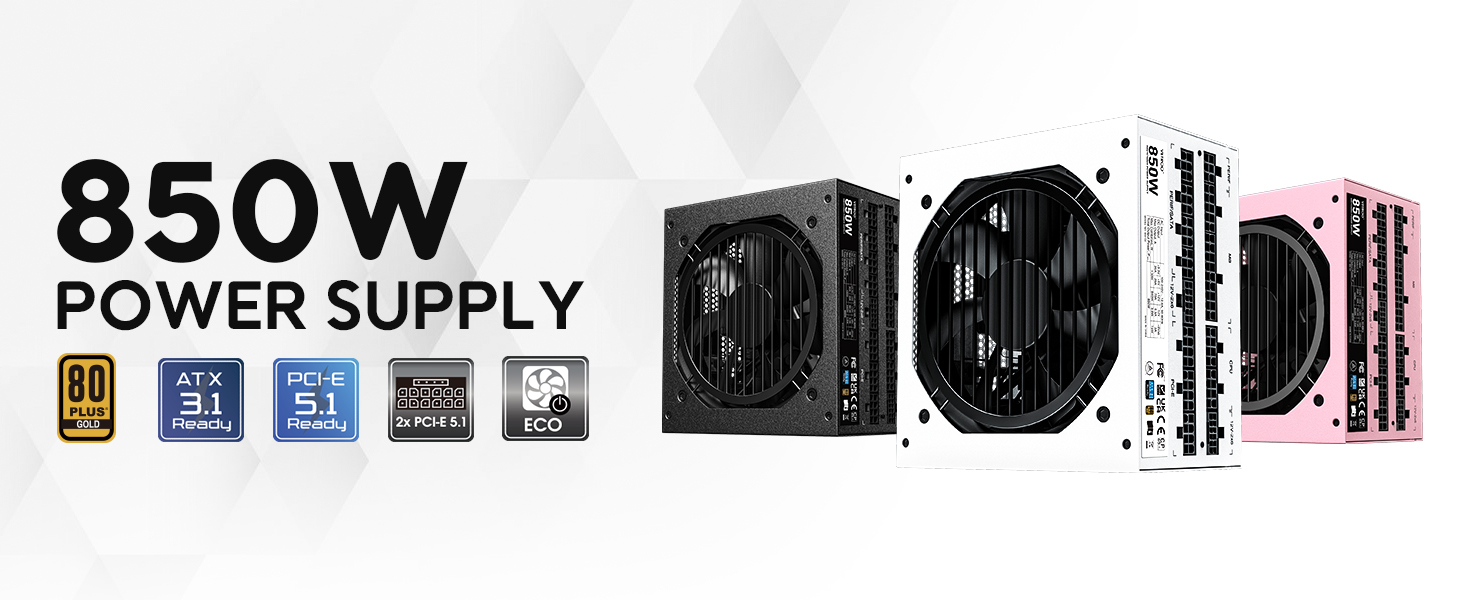
Figuur 2: oorview of Vetroo 850W Power Supply features
3. Pakketinhoud
Verifieer dat alle komponente in die pakket teenwoordig is:
- Vetroo 850W Power Supply Unit
- Modular Cable Set (including 24-pin ATX, CPU, PCIe, SATA, Molex, FDD connectors)
- AC kragkabel
- Monteer skroewe
- Kabelbestuurbande
- Storage Bag for Unused Cables
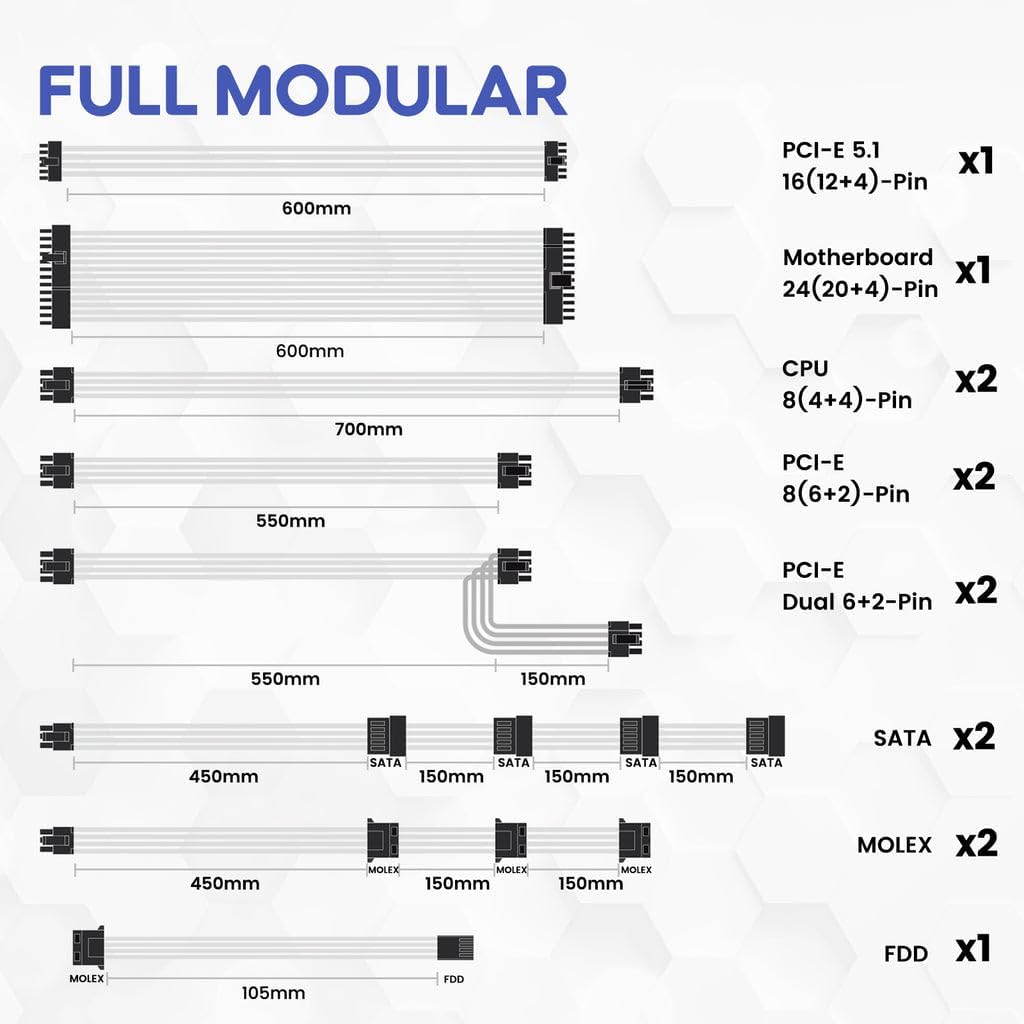
Figure 3: Included Modular Cables
4. Veiligheidsinligting
WARNING: Improper installation or use can result in serious injury or damage to your system.
- Always disconnect the AC power cord from the wall outlet before installing or removing the power supply.
- Moenie die kragtoevoereenheid oopmaak nie. Hoë volumetages are present inside, even when disconnected.
- Ensure all cables are securely plugged into their respective ports. Loose connections can cause damage.
- Use only the modular cables provided with this power supply. Third-party cables may not be compatible and could cause serious damage.
- Install the power supply in a well-ventilated area, away from high humidity and extreme temperatures.
5. Opstelling en installering
Follow these general steps for installing your power supply. Refer to your PC case and motherboard manuals for specific instructions.
- Berei jou stelsel voor: Maak seker dat jou rekenaar afgeskakel en uit die muurprop ontkoppel is.
- Monteer die kragtoevoer: Secure the power supply unit into the designated bay in your PC case using the provided mounting screws.
- Connect Main Power Cables: Koppel die 24-pen ATX-kabel aan jou moederbord.
- Connect CPU Power Cables: Koppel die 8-pen (4+4) SVE-kragkabel(s) aan jou moederbord.
- Connect PCIe Power Cables: Connect the necessary PCIe power cables (e.g., 12V-2x6 for PCIe 5.1 GPUs, or 8-pin (6+2) for older GPUs) to your graphics card(s).

Figure 4: Dual PCIe 5.1 Connectors
- Verbind randapparatuurkabels: Connect SATA, Molex, and FDD cables to your storage drives and other peripherals as needed.
- Kabelbestuur: Utilize the fully modular design and included cable ties to route cables neatly, improving airflow and aesthetics.
- Finale kontrole: Double-check all connections to ensure they are secure before closing your PC case.
Video 1: Vetroo Power Supply Installation Guide. This video demonstrates the process of installing a Vetroo power supply into a PC case, including cable connections.
6. Bedryfsinstruksies
After successful installation, you can power on your system.
- Krag aan: Connect the AC power cord to the power supply and a wall outlet. Flip the main power switch on the power supply to the 'ON' position.
- ECO -modus: The power supply features an ECO mode switch. When 'ON', the fan will stop spinning unless the load is above approximately 50% of the rated capacity, ensuring silent operation at low loads. When 'OFF', the fan will spin continuously.

Figure 5: Power Switch and ECO Mode
7. Onderhoud
Behoorlike onderhoud verseker die lang lewensduur en optimale werkverrigting van u kragtoevoer.
- Skoonmaak: Periodically clean the exterior of the power supply and the fan grille to prevent dust buildup, which can impede airflow and cooling. Use compressed air or a soft brush. Ensure the power supply is off and unplugged before cleaning.
- Ventilator werking: The 120mm Fluid Dynamic Bearing fan is designed for durability and quiet operation. In ECO mode, the fan may not spin at low loads; this is normal.
8. Probleemoplossing
As jy probleme met jou kragtoevoer ondervind, oorweeg die volgende:
- Geen krag: Ensure the AC power cord is securely connected to both the power supply and the wall outlet. Verify the main power switch on the power supply is in the 'ON' position. Check your wall outlet with another device.
- System Instability/Shutdowns: This power supply includes multiple protection features (OVP, OCP, OPP, SCP, UVP, OTP) to safeguard your components. If your system is unstable or shuts down unexpectedly, it could indicate an issue with power delivery or another component. Ensure all power connections are firm.
- Waaier draai nie: If the ECO mode is enabled, the fan will not spin until the power supply reaches approximately 50% load. This is normal operation for quiet performance. If the fan does not spin under heavy load, contact support.
- Ongewone geluide: If you hear unusual noises (e.g., coil whine, grinding), power down your system immediately and contact support.
9. Spesifikasies
| Kenmerk | Detail |
|---|---|
| Model Naam | 850 g5 |
| Uitset Wattage | 850 Watt |
| Doeltreffendheidsertifisering | 80 Plus Goud |
| ATX-standaard | ATX 3.1 Compliant |
| PCIe Standaard | PCIe Gen 5.1 Ready |
| Vormfaktor | ATX |
| Verkoelingsmetode | Air (120mm FDB Fan) |
| Modulêre tipe | Vol modulêr |
| Kapasitors | Premium 105°C |
| Produkafmetings (L x B x H) | 5.9 x 5.5 x 3.4 duim |
| Item gewig | 5.7 pond (2.59 kilogram) |
| Versoenbare toestelle | Persoonlike rekenaar |
| Beskermingskenmerke | OVP (Oor Voltage Protection), OCP (Over Current Protection), OPP (Over Power Protection), SCP (Short Circuit Protection), UVP (Under Voltage Protection), OTP (Over Temperature Protection) |
10. Waarborg en Ondersteuning
The Vetroo 850W Power Supply comes with a 10-jaar waarborg, ensuring long-term reliability and peace of mind. For technical support, warranty claims, or any questions regarding your product, please visit the official Vetroo webwebwerf of kontak hul kliëntediensafdeling.
Video 2: Vetroo 850W Power Supply - White Product OverviewHierdie video bied 'n visuele oorsigview of the white Vetroo 850W Power Supply.