
1. Produk verbyview
The Morpheus 360 Sanctuary ANC Wireless UC Headset is designed for professional communication and audio playback. It features Active Noise Canceling (ANC), a noise-canceling boom microphone, and Bluetooth connectivity with an included USB dongle for unified communication platforms.
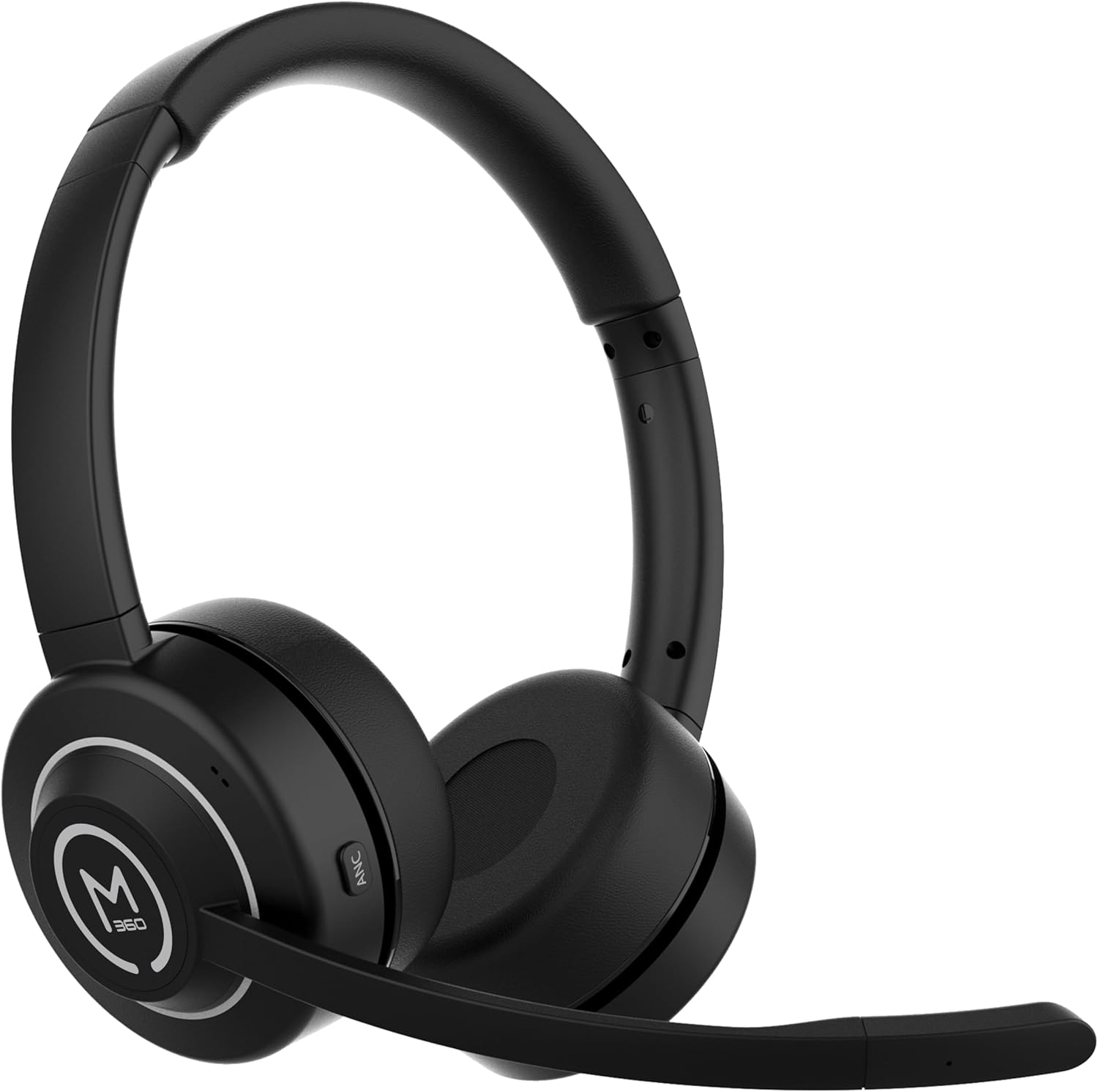
Beeld 1.1: Voorkant view of the Morpheus 360 Sanctuary ANC Wireless UC Headset.
2. Wat is in die boks
- Morpheus 360 Sanctuary ANC Wireless UC Headset
- USB Bluetooth dongle
- Laai staander
- USB-C-laaikabel

Image 2.1: The dedicated charging stand for the headset.
3. Opstelling
3.1 Laai die oorfone
- Connect the USB-C charging cable to the charging stand and a power source.
- Place the headset onto the charging stand, ensuring proper alignment. The headset will begin charging.
- A full charge provides approximately 55 hours of battery life.
Let wel: The headset cannot be used while it is charging on the stand.
3.2 Koppeling met toestelle
The headset can be paired via Bluetooth or using the included USB dongle.
Bluetooth-paring:
- Verseker dat die koptelefoon afgeskakel is.
- Druk en hou die aan/af-knoppie in totdat die LED-aanwyser blou en rooi flikker, wat paringsmodus aandui.
- On your device (smartphone, tablet), go to Bluetooth settings and select "Morpheus 360 Sanctuary" from the list of available devices.
- Once connected, the LED indicator will show a solid blue light.
USB Dongle Pairing (for PC/Mac):
- Plug the USB Bluetooth dongle into an available USB port on your computer.
- Power on the headset. It should automatically connect to the dongle. The LED on the dongle will indicate a successful connection.
- Ensure the headset is selected as the audio input and output device in your computer's sound settings.
Waarskuwing: Handle the USB dongle with care. Repeated insertion and removal, or improper handling, may cause the dongle to separate.
3.3 Dra van die oorfone
- Verstel die kopband om gemaklik oor jou kop te pas.
- Position the earcups so they sit gently on your ears. The eco-leather ear cushions are designed for comfort.
- Adjust the flexible boom microphone to be near your mouth for optimal voice pickup.

Beeld 3.1: Sykant view of the headset highlighting the boom microphone and control buttons.
4. Bediening van die oorfone
4.1 Krag aan/af
- Krag aan: Druk en hou die kragknoppie vir 3 sekondes.
- Skakel af: Druk en hou die kragknoppie vir 5 sekondes.
4.2 Active Noise Canceling (ANC)
The ANC feature detects and reduces background noise by up to 20dB, helping you focus. This is effective against consistent low-frequency sounds like office chatter or keyboard noise.
- Aktiveer ANC: Press the ANC button located on the earcup.
- Deaktiveer ANC: Press the ANC button again.
4.3 Deursigtigheidsmodus
Transparency Mode allows you to hear your surroundings without removing the headset, useful for quick conversations or awareness.
- Activate/Deactivate Transparency Mode: Refer to the specific button on your headset (often shared with ANC or a dedicated button).
4.4 Oproepbestuur
- Beantwoord/beëindig oproep: Druk een keer op die Multifunksie-knoppie.
- Verwerp oproep: Druk en hou die multifunksieknoppie vir 2 sekondes in.
- Demp/ontdemp mikrofoon: Use the dedicated mute button on the boom microphone or earcup.
The noise-canceling boom microphone uses specialized technology to filter out background noise from your voice during calls.
4.5 Musiekweergawe
- Speel/pouse: Druk een keer op die Multifunksie-knoppie.
- Volgende snit: Druk en hou die Volume Op-knoppie.
- Vorige snit: Druk en hou die Volume Down-knoppie.
4.6 Volumebeheer
- Verhoog volume: Druk die Volume Op-knoppie.
- Verlaag volume: Druk die Volume Af-knoppie.
5. Onderhoud
5.1 Skoonmaak
- Wipe the headset and ear cushions with a soft, dry, lint-free cloth.
- Moenie harde chemikalieë, skoonmaakmiddels of sterk skoonmaakmiddels gebruik nie.
- Vermy dat vog in enige openinge kom.
5.2 Berging
- Bêre die oorfone op 'n koel, droë plek weg van direkte sonlig en uiterste temperature.
- When not in use, placing the headset on its charging stand can help keep it organized and ready for use.
5.3 Batterysorg
- Om die batterylewe te verleng, vermy om die oorfone gereeld heeltemal te ontlaai.
- Charge the headset regularly, even if not used for extended periods.
6. Probleemoplossing
6.1 Konnektiwiteitsprobleme
- Headset not pairing: Ensure the headset is in pairing mode (flashing blue/red LED). Check your device's Bluetooth settings.
- USB Dongle not connecting: Ensure the dongle is fully inserted into the USB port. Try a different USB port. Re-pair the headset if necessary.
- Onderbroke verbinding: Ensure no major obstructions are between the headset and your device/dongle. Move closer to the connected device.
6.2 Oudio-kwessies
- Geen klank nie: Check volume levels on both the headset and your connected device. Ensure the headset is selected as the audio output device.
- Mikrofoon werk nie: Ensure the microphone is not muted. Check that the headset is selected as the audio input device in your computer's sound settings.
6.3 Active Noise Canceling (ANC) Performance
- ANC is most effective against consistent low-frequency sounds. It may not completely block out human speech or sudden loud noises.
- Ensure the earcups are properly seated on your ears for optimal ANC performance.
6.4 USB Dongle Durability
Some users have reported the USB dongle separating. To prevent this, handle the dongle gently when inserting or removing it from USB ports or the charging stand. Avoid pulling it out by the plastic casing alone.
6.5 Battery Alerts
The headset may issue 'Charge headset' warnings when the battery level is around 30%. This is normal behavior to prompt early recharging.
7. Spesifikasies
| Modelnommer | HS6750ANC |
| Handelsmerk | Morfeus 360 |
| Kleur | Swart |
| Materiaal | Faux Leather, Plastic, Stainless Steel |
| Batterylewe | Tot 55 uur |
| Aktiewe ruisonderdrukking | Up to 20dB reduction |
| Mikrofoon | Noise Canceling Boom Microphone |
| Konnektiwiteit | Bluetooth, USB Dongle |
| UPC | 856816008590 |
8. Waarborginligting
The Morpheus 360 Sanctuary ANC Wireless UC Headset (Model HS6750ANC) comes with a 1 Jaar Onderdele en Arbeid warranty from the date of purchase. Please retain your proof of purchase for warranty claims.
9. Ondersteuning
For further assistance, technical support, or warranty inquiries, please refer to the official Morpheus 360 webwebwerf of kontak hul kliëntediensafdeling. Kontakbesonderhede kan tipies op die produkverpakking of die handelsmerk se amptelike aanlyn teenwoordigheid gevind word.