
pecron E1000LFP

Pecron E1000LFP draagbare kragstasie
Gebruikershandleiding
1. Inleiding
The Pecron E1000LFP is a versatile and powerful portable power station designed to provide reliable energy for various applications, including emergencies, camping, RV trips, and home use. Featuring a 1024Wh LiFePO4 battery and an impressive 1800W AC output, it offers a safe and long-lasting power supply. This manual provides essential information for the safe and efficient operation and maintenance of your E1000LFP power station.
2. Produk verbyview
The Pecron E1000LFP is engineered for portability and durability, featuring a robust design with multiple output options to power a wide range of devices. Its intuitive interface ensures ease of use, while advanced battery technology provides reliable performance.

Figuur 2.1: Voorkant view of the Pecron E1000LFP Portable Power Station, showcasing sy skerm en verskeie uitvoerpoorte.
2.1 Sleutelkenmerke
- 1024Wh LiFePO4-battery: Ensures a safe and long-lasting power supply with over 3500 complete charge cycles.
- 1800W WS-uitset: Capable of powering high-wattage toestelle.
- Uitbreidbare kapasiteit: Can be expanded up to 4096Wh by connecting an external Pecron EP3000-48V battery.
- Vinnige laai: Recharges in approximately 1.3 hours via AC input.
- Veelvuldige uitsetpoorte: Includes 5x AC Outlets, 2x USB-C (100W), 2x USB-A (18W), 1x XT60 Output, 1x Cigar Port, and 1x DC 5525 Output.
- Slim toepassingbeheer: Monitor and control the power station remotely via a dedicated mobile application.
- Battery Heating: Activates automatically when charging in cold temperatures (-20°C to 0°C) to ensure optimal performance.
- UPS-funksie: Provides uninterrupted power supply with 8-20ms fast switching.
2.2 Poorten en Beheer
Familiarize yourself with the various ports and controls on your Pecron E1000LFP unit:
- GS-invoer: For solar panel or car charging (11-60V, 600W Max). Features an 8/20A adjustable switch.
- WS-uitset: Five standard AC outlets (1800W max).
- USB-C-poorte: Twee 100W USB-C-poorte vir vinnig laai-versoenbare toestelle.
- USB-A-poorte: Twee 18W USB-A-poorte vir standaard USB-laai.
- Cigar Port: One 12V/10A cigar lighter port.
- DC 5525 Output: One 12V/10A DC 5525 output.
- XT60 Uitset: One 12V/10A XT60 output.
- AC-invoerpoort: Located at the rear, for wall charging (100-120V, 15A Max).
- Ekstra batterypoort: Located at the rear, for connecting the Pecron EP3000-48V expansion battery.
- LCD-skerm: Shows input/output power, battery percentage, and other status indicators.
- Kragknoppie: Skakel die eenheid aan/uit.
- AC/DC Buttons: Activate/deactivate respective outputs.
Video 2.1: 'n Gedetailleerde oorsigview of the Pecron E1000LFP Portable Power Station, demonstrating its features, ports, and expandable capacity.
3. Opstelling en aanvanklike gebruik
3.1 Uitpak en inspeksie
Upon receiving your Pecron E1000LFP, carefully unpack all components and inspect for any shipping damage. The package should include:
- Pecron E1000LFP Power Station
- Wisselstroomkabel
- Sonkrag laai kabel
- Motor laai kabel
- Toebehore sak
- Gebruikershandleiding
3.2 Aanvanklike laai
It is recommended to fully charge the power station before first use to optimize battery performance and lifespan.
- Open the protective cover for the AC Input Port located at the rear of the unit.
- Connect the AC Charging Cable to the power station and then to a standard wall outlet.
- The LCD display will show charging status. The unit will be fully charged in approximately 1.3 hours.

Figure 3.1: The Pecron E1000LFP being charged via its AC input from a standard wall outlet, illustrating its fast charging capability.
4. Bedryfsinstruksies
4.1 Skakel aan/af
Press and hold the main power button for a few seconds to turn the unit on or off. The LCD display will illuminate upon activation.
4.2 Using AC/DC Outputs
To activate the AC or DC outputs, press the corresponding AC or DC button on the front panel. The respective indicators on the LCD display will light up. Connect your devices to the appropriate ports.

Figure 4.1: The Pecron E1000LFP demonstrating its 12 output options, including AC, USB-C, USB-A, XT60, Cigar Port, and DC 5525, suitable for powering diverse devices.

Figure 4.2: The Pecron E1000LFP powering various devices like phones, laptops, drones, cameras, and projectors, highlighting its 1024Wh/1800W capacity for outdoor use.
4.3 Laai metodes
The Pecron E1000LFP supports multiple charging methods:
- AC muuraansluiting: Fastest charging method, approximately 1.3 hours.
- Sonpanele: Connect compatible solar panels (up to 600W) to the DC input port. Charging time varies based on solar intensity and panel wattage.
- Motorlaaier: Use the provided car charging cable to charge from your vehicle's 12V outlet.

Figure 4.3: Illustration of the multiple charging methods for the Pecron E1000LFP, including AC fast charge, 200W solar panel, 12V car, and PECRON 500W car charging.
4.4 Expandable Capacity
The E1000LFP's capacity can be expanded up to 4096Wh by connecting a Pecron EP3000-48V external battery. Connect the expansion battery to the dedicated port at the rear of the main unit.
4.5 Slim toepassingbeheer
Download the Pecron app from your device's app store to remotely monitor and control your power station. The app allows you to customize charging power, view input/output power, check power levels, and remotely switch DC/AC outputs.

Figure 4.4: The Pecron E1000LFP demonstrating its smart app control feature, allowing users to manage settings and monitor power from their smartphone.
4.6 UPS-funksie
The E1000LFP features an Uninterruptible Power Supply (UPS) function, providing seamless power transfer within 8-20ms in case of a power outage when connected to a wall outlet and powering devices.
5. Onderhoud en versorging
5.1 Batterysorg
The Pecron E1000LFP uses a LiFePO4 battery, known for its longevity and safety. To maximize its lifespan:
- Vermy om die battery gereeld heeltemal te ontlaai.
- Store the unit in a cool, dry place, ideally with a charge level between 50-80%.
- Recharge the unit every 3-6 months if not in use to prevent deep discharge.
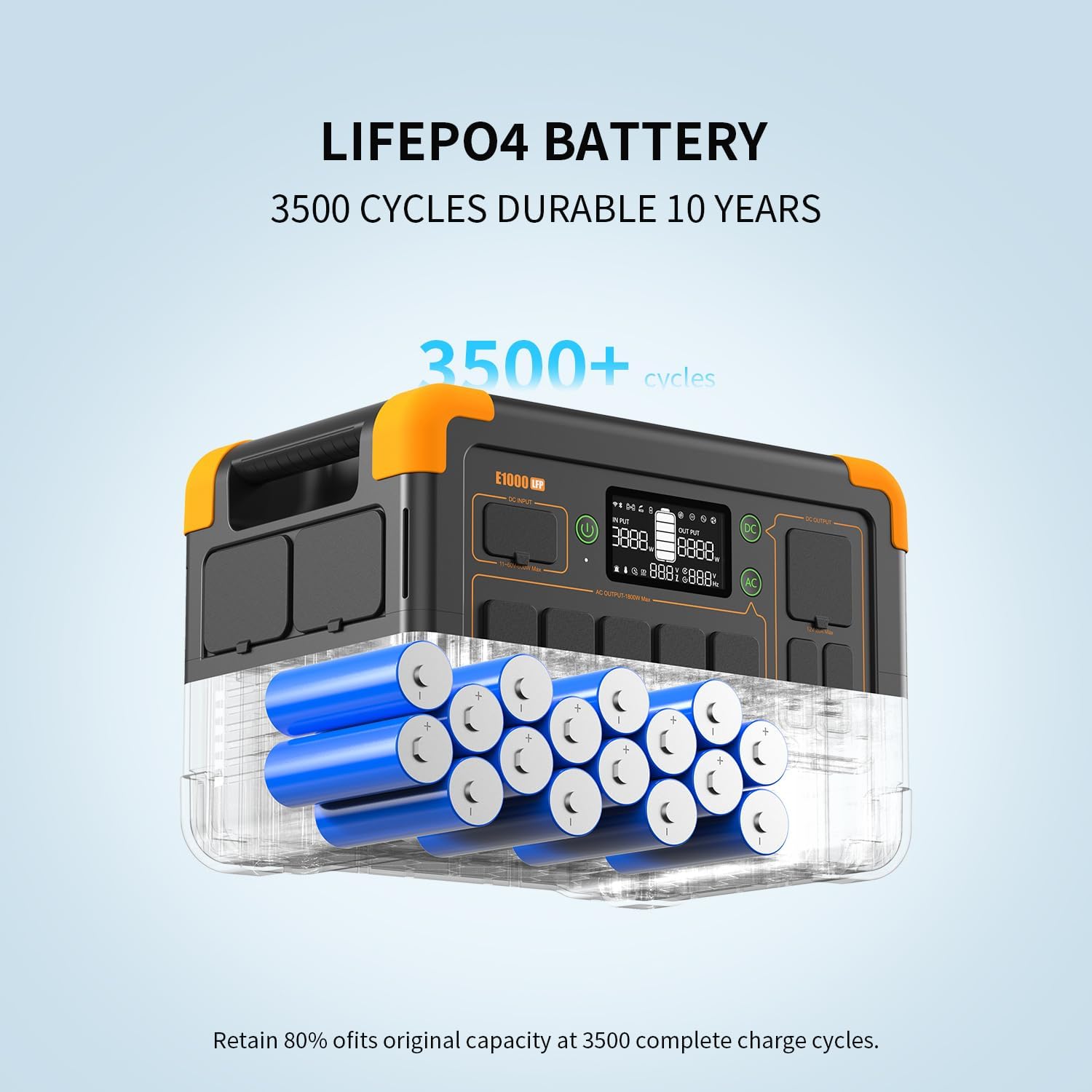
Figure 5.1: Diagram illustrating the durability of the Pecron E1000LFP's LiFePO4 battery, capable of 3500+ cycles while retaining 80% of its original capacity.
5.2 Cold Weather Operation
The E1000LFP features a battery heating module. When charging at temperatures between -20°C and 0°C, the battery will automatically activate this module to heat up above 0°C, ensuring safe and efficient charging.

Figure 5.2: The Pecron E1000LFP's battery heating feature, which allows for worry-free charging in cold environments by warming the battery to above 0 degrees Celsius.
5.3 Skoonmaak
Gebruik 'n sagte, droë lap om die buitekant van die eenheid skoon te maak. Moenie skuurmiddels gebruik of die eenheid in water dompel nie.
6. Probleemoplossing
If you encounter issues with your Pecron E1000LFP, refer to the following common problems and solutions:
| Probleem | Moontlike oorsaak | Oplossing |
|---|---|---|
| Eenheid skakel nie aan nie | Battery is heeltemal leeg; Aan/af-knoppie nie lank genoeg gedruk nie. | Charge the unit using the AC charging cable. Press and hold the power button for 3-5 seconds. |
| Geen AC-uitset nie | AC output not activated; Overload protection; Device power exceeds 1800W. | Press the AC button to activate. Reduce connected load. Check device wattage. |
| Geen DC-uitset nie | DC output not activated; Overload protection. | Press the DC button to activate. Reduce connected load. |
| Stadige laai | Gebruik 'n laer watttage charger (e.g., car charger vs. AC); High ambient temperature. | Use the AC charging cable for fastest charge. Ensure proper ventilation. |
| LCD-skerm werk nie | Unit is off; Display malfunction. | Turn on the unit. If issue persists, contact customer support. |
For further assistance, please contact Pecron customer service.
7. Spesifikasies
Detailed technical specifications for the Pecron E1000LFP Portable Power Station:
| Kenmerk | Spesifikasie |
|---|---|
| Model Naam | E1000LFP |
| Battery Tipe | LiFePO4 |
| Kapasiteit | 1024Wh |
| AC Uitset | 1800W (Gegradeer), 3600W (Piek) |
| AC Inset Voltage | 100-120V, 15A Maks |
| DC Inset Voltage | 11-60V, 600W Max (Adjustable 8/20A) |
| USB-C-uitset | 2 x 100W |
| USB-A-uitgang | 2 x 18W |
| Sigaarpoort-uitset | 1 x 12V/10A |
| DC 5525 Uitset | 1 x 12V/10A |
| XT60 Uitset | 1 x 12V/10A |
| Afmetings (L x B x H) | 14.9" x 9.4" x 10" |
| Gewig | 29 pond |
| Bedryfstemperatuur | Optimal range for discharge and charge (with heating) |
| Lewenssiklusse | 3500+ siklusse tot 80% kapasiteit |
8. Waarborg en Ondersteuning
Pecron offers a 2+1 years worry-free warranty for the E1000LFP Portable Power Station. This includes 2 years standard warranty plus an additional 1 year upon product registration or other qualifying conditions. For technical support, warranty claims, or any inquiries, please contact Pecron customer service. Keep your proof of purchase for warranty validation.
Customer service is available 24 hours a day, 7 days a week.