
Anytone AT-D878UVII
Anytone AT-D878UVII Dubbelband DMR Handtoestel Instruksiehandleiding
Model: AT-D878UVII | Brand: Anytone
1. Inleiding
The Anytone AT-D878UVII is a versatile dual-band Digital Mobile Radio (DMR) handheld device designed for reliable communication across VHF and UHF frequencies. This manual provides essential information for setting up, operating, maintaining, and troubleshooting your radio to ensure optimal performance.
Key features include dual-mode digital and analog capabilities, a large color display, built-in GPS and APRS TX, and an upgraded USB Type-C rechargeable battery. With 2GB of memory, it supports up to 500,000 digital contacts and 250 zones, each with up to 250 channels. The radio is FCC Part 90 certified, making it suitable for various professional and amateur applications.
2. Pakketinhoud
Verifieer dat al die items wat hieronder gelys word, in jou pakket ingesluit is:
- Anytone AT-D878UVII Radio Unit
- 3100mAh USB Type-C Battery
- Charging Cradle with Power Supply
- USB Cable (for charging and programming)
- Programmeringskabel
- Gordelklem
- Lanyard
- Antenne
- Printed User Manual
3. Komponente verbyview
Familiarize yourself with the main components of your AT-D878UVII radio.
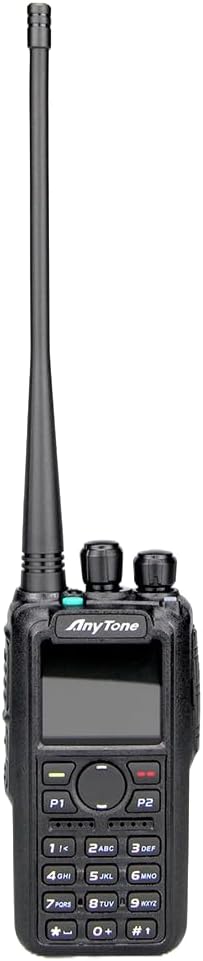
Figuur 3.1: Voorkant view of the Anytone AT-D878UVII radio, highlighting the display, keypad, and control knobs.

Figure 3.2: The Anytone AT-D878UVII radio alongside its detached battery, illustrating the USB Type-C charging port on the battery unit.

Figuur 3.3: 'n Gedetailleerde view of the USB Type-C charging port located on the AT-D878UVII battery.
4. Opstelling
4.1 Batteryinstallasie en -laai
- Rig die battery met die groewe aan die agterkant van die radio.
- Skuif die battery opwaarts totdat dit stewig in plek klik.
- To charge, connect the USB Type-C cable directly to the battery's port or place the radio in the charging cradle. The charging indicator will show the status.
4.2 Antenna-aanhegting
- Skroef die antenna kloksgewys in die konnektor bo-op die radio totdat dit vingervas is. Moenie te styf vasdraai nie.
5. Bedryfsinstruksies
5.1 Aan/Af en Volumebeheer
- To power on/off, rotate the top-left knob clockwise/counter-clockwise until you hear a click.
- Verstel die volume deur dieselfde knoppie te draai.
5.2 Channel Selection (VFO/Memory)
The radio supports both VFO (Variable Frequency Oscillator) mode for direct frequency input and Memory mode for pre-programmed channels.
- Use the navigation buttons or the top-right knob to select channels or adjust frequencies.
- Press the V/M button to switch between VFO and Memory modes.
5.3 DMR and Analog Mode Switching
The AT-D878UVII supports both Digital Mobile Radio (DMR) and traditional Analog communication.
- The radio automatically detects the mode for pre-programmed channels.
- In VFO mode, you can manually select the desired mode through the menu settings.
5.4 GPS and APRS TX
The integrated GPS module allows for location tracking, and APRS TX enables automatic position reporting.
- Access GPS and APRS settings via the main menu to configure reporting intervals and other parameters.
5.5 Programming and Codeplugs
The radio's extensive features are best managed through its Customer Programming Software (CPS). A codeplug is a configuration file that contains all your radio's settings, including channels, zones, contacts, and talkgroups.
For a detailed guide on understanding and creating codeplugs, refer to the video below. While the video demonstrates a similar model, the principles of codeplug creation and management are applicable to your AT-D878UVII.
Video 5.1: An Easy Intro to DMR Codeplugs. This video demonstrates the process of creating and managing codeplugs, a fundamental aspect of configuring your DMR radio. The concepts shown are applicable to the Anytone AT-D878UVII, though a different model is used for demonstration.
5.6 AES256-enkripsie
The AT-D878UVII supports AES256 encryption for secure digital communications, primarily for commercial use.
Video 5.2: Digital/Analog Walkie-Talkie with AES256. This video illustrates the AES256 encryption feature, which provides enhanced security for digital transmissions. While a different radio model is shown, the encryption functionality is similar to that found in the Anytone AT-D878UVII.
5.7 Bluetooth PTT Button
The radio includes Bluetooth connectivity, allowing for wireless operation with a Push-To-Talk (PTT) button.
Video 5.3: BTECH DMR-6X2 PRO Feature Highlights. This video demonstrates various features including Bluetooth PTT functionality, which is also available on the Anytone AT-D878UVII for convenient wireless operation.
5.8 SMS-boodskappe
Send and receive text messages over the DMR network.
- Navigate to the 'Messages' option in the main menu to compose, send, and view boodskappe.
5.9 Copying Frequencies
The radio supports copying frequencies and sub-tones from other radios, simplifying channel setup.
Video 5.4: Copy a frequency and sub tone from other radio nearby. This video demonstrates how to quickly copy frequency and sub-tone settings from another radio, a useful feature for rapid channel configuration on your Anytone AT-D878UVII.
6. Onderhoud
6.1 Batterysorg
- Laai die battery voor die eerste gebruik volledig.
- Vermy oorlaai of heeltemal leegmaak van die battery om sy lewensduur te verleng.
- Bêre die battery op 'n koel, droë plek wanneer dit nie vir lang tye gebruik word nie.
6.2 Skoonmaak
- Vee die radio se oppervlak af met 'n sagte, damp lap.
- Moenie harde chemikalieë of skuurmiddels gebruik nie.
- Maak seker dat die radio droog is voor gebruik of berging.
7. Probleemoplossing
| Probleem | Moontlike oorsaak | Oplossing |
|---|---|---|
| Radio skakel nie aan nie | Lae of dooie battery | Laai die battery vol. |
| No audio reception | Volume too low, incorrect frequency/channel, squelch too high | Increase volume, verify frequency/channel, adjust squelch level. |
| Kan nie oordra nie | Incorrect frequency, low battery, transmit inhibit enabled | Verify frequency, charge battery, check programming for transmit inhibit. |
| GPS kry nie sein nie | Belemmer view of sky, indoor use | Beweeg na 'n oop buitelugarea met 'n helder lug view. |
8. Spesifikasies
| Kenmerk | Detail |
|---|---|
| Modelnommer | AT-D878UVII |
| Frekwensiereeks | 136-174MHz (VHF), 400-480MHz (UHF) |
| Aantal kanale | 4000 |
| Digitale Kontakte | 500,000 |
| Sones | 250 (up to 250 channels per zone) |
| Battery kapasiteit | 3100mAh (USB Type-C) |
| Spesiale kenmerke | Dual Band, Digital DMR, Analog, GPS, APRS TX, AES256 Encryption |
| Maksimum praatbereik | 5 myl |
| Item gewig | 2 pond |
| Waterweerstandvlak | Nie waterbestand nie |
| Voltage | 12 Volt (DC) |
9. Waarborg en Ondersteuning
9.1 Waarborginligting
The Anytone AT-D878UVII radio comes with a 1-Year Limited Warranty from the manufacturer, 12 Volt Power. This warranty covers defects in materials and workmanship under normal use. Please retain your proof of purchase for warranty claims.
9.2 Kliëntediens
For technical assistance, troubleshooting, or warranty inquiries, please contact 12 Volt Power customer support through their official channels. Refer to the product packaging or the manufacturer's webwebwerf vir die mees onlangse kontakinligting.