Inleiding
This manual provides detailed instructions for the proper use and maintenance of your ACEFAST H2 Wireless Headset. Designed with advanced Active Noise Cancelling (ANC) technology and Bluetooth 5.3 connectivity, these headphones offer a high-quality audio experience. Please read this manual thoroughly before using the product to ensure optimal performance and longevity.
Pakketinhoud
- ACEFAST H2 Wireless Headset
- USB-C-laaikabel
- 3.5 mm Aux -kabel
- Gebruikershandleiding (hierdie dokument)
Produk verbyview
Familiarize yourself with the components and controls of your ACEFAST H2 headset.
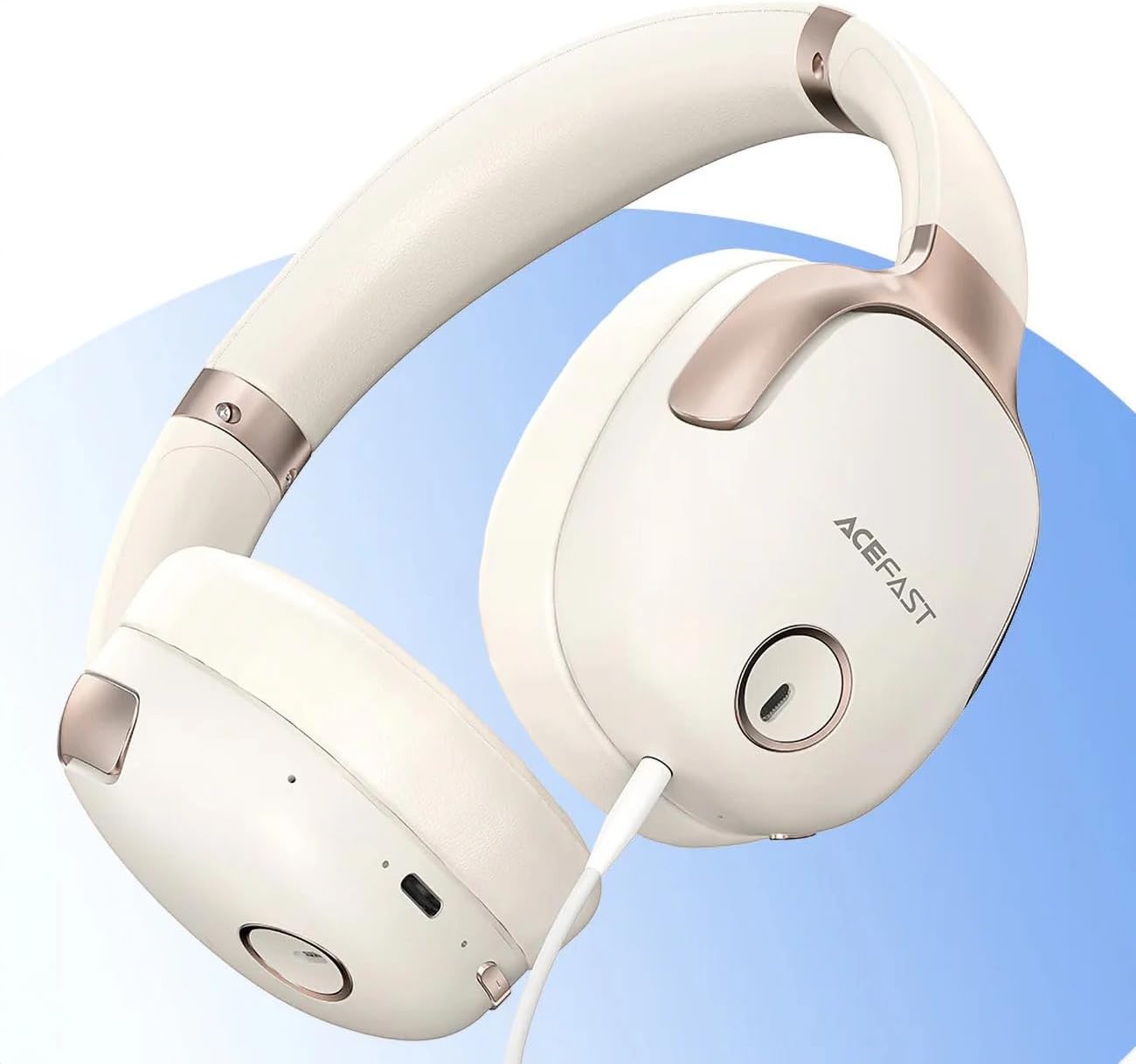
Figuur 1: ACEFAST H2 Headset showing USB-C charging port, 3.5mm audio jack, and control buttons.
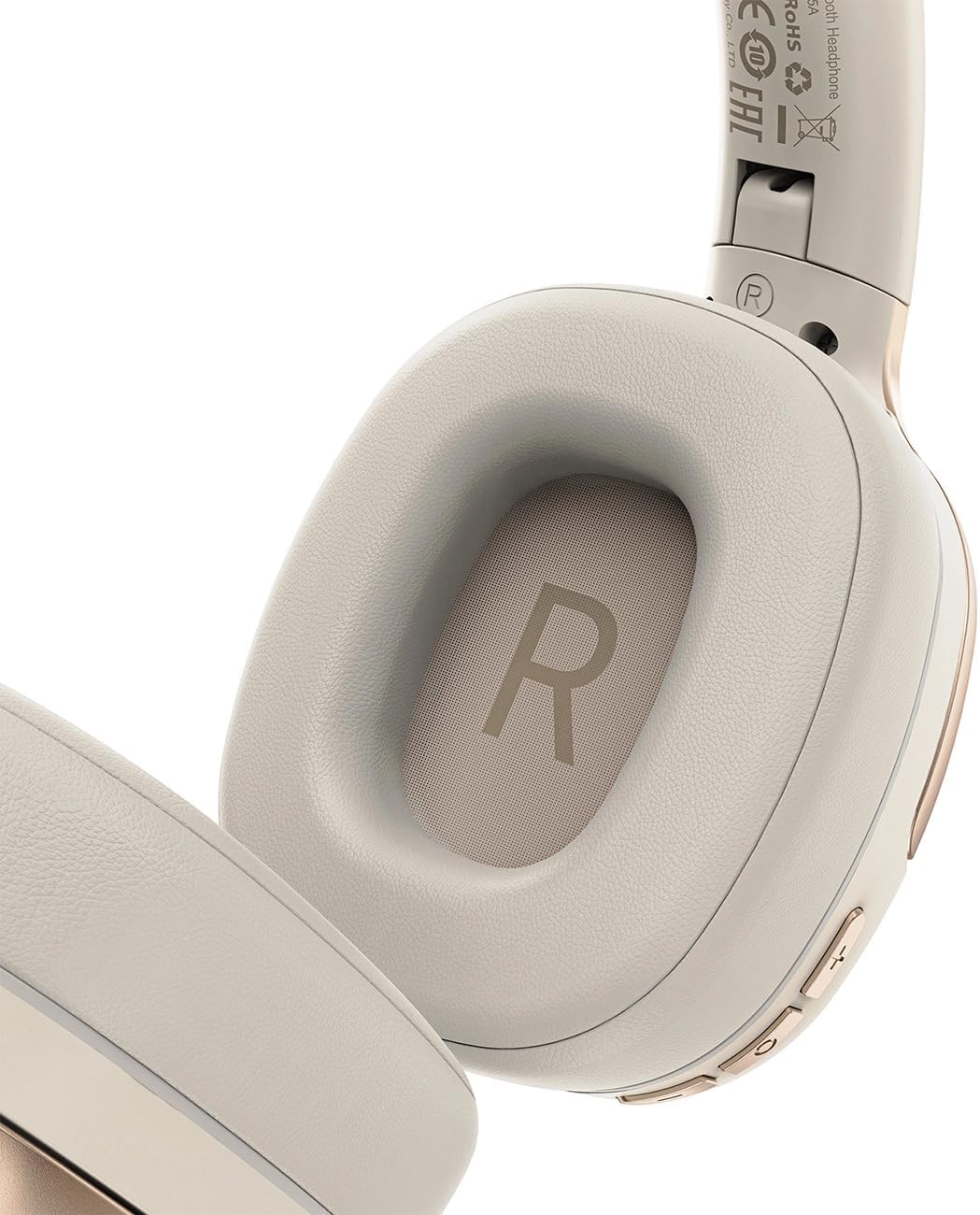
Figuur 2: Interior of the right earcup, indicating proper orientation for wearing.

Figuur 3: Headband adjustment mechanism and ear cup swivel for comfortable fit.

Figuur 4: The foldable design of the headset for easy storage and transport.
Sleutelkomponente:
- Aan/af-/Multifunksie-knoppie: Gebruik vir aan/af, speel/pouseer, beantwoord/beëindig oproepe.
- Volume op/Volgende snit-knoppie: Druk vir volume op, hou vir volgende snit.
- Volume Verlaag/Vorige Liedjie Knoppie: Druk vir volume af, hou vir vorige snit.
- ANC-knoppie: Aktiveer of deaktiveer Aktiewe Geraaskansellasie.
- USB-C-laaipoort: Vir die laai van die headset.
- 3.5 mm oudio-aansluiting: For wired connection using the Aux cable.
- Mikrofoon: Ingebou vir oproepe.
- LED-aanwyser: Shows power, charging, and pairing status.
Opstelling
1. Laai die headset
- Koppel die meegeleverde USB-C-laaikabel aan die USB-C-poort van die headset.
- Koppel die ander kant van die kabel aan 'n USB-kragadapter (nie ingesluit nie) of 'n rekenaar se USB-poort.
- The LED indicator will show charging status (e.g., red while charging, blue when fully charged).
- A full charge takes approximately 2 hours and provides up to 80 hours of music playback.
2. Skakel aan/af
- Om aan te skakel: Press and hold the Power/Multi-function button for approximately 3 seconds until the LED indicator flashes.
- Om af te skakel: Press and hold the Power/Multi-function button for approximately 5 seconds until the LED indicator turns off.
3. Bluetooth-koppeling
- Verseker dat die koptelefoon afgeskakel is.
- Press and hold the Power/Multi-function button for about 5-7 seconds until the LED indicator flashes red and blue alternately, indicating pairing mode.
- Aktiveer Bluetooth op jou toestel (slimfoon, tablet, rekenaar) en soek vir beskikbare toestelle.
- Select "ACEFAST H2" from the list of found devices.
- Sodra dit gekoppel is, sal die LED-aanwyser stadig blou flikker.
- The headset will automatically connect to the last paired device when powered on, if within range.
4. Wired Connection (Aux Mode)
- Connect one end of the 3.5mm Aux cable to the headset's 3.5mm audio jack.
- Koppel die ander kant aan jou klankbron se 3.5 mm-klankuitvoer.
- In wired mode, the headset functions passively, and Bluetooth features are disabled. ANC may still be active if powered on.
Bedryfsinstruksies
Musiek afspeel
- Speel/pouse: Druk kort op die Aan/Aan/Multifunksie-knoppie.
- Volume op: Druk kort op die Volume Op-knoppie.
- Volume af: Druk kort op die Volume Af-knoppie.
- Volgende snit: Druk die Volume Op-knoppie lank.
- Vorige snit: Druk die Volume Af-knoppie lank.
Telefoonoproepe
- Beantwoord/beëindig oproep: Druk kort op die Aan/Aan/Multifunksie-knoppie.
- Verwerp oproep: Long press the Power/Multi-function button.
- Stemassistent: Double-press the Power/Multi-function button (if supported by your device).
Aktiewe ruisonderdrukking (ANC)
- Aktiveer/Deaktiveer ANC: Press the dedicated ANC button. The LED indicator will change to confirm status.
- ANC reduces ambient noise up to -40dB, providing a quieter listening environment.
Onderhoud
- Skoonmaak: Gebruik 'n sagte, droë lap om die headset skoon te maak. Moenie skuurmiddels of oplosmiddels gebruik nie.
- Berging: Store the headset in a cool, dry place away from direct sunlight and extreme temperatures. When not in use, it is recommended to fold the headset for compact storage.
- Waterweerstand: The headset is IPX4 water-resistant, meaning it is protected against splashing water from any direction. It is not designed for submersion or exposure to heavy rain. Avoid exposing the charging port and audio jack to moisture.
- Batterysorg: To preserve battery life, charge the headset fully before long periods of storage and recharge it at least once every three months.
Probleemoplossing
| Probleem | Moontlike oorsaak | Oplossing |
|---|---|---|
| Die oorfone skakel nie aan nie. | Lae battery. | Laai die oorfone volledig. |
| Kan nie met toestel koppel nie. | Oorfone nie in paringsmodus nie; toestel Bluetooth af; te ver van toestel. | Ensure headset is in pairing mode (flashing red/blue). Turn on device Bluetooth. Move headset closer to device (within 10 meters). |
| Geen klank of swak oudiokwaliteit. | Volume too low; headset not connected; interference; incorrect audio output selected. | Adjust volume on headset and device. Re-pair headset. Move away from sources of interference. Check device's audio output settings. |
| Die ANC werk nie effektief nie. | ANC nie geaktiveer nie; onbehoorlike pasvorm. | Press the ANC button to activate. Adjust headset for a snug fit over your ears. |
Spesifikasies
| Model Naam | H2 |
| Verbindingstegnologie | Wireless (Bluetooth 5.3) / Wired (3.5mm Aux) |
| Bluetooth-reeks | Tot 10 meter |
| Geraasbeheer | Active Noise Cancellation (ANC) up to -40dB, Environmental Noise Cancelling (ENC) for microphone |
| Batterylewe | Tot 80 uur (musiekterugspeel) |
| Laai tyd | Ongeveer 2 uur (via USB-C) |
| Waterweerstand | IPX4 (spatbestand) |
| Oorplasing | Op Oor |
| Materiaal | Akrielnitril Butadieen Styreen (ABS) |
| Kleur | Beige |

Figuur 5: Illustration of the dynamic HiFi audio driver components.
Waarborg inligting
The ACEFAST H2 Wireless Headset comes with a 6 maande vervaardiger se waarborg vanaf die aankoopdatum. Hierdie waarborg dek vervaardigingsdefekte en vakmanskap onder normale gebruik. Dit dek nie skade wat veroorsaak word deur misbruik, ongelukke, ongemagtigde wysigings of normale slytasie nie. Bewaar asseblief u bewys van aankoop vir waarborgeise.
Ondersteuning
For further assistance, technical support, or warranty inquiries, please refer to the contact information provided by your retailer or visit the official ACEFAST website. Ensure you have your product model number (H2) and proof of purchase ready when contacting support.