
SIMATE S2
SIMATE S2 Electric Scooter User Manual
Model: S2
For Kids Ages 6-14, Rider Height 4.0 ft-5.3 ft
1. Inleiding
Thank you for choosing the SIMATE S2 Electric Scooter. This manual provides essential information for the safe operation, maintenance, and troubleshooting of your new scooter. Please read it thoroughly before first use and keep it for future reference. Proper use and maintenance will ensure a long and enjoyable experience.
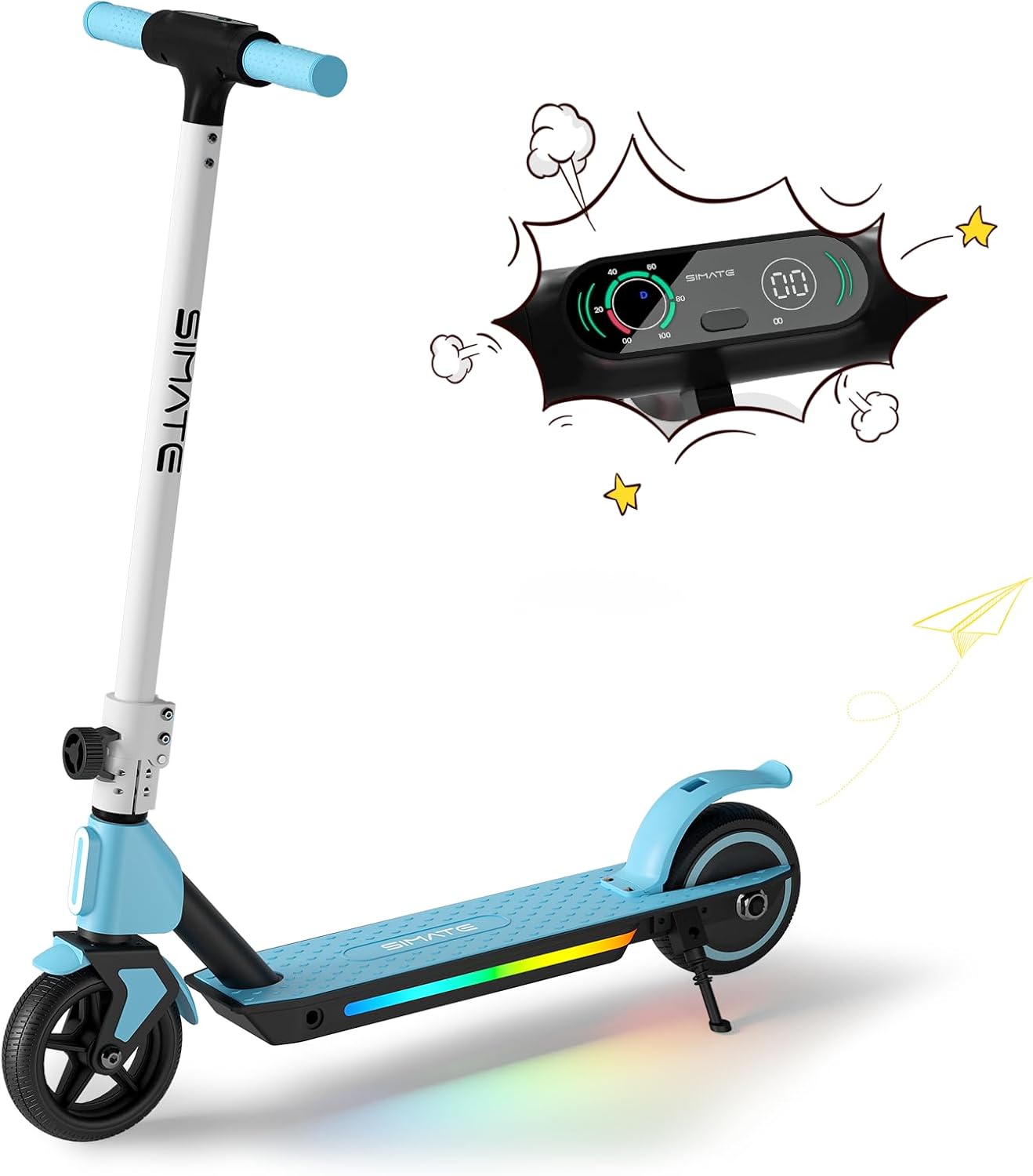
Figure 1: SIMATE S2 Electric Scooter (Blue)
The SIMATE S2 Electric Scooter features a sleek design with an integrated LED display and colorful lights on the deck. It is designed for easy learning and use, making it an ideal choice for young riders.
2. Veiligheidsinligting
WARNING: Always wear a helmet and appropriate safety gear when riding. Adult supervision is recommended for young riders.
- Do not ride in wet conditions, on uneven surfaces, or near traffic.
- Maak seker dat alle boute en bevestigingsmiddels voor elke rit vasgedraai is.
- Familiarize yourself with both the electronic brake and foot brake.
- Die bromponie is slegs vir een ryer ontwerp.
- The motor will not engage until the riding speed reaches 2 mph for safety.
3. Komponente verbyview
The SIMATE S2 Electric Scooter consists of several key components:
- Stuurstang: Adjustable height for comfortable riding.
- LED digitale skerm: Shows speed, speed gear, and battery capacity.
- Electronic Throttle: Beheer versnelling.
- Electronic Brake: Lever on the handlebar for quick stopping.
- Foot Brake: Rear fender brake for additional stopping power.
- dek: Non-slip surface with colorful LED lights.
- Wiele: Solid anti-puncture rubber tires for smooth riding.
- Vou meganisme: Allows for easy storage and transport.

Figure 2: Handlebar and Display Features
The intuitive LED display provides real-time information about your ride, enhancing safety and control.

Figure 3: Dual Brake System
The scooter is equipped with both an electronic brake and a foot brake for reliable stopping power in various conditions.
4. Opstelling
Follow these steps to set up your SIMATE S2 Electric Scooter:
- Pak uit: Verwyder alle komponente versigtig uit die verpakking.
- Ontvou: Release the folding mechanism and raise the handlebar stem until it locks into place. Ensure it is securely latched.
- Verstel stuurhoogte: Maak die snellos-cl losamp on the handlebar stem. Adjust the handlebar to a comfortable height for the rider, ensuring the rider can maintain a slight bend in their elbows while holding the grips. Tighten the clamp veilig.
- Aanvanklike heffing: Before first use, fully charge the scooter's battery. Connect the charger to the charging port and plug it into a power outlet. The indicator light on the charger will change when fully charged.

Figuur 4: Opvoubare ontwerp vir maklike berging
The scooter's foldable design makes it easy to store and transport, fitting conveniently into car trunks.
5. Bedryfsinstruksies
To operate your SIMATE S2 Electric Scooter:
- Krag aan: Press and hold the power button on the LED display to turn on the scooter.
- Kick-Start Assist: For safety, the motor will only engage after the scooter reaches a speed of 2 mph (3.2 km/h). Place one foot on the deck and use the other foot to push off the ground, similar to a traditional kick scooter.
- Versnel: Once moving, gently press the electronic throttle with your thumb to accelerate.
- Remming: To slow down or stop, release the throttle and use either the electronic brake lever on the handlebar or press down on the rear foot brake. Use both brakes simultaneously for quicker stops.
- LED ligte: The colorful LED lights on the deck and front light activate automatically when the scooter is powered on, enhancing visibility and style.
- Skakel af: Press and hold the power button to turn off the scooter when you are finished riding.

Figure 5: Large-Sized LED Digital Display
The clear LED display provides essential riding information at a glance, including current speed and battery level.

Figure 6: Front and Pedal Lights
The integrated lighting system enhances visibility and adds a fun element to the ride, especially in low-light conditions.
Video 1: SIMATE Electric Kids Scooter in action, demonstrating riding and features.
Watch this video to see the SIMATE Electric Scooter's features and how it performs in various settings.
6. Onderhoud
Regular maintenance ensures the longevity and safe operation of your scooter:
- Skoonmaak: Vee die bromponie met advertensie afamp cloth after each use. Do not use harsh chemicals or abrasive cleaners. Avoid direct water spray to prevent damage to electronic components.
- Batterysorg: Charge the battery fully after each ride. If storing for an extended period, charge the battery every 30-60 days to maintain its health. Do not overcharge or completely drain the battery.
- Bande: The scooter is equipped with solid anti-puncture rubber tires, requiring minimal maintenance. Periodically check for debris or damage.
- Remme: Regularly check the functionality of both the electronic and foot brakes. Ensure they respond promptly and effectively.
- Bevestigingsmiddels: Periodically inspect all screws, bolts, and connections to ensure they are tight and secure.

Figure 7: Anti-Puncture Tire and Non-Slip Pedal
The durable solid tires and non-slip deck are designed for low maintenance and enhanced safety.
7. Probleemoplossing
Algemene probleme en hul oplossings:
| Probleem | Moontlike oorsaak | Oplossing |
|---|---|---|
| Scooter skakel nie aan nie. | Low battery; loose connection. | Charge the battery fully. Check all cable connections. |
| Motor does not engage. | Not kick-started; safety feature activated. | Ensure scooter is moving at least 2 mph before pressing throttle. |
| Verminderde reikafstand of spoed. | Low battery; heavy load; uphill riding; cold weather. | Charge battery fully. Ensure rider weight is within limits. Performance may vary with conditions. |
| Remme nie effektief nie. | Brake mechanism issue. | Inspect brake levers and foot brake for damage or obstruction. Contact support if issues persist. |
8. Spesifikasies
| Kenmerk | Detail |
|---|---|
| Model Naam | S2 |
| Handelsmerk | SIMATE |
| Ouderdomsreeks (Aanbeveel) | 6-14 jaar |
| Rider Height (Recommended) | 4.0 vt - 5.3 vt |
| Motor Krag | 130 W |
| Maksimum spoed | 8.7 mph (14 km/h) |
| Maksimum reikwydte | Tot 5 myl (8 km) |
| Max Load (Weight Limit) | 154 pond |
| Laai tyd | 2-3 uur |
| Produk afmetings | 16 cm L x 32 cm B x 6 cm H |
| Raammateriaal | Aluminium |
| Bande tipe | Solid Anti-Puncture Rubber |
| Remstelsel | Electronic Brake & Foot Brake |
| Spesiale kenmerke | Digital Display, Colorful Lights, Lightweight, Foldable, Rechargeable |

Figuur 8: Belangrike produkspesifikasies
A summary of the SIMATE S2 Electric Scooter's performance and physical characteristics.
9. Waarborg en Ondersteuning
The SIMATE S2 Electric Scooter comes with a limited warranty. Please refer to the warranty card included in your product packaging for specific terms and conditions.
For technical support, replacement parts, or any inquiries not covered in this manual, please contact SIMATE customer service:
- Aanlyn ondersteuning: Besoek die SIMATE Store on Amazon.
- Vervaardiger: Jinhua Smart Electric Technology Co., Ltd
Ask a question about this manual
Ask about setup, troubleshooting, compatibility, parts, safety, or missing instructions. Manuals+ will review the question and use this page’s manual context to help answer it.