
Ergear EGESD7W-CA
ErGear Elektriese Staande Lessenaar Gebruikershandleiding
Model: EGESD7W-CA | Brand: ErGear
Inleiding
Thank you for choosing the ErGear Electric Standing Desk. This manual provides detailed instructions for assembly, operation, maintenance, and troubleshooting to ensure optimal performance and longevity of your desk. Please read this manual thoroughly before installation and use, and retain it for future reference.
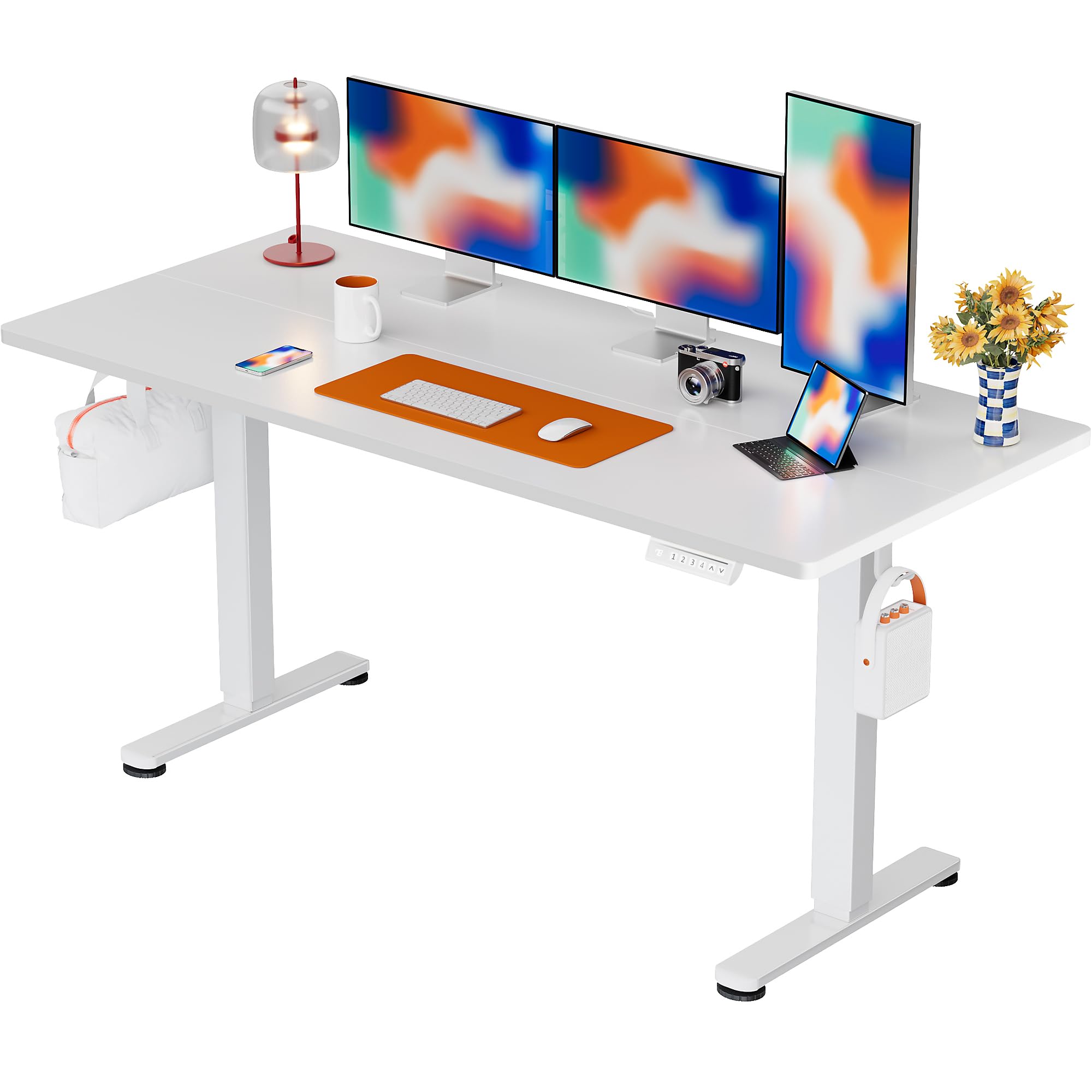
The ErGear Electric Standing Desk, 63x28 inch, in a white finish, featuring a spacious desktop and electric height adjustment capabilities.
Veiligheidsinligting
- Maak seker dat alle komponente teenwoordig en onbeskadig is voor montering. Moenie gebruik as enige onderdele ontbreek of defektief is nie.
- Hou kinders en troeteldiere weg van die lessenaar tydens gebruik om beserings te voorkom.
- Do not overload the desk. The maximum weight recommendation is 176 pounds (80 kg).
- Ensure the power cord is not pinched or damaged. Connect to a grounded outlet.
- Vermy die plasing van vloeistowwe direk op die beheerpaneel of naby elektriese komponente.
- Kontroleer gereeld alle skroewe en verbindings om te verseker dat hulle styf en stewig vas is.
- Hierdie lessenaar is slegs ontwerp vir binnenshuise gebruik.
Pakketinhoud
Voordat u met die montering begin, maak asseblief seker dat al die volgende komponente in u pakket ingesluit is:
- Desktop Boards ×2
- Leg with Motor ×1
- Been × 1
- Leg Bases ×2
- Crossbar & Transmission Rod
- Controller & Power Cable
- Alle nodige monteergereedskap en hardeware
Monteer-instruksies
Follow these steps carefully to assemble your ErGear Electric Standing Desk. An assembly video is also provided for visual guidance.
Official ErGear Electric Standing Desk Assembly Video. This video demonstrates the step-by-step process for setting up your desk.
Step 1: Assemble the Desk Legs
Attach the leg bases to the desk legs using the provided screws. Ensure they are securely fastened.

The stable T-shaped desk legs provide a sturdy foundation for the electric standing desk.
Step 2: Attach Side Plates and Transmission Rod
Connect the side plates to the desk legs. Insert the transmission rod fully into the left leg and secure it. If the two desk legs are not at the same height, insert the rod into the left leg and turn to adjust.
Step 3: Assemble and Attach the Desktop
Place the two desktop boards together, aligning the dowels. Secure the desktop to the assembled frame using the provided screws and brackets. Ensure all connections are tight.
Stap 4: Koppel die kabels
Connect the motor and control panel cables to the main control box. Ensure all connections are firm and correctly oriented.
Step 5: Install Cable Hole Covers
Place the cable hole covers into the designated openings on the desktop to manage wires neatly.

Ergonomic guidelines for using the standing desk, showing optimal monitor and arm positions for both sitting and standing.
Bedryfsinstruksies
Beheerpaneel oorview
The desk features an intuitive control panel with height adjustment buttons and memory presets.
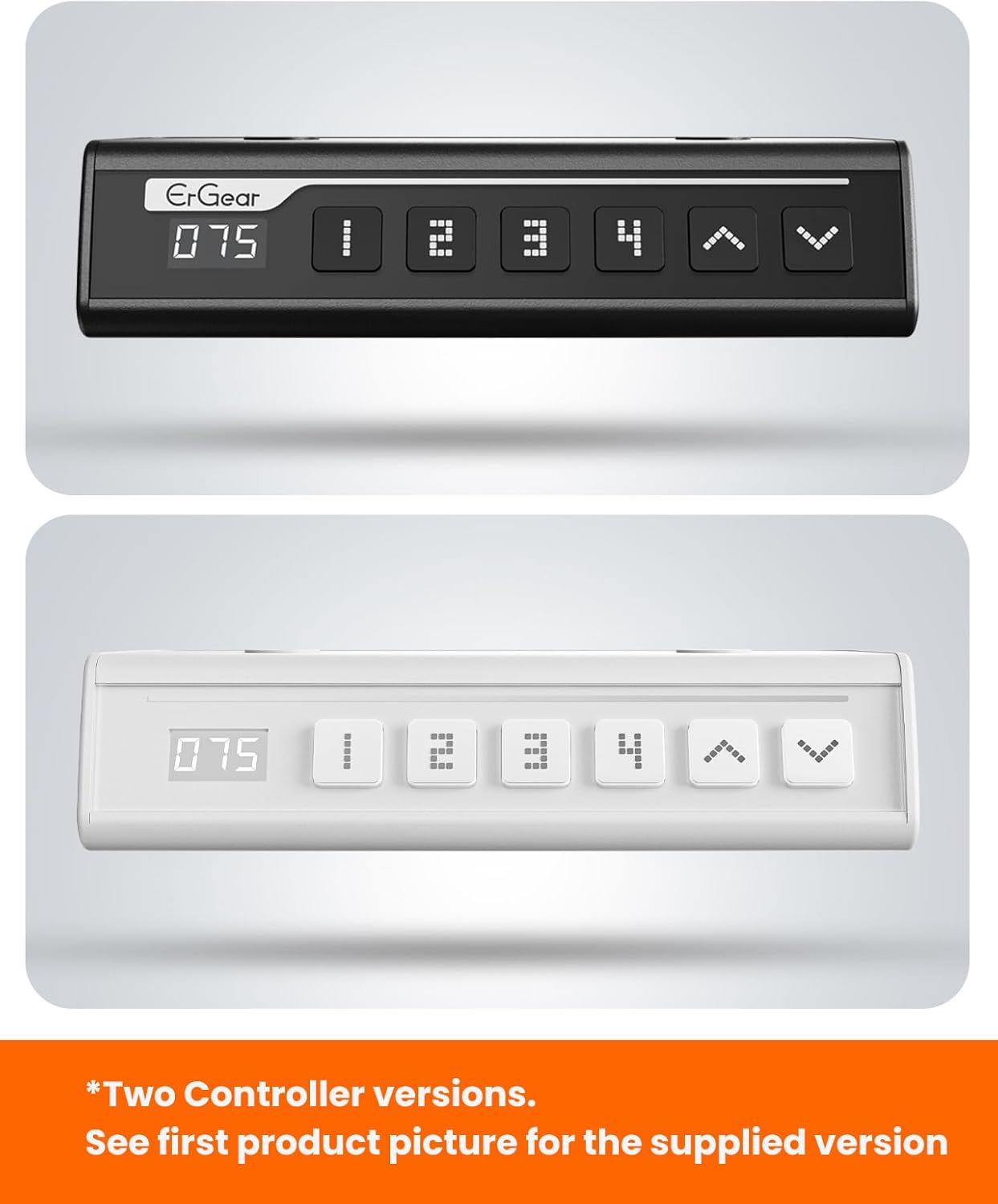
The ErGear control panel, available in two versions, features a digital height display and four programmable memory settings.
Hoogte verstelling
- Gebruik die Op (^) en Af (v) arrows to smoothly adjust the desk height between 28.35 inches and 46.46 inches.
- Laat die knoppie los op die verlangde hoogte.
Geheuevoorinstellings
Die lessenaar laat jou toe om tot 4 voorkeurhoogte-instellings te stoor.
- Verstel die lessenaar tot die verlangde hoogte met die pyltjies op/af.
- Druk die M button (or equivalent memory set button). The display will flash.
- Press one of the numbered preset buttons (1, 2, 3 of 4) binne 3 sekondes om die huidige hoogte na daardie vooraf ingestelde waarde te stoor.
- To recall a saved height, simply press the corresponding numbered preset button. The desk will automatically move to the saved position.
This video demonstrates the smooth and quiet operation of the ErGear Electric Standing Desk, showcasing its height adjustment and memory preset features.
Onderhoud
- Skoonmaak: Vee die lessenaar en raam af met 'n sagte, damp lap. Vermy harde chemikalieë of skuurmiddels.
- Inspeksie: Periodically check all screws and connections for tightness. Re-tighten if necessary.
- Kabelbestuur: Ensure cables are neatly organized and not tangled or pinched to prevent damage.
Probleemoplossing
Indien u enige probleme met u ErGear Elektriese Staande Lessenaar ondervind, verwys asseblief na die volgende algemene probleme en oplossings:
| Probleem | Moontlike oorsaak | Oplossing |
|---|---|---|
| Lessenaar beweeg nie | Power cable disconnected, motor error, overloaded desk. | Check power connections. Unplug for 30 seconds and plug back in. Reduce weight on the desk. |
| Ongelyke hoogte | Transmission rod not fully inserted or adjusted. | Refer to Step 2 of assembly to ensure the transmission rod is correctly installed and adjusted. |
| Geraas tydens operasie | Normal operation sound, loose screws. | A slight motor sound is normal. Check and tighten any loose screws on the frame. |
| Geheue-voorinstellings werk nie | Verkeerde stoorprosedure. | Follow the memory preset instructions carefully (press M, then the number within 3 seconds). |
Spesifikasies
| Kenmerk | Detail |
|---|---|
| Handelsmerk | ErGear |
| Modelnommer | EGESD7W-CA |
| lessenaar ontwerp | Staande lessenaar |
| Vorm | Reghoekig |
| Produk Afmetings (D x B x H) | 71.1D x 160B x 118H Sentimeter |
| Grootte | 63*28 duim |
| Kleur | Wit |
| Minimum Hoogte | 28.35 duim |
| Maksimum Hoogte | 46.46 duim |
| Tafelblad dikte | 1.5 sentimeter |
| Basis materiaal | Allooi staal |
| Top materiaal tipe | Engineered Wood (Walnut Wood finish) |
| Spesiale kenmerke | Verstelbare hoogte, Elektries, Ergonomies |
| Maksimum gewig aanbeveling | 176 pond (80 kg) |
| Vergadering benodig | Yes (Includes all assembly tools) |
Waarborg en Ondersteuning
ErGear is committed to providing high-quality products and customer satisfaction. This product comes with:
- 5-jaar beskerming on the desktop and desk frame.
- 2-jaar beskerming on motors and electrical components.
For any questions, concerns, or warranty claims, please contact ErGear customer support. You can typically find contact information on the product packaging or the official ErGear website. Please have your model number (EGESD7W-CA) and purchase details ready when contacting support.

The ErGear Electric Standing Desk seamlessly integrates into various home office environments.
Ask a question about this manual
Ask about setup, troubleshooting, compatibility, parts, safety, or missing instructions. Manuals+ will review the question and use this page’s manual context to help answer it.