
1. Inleiding
Thank you for choosing the Stealth Cam 40MP Deceptor Max Cellular Trail Camera. This advanced cellular trail camera is designed to capture high-quality photos and videos of wildlife with exceptional clarity and speed. Featuring 40-megapixel image resolution, a rapid 0.4-second trigger speed, and reliable cellular connectivity, the Deceptor Max ensures you stay connected to your scouting efforts. This manual provides detailed instructions for setting up, operating, and maintaining your camera to ensure optimal performance.
2. Pakketinhoud
Verifieer asseblief dat al die items wat hieronder gelys word, in u pakket ingesluit is:
- 2 x Stealth Cam 40MP Deceptor Max Cellular Trail Camera
- 4 x SanDisk 32GB Ultra SDHC UHS-I Memory Card (100MB/s)
- 1 x Vidpro 4-in-1 USB 2.0 Card Reader

Figure 2.1: Included items in the Stealth Cam Deceptor Max bundle.
3. Produk verbyview
The Deceptor Max camera is equipped with advanced features for reliable outdoor surveillance:
- 40 Megapixel Resolusie: Captures highly detailed images.
- 0.4-Second Trigger Speed: Verseker vinnige vaslegging van bewegende onderwerpe.
- Sellulêre verbinding: Dual pre-installed SIM cards for automatic connection to the strongest AT&T or Verizon network.
- 940nm No-Glo LED Array: Provides invisible detection and flash up to 80 feet for discreet operation.
- Expanded Battery Capacity: Designed to hold 16 AA batteries for extended field use.
- Weatherproof Housing: Durable construction with an integrated lock latch.
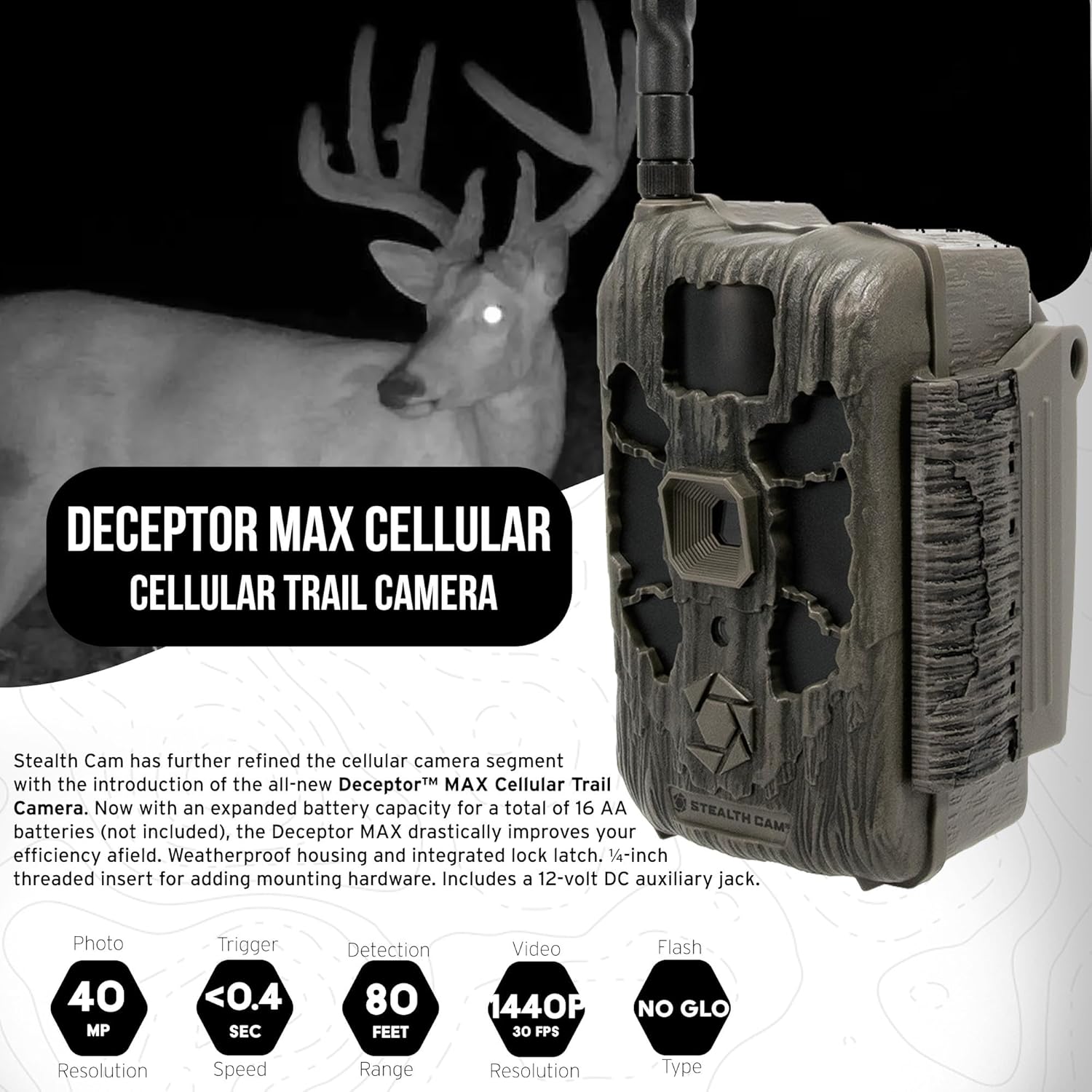
Figuur 3.1: Voorkant view of the Deceptor Max camera, showing key components.

Figuur 3.2: Example image captured by the Deceptor Max, showcasing image clarity.
4. Opstelling
4.1. Battery Installasie
The Deceptor Max requires 16 AA batteries (not included) for operation. For best performance and extended battery life, use high-quality alkaline or lithium batteries. Ensure correct polarity when inserting batteries.
- Open the camera's battery compartment latch.
- Insert 16 AA batteries, matching the positive (+) and negative (-) indicators inside the compartment.
- Securely close the battery compartment latch.

Figure 4.1: Proper battery installation in the Deceptor Max camera.
4.2. Geheuekaartinstallasie
The camera supports SDHC memory cards. A 32GB SDHC card is included in your bundle.
- Locate the SD card slot, typically near the battery compartment.
- Insert the 32GB SDHC memory card with the label facing up until it clicks into place.
- Om te verwyder, druk die kaart versigtig in totdat dit uitspring.
4.3. Monteer die kamera
The Deceptor Max features a weatherproof housing and a 1/4-inch threaded insert for various mounting options.
- Choose a suitable location, such as a tree or post, that provides a clear view van die gewenste area.
- Use the included mounting strap to secure the camera firmly. Thread the strap through the slots on the back of the camera and around the mounting surface.
- Alternatively, utilize the 1/4-inch threaded insert at the bottom of the camera to attach it to compatible mounting hardware (sold separately).
- Pas die kamera se hoek aan om die teikenarea effektief te dek.
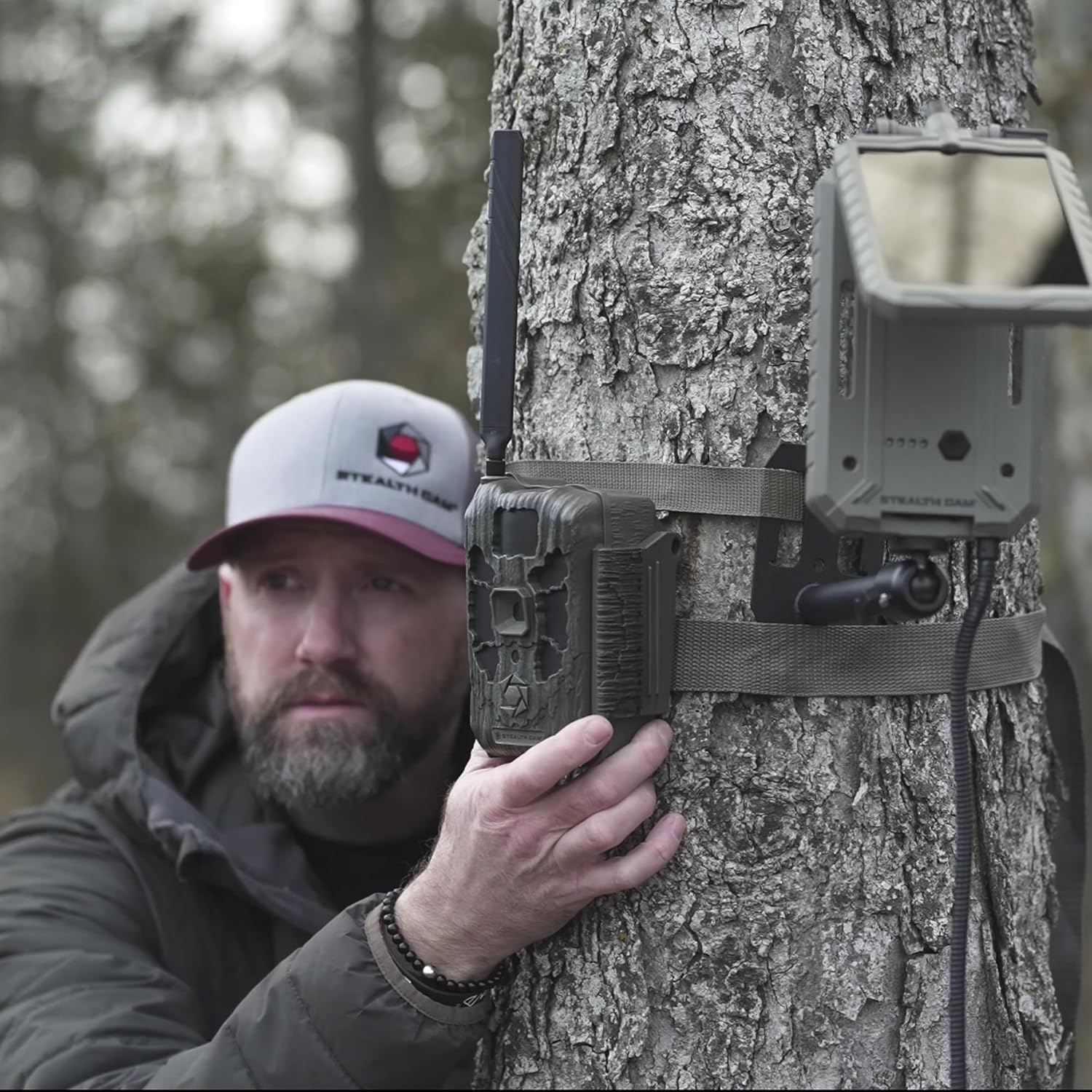
Figuur 4.2: Example of mounting the Deceptor Max camera to a tree.
5. Bedien die kamera
5.1. Skakel aan/af
Locate the power switch inside the camera's housing. Toggle it to the 'ON' position to power up the camera. To power off, toggle the switch to 'OFF'.
5.2. Cellular Connectivity and Command Pro App
The Deceptor Max utilizes two pre-installed SIM cards and an Automatic Network Coverage feature to connect to the strongest available AT&T or Verizon network. Manage your camera remotely using the Command Pro app.
- Download the Command Pro app from your smartphone's app store.
- Create an account and register your Deceptor Max camera following the in-app instructions.
- Through the app, you can remotely control camera settings, request on-demand photos and videos, and view captured media in real-time.
- The app also allows for sharing images and integrating with HuntStand for enhanced scouting.

Figure 5.1: Command Pro app interface for remote camera management.
5.3. Foto- en video-opname
The camera is designed for high-performance image and video capture:
- Prentresolusie: Tot 40 megapixels.
- Snellerspoed: Ultra-fast 0.4 seconds.
- Burst-modus: Captures up to nine photos per burst.
- Flitsreeks: 80 feet with 940nm No-Glo LED array.
- Video: Records videos with audio.
6. Onderhoud
Behoorlike onderhoud verseker die lang lewensduur en optimale werkverrigting van jou roetekamera:
- Skoonmaak: Vee die kameralens en behuising liggies af met 'n sagte, damp lap. Vermy skuur skoonmakers.
- Battery vervanging: Replace all 16 AA batteries when the low battery indicator appears or when performance degrades.
- Geheuekaartbestuur: Regularly format your SD card using the camera's menu (if available) or a computer to prevent data corruption and ensure maximum storage.
- Firmware -opdaterings: Check the Stealth Cam website periodically for firmware updates to ensure your camera has the latest features and bug fixes.
- Berging: Wanneer dit nie vir lang tye gebruik word nie, verwyder die batterye en bêre die kamera op 'n koel, droë plek.
7. Probleemoplossing
If you encounter issues with your Deceptor Max camera, refer to the following common solutions:
- Kamera skakel nie aan nie: Ensure batteries are inserted correctly with proper polarity and are fully charged. Check that the power switch is in the 'ON' position.
- Geen beelde/video's vasgelê nie: Verify the SD card is properly inserted and has sufficient free space. Check camera settings for trigger delay and detection sensitivity. Ensure the camera is armed.
- Swak beeld-/videokwaliteit: Clean the camera lens. Ensure the camera is mounted securely to prevent movement. Check for obstructions in front of the lens or flash.
- Geen sellulêre verbinding: Confirm you have an active data plan for your camera. Check the signal strength indicator in the Command Pro app. Relocate the camera to an area with better cellular coverage.
- Programverbindingskwessies: Ensure your smartphone has a stable internet connection. Update the Command Pro app to the latest version. Restart both your phone and the camera.
- Kort batterylewe: Use high-quality alkaline or lithium batteries. Reduce the frequency of image/video capture or cellular transmissions if possible.
8. Spesifikasies
| Kenmerk | Detail |
|---|---|
| Beeld resolusie | 40 megapixels |
| Snellersnelheid | 0.4 sekondes |
| Flits tipe | 940nm No-Glo LED |
| Flitsreeks | Tot 80 voet |
| Burst-modus | Up to 9 photos per burst |
| Sellulêre netwerk | Automatic connection to AT&T or Verizon |
| Battery Tipe | 16 x AA (nie ingesluit nie) |
| Geheuekaartondersteuning | SDHC (up to 32GB included) |
| Produkafmetings (L x B x H) | 9.1 x 9.1 x 9.1 duim |
| Item gewig | 7.39 pond |
| Weerweerstand | Weerbestande behuising |
| UPC | 196271787891 |
9. Waarborginligting
For detailed warranty information regarding your Stealth Cam Deceptor Max Cellular Trail Camera, please refer to the official Stealth Cam website or the warranty card included with your product packaging. Warranty terms and conditions may vary.
10. Kliëntediens
If you require further assistance or have questions not covered in this manual, please contact Stealth Cam customer support. You can find contact information and additional resources on the official Stealth Cam webwebwerf: