
1. Inleiding
Dankie vir die aankoopasing the Aiwa SP-03-BL Bluetooth Speaker. This portable speaker is designed to deliver clear, balanced sound with enhanced bass, dynamic RGB lighting, and multiple connectivity options. Its IPX4 splash resistance makes it suitable for various environments. Please read this manual carefully before using the product to ensure proper operation and to maximize your listening experience.

Image: Aiwa SP-03-BL Bluetooth Speaker, showcasing its compact design and carrying handle.
2. Veiligheidsinligting
- Moenie die luidspreker blootstel aan uiterste temperature, direkte sonlig of hoë humiditeit nie.
- Vermy om die luidspreker te laat val of aan sterk impakte te onderwerp.
- Keep the speaker away from water sources, despite its IPX4 rating, to prevent damage.
- Do not attempt to disassemble, repair, or modify the speaker yourself. Contact qualified service personnel.
- Gebruik slegs die meegeleverde USB-C-kabel vir laai.
- Hou buite bereik van kinders.
3. Pakketinhoud
Maak seker dat alle items in die pakket teenwoordig is:
- 1 x Aiwa SP-03-BL Bluetooth Speaker
- 1 x USB-C laaikabel
- 1 x handleiding
4. Produkkenmerke
- Kragtige oudio: 15W RMS output for clear and balanced sound.
- Verbeterde bas: Passive radiator technology for deeper and more impactful bass.
- Lang batterylewe: Tot 12 uur se aaneenlopende afspeel op 'n enkele laai.
- Spatbestand: IPX4 certified for protection against liquid splashes.
- True Wireless Sound (TWS): Connect two SP-03-BL speakers for an immersive stereo experience.
- Bluetooth 5.3: Stable, efficient, and low-power wireless connectivity.
- Dinamiese RGB-ligte: Three multi-colored light modes to enhance your music.
- Meervoudige konnektiwiteit: Supports Micro SD card, USB drive, and USB-C for charging.
- Draagbare ontwerp: Compact and lightweight with a convenient carrying handle.
- Programbeheer: Adjust equalization, DJ effects, and light intensity via the AIWA Brazil app.
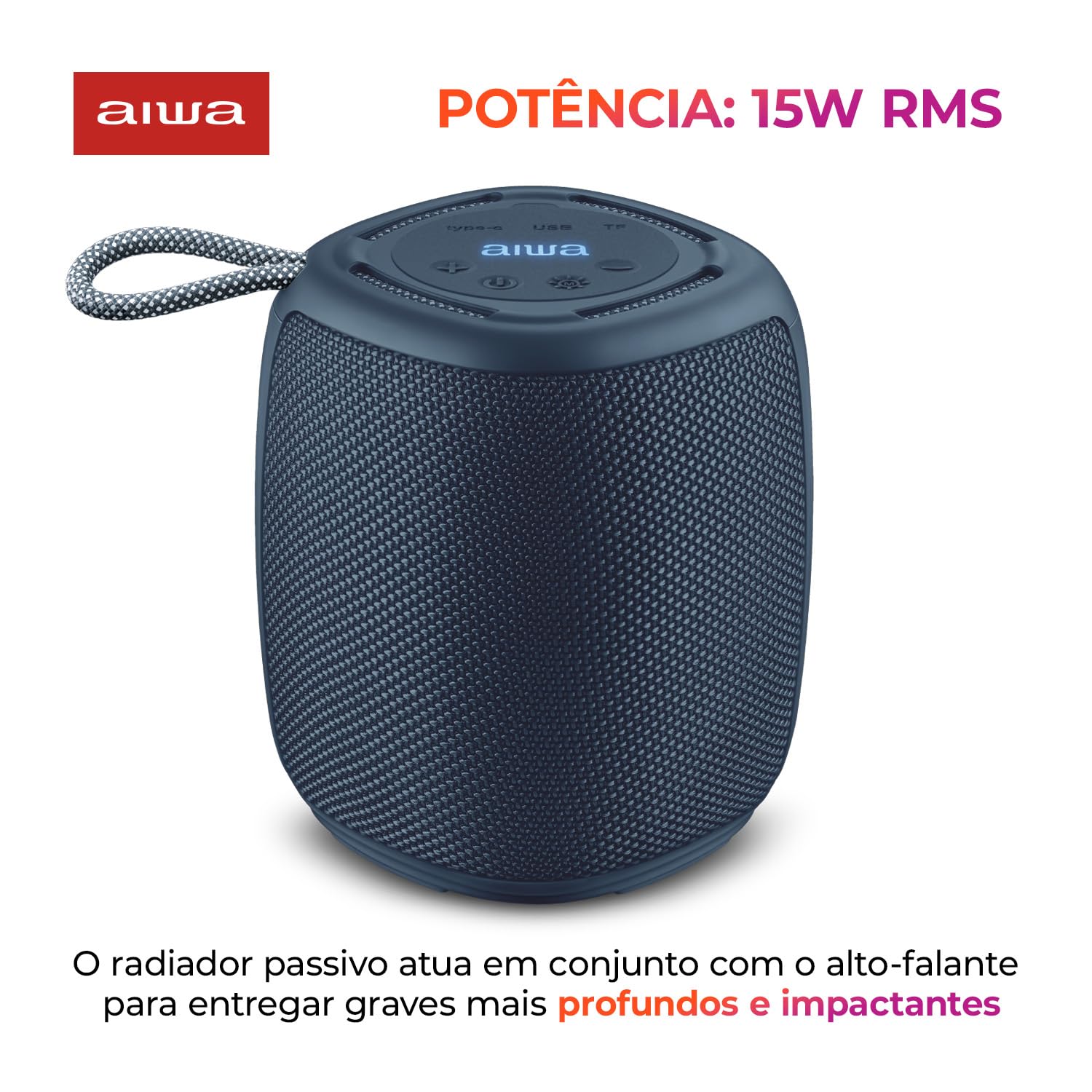
Image: The Aiwa SP-03-BL speaker, emphasizing its 15W RMS power output.

Image: The Aiwa SP-03-BL speaker, illustrating its IPX4 splash resistance.
5. Opstelling en aanvanklike gebruik
5.1 Laai die luidspreker
Before first use, fully charge the speaker. Connect the provided USB-C cable to the speaker's USB-C port and the other end to a USB power adapter (not included) or a computer's USB port. The LED indicator will show charging status and turn off when fully charged. A full charge takes approximately 3 hours.
5.2 Aan-/afskakel
- Om aan te skakel: Druk en hou die aan/af-knoppie vir 'n paar sekondes in totdat jy 'n hoorbare aanwysing hoor en die LED-liggies aanskakel.
- Om af te skakel: Druk en hou die aan/af-knoppie weer vir 'n paar sekondes in totdat jy 'n hoorbare aanwysing hoor en die LED-liggies afskakel.
5.3 Bluetooth -koppeling
- Ensure the speaker is powered on and in Bluetooth pairing mode (the LED indicator will flash).
- Aktiveer Bluetooth op jou mobiele toestel en soek vir beskikbare toestelle.
- Select "Aiwa SP-03-BL" from the list of devices.
- Once paired, the speaker will emit an audible confirmation, and the LED indicator will stop flashing.

Image: The Aiwa SP-03-BL speaker, indicating its Bluetooth 5.3 connectivity.
5.4 True Wireless Sound (TWS) Pairing
To connect two Aiwa SP-03-BL speakers for stereo sound:
- Maak seker dat beide luidsprekers aangeskakel is en nie aan enige Bluetooth-toestel gekoppel is nie.
- On one speaker (this will be the primary speaker), press and hold the TWS button (usually indicated by a chain link or TWS icon) for a few seconds.
- The primary speaker will search for the secondary speaker. Once connected, both speakers will emit an audible confirmation.
- Now, pair your mobile device to the primary speaker via Bluetooth as described in section 5.3.

Image: Two Aiwa SP-03-BL speakers demonstrating True Wireless Sound (TWS) connection for stereo audio.
5.5 Using Micro SD Card or USB Drive
Insert a Micro SD card or USB drive (with supported audio files) into the respective port on the speaker. The speaker will automatically detect the storage device and begin playing music. Use the speaker's control buttons to navigate tracks.

Image: Close-up of the Aiwa SP-03-BL speaker's top panel, highlighting the Micro SD, USB, and USB-C ports for various connections.
6. Bediening van die luidspreker
6.1 Basiese kontroles
| Knoppie/funksie | Aksie |
|---|---|
| Kragknoppie | Druk en hou in om aan/af te skakel. |
| Speel/Pause-knoppie | Druk om musiek te speel of te onderbreek. |
| Volume op (+) | Druk kort om die volume te verhoog. Druk lank vir die volgende snit. |
| Volume af (-) | Druk kort om die volume te verlaag. Druk lank vir die vorige snit. |
| Mode-knoppie | Press to switch between Bluetooth, Micro SD, and USB modes. |
| Ligte knoppie | Druk om deur RGB-ligmodusse te blaai of ligte af te skakel. |
| TWS-knoppie | Druk en hou in om TWS-paring te begin. |
6.2 RGB lig modusse
The speaker features dynamic RGB LED lights. Press the Light button to cycle through the available light modes. There are three distinct multi-colored effects. Pressing the button again will turn the lights off.

Image: The Aiwa SP-03-BL speaker displaying its vibrant RGB color lights.
6.3 Using the AIWA Brazil App
For enhanced control, download the AIWA Brazil app from your smartphone's app store. The app allows you to:
- Adjust equalization settings (Bass, Mid, Treble).
- Control DJ effects.
- Change playback modes.
- Adjust the intensity of the portable speaker lights.
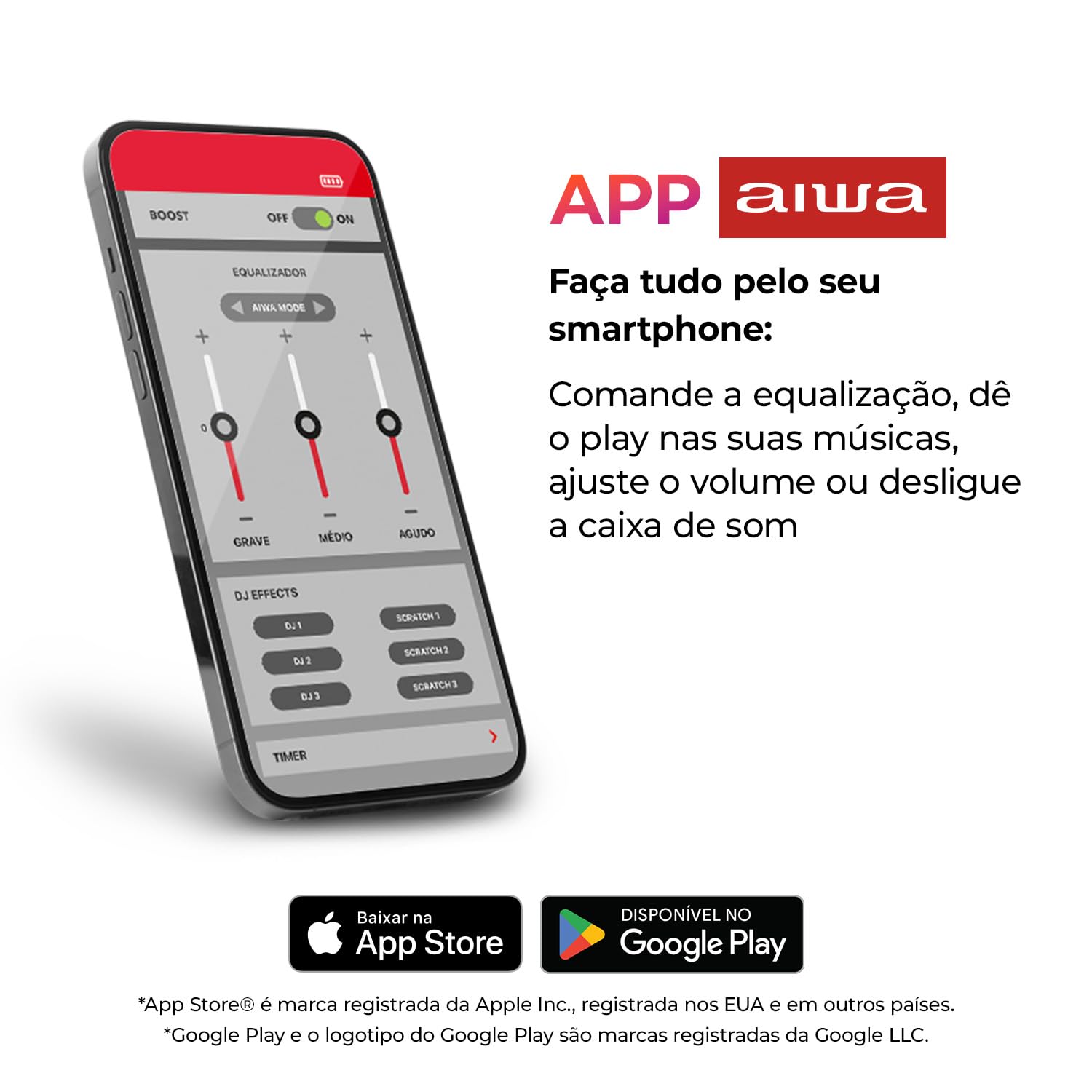
Image: A smartphone screen displaying the AIWA app interface with equalization and DJ effects controls.
7. Onderhoud
7.1 Skoonmaak
Wipe the speaker with a soft, dry, or slightly damp cloth. Do not use abrasive cleaners, alcohol, or chemical solvents, as these may damage the surface.
7.2 Berging
When not in use for extended periods, store the speaker in a cool, dry place away from direct sunlight and extreme temperatures. It is recommended to charge the battery at least once every three months to maintain its lifespan.
7.3 Batterysorg
To prolong battery life, avoid fully discharging the speaker frequently. Charge the speaker when the low battery indicator appears.
8. Probleemoplossing
| Probleem | Moontlike Oplossing |
|---|---|
| Luidspreker skakel nie aan nie. | Maak seker dat die battery gelaai is. Koppel aan 'n kragbron en probeer weer. |
| Kan nie via Bluetooth koppel nie. | Ensure the speaker is in pairing mode. Turn off and on your device's Bluetooth. Move closer to the speaker. Forget previous pairings on your device. |
| Geen geluid of lae volume nie. | Increase volume on both the speaker and your connected device. Ensure the speaker is not muted. Check if the correct input mode (Bluetooth, SD, USB) is selected. |
| TWS-paring misluk. | Ensure both speakers are powered on and not connected to any other Bluetooth device. Try resetting both speakers and repeating the TWS pairing process. |
| Luidspreker laai nie. | Check the USB-C cable and power adapter. Ensure connections are secure. Try a different cable or power source. |
9. Spesifikasies
| Kenmerk | Detail |
|---|---|
| Handelsmerk | Geen |
| Modelnommer | AWS-SP-03-BL |
| Luidspreker Maksimum uitsetkrag | 15 Watt RMS |
| Verbindingstegnologie | Bluetooth 5.3 |
| Waterweerstandgradering | IPX4 (Spatbestand) |
| Battery Tipe | Herlaaibare litium-ioon |
| Battery kapasiteit | 2000 mAh |
| Battery Gemiddelde Lewe | Tot 12 ure |
| Battery Laai Tyd | Ongeveer 3 ure |
| Beheer metode | Touch Buttons, AIWA App |
| Itemafmetings (D x B x H) | 13.3 x 11.6 x 11.3 sentimeter |
| Item gewig | 0.54 kilogram |
| Versoenbare toestelle | Skootrekenaar, slimfoon, tablet, televisie |
| Invoerpoorte | Micro SD, USB, USB-C (Charging) |

Image: The Aiwa SP-03-BL speaker, illustrating its physical dimensions and weight.
10. Waarborg en Ondersteuning
For warranty information or technical support, please refer to the warranty card included in your package or visit the official Aiwa website. You may also contact Aiwa customer service through the contact details provided on their webwebwerf.
Aiwa Official Webwebwerf: Besoek die Aiwa-winkel op Amazon