
1. Inleiding
The DALY Smart Active Balance BMS is a sophisticated Battery Management System designed to protect and optimize the performance of Li-ion, LiFePO4, and LTO battery packs. This model supports 4 to 8 series cells (4S-8S) with a 400A charge/discharge current and features 1A active balancing. It includes built-in Bluetooth for monitoring and communication interfaces like RS485 and CAN, ensuring comprehensive battery management and data accessibility.
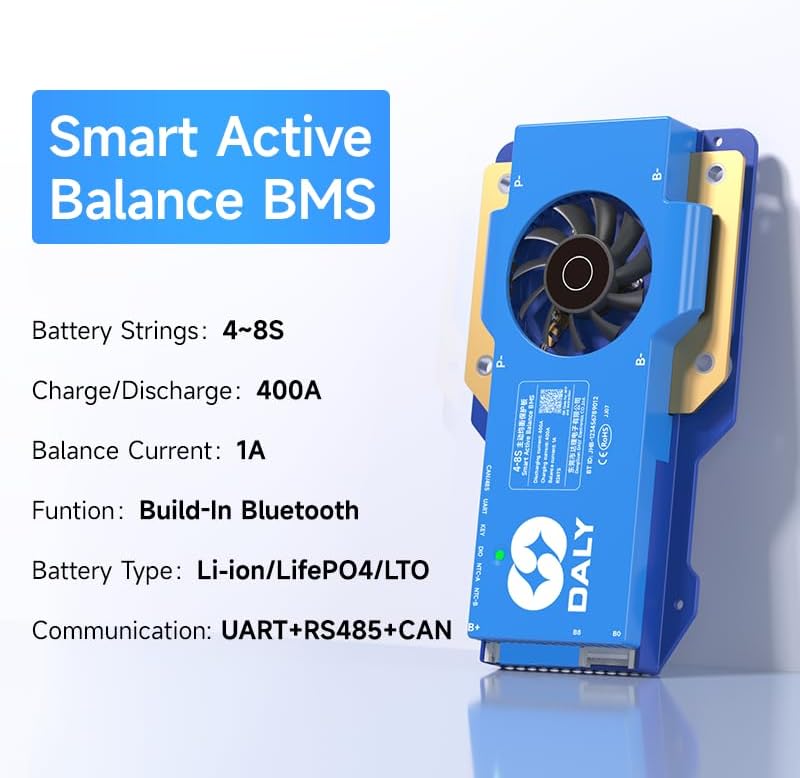
Image 1.1: DALY Smart Active Balance BMS highlighting 4S-8S, 400A, 1A balance, Bluetooth, UART+RS485+CAN.
2. Veiligheidsinligting
Please read and understand all safety instructions before installing or operating the DALY Smart Active Balance BMS. Failure to follow these instructions may result in electric shock, fire, or serious injury.
- Always disconnect power from the battery pack before performing any installation, maintenance, or wiring changes.
- Ensure correct polarity when connecting the BMS to the battery pack. Incorrect wiring can cause severe damage to the BMS and battery.
- Do not short-circuit the battery terminals or the BMS connection points.
- Install the BMS in a well-ventilated area, away from flammable materials and direct sunlight.
- Avoid exposing the BMS to moisture, dust, or extreme temperatures.
- Raadpleeg 'n gekwalifiseerde professionele persoon vir installasie as u onseker is oor enige stappe.
- Use appropriate personal protective equipment (PPE) such as insulated gloves and safety glasses during installation.
3. Produk verbyview
The DALY Smart Active Balance BMS provides comprehensive protection and management for your battery system. Key features include:
- Cell Compatibility: Supports 4 to 8 series (4S-8S) Li-ion, LiFePO4, and LTO battery types.
- Hoë stroomkapasiteit: Rated for 400A continuous charge and discharge current.
- Active Balancing: Features 1A active balancing to equalize cell voltages, extending battery life and performance.
- Slim monitering: Integrated Bluetooth for real-time monitoring via a mobile application.
- Kommunikasie-koppelvlakke: Equipped with UART, RS485, and CAN ports for versatile system integration and data logging.
- Veelvuldige beskermings: Includes overcharge, over-discharge, overcurrent, short circuit, and high-temperature shutdown protections.
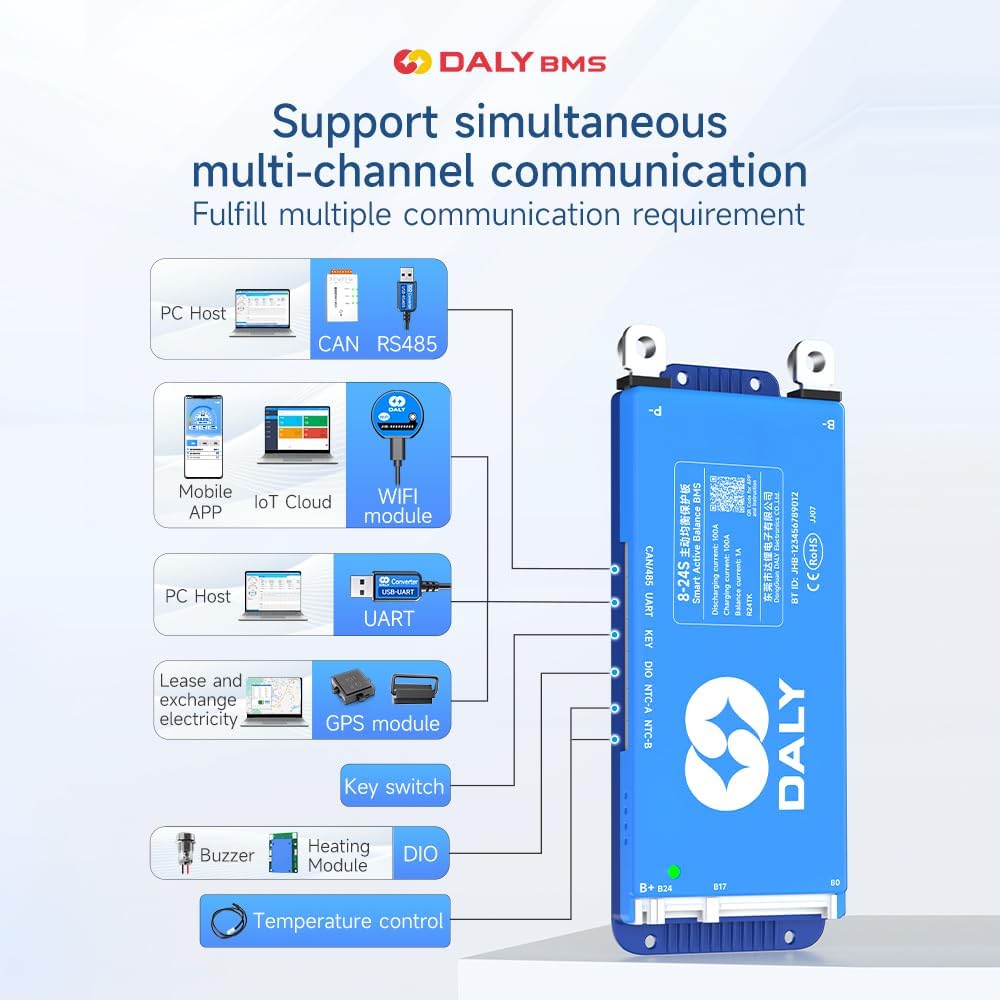
Image 3.1: Diagram illustrating the DALY BMS's support for multi-channel communication including PC Host (CAN, RS485, UART), Mobile APP (Bluetooth, WiFi module), GPS module, Key switch, Buzzer, Heating Module, and DIO for temperature control.
4. Paklys
Verifieer asseblief dat al die items wat hieronder gelys word, in u pakket ingesluit is:
- Smart Active Balance BMS (1 unit)
- P-&B- cable (1 set)
- Screws (2 Pcs)
- Sampling cable (1 set)
- B+ cable (1 unit)
- NTC Temperature Sensor (One standard, two optional)
- Gebruikershandleiding (1 kopie)
- Verpakkingsboks (1 eenheid)
- RS485/CAN port cable (1 unit)

Image 4.1: Visual representation of the DALY BMS package contents, including the BMS unit, various cables, screws, NTC sensor, and user manual.
5. Opstelling en installering
Proper installation is crucial for the safe and efficient operation of your BMS. Follow these steps carefully:
5.1 Voor-installasie tjeks
- Ensure your battery pack matches the BMS specifications (4S-8S, Li-ion/LiFePO4/LTO).
- Verify all battery cells are balanced and within a healthy voltage range before connecting the BMS.
- Versamel al die nodige gereedskap en komponente.
5.2 Bedradingsverbindings
Belangrik: Connect the balance wires first, then the main power cables. Disconnect in reverse order.
- Balance Wire Connection: Koppel die sampling cable to each cell's positive terminal, starting from B- (0V) up to B+ (total voltage). Ensure the sequence is correct.
- B- Connection: Connect the main negative terminal of the battery pack to the B- port on the BMS.
- P- Connection: Connect the negative terminal of your load/charger to the P- port on the BMS.
- B+ Connection: Connect the main positive terminal of the battery pack to the B+ port on the BMS.
- Kommunikasiepoorte: Connect RS485, CAN, or UART cables as required for external communication or monitoring.
- NTC sensor: Attach the NTC temperature sensor to a central cell or area within the battery pack to monitor temperature.

Image 5.1: Wiring diagram for BMS pre-charge protection, showing connections to the battery pack.

Image 5.2: Illustration of BMS misconnection protection, highlighting correct balance wire connections.

Image 5.3: Diagram showing how to connect multiple BMS units in parallel for increased capacity.

Image 5.4: Comprehensive wiring diagram for all-in protection, including main power and balance connections.
5.3 App-installasie
Download the "BalanceBMS" app from your device's app store (available on iOS and Android) to monitor and configure your BMS via Bluetooth.
6. Bedryfsinstruksies
Once installed, the DALY Smart Active Balance BMS operates automatically to protect your battery. For monitoring and advanced settings, use the mobile application or a PC connection.
6.1 Bluetooth Monitoring (Mobile App)
- Maak seker dat Bluetooth op jou slimfoon geaktiveer is.
- Open the "BalanceBMS" application.
- The app will scan for nearby DALY BMS devices. Select your BMS from the list to connect.
- Sodra jy gekoppel is, kan jy view real-time data such as individual cell voltages, total battery voltage, charge/discharge current, temperature, and battery state of charge (SOC).
- The app also allows for basic parameter adjustments and viewing of protection status.
6.2 PC Monitoring and Configuration (UART/RS485/CAN)
For detailed configuration and data logging, connect the BMS to a PC using a compatible UART, RS485, or CAN adapter. DALY provides dedicated PC software for these connections, allowing for:
- Advanced parameter settings (e.g., over-voltage, onder-voltage thresholds, balancing current).
- Detailed data logging and analysis.
- Firmware -opdaterings.
7. Onderhoud
Regular maintenance ensures the longevity and optimal performance of your DALY BMS and battery pack.
- Visuele inspeksie: Periodically inspect all wiring and connections for signs of wear, corrosion, or looseness. Ensure all screws are tightened.
- Monitering: Regularly check battery parameters via the "BalanceBMS" app or PC software. Pay attention to cell voltage differences, temperatures, and any active protection alerts.
- Skoonmaak: Keep the BMS unit clean and free from dust and debris. Use a dry, soft cloth for cleaning. Do not use liquids or abrasive cleaners.
- Omgewing: Ensure the BMS is operating within its specified temperature range and in a dry environment.
8. Probleemoplossing
If you encounter issues with your DALY Smart Active Balance BMS, refer to the following common problems and solutions:
| Probleem | Moontlike oorsaak | Oplossing |
|---|---|---|
| BMS not powering on / No output | Main power cables incorrectly connected or loose. Battery voltage te laag. | Check B- and P- connections. Verify battery voltage is above the under-voltage beskermingsdrempel. |
| Cells are not balancing | Balance wires incorrectly connected or damaged. Balancing function disabled in settings. | Inspect balance wire connections for correct sequence and integrity. Check BMS settings via app/PC software to ensure active balancing is enabled. |
| Probleme met Bluetooth-verbinding | Bluetooth disabled on phone. App not installed correctly. BMS too far from device. | Ensure phone Bluetooth is on. Reinstall "BalanceBMS" app. Move closer to the BMS. Restart BMS (if possible) and phone. |
| Overcharge/Over-discharge protection triggered frequently | Laaier voltage too high/low. Load drawing too much current. Battery capacity degradation. | Verifieer laaiervolumetage and current settings. Reduce load. Check individual cell health. Adjust protection parameters via app/PC software if appropriate for your battery type. |
| BMS gets hot during operation | High current draw. Poor ventilation. Internal fault. | Ensure adequate ventilation around the BMS. Reduce continuous current if possible. If overheating persists at normal loads, contact support. |
If the problem persists after attempting these solutions, please contact DALY customer support for further assistance.
9. Spesifikasies
Detailed technical specifications for the DALY Smart Active Balance BMS 400A (4S-8S):
| Kenmerk | Spesifikasie |
|---|---|
| Handelsmerk | DALY |
| Modelnommer | R24TS-400A |
| Battery Series Support | 4-8 |
| Battery tipe verenigbaarheid | Li-ion, LiFePO4, LTO |
| Deurlopende Laai-/Ontlaadstroom | 400A |
| Active Balance Current | 1A |
| Invoer Voltage Reeks | 12V-24V (Nominal, dependent on cell configuration) |
| Kommunikasie-koppelvlakke | Built-in Bluetooth, UART, RS485, CAN |
| Itemafmetings (L x B x H) | 7.72 x 4.29 x 1.02 duim |
| Item gewig | 660 gram |
| Vervaardiger | Dongguan Daly Electronics Co., Ltd |

Image 9.1: Table showing various DALY BMS models with their current ratings, sizes, and cable specifications, applicable for 4S-24S configurations.
10. Waarborg en Ondersteuning
10.1 Vervaardiger se waarborg
The DALY Smart Active Balance BMS 400A (4S-8S) comes with a 3-jaar vervaardigerwaarborgHierdie waarborg dek defekte in materiaal en vakmanskap onder normale gebruik. Bewaar asseblief u bewys van aankoop vir waarborgeise.
10.2 Kliëntediens
Vir tegniese bystand, probleemoplossing of waarborgnavrae, verwys asseblief na die volgende bronne:
- Mobiele toepassing: The "BalanceBMS" app often contains helpful guides and FAQs.
- Aanlyn hulpbronne: Visit the official DALY website for product documentation and support.
- Kontak Kliëntediens: For direct support, please reach out to DALY customer service. Contact information can typically be found on the product packaging or the official DALY webwebwerf.