
1. Inleiding
This manual provides comprehensive instructions for the safe and efficient installation, operation, maintenance, and troubleshooting of your ABB PowerValue 11RT 2kVA Uninterruptible Power Supply (UPS). Please read this manual thoroughly before installing or operating the unit to ensure proper functionality and to prevent damage to the equipment or injury to personnel. Keep this manual for future reference.
2. Veiligheidsinligting
Observe the following safety precautions during all phases of UPS installation, operation, and maintenance. Failure to comply with these warnings may result in electric shock, fire, or serious injury.
- Elektriese gevaar: The UPS contains internal batteries and can supply hazardous voltage even when disconnected from the AC mains.
- Gekwalifiseerde personeel: Only qualified service personnel should perform installation, maintenance, or repair procedures.
- Aarding: Ensure the UPS is properly grounded to prevent electric shock.
- Omgewing: Do not operate the UPS in environments with excessive dust, humidity, or extreme temperatures.
- Batteryveiligheid: Batterye kan 'n risiko van elektriese skok en hoë kortsluitstroom inhou. Neem behoorlike voorsorgmaatreëls in ag wanneer u met batterye werk.
3. Produk verbyview
The ABB PowerValue 11RT 2kVA UPS is designed to provide reliable, high-quality power protection for critical loads. It features a compact design suitable for rack-mount or tower configurations, ensuring continuous power during outages and protecting against power fluctuations.
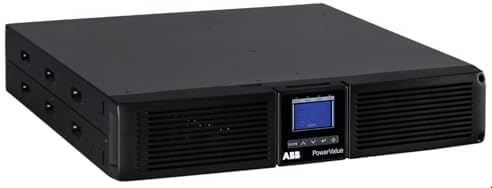
This image displays the front of the ABB PowerValue 11RT UPS, showing the ventilation grilles, the control panel with a blue LCD screen, and the ABB PowerValue branding. The unit is black and designed for rack-mount or tower configurations.
4. Opstelling
4.1 Uitpak en inspeksie
- Carefully unpack the UPS and its accessories from the packaging.
- Inspect the unit for any signs of shipping damage. If damage is found, do not install and contact your supplier.
- Retain the packaging materials for future transport or storage.
4.2 Plasing
- Place the UPS in a clean, temperature-controlled environment, away from direct sunlight, heat sources, and excessive moisture.
- Ensure adequate airflow around the unit. Maintain at least 10 cm (4 inches) of clearance at the front and rear for ventilation.
- The UPS can be installed in a standard 19-inch rack or used as a tower unit with the provided stands (if applicable).
4.3 Elektriese verbindings
- Invoerkrag: Connect the UPS input power cord to a properly grounded electrical outlet. Ensure the outlet capacity matches the UPS requirements.
- Uitvoerverbindings: Connect your critical equipment to the UPS output receptacles. Do not overload the UPS.
- Kommunikasiepoorte: If desired, connect communication cables (e.g., USB, RS-232, network card) for monitoring and management.
5. Operasie
5.1 Aanvanklike opstart
- After all connections are secure, press and hold the power button on the front panel for a few seconds until the UPS powers on.
- The LCD display will illuminate and show the startup sequence.
- Allow the UPS to perform its self-test. Once complete, the display will show normal operating status.
5.2 Normale werking
In normal operation, the UPS provides conditioned power to connected equipment and keeps its batteries charged. The LCD display provides real-time information on input/output voltage, load level, battery status, and operational mode.
5.3 Afskakelprosedure
- Safely shut down all connected equipment.
- Press and hold the power button on the front panel until the UPS initiates its shutdown sequence.
- The UPS will power off, and the display will turn off.
6. Onderhoud
6.1 Batterysorg
- The UPS batteries are designed for a specific lifespan. Regular self-tests help monitor battery health.
- Replace batteries when indicated by the UPS or after their recommended service life. Battery replacement should only be performed by qualified personnel.
6.2 Skoonmaak
- Ensure the UPS is powered off and disconnected from the AC mains before cleaning.
- Gebruik 'n sagte, droë lap om die buitekant van die eenheid skoon te maak. Moenie vloeibare of aërosol skoonmaakmiddels gebruik nie.
- Hou ventilasie-openinge vry van stof en puin.
7. Probleemoplossing
This section provides solutions to common issues you may encounter with your UPS. For problems not listed here, contact technical support.
| Probleem | Moontlike oorsaak | Oplossing |
|---|---|---|
| UPS skakel nie aan nie | No AC input power; Battery deeply discharged | Check power cord connection and wall outlet; Allow UPS to charge for several hours. |
| UPS piep aanhoudend | Overload condition; On battery power | Reduce connected load; Restore AC input power. |
| Battery runtime is short | Battery nearing end of life; Battery not fully charged | Consider battery replacement; Allow UPS to charge for 24 hours. |
8. Spesifikasies
Key technical specifications for the ABB PowerValue 11RT 2kVA UPS (Model 4NWP100201R0001):
- Handelsmerk: FIG
- Model: PowerValue 11RT 2kVA (4NWP100201R0001)
- Produk afmetings: 16.77 duim (D) x 17.24 duim (B) x 3.39 duim (H)
- Item gewig: 42 pond (19.1 kilogram)
- Kleur: Swart
- Voltage: Refer to the product label on the unit for specific input and output voltage graderings.
9. Waarborg en Ondersteuning
ABB products are manufactured to high standards and are backed by a limited warranty. For specific warranty terms and conditions, please refer to the warranty card included with your product or visit the official ABB webwebwerf.
For technical assistance, troubleshooting, or service inquiries, please contact ABB customer support through their official channels. When contacting support, please have your product model number (4NWP100201R0001) and serial number available.
ABB-amptenaar Webwebwerf: www.abb.com