
Inleiding
This manual provides essential information for the safe and efficient use of your NOHON 10000mAh Magnetic Wireless Power Bank, Model NX-YSP04. Please read this manual thoroughly before using the product and retain it for future reference.
The NOHON Magnetic Wireless Power Bank offers a convenient and portable charging solution with its 10000mAh capacity, magnetic wireless charging, and fast wired charging capabilities. Its compact design makes it ideal for travel and daily use.
Pakketinhoud
Verifieer dat alle items in jou pakket teenwoordig is:
- 1 x NOHON 10000mAh Magnetic Wireless Power Bank
- 1 x USB-C laaikabel
- 1 x Gebruikershandleiding
Produk verbyview
Familiarize yourself with the components of your power bank.
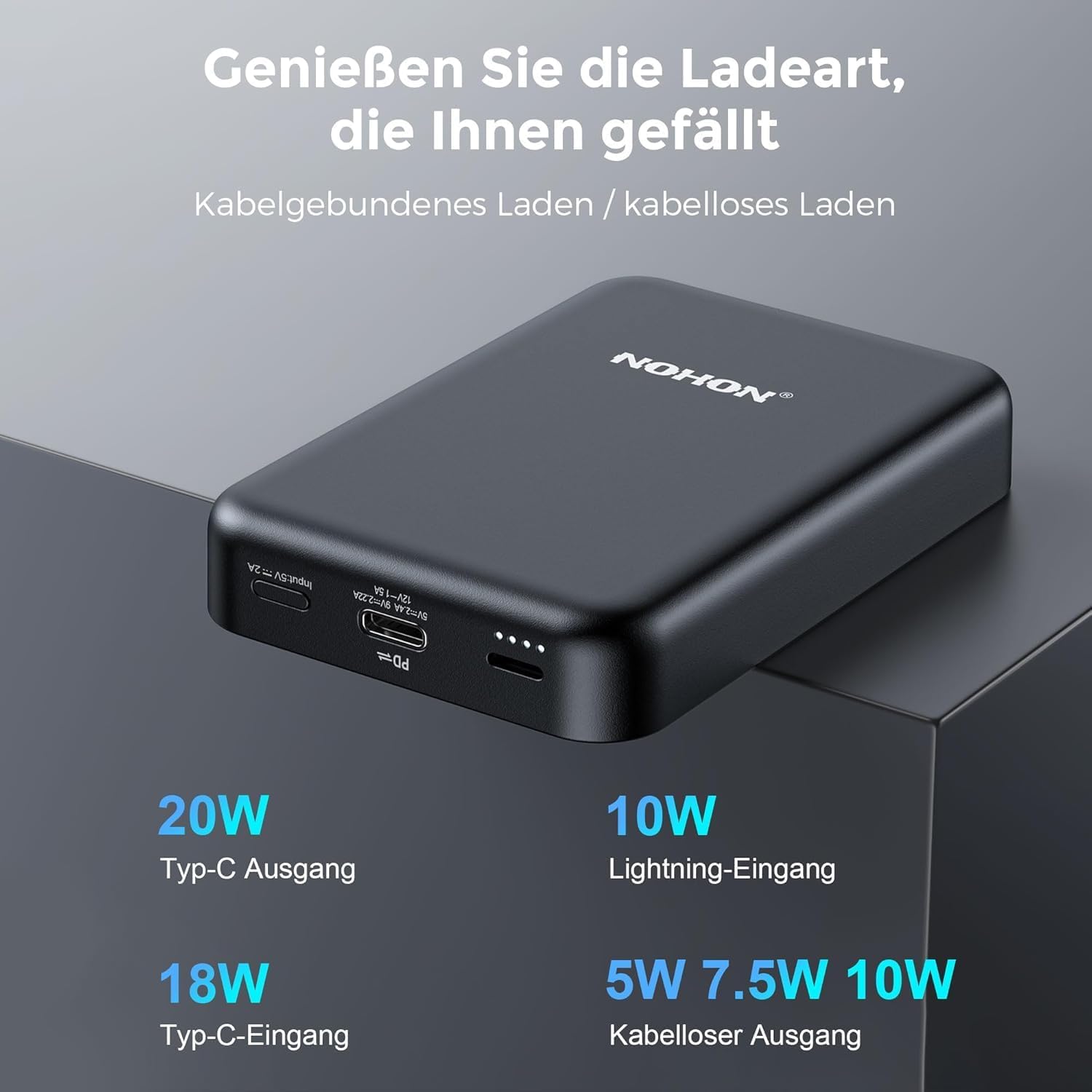
Image: NOHON Magnetic Wireless Power Bank showing its Type-C In/Out port, Lightning Input, and LED indicators.
- Magnetiese draadlose laaipad: Vir toestelle wat versoenbaar is met draadlose laai.
- USB-C-poort (in/uit): Supports 20W PD fast charging for both input and output.
- Weerlig-invoerpoort: For charging the power bank using a Lightning cable (10W).
- LED-aanwysers: Wys batteryvlak en laaistatus.
- Kragknoppie: To activate/deactivate the power bank and check battery level.
Opstelling
Aanvanklike laai van die kragbank
Before first use, fully charge your NOHON Power Bank.
- Koppel die meegeleverde USB-C-kabel aan die USB-C-poort op die kragbank.
- Connect the other end of the USB-C cable to a compatible USB wall adapter (not included).
- Die LED-aanwysers sal brand om die laaivordering aan te dui. Alle LED's sal solied brand wanneer dit volledig gelaai is.
- Alternatively, you can use a Lightning cable (not included) to charge the power bank via its Lightning input port.

Beeld: Nabyskoot view of the USB-C and Lightning input ports on the power bank.
Bedryfsinstruksies
Kontroleer batteryvlak
Press the power button once to check the remaining battery level via the LED indicators.
Draadlose laai
The power bank features magnetic wireless charging for compatible devices (e.g., iPhone 12/13/14 series).
- Ensure your device supports magnetic wireless charging. For other devices, a MagSafe-compatible case may be required.
- Align your device with the magnetic charging pad on the power bank. The magnets will securely attach the device.
- Wireless charging will begin automatically. The power bank supports 5W/7.5W/10W wireless output.

Image: An iPhone is shown magnetically attached to the NOHON power bank, indicating active wireless charging.

Image: A hand demonstrates the strong magnetic attachment of the power bank to a smartphone, ensuring stable charging.

Image: Illustration differentiating between MagSafe-compatible cases (green check) and non-MagSafe cases (red cross) for optimal magnetic charging.
Bedrade laai
Use the USB-C port for wired charging of your devices.
- Connect one end of a USB-C cable to the USB-C port on the power bank.
- Koppel die ander kant van die kabel aan jou toestel se laaipoort.
- The power bank will automatically begin charging your device with up to 20W PD fast charging.
Laai verskeie toestelle gelyktydig
The NOHON Power Bank supports charging two devices at the same time: one wirelessly and one via the USB-C port.

Image: The power bank is shown charging an iPhone wirelessly while simultaneously being recharged via a USB-C cable from a wall adapter.
Onderhoud
- Hou die kragbank droog en weg van vog.
- Moenie aan uiterste temperature (warm of koud) blootstel nie.
- Clean the surface with a soft, dry cloth. Avoid harsh chemicals or abrasive materials.
- Berg in 'n koel, droë plek wanneer dit vir lang tydperke nie gebruik word nie.
- Vermy om die kragbank te laat val of aan sterk impakte te onderwerp.
Probleemoplossing
- Kragbank laai nie:
- Maak seker dat die laaikabel stewig aan beide die kragbank en die kragbron gekoppel is.
- Probeer 'n ander laaikabel of muuradapter.
- Kontroleer of die kragbron aktief is.
- Toestel laai nie draadloos nie:
- Ensure your device is wirelessly charging compatible and properly aligned with the power bank's magnetic pad.
- Remove any thick cases or metal objects between the device and the power bank.
- Maak seker dat die kragbank voldoende lading het.
- Press the power button on the power bank to activate wireless charging if it doesn't start automatically.
- Toestel laai nie via kabel nie:
- Maak seker dat die kabel stewig aan beide die kragbank en jou toestel gekoppel is.
- Try a different cable or device to rule out cable or device issues.
- Maak seker dat die kragbank voldoende lading het.
Spesifikasies
| Modelnommer | NX-YSP04 |
| Battery kapasiteit | 10000mAh |
| USB-C Invoer/ Uitset | 20W PD (Kraglewering) |
| Weerlig-invoer | 10 W |
| Draadlose uitset | 5W / 7.5W / 10W |
| Battery Tipe | Litium-polimeer |
| Afmetings (L x B x H) | 9.6 x 6.4 x 1.8 cm |
| Gewig | 250 g |
| Versoenbare toestelle | Smartphones (e.g., iPhone 12/13/14 series), Tablets, Wireless Earbuds |

Image: Visual representation of the power bank's broad compatibility with iOS devices (iPhone 12/13/14 series) and other smartphones (requiring a MagSafe case).
Veiligheidsinligting
Om veilige werking te verseker en skade te voorkom, neem asseblief die volgende veiligheidsmaatreëls in ag:
- Moenie die toestel self uitmekaar haal, wysig of herstel nie.
- Do not expose to fire, water, or extreme temperatures.
- Vermy val of sterk impak.
- Hou buite bereik van kinders.
- Moenie gebruik as die kragbank beskadig of geswel is nie.
- Gooi die produk verantwoordelik volgens plaaslike regulasies weg.
- The product features Multi-Protect safety technology to prevent overcharge, over-discharge, over-current, and short-circuit.
Waarborg en Ondersteuning
NOHON is committed to product quality and customer satisfaction. If you encounter any issues or have questions regarding your NOHON Magnetic Wireless Power Bank, please contact our customer support.
Please refer to the contact information provided on the product packaging or the official NOHON webwebwerf vir ondersteuningsbesonderhede.
The product includes a standard manufacturer's warranty. Please retain your proof of purchase for warranty claims.