
1. Inleiding
This instruction manual provides essential information for the safe and effective use of your GT POWER AC Adapter, model 602. This power supply is designed to be compatible with the Verizon WNC-CR200A Gateway Router. Please read this manual thoroughly before use and retain it for future reference.
2. Veiligheidsinligting
WAARSKUWING: Om die risiko van elektriese skok, brand of besering te verminder, neem die volgende veiligheidsmaatreëls in ag:
- Ensure the power adapter is used with devices that match its voltage en huidige spesifikasies.
- Moenie die adapter aan water, reën of oormatige vog blootstel nie.
- Do not disassemble or modify the adapter. Refer all servicing to qualified personnel.
- Avoid placing the adapter in areas with poor ventilation or near heat sources.
- Inspect the adapter and cable for damage before each use. Do not use if damaged.
- Hou buite bereik van kinders.
- Ontkoppel die adapter uit die kragtoevoer wanneer dit nie vir lang tye gebruik word nie.
Hierdie adapter beskik oor Oor Voltage Protection (OVP), Over Current Protection (OCP), and Short Circuit Protection (SCP) to ensure safe operation.
3. Pakketinhoud
- 1 x GT POWER AC Adapter (Model 602)
4. Produk verbyview
The GT POWER AC Adapter is a compact and reliable power supply designed for specific networking equipment. It converts standard AC wall power to the DC power required by your device.

Figuur 4.1: Voorkant view of the GT POWER AC Adapter, showing the power prongs and the output cable.

Figuur 4.2: Kant view of the GT POWER AC Adapter, highlighting the barrel connector at the end of the output cable.
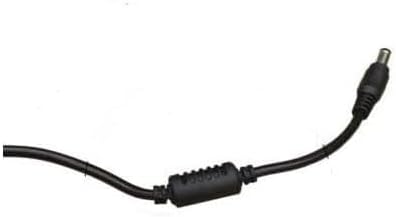
Figuur 4.3: Close-up view of the barrel connector, which plugs into the compatible device.
5. Opstelling
Follow these steps to properly connect your GT POWER AC Adapter to your Verizon WNC-CR200A Gateway Router.
- Verifieer toestelversoenbaarheid: Before connecting, ensure your device is a Verizon WNC-CR200A Gateway Router. The adapter is specifically designed for this model. You can often find the model number on a label at the bottom or back of your router.

Figuur 5.1: Example of a Verizon WNC-CR200A Gateway Router's bottom label, indicating the model number for compatibility verification.
- Koppel aan toestel: Insert the barrel connector of the GT POWER AC Adapter firmly into the power input port of your Verizon WNC-CR200A Gateway Router.
- Koppel aan kraguitlaat: Plug the AC prongs of the adapter into a standard 100-240V AC wall outlet.
- Krag aan: Once connected, your Verizon WNC-CR200A Gateway Router should power on automatically or can be turned on using its power button, if available.
6. Bedryf
The GT POWER AC Adapter operates automatically once connected. It provides a stable power supply to your compatible device. No user interaction is required for its operation beyond initial connection.
- Ensure the adapter is always connected to a functioning power outlet.
- Avoid disconnecting the adapter during critical operations of your router to prevent data loss or system instability.
7. Onderhoud
Behoorlike onderhoud verseker die lang lewensduur en veilige werking van jou WS-adapter.
- Skoonmaak: Disconnect the adapter from the power outlet and the device before cleaning. Use a soft, dry cloth to wipe the exterior. Do not use liquid cleaners or solvents.
- Berging: Wanneer dit nie gebruik word nie, bêre die adapter op 'n koel, droë plek, weg van direkte sonlig en uiterste temperature. Vermy om die kabel styf op te rol om skade te voorkom.
- Kabelversorging: Do not bend, twist, or pull the cable excessively. Avoid placing heavy objects on the cable.
8. Probleemoplossing
If you encounter issues with your GT POWER AC Adapter, refer to the following common problems and solutions:
| Probleem | Moontlike oorsaak | Oplossing |
|---|---|---|
| Toestel skakel nie aan nie. |
|
|
| Die adapter voel ongewoon warm. |
|
|
9. Spesifikasies
| Kenmerk | Detail |
|---|---|
| Modelnommer | 602 |
| Handelsmerk | GT KRAG |
| Invoer Voltage | AC 100-240V (50/60Hz) |
| Uitset Voltage | DC 12V |
| Uitsetstroom | 3A |
| Wattage | 36 Watt |
| Connector Tipe | Vat |
| Kabellengte | 59 duim (ongeveer 1.5 meter) |
| Beskermingskenmerke | OVP (Oor Voltage-beskerming), OCP (Oorstroombeskerming), SCP (Kortsluitingbeskerming) |
| Versoenbare toestelle | Verizon WNC-CR200A Gateway Router CR200A WiFi6 NKR-LV65C-T3 |
10. Waarborg en Ondersteuning
This GT POWER AC Adapter comes with a Een jaar waarborg vanaf die aankoopdatum. Daarbenewens, 'n 30-dae geld terug waarborg word aangebied.
For technical support, warranty claims, or further assistance, please contact your retailer or the manufacturer directly. Please have your purchase information and product model number (602) available when contacting support.
For more information, you may refer to the seller's contact details provided at the point of purchase.