
1. Produk verbyview
The AUTOOL GOGO8-US Digital Manometer is a precision instrument designed for measuring gas pressure and differential pressure. It features a dual-port design for synchronous detection, a backlit LCD display, and supports 12 different pressure units. This device is suitable for applications such as HVAC duct pressure monitoring, filter blockage diagnosis, cleanroom micro-pressure control, and gas appliance maintenance.

Figure 1: AUTOOL GOGO8-US Digital Manometer with accessories.
Sleutel kenmerke:
- Meetreeks: ±20.68 kPa / ±2.999 psi.
- Akkuraatheid: ±0.3% FSO (Full Scale Output).
- Reaksie Tyd: 0.5 sekondes.
- Unit Support: 12 selectable units including PSI, inHg, inH₂O, ftH₂O, kPa, mbar, Bar, kgcm², ozin², mmHg, cmH₂O, Pa.
- Dual-Port Detection: Real-time display of pressure difference (P1-P2).
- Datafunksies: Data storage (100 groups), Data Hold, Max/Min value recording.
- Vertoon: Large backlit LCD for clear readings in various lighting conditions.
- Kragbestuur: Automatic shutdown after 15 minutes of inactivity, low battery warning.
- Kalibrasie: One-button zero calibration.
2. Wat is in die boks
Maak asseblief seker dat al die items wat hieronder gelys word, teenwoordig en in 'n goeie toestand is wanneer u dit uitpak:
- AUTOOL GOGO8-US Digital Manometer
- Flexible Tubes (2 pieces)
- Metaal adapter
- Gebruikershandleiding

Figure 2: Package contents of the Digital Manometer.
3. Opstelling
3.1 Battery installasie
- Locate the battery compartment on the back of the manometer.
- Maak die batterydeksel oop.
- Insert one 9V battery, ensuring correct polarity.
- Maak die batterydeksel stewig toe.
3.2 Connecting Tubes and Adapters
- Identify the two tube connectors on the top of the manometer: Tube Connector (-) and Tube Connector (+).
- Connect the flexible tubes to the desired ports based on your measurement requirements (e.g., for differential pressure, connect one tube to each port).
- If needed, attach the metal adapter to one of the flexible tubes for specific connection points.

Figure 3: Manometer components and dimensions.
4. Bedryfsinstruksies
4.1 Krag aan/af
- Druk die AAN/AF button (red power icon) to turn the device on.
- Druk en hou die AAN/AF knoppie om die toestel af te skakel.
4.2 Nulkalibrasie
Before each measurement, especially for differential pressure, it is recommended to perform a zero calibration to ensure accuracy.
- Ensure both pressure ports are open to atmospheric pressure or disconnected from any pressure source.
- Druk lank op die HOU button to clear any zero drift and calibrate the device to zero.
4.3 Eenheidseleksie
The manometer supports 12 different pressure units.
- Druk die EENHEDE button to cycle through the available pressure units (PSI, inHg, inH₂O, ftH₂O, kPa, mbar, Bar, kgcm², ozin², mmHg, cmH₂O, Pa).
4.4 Differential Pressure Measurement (P1-P2)
The device automatically displays the pressure difference between the two ports (P1-P2).
- Connect the higher pressure source to the (+) port and the lower pressure source to the (-) port for positive readings, or vice-versa.
- The display will show the real-time pressure difference.

Figure 4: Dual-port for positive and negative pressure measurement.
4.5 Datavashouding
- Druk die HOU button briefly to freeze the current reading on the display.
- Druk die HOU button again to release the data hold function.
4.6 Max/Min Value Recording
To capture the maximum and minimum pressure values during a measurement period:
- Druk lank op die MAKS button to activate Max/Min recording mode. The display will show 'MAX' or 'MIN'.
- Druk kortliks die MAKS button to toggle between MAX and MIN values.
- Druk lank op die MAKS button again to exit Max/Min recording mode.
4.7 Agtergrondbeligtingskerm
- Druk die ° C / ° F. button briefly to turn the backlight on or off.

Figure 5: LCD Backlight Display for enhanced visibility.
4.8 Databerging
The device can store up to 100 groups of readings.
- Druk kort op die ° C / ° F. key to save the current reading.
- Gebruik die DIF en MAKS keys to scroll through stored data.
5. Onderhoud
5.1 Skoonmaak
- Vee die toestel af met 'n sagte, droë lap. Moenie skuurmiddels of oplosmiddels gebruik nie.
- Ensure the pressure ports are free from dust and debris.
5.2 Batteryvervanging
When the low battery indicator appears on the display, replace the 9V battery promptly to ensure accurate operation.
- Volg die battery-installasiestappe in Afdeling 3.1.

Figure 6: Low Battery Reminder and Auto Shutdown feature.
5.3 Berging
- Store the manometer in a cool, dry place, away from direct sunlight and extreme temperatures.
- Verwyder die battery as die toestel nie vir 'n lang tydperk gebruik gaan word om lekkasie te voorkom.
6. Probleemoplossing
| Probleem | Moontlike oorsaak | Oplossing |
|---|---|---|
| Toestel skakel nie aan nie | Dooie of verkeerd geïnstalleerde battery | Kontroleer die polariteit van die battery of vervang dit met 'n nuwe 9V-battery. |
| Inaccurate readings / Zero drift | Environmental factors or sensor drift | Perform one-button zero calibration by long pressing the HOLD button. Ensure ports are open to atmosphere during calibration. |
| Display shows "Err0" | Exceeds positive pressure range | The measured pressure is above the maximum positive range. Reduce pressure or use a device with a higher range. |
| Display shows "Err1" | Exceeds negative pressure range | The measured pressure is below the minimum negative range. Reduce vacuum or use a device with a wider negative range. |
| Agterlig werk nie | Backlight off or low battery | Press the °C/°F button to toggle backlight. Check battery level and replace if low. |
| Auto-shutdown occurs too quickly | Normal operation (15 minutes inactivity) | This is a power-saving feature. The device will shut down after 15 minutes of no operation. |
7. Spesifikasies
| Parameter | Waarde |
|---|---|
| Meetreeks | ±20.68 kPa / ±2.999 PSI |
| Meeteenhede | 12 (PSI, inHg, inH₂O, ftH₂O, kPa, mbar, Bar, kgcm², ozin², mmHg, cmH₂O, Pa) |
| Akkuraatheid | ±0.3% FSO (25°C) |
| Herhaalbaarheid | ±0.2% (Maks±0.5%FSO) |
| Linearity / Hysteresis | ±0.29% FSO (25°C) |
| Metingstempo | 0.5 sekondes |
| Databerging | 100 groepe |
| Maksimum druk | 20 KPa |
| Werkstemperatuur | 0°C tot 50°C (32°F tot 122°F) |
| Bergingstemperatuur | -10°C tot 60°C (14°F tot 140°F) |
| Kragtoevoer | 9V battery |
| Automatic Shut-down Time | 15 minute |
| Afmetings | 164 x 70 x 32 mm (6.5 x 2.8 x 1.3 duim) |
| Gewig | 200 g (0.44 lbs) |
| Materiaal | Akrielnitril Butadieen Styreen (ABS) |
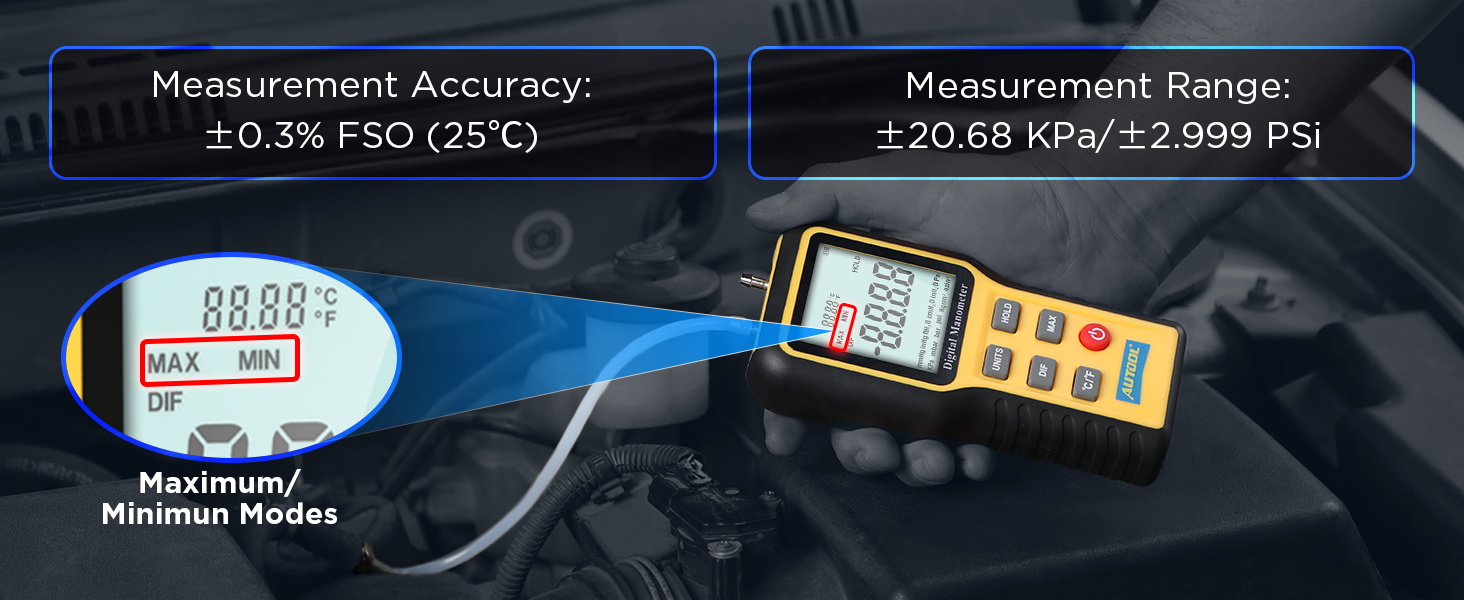
Figuur 7: Gedetailleerde produkspesifikasies.
8. Waarborg en Ondersteuning
8.1 Waarborginligting
The AUTOOL GOGO8-US Digital Manometer comes with a Drie jaar waarborg against manufacturing defects. If the manometer exhibits any defects within this period, AUTOOL will provide a replacement or a suitable solution to ensure customer satisfaction without delay.
8.2 Tegniese Ondersteuning
AUTOOL provides leeftyd tegniese ondersteuning for this product. For any technical assistance, operational queries, or warranty claims, please contact AUTOOL customer service. We are committed to responding to your inquiries within 24 hours.