
1. Inleiding
Dankie vir die aankoopasing the Philco Portable CD Player Boombox. This versatile audio system combines modern and classic audio playback options, including CD, cassette, FM radio, and Bluetooth connectivity. This manual provides essential information for safe and efficient use of your device.
2. Belangrike veiligheidsinstruksies
- Lees alle instruksies voordat u die toestel gebruik.
- Bewaar hierdie handleiding vir toekomstige verwysing.
- Moenie die eenheid aan reën of vog blootstel om brand of elektriese skok te voorkom nie.
- Verseker behoorlike ventilasie; moenie enige ventilasie-openinge blokkeer nie.
- Gebruik slegs aanhegsels/bykomstighede wat deur die vervaardiger gespesifiseer word.
- Ontkoppel die eenheid tydens weerligstorms of wanneer dit vir lang tye ongebruik word.
- Verwys alle diens na gekwalifiseerde dienspersoneel.
- Moenie die c oopmaak nieasing; daar is geen gebruiker-onderhoudbare onderdele binne nie.
- Vermy die plasing van die eenheid naby hittebronne soos verkoelers, hitteregisters, stowe of ander apparaat (insluitend ampversterkers) wat hitte produseer.
3. Produkkomponente en -kontroles
Familiarize yourself with the various parts and controls of your Philco Portable CD Player Boombox.
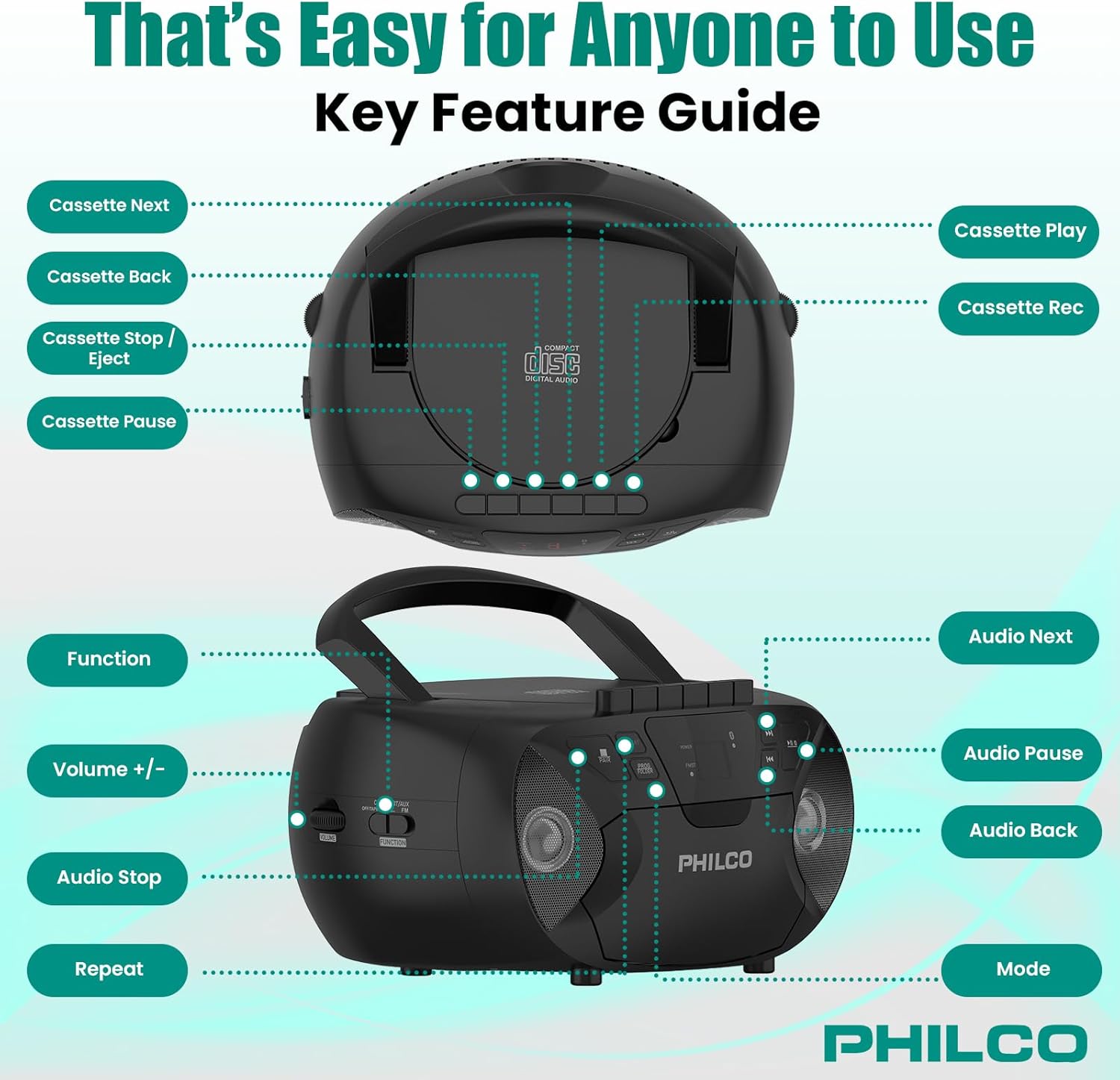
Prent 3.1: Bo en kant view of the Philco Boombox with key controls labeled. This image shows the layout of buttons for cassette functions (Next, Back, Stop/Eject, Pause, Play, Record) and audio controls (Next, Pause, Back, Mode, Volume, Function, Stop, Repeat).
Voorpaneelkontroles:
- Kragknoppie: Skakel die eenheid aan of af.
- MODUS-knoppie: Switches between CD, Cassette, FM Radio, Bluetooth, and AUX modes.
- PLAY/PAUSE Button (CD/Bluetooth): Begin of laat wag die afspeel.
- STOP Button (CD/Bluetooth): Stop afspeel.
- OORLAAN/SOEK-knoppies (<< / >>): Skips tracks or fast forwards/rewinds.
- VOLUME-beheer: Pas die klank-uitsetvlak aan.
- FM TUNER Dial: Selects FM radio stations.
Kassettedekkontroles:
- SPEEL-knoppie: Starts cassette playback.
- RECORD-knoppie: Initiates cassette recording (from CD, FM, or AUX).
- REWIND/FAST FORWARD Buttons: Rewinds or fast forwards the tape.
- STOP/UITWERP-knoppie: Stops tape playback/recording and opens the cassette door.
- POUSE-knoppie: Temporarily pauses cassette playback/recording.
Rear/Side Panel Connections:
- Wisselstroominset: Verbind die AC-kragkabel.
- Battery kompartement: Holds 6 x 'C' size batteries (not included) for portable use.
- AUX IN-aansluiting (3.5 mm): Verbind eksterne oudio-toestelle.
- HEADPHONE Jack (3.5mm): Vir privaat luister met oorfone.
- FM-antenne: Extendable antenna for improved FM reception.
4. Opstelling
4.1 Aandryf van die Eenheid
Your Philco Boombox can be powered by either AC power or batteries.

Prent 4.1: Illustration of AC power connection and battery installation for the Philco Boombox.
AC krag:
- Maak seker dat die eenheid afgeskakel is.
- Connect the supplied AC power cord to the AC power input jack on the back of the unit.
- Steek die ander kant van die wisselstroomkabel in 'n standaard muuraansluiting (WS 120V ~ 60Hz).
Batterykrag:
- Maak seker dat die eenheid afgeskakel en van die wisselstroom ontkoppel is.
- Maak die batteryklep oop wat aan die onderkant of agterkant van die eenheid geleë is.
- Insert 6 x 'C' size batteries (not included), observing the correct polarity (+/-) as indicated inside the compartment.
- Maak die batterykompartement se deksel stewig toe.
Let wel: Wanneer wisselstroom gebruik word, word batterye outomaties ontkoppel. Verwyder batterye as die eenheid nie vir 'n lang tydperk gebruik gaan word om lekkasie te voorkom.
4.2 Aanvanklike aanskakeling
Druk die KRAG button to turn on the unit. The unit will typically default to the last used mode or CD mode.
5. Operasie
5.1 CD-speler werking
Prent 5.1: Demonstrating the top-loading CD compartment for disc insertion.
- Druk die MODUS button until "CD" mode is selected.
- Maak die CD-kompartementdeur oop deur dit versigtig op te lig.
- Place a CD (CD-R, CD-RW, MP3, WMA compatible) onto the spindle with the label side facing up.
- Close the CD compartment door securely.
- Druk die SPEEL/POUSEER knoppie om die afspeel te begin.
- Gebruik die SKIP / SOEK knoppies (<< / >>) om tussen snitte te navigeer.
- Druk die STOP knoppie om die terugspeel te beëindig.
- Druk die HERHAAL knoppie om die huidige snit of alle snitte te herhaal.
5.2 Kassettespeler/-opnemerwerking

Prent 5.2: View of the cassette deck with a tape loaded, ready for playback or recording.
Speel 'n kasset:
- Druk die MODUS button until "TAPE" or "CASSETTE" mode is selected.
- Druk die STOP/UIT UIT knoppie om die kassetdeur oop te maak.
- Insert a cassette tape with the open edge facing upwards and the side to be played facing you.
- Maak die kassetdeur toe.
- Druk die SPEEL knoppie om die afspeel te begin.
- Gebruik TERUGSPOEL/VINNIG VORUT knoppies om deur die band te navigeer.
- Druk die STOP/UIT UIT button to stop playback and eject the tape.
Opname na kasset:
- Plaas 'n leë kassetband in die kassetdek.
- Select the desired source (CD, FM Radio, or AUX) using the MODUS knoppie.
- Start playback on the source (e.g., play a CD track, tune to an FM station).
- Druk die REKORD knoppie op die kassetdek. Die SPEEL die knoppie sal ook inskakel.
- Om opname te onderbreek, druk die POUSE knoppie. Druk dit weer om te hervat.
- Druk op die om die opname te stop STOP/UIT UIT knoppie.
5.3 FM-radiowerking
- Druk die MODUS button until "FM" mode is selected.
- Extend the FM telescopic antenna for optimal reception.
- Draai die FM TUNER skakel om jou verlangde radiostasie te kies.
- Pas die VOLUME control to your preferred listening level.
5.4 Bluetooth-klankstroom

Prent 5.3: The Philco Boombox wirelessly connected to a smartphone via Bluetooth for audio streaming.
- Druk die MODUS button until "BT" or "BLUETOOTH" mode is selected. The unit will enter pairing mode, indicated by a flashing Bluetooth indicator.
- Aktiveer Bluetooth op jou Bluetooth-geaktiveerde toestel (bv. slimfoon, tablet), en soek vir beskikbare toestelle.
- Select "PHILCO BOOMBOX" (or similar name) from the list of devices to pair.
- Sodra dit gekoppel is, sal die Bluetooth-aanwyser ophou flikker en konstant bly.
- Start playing audio on your connected device. The sound will be streamed to the boombox.
- Adjust volume on both the boombox and your connected device.
Belangrike nota: This boombox is designed to ontvang audio via Bluetooth from other devices. It cannot oordra audio to Bluetooth headphones, earbuds, or speakers.
5.5 AUX-invoerwerking

Prent 5.4: The AUX input jack on the Philco Boombox, used for connecting external audio sources.
- Koppel die een kant van 'n 3.5 mm-klankkabel (nie ingesluit nie) aan die AUX IN-aansluiting op die boombox.
- Koppel die ander kant van die klankkabel aan die koptelefoonaansluiting of klankuitset van jou eksterne toestel (bv. MP3-speler, slimfoon).
- Druk die MODUS button until "AUX" mode is selected.
- Start playing audio on your external device.
- Verstel die volume op beide die boombox en jou eksterne toestel.
5.6 Gebruik van oorfone
For private listening, plug any standard 3.5mm headphones into the OORFOON jack. The internal speakers will automatically mute.
6. Onderhoud
6.1 Skoonmaak van die eenheid
- Vee die buitekant van die eenheid af met 'n sagte, damp lap. Moenie skuur skoonmaakmiddels of oplosmiddels gebruik nie.
- For the CD lens, use a specialized CD lens cleaning kit.
- Vir die kassetdek, maak die bandkoppe en knyprolletjies gereeld skoon met 'n wattestokkie liggies.ampgeëindig met isopropylalkohol.
6.2 Batterysorg
- Remove batteries if the unit will not be used for an extended period to prevent battery leakage and corrosion.
- Moenie ou en nuwe batterye, of verskillende tipes batterye meng nie.
- Gooi gebruikte batterye verantwoordelik volgens plaaslike regulasies weg.
7. Probleemoplossing
| Probleem | Moontlike oorsaak | Oplossing |
|---|---|---|
| Geen krag nie | Netsnoer nie gekoppel nie; Batterye leeg of verkeerd geplaas. | Kontroleer die WS-kabelverbinding; Vervang batterye of maak seker dat die polariteit korrek is. |
| No sound from CD/Cassette/Radio/Bluetooth/AUX | Volume too low; Incorrect mode selected; Headphones connected; CD/Cassette inserted incorrectly or damaged; Bluetooth not paired. | Increase volume; Select correct mode; Disconnect headphones; Check/replace media; Re-pair Bluetooth device. |
| CD skips | CD dirty or scratched; Unit on an unstable surface. | Clean or replace CD; Place unit on a stable, flat surface. |
| Swak FM-ontvangs | Antenna nie uitgestrek nie; Swak sein. | Fully extend and adjust the FM antenna; Try moving the unit to a different location. |
| Bluetooth-toestel wil nie koppel nie | Boombox not in pairing mode; Device too far; Bluetooth already connected to another device. | Ensure boombox is in BT pairing mode; Move device closer; Disconnect from other devices and try again. |
| Cassette tape not playing/recording correctly | Tape damaged; Tape heads dirty; Buttons stuck (as per review). | Try a different tape; Clean tape heads; If buttons are stuck, gently try to free them or contact support if persistent. |
8. Spesifikasies
- Handelsmerk: Philco
- Model: B0DHYKCWYN
- Verbindingstegnologie: Bluetooth
- Kleur: Swart
- Tipe luidspreker: Stereo
- Itemafmetings (L x B x H): 10.08 x 5.71 x 10.75 duim
- Kragbron: AC 120V ~ 60Hz or 6 x 'C' Batteries (not included)
- Versoenbare toestelle: MP3 Player (via AUX)
- Ondersteunde oudioformate: CD, CD-R, CD-RW, MP3, WMA (from CD)
- Aantal sprekers: 2
- Klankuitsetmodus: Stereo
- Bluetooth-ondersteuning: Yes (receive only)
- Ingeboude media: CD, Cassette, FM Radio
9. Waarborg en Ondersteuning
9.1 Waarborginligting
For specific warranty details, please refer to the warranty card included with your product or visit the official Philco webwebwerf. Waarborgbepalings en -voorwaardes kan per streek en kleinhandelaar verskil.
9.2 Kliëntediens
If you encounter any issues or have questions not covered in this manual, please visit the official Philco website for support resources, FAQs, and contact information. You can typically find support links on the product page where you purchased the item or by searching for "Philco customer support" online.