
OHAYO X2
OHAYO Portable Bluetooth Speaker User Manual
Model: X2 | Brand: OHAYO
1. Inleiding
Thank you for choosing the OHAYO Portable Bluetooth Speaker. This manual provides essential information for setting up, operating, and maintaining your speaker to ensure optimal performance. Designed for both indoor and outdoor use, this speaker delivers exceptional audio quality with its 15W loud stereo sound, IPX7 waterproof rating, and versatile connectivity options.
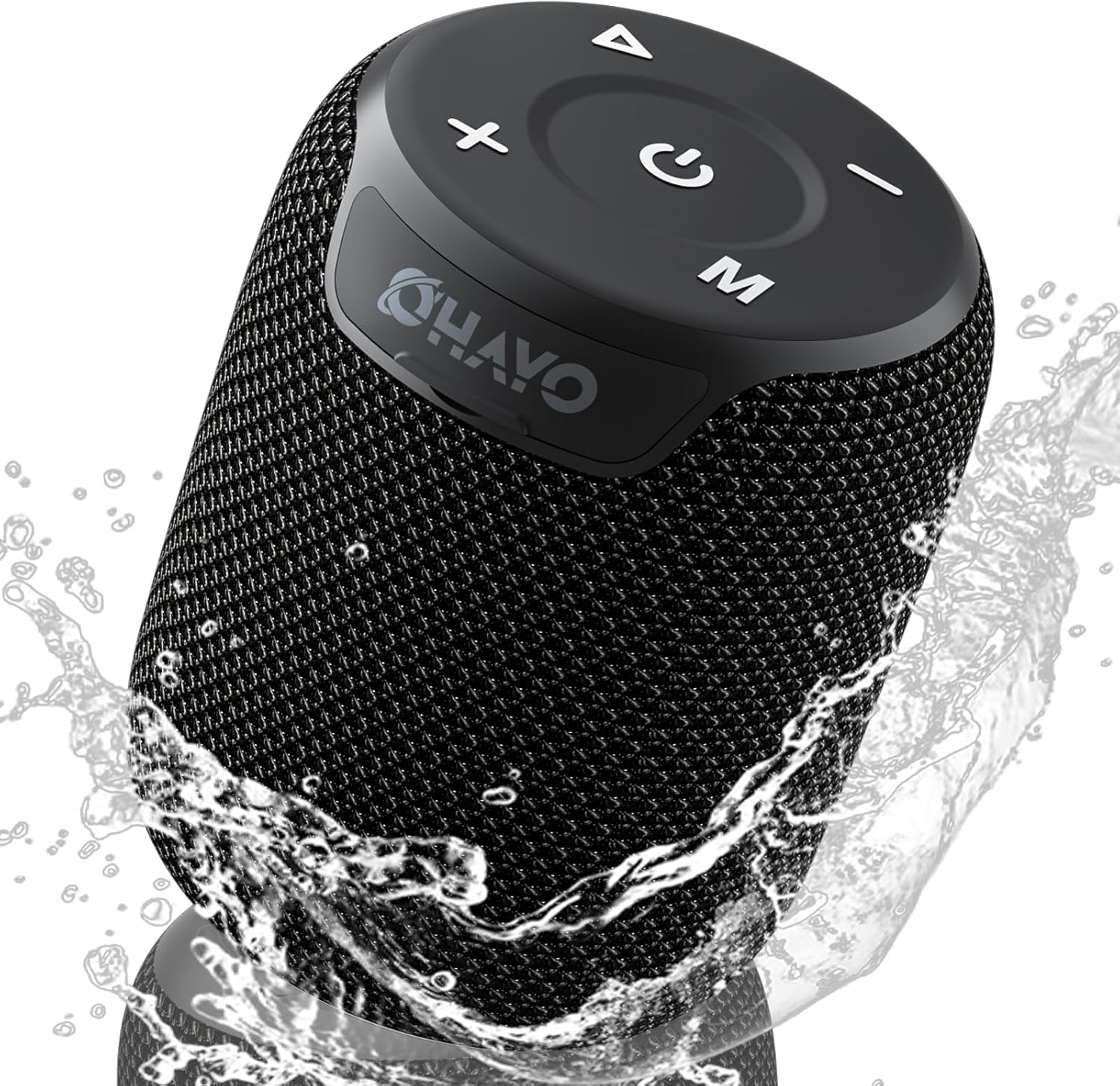
Image: The OHAYO Portable Bluetooth Speaker, showcasing its compact design and IPX7 waterproof capability with water splashing around it.
2. Produk verbyview
2.1 Sleutelkenmerke
- Exceptional Audio Performance: Features a 60mm mid-high speaker and a 65mm bass diaphragm for clear treble and rich bass.
- IPX7 waterdig: Fully submersible up to 3 feet for 30 minutes, resistant to rain, dust, snow, and spills.
- Bluetooth V5.3: Ensures quick pairing and stable connection with automatic re-connection.
- TWS-koppeling: Connect two speakers for synchronized, immersive stereo sound.
- Veelsydige afspeel: Supports Bluetooth, TF cards, and 3.5mm AUX input.
- Lang speeltyd: Tot 18 uur se musiekweergawe op 'n enkele lading.
- Ingeboude mikrofoon: For high-quality, hands-free calls.
- Draagbare ontwerp: Compact, lightweight, and includes a handy lanyard for easy carrying.

Beeld: 'n Ontplofte view of the speaker's internal components highlighting the 60mm mid-high speaker and 65mm bass diaphragm, alongside icons representing key features like Aux-in, HD Mic, Hand-free Call, IPX7 Waterproof, Bluetooth 5.3, Micro SD support, and 16 hours of playtime.
2.2 Kontroles en Poorts
The OHAYO speaker features intuitive controls located on the top panel and essential ports for connectivity.

Beeld: 'n Gedetailleerde view of the speaker's top panel, showcasing the sleek black design with bold white buttons for power, volume control, mode selection, and track navigation.
- Kragknoppie: Druk en hou om aan/af te skakel.
- Volume op (+): Verhoog volume.
- Volume af (-): Verminder volume.
- Speel/Pause-knoppie: Speel of onderbreek oudio.
- Modus (M) Knoppie: Switch between Bluetooth, AUX, and TF Card modes.
- USB-C-laaipoort: Vir die laai van die luidspreker.
- AUX-in-poort: Vir bedrade klankverbinding.
- TF-kaartgleuf: For playing music directly from a Micro SD card.
3. Aan die gang
3.1 Laai die luidspreker
Before first use, fully charge the speaker. Use the provided Type-C charging cable.
- Connect the Type-C end of the cable to the speaker's charging port.
- Koppel die USB-A-punt aan 'n versoenbare USB-kragadapter (nie ingesluit nie) of 'n rekenaar se USB-poort.
- The charging indicator light will illuminate. It takes approximately 3 hours for a full charge.
- Die aanwyserliggie sal verander of afskakel sodra die laai voltooi is.

Image: The OHAYO speaker connected to a USB-C charging cable, illustrating its fast charging capability and long battery life.
3.2 Aan-/afskakel
- Om aan te skakel: Druk en hou die aan/af-knoppie vir 2-3 sekondes in totdat jy 'n hoorbare aanwysing hoor en die aanwyserliggie aanskakel.
- Om af te skakel: Druk en hou die aan/af-knoppie vir 2-3 sekondes in totdat jy 'n hoorbare aanwysing hoor en die aanwyserliggie afskakel.
4. Konnektiwiteit
4.1 Bluetooth -koppeling
Die luidspreker sal outomaties na Bluetooth-paringsmodus gaan wanneer dit vir die eerste keer aangeskakel word of as geen toestel gekoppel is nie.
- Ensure the speaker is powered on and in Bluetooth mode (blue indicator light blinking).
- Aktiveer Bluetooth op jou toestel (slimfoon, tablet, skootrekenaar) en soek vir beskikbare toestelle.
- Select "OHAYO X2" from the list of devices.
- Once connected, the speaker will emit a confirmation sound, and the blue indicator light will remain solid.
- Die luidspreker sal outomaties weer aan die laaste gekoppelde toestel koppel wanneer dit aangeskakel word, indien die toestel se Bluetooth aktief en binne bereik is.
4.2 Ware Draadlose Stereo (TWS) Paring
You can pair two OHAYO X2 speakers together for a true stereo sound experience.
- Ensure both OHAYO X2 speakers are powered on and not connected to any Bluetooth device.
- On one speaker (this will be the primary speaker), double-press the Power button. You will hear a prompt indicating TWS pairing mode.
- Die twee luidsprekers sal outomaties na mekaar soek en aan mekaar koppel. Sodra hulle gekoppel is, sal jy 'n bevestigingsgeluid hoor.
- Now, connect your device to the primary speaker via Bluetooth as described in Section 4.1. The audio will play through both speakers in stereo.

Image: Two OHAYO Portable Bluetooth Speakers wirelessly connected to a laptop, demonstrating the True Wireless Stereo (TWS) pairing feature for an immersive audio experience.
4.3 AUX-in Mode
Use the 3.5mm AUX input for wired connection to devices without Bluetooth.
- Connect one end of a 3.5mm audio cable (not included) to the speaker's AUX-in port.
- Koppel die ander kant aan die klank-uitvoeraansluiting van jou toestel.
- The speaker will automatically switch to AUX mode. If not, press the 'M' (Mode) button to select AUX mode.
4.4 TF Card Mode
Play music directly from a Micro SD (TF) card.
- Insert a Micro SD (TF) card with MP3 audio files in die TF-kaartgleuf.
- The speaker will automatically switch to TF Card mode and begin playing music. If not, press the 'M' (Mode) button to select TF Card mode.
5. Bediening van jou luidspreker
5.1 Musiekweergawe
- Speel/pouse: Druk die Speel/Pause-knoppie een keer.
- Volgende snit: Druk en hou die Volume Op (+) knoppie.
- Vorige snit: Druk en hou die Volume Verlaag (-) knoppie.
- Volumebeheer: Druk kort op die Volume Op (+) of Volume Af (-) knoppies.
5.2 Handvrye oproepe
When connected via Bluetooth, you can use the speaker for hands-free calls.
- Beantwoord oproep: Druk die Speel/Pause-knoppie een keer.
- Beëindig oproep: Druk die Speel/Pause-knoppie een keer tydens 'n oproep.
- Verwerp oproep: Druk en hou die Speel/Pause-knoppie vir 2 sekondes in.
- Herbel laaste nommer: Dubbeldruk die Speel/Pause-knoppie.
6. Sorg en Onderhoud
Proper care ensures the longevity of your OHAYO Portable Bluetooth Speaker.
6.1 Waterdigting (IPX7)
The speaker is IPX7 waterproof, meaning it can be submerged in water up to 1 meter (3 feet) for up to 30 minutes. Ensure the charging port cover is securely closed before exposing the speaker to water.

Image: A person submerged in water, holding the OHAYO speaker, demonstrating its fully IPX7 waterproof capability and seamless, enclosed design.
6.2 Skoonmaak
- Vee die luidspreker af met 'n sagte, damp lap.
- Moenie skuurmiddels, alkohol of chemiese oplosmiddels gebruik nie.
- Ensure the speaker is dry before charging.
6.3 Berging
- Bêre die luidspreker op 'n koel, droë plek weg van uiterste temperature.
- Vermy langdurige blootstelling aan direkte sonlig.
7. Probleemoplossing
If you encounter issues with your speaker, please refer to the following common problems and solutions.
| Probleem | Moontlike oorsaak | Oplossing |
|---|---|---|
| Luidspreker wil nie aanskakel nie. | Lae battery; Aan/af-knoppie nie lank genoeg gedruk nie. | Laai die luidspreker volledig. Druk en hou die aan/af-knoppie vir 2-3 sekondes in. |
| Kan nie via Bluetooth koppel nie. | Luidspreker nie in paringsmodus nie; Toestel Bluetooth af; Te ver van luidspreker. | Ensure speaker is in Bluetooth pairing mode (blinking blue light). Turn on Bluetooth on your device. Move device closer to speaker (within 33 feet/10 meters). |
| Geen klank nie. | Volume te laag; Verkeerde modus gekies; Toestel speel nie klank nie. | Increase speaker and device volume. Press 'M' button to select correct mode (Bluetooth, AUX, TF Card). Ensure audio is playing on your device. |
| TWS-koppeling het misluk. | Speakers already connected to another device; Incorrect pairing steps. | Disconnect both speakers from any Bluetooth devices. Follow TWS pairing steps carefully (Section 4.2). |
| Swak klankgehalte. | Low battery; Obstructions between speaker and device; Source audio quality. | Charge the speaker. Reduce distance or remove obstructions. Try a different audio source. |
8. Spesifikasies
Detailed technical specifications for the OHAYO Portable Bluetooth Speaker.
| Kenmerk | Detail |
|---|---|
| Model Naam | X2 |
| Handelsmerk | OHAYO |
| Tipe luidspreker | Buitelug |
| Verbindingstegnologie | Bluetooth |
| Draadlose kommunikasietegnologie | Bluetooth V5.3 |
| Luidspreker Maksimum uitsetkrag | 15 Watt |
| Tipe oudiobestuurder | Dynamic Driver (60mm mid-high, 65mm bass diaphragm) |
| Frekwensierespons | 20 KHz (typical range for portable speakers) |
| Klankuitvoermodus | Stereo (met TWS-paring) |
| Waterdigte gradering | IPX7 |
| Batterylewe | Tot 16-18 uur |
| Battery kapasiteit | 3300 mAh |
| Laai tyd | Ongeveer. 3 ure |
| Kragbron | Battery aangedrewe |
| Produk afmetings | 3.97" D x 3.97" B x 4.8" H |
| Item gewig | 14.9 onse |
| Beheer metode | Touch (buttons on top) |
| Versoenbare toestelle | Skootrekenaar, slimfoon, tablet, televisie |
| Materiaal | Other (durable mesh and plastic) |
9. Waarborg en Ondersteuning
9.1 Waarborginligting
The OHAYO Portable Bluetooth Speaker comes with a Beperkte waarborg. Please retain your proof of purchase for warranty claims. For specific terms and conditions, refer to the warranty card included in your product packaging or contact customer support.
9.2 Kliëntediens
For any questions, technical assistance, or warranty inquiries, please contact OHAYO customer support. We offer 24-hour customer support and easy, hassle-free returns & replacements. Support Extended Term of Service is also available.
Kontakinligting: Please refer to the contact details provided on the product packaging or the official OHAYO webwebwerf.
Verwante Dokumente - X2
 |
OHAYO X2 Bluetooth-luidspreker se vinnige begingids Concise guide for the OHAYO X2 Bluetooth Speaker, covering setup, features like Bluetooth pairing, TWS, light effects, and charging. Includes product specifications and safety information. |
 |
OHAYO A7 Vinnige Begingids 'n Beknopte vinnige begingids vir die OHAYO A7 draadlose oordopjes, wat die aan-/afskakeling, paring, musiekmodus, oproepmodus, fabrieksherstel, laai, spesifikasies en probleemoplossing dek. |
 |
OHAYO X3 Bluetooth-luidspreker se vinnige begingids Omvattende vinnige begingids vir die OHAYO X3 Bluetooth-luidspreker, wat opstelling, TWS-paring, kontroles, laai en tegniese spesifikasies dek. |
 |
OHAYO FreeRun F5 Wireless Bluetooth Headphones User Manual Comprehensive user manual for the OHAYO FreeRun F5 wireless Bluetooth headphones, covering setup, operation, pairing, charging, specifications, and maintenance. Learn how to wear, use, and care for your headphones. |
 |
OHAYO C6 Computer Speakers User Manual - Setup, Features, and Troubleshooting Comprehensive user manual for the OHAYO C6 Computer Speakers. Learn about setup, features, specifications, troubleshooting, and warranty information. |