
Inleiding
The HOVERAir X1 PRO is a state-of-the-art 4K action flying camera designed for adventurers and creators. This foldable drone offers exceptional cinematic footage, advanced flight modes, and robust features for capturing dynamic moments. Its compact and safe design makes it an ideal companion for various activities, from high-speed sports to serene landscapes.
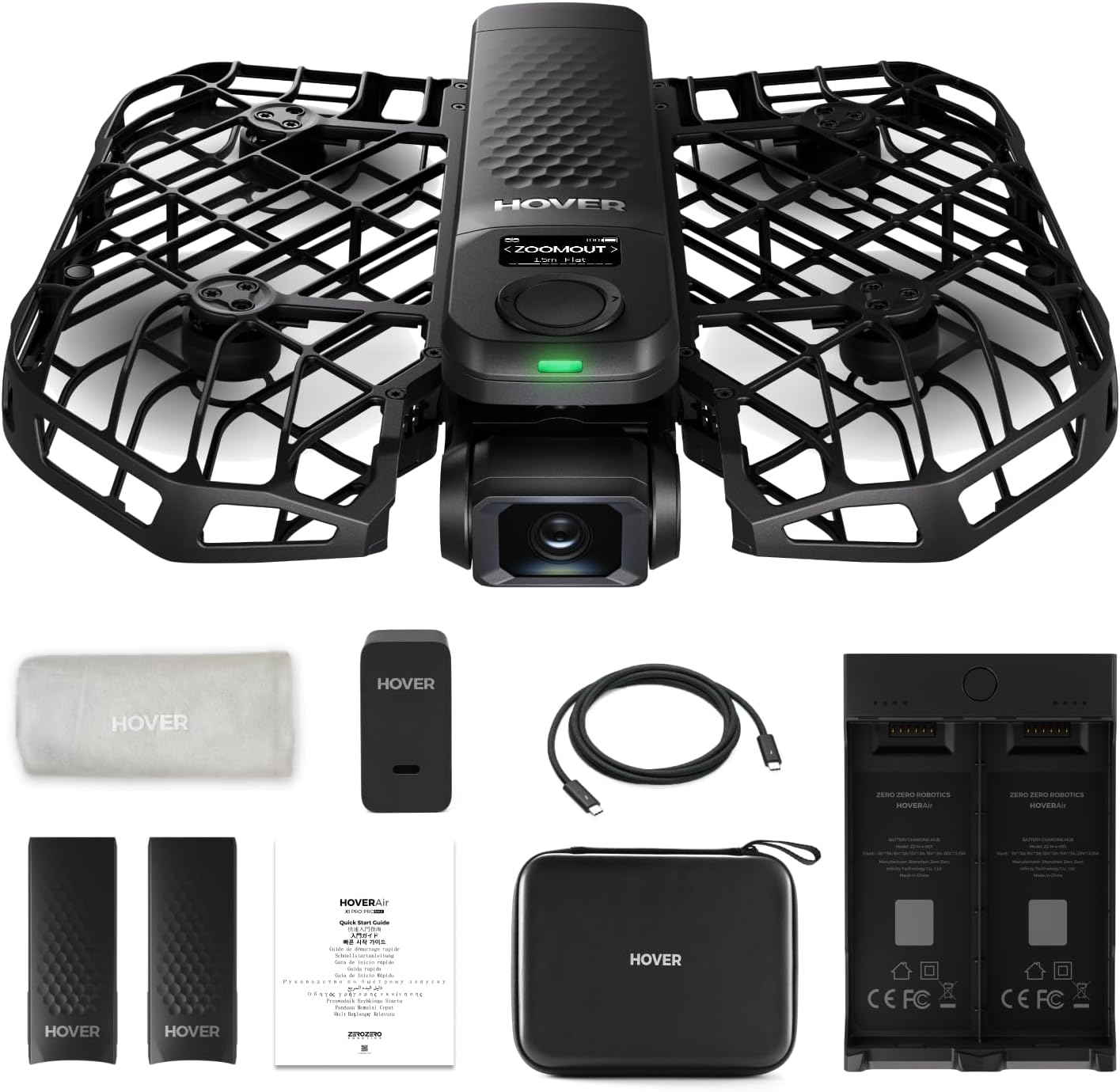
Figure 1: The HOVERAir X1 PRO drone with its complete set of accessories, including batteries, charging hub, carrying case, and user manual.
Sleutel kenmerke
- 4K@60fps Cinematic Footage: Capture every detail of your adventures in stunning 4K resolution at 60 frames per second. The drone supports horizontal 4K@60fps and vertical 2.7K@60fps for versatile shooting.
- SmoothCapture 2.0: Equipped with a two-axis gimbal, Electronic Image Stabilization (EIS), and Horizon Leveling (HL) for exceptionally stable and smooth shots, even during movement. The 104° FOV lens provides a wide, immersive perspective.
- Totally Hands-free Operation: The HOVERAir X1 PRO takes off directly from your hand with a simple click or voice command, eliminating the need for a separate controller or smartphone during flight. Automated flight modes allow you to focus on your activity while the camera handles the filming.
- Fly Anywhere, Anytime with OmniTerrain: Innovative OmniTerrain technology enables stable flight across diverse environments, including snow, water, and cliffs.
- Fly Fast, Follow Fast: An upgraded aerodynamic design allows the drone to reach follow speeds of up to 42 KM/H (26 mph) and a top burst speed of 60 KM/H. Enhanced chip and tracking algorithms ensure you remain centered in the frame during high-speed activities like cycling and skiing.
- Rear Active Collision Detection: Features an advanced rear ToF (Time of Flight) proximity sensor for obstacle detection and pre-collision braking at speeds up to 1.5m/s, ensuring safer tracking in complex environments.
- Portable, Foldable and Durable Design: The fully enclosed design ensures portability and safety. Propeller guards are made of HEM, an aerospace-grade material offering superior safety, elasticity, durability, and structural integrity.
- App Control & Ample interne berging: The HOVERAir X1 app allows configuration of flight modes, content download and sharing, and manual control. The drone includes 32GB internal storage and supports external SD cards up to 1TB.

Figure 2: The HOVERAir X1 PRO capturing dynamic 4K footage of a mountain biker in action.

Figure 3: Demonstrating the foldable, portable, and one-click takeoff features of the HOVERAir X1 PRO.

Figure 4: The OmniTerrain feature allows the HOVERAir X1 PRO to operate reliably in various challenging environments.

Figure 5: Speed and feature comparison highlighting the HOVERAir PRO's enhanced capabilities.

Figure 6: The HOVERAir X1 app provides intuitive control and access to various flight modes.
Opstelling
Follow these steps to set up your HOVERAir X1 PRO for its first flight:
- Ontboks en inspekteer: Carefully remove all components from the packaging. Verify that all items listed in the 'What's in the Box' section are present and undamaged.
- Laai batterye: Connect the provided charging cable to the drone's battery and a power source. Ensure the battery is fully charged before first use. The drone comes with two batteries.
- Install HOVERAir X1 App: Download and install the official HOVERAir X1 app from your device's app store. This app is essential for configuring flight modes, viewing footage, and advanced controls.
- Krag aan: Druk en hou die aan/af-knoppie op die hommeltuig in totdat die aanwyserliggies aanskakel.
- Vou hommeltuig oop: Gently unfold the drone's propellers and frame into the flight-ready position. Ensure all parts click securely into place.
- Koppel aan toepassing: Open the HOVERAir X1 app on your smartphone and follow the on-screen instructions to connect to your drone via Wi-Fi.
Bedryfsinstruksies
The HOVERAir X1 PRO features a variety of intelligent, automated flight modes designed for ease of use and cinematic capture. Once connected to the app, you can select your desired mode and initiate flight with a simple gesture or button press.
Flight Modes Overview
Video 1: This video demonstrates the various flight modes available on the HOVERAir X1 PRO and PROMAX models, including Hover, Zoom Out, Follow, Orbit, Dolly Track, and Side Track, showcasing their unique cinematic capabilities.
- Beweeg: The drone maintains a stable position in the air, ideal for static shots or preparing for other modes.
- Zoem uit: The drone flies backward and upward, creating a dramatic reveal of the surrounding environment.
- Volg: The drone intelligently tracks and follows the designated subject, keeping them in the center of the frame.
- Dolly Track: The drone moves forward or backward while maintaining a consistent distance and angle from the subject, creating a smooth tracking shot.
- Side Track: The drone moves horizontally alongside the subject, capturing dynamic side-view footage.
- Wentelbaan: The drone circles around the subject, providing a panoramic view.
- Birds Eye: The drone ascends to a higher altitude and looks straight down, offering a unique top-down perspective.
To activate a flight mode, select it within the HOVERAir X1 app and follow the on-screen prompts. The drone will typically take off from your hand and execute the chosen maneuver automatically.
Onderhoud
Proper maintenance ensures the longevity and optimal performance of your HOVERAir X1 PRO.
- Batterysorg: Always use the provided charger. Avoid overcharging or over-discharging the batteries. Store batteries in a cool, dry place when not in use.
- Skoonmaak: Gently wipe the drone's exterior with a soft, dry cloth. Ensure no dust or debris accumulates around the propellers or camera lens.
- Berging: When not in use, fold the drone and store it in its protective carrying case to prevent damage. Keep it away from extreme temperatures and direct sunlight.
- Sagteware-opdaterings: Regularly check the HOVERAir X1 app for firmware updates to ensure your drone has the latest features and performance improvements.
Figure 7: The HOVERAir X1 PRO utilizes 1920mAh smart batteries designed to prevent overcharging and over-discharging.
Probleemoplossing
If you encounter issues with your HOVERAir X1 PRO, consider the following common solutions:
- Drone skakel nie aan nie: Ensure the battery is fully charged and properly inserted. Try a different battery if available.
- Programverbindingskwessies: Verify your smartphone's Wi-Fi is enabled and connected to the drone's network. Restart both the drone and the app.
- Onstabiele vlug: Ensure the propellers are free from obstructions and not damaged. Calibrate the drone through the app if flight remains unstable.
- Swak videogehalte: Check the camera lens for smudges or dirt. Ensure you are recording in the desired resolution settings within the app.
- Drone reageer nie: Power cycle the drone (turn off and on again). If the issue persists, refer to the support section for further assistance.
Spesifikasies
| Eienskap | Waarde |
|---|---|
| Handelsmerk | HOVERAir |
| Model | X1 PRO |
| Item gewig | 3.81 pond |
| Produk afmetings | 9.99 x 6.69 x 1.97 duim |
| Item Modelnommer | ZZ-H-1-003 |
| Batterye | 2 A batterye benodig (ingesluit) |
| Maksimum brandpuntsafstand | 10000 millimeter |
| Minimum brandpuntsafstand | 600 millimeter |
| Beeldstabilisasie | Ja |
| Ondersteunde beeldformaat | JPEG |
| Ingesluit komponente | Propeller, Memory Card, Carrying Case, Remote Control, Battery |
Waarborg en Ondersteuning
HOVERAir is committed to providing excellent customer service and support for your X1 PRO drone.
- Waarborg: The HOVERAir X1 PRO comes with a 1-year warranty against manufacturing defects. For detailed warranty terms and conditions, please refer to the official HOVERAir webwebwerf of kontak kliëntediens.
- Beskermingsplanne: Additional protection plans are available for purchase, including 2-Year and 3-Year options, to cover accidental damage and extend coverage.
- Kliëntediens: For any inquiries, technical assistance, or support needs, please contact the HOVERAir support team.
- Na-verkope posbus: support@hoverair.com