
BRIKSMAX 21351
BRIKSMAX 2.0 Light Kit Instruction Manual
Model: 21351 | Brand: BRIKSMAX
Inleiding
This instruction manual provides detailed guidance for the installation, operation, and maintenance of your BRIKSMAX 2.0 Light Kit, specifically designed for the Lego Ideas 21351 Disney Tim Burton's The Nightmare Before Christmas set. This lighting kit enhances your Lego model with vibrant LED illumination, bringing the scene to life with dynamic visual effects. Please read these instructions carefully before beginning the installation process to ensure proper setup and optimal performance.
Wat is ingesluit
Your BRIKSMAX 2.0 Light Kit package contains the following components:
- LED Light Kit components:
- Warm White Dot Lights (quantity may vary, typically 3)
- Green Dot Lights (quantity may vary, typically 1)
- Purple Dot Lights (quantity may vary, typically 2)
- Face Lamp-Electronic - Warm White (quantity may vary, typically 3)
- Expansion Board Blocks (quantity may vary, typically 1)
- Wire Organizing Blocks (quantity may vary, typically 5)
- AA Battery Box (batteries not included)
- 30cm USB Power Cable
- 3-in-1 USB Adapter
- Papierinstruksies
- Gebruikersgids
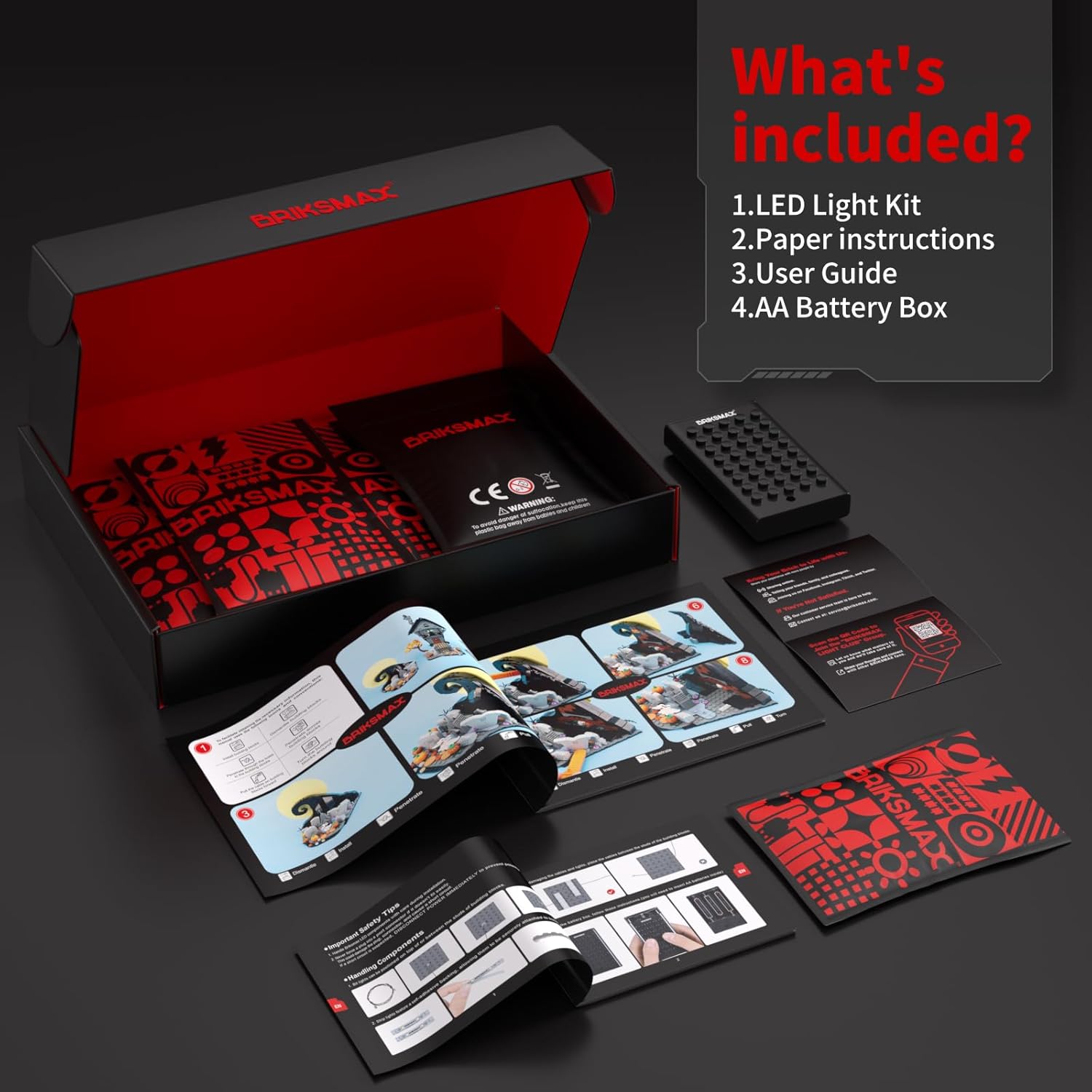
Figuur 1: oorview of the BRIKSMAX 2.0 Light Kit contents. The image displays the light components, power accessories, and documentation included in the package.
Opstelling en installasie
Follow these steps to integrate the BRIKSMAX 2.0 Light Kit with your Lego Ideas 21351 Disney Tim Burton's The Nightmare Before Christmas set. It is recommended to refer to the included paper instructions for detailed, step-by-step visual guidance.
- Prepare Your Lego Model: Ensure your Lego 21351 set is fully assembled according to its original instructions. Identify the specific areas where lights will be installed as indicated in the BRIKSMAX manual.
- Connect Light Components: Carefully connect the individual LED lights to the expansion board blocks. The connectors are designed for a secure and tight fit.

Figure 2: Illustration of the secure and user-friendly design of BRIKSMAX light connectors, ensuring stable connections during installation.
- Integrate Lights into Lego Structure: Place the connected lights within the designated areas of your Lego model. The design allows for integration with minimal gaps, maintaining the aesthetic integrity of the set.
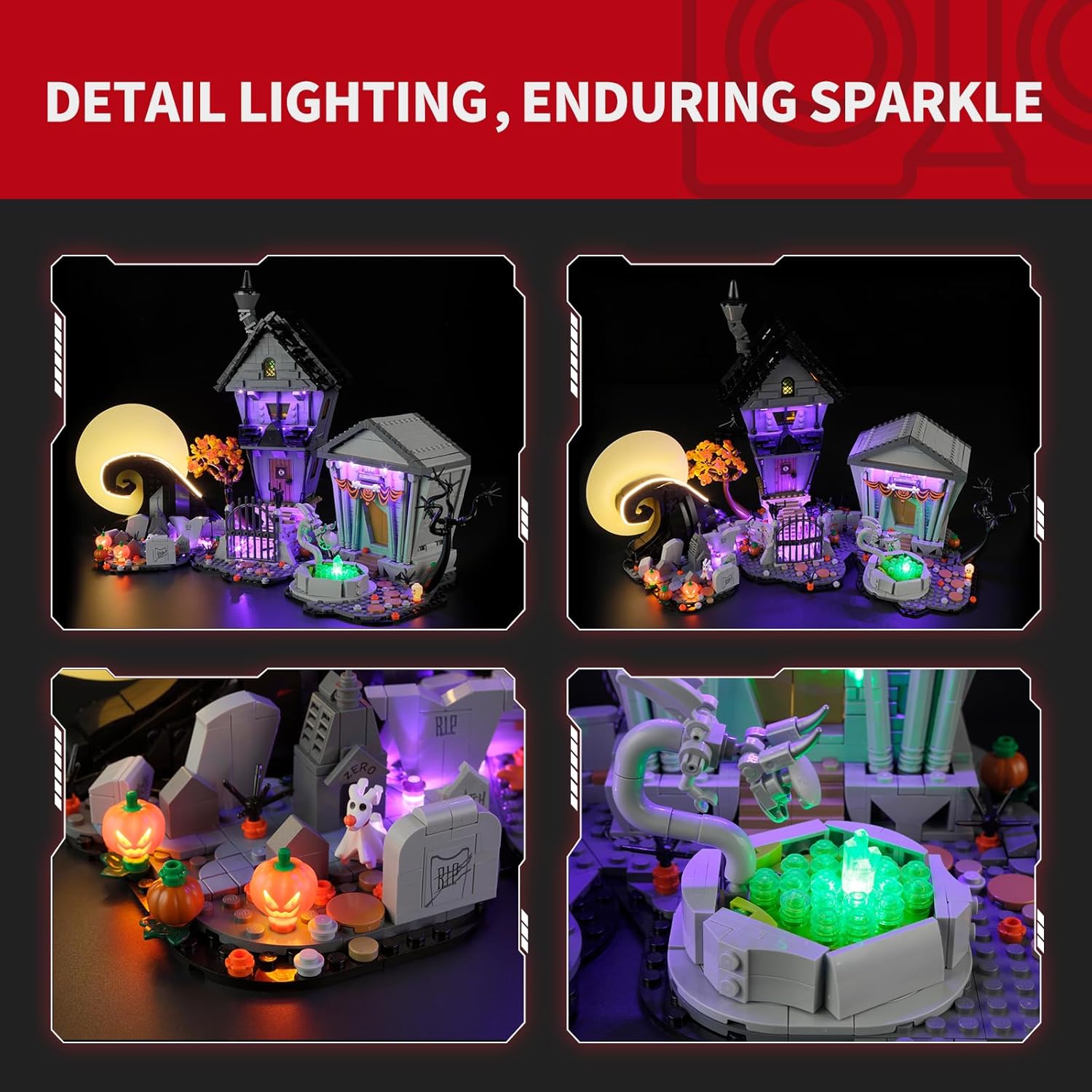
Figuur 3: Examples of detailed lighting integration within the Lego model, highlighting the vibrant illumination of specific elements.
- Organize Wires: Utilize the provided wire organizing blocks to conceal and manage the wires. This prevents wire breakage and ensures a neat and tidy appearance for your illuminated Lego set.

Figure 4: Demonstration of wire organization using specialized blocks to ensure a slim fit and protect wires within the Lego structure.
- Koppel kragbron: Connect the expansion boards to the AA Battery Box or the USB Power Cable using the 3-in-1 USB Adapter. Ensure batteries are correctly inserted into the battery box if using that option.
Bedryfsinstruksies
Once the BRIKSMAX 2.0 Light Kit is fully installed and connected to a power source, operating it is straightforward:
- Krag aan/af: If using the AA Battery Box, locate the switch on the box to turn the lights on or off. If using the USB Power Cable, the lights will illuminate once connected to a powered USB port.
- Geniet die skerm: Observe your Lego set transformed with vibrant LED lighting, highlighting its intricate details and creating an immersive display.

Figure 5: Visual comparison of the Lego set with the lights off versus the lights on, showcasing the significant impact of the BRIKSMAX lighting.
Video 1: Official product video demonstrating the BRIKSMAX 2.0 Light Kit installed on the Lego 21351 Disney Tim Burton's The Nightmare Before Christmas set, showcasing the various lighting effects and overall illuminated appearance.
Onderhoud
To ensure the longevity and optimal performance of your BRIKSMAX 2.0 Light Kit, consider the following maintenance tips:
- Skoonmaak: Gently dust the lights and wires with a soft, dry cloth. Avoid using liquid cleaners directly on the electronic components.
- Draadbestuur: Periodically check the wire organization to ensure no wires are pinched or exposed, which could lead to damage.
- Battery vervanging: If using the AA Battery Box, replace batteries when the lights dim or cease to function. Always use new batteries of the same type.
- Berging: If disassembling the light kit for storage, carefully disconnect components and store them in a dry, cool place away from direct sunlight.
Probleemoplossing
If you encounter any issues with your BRIKSMAX 2.0 Light Kit, please refer to the following common problems and solutions:
| Probleem | Moontlike oorsaak | Oplossing |
|---|---|---|
| Ligte gaan nie aan nie. | No power, loose connection, or dead batteries. |
|
| Sommige ligte werk nie. | Loose connection to a specific light or expansion board, or a damaged light. |
|
| Ligte is dof. | Lae batterykrag. | Replace the batteries in the AA Battery Box. If using USB, ensure the USB port provides sufficient power. |
| Wires are visible or not fitting correctly. | Improper wire routing. | Re-route wires using the provided wire organizing blocks to conceal them within the Lego structure. Refer to the detailed paper instructions for optimal routing. |
Spesifikasies
| Kenmerk | Detail |
|---|---|
| Produk afmetings | 6.5 x 4.72 x 1.57 duim |
| Item gewig | 7.4 onse |
| Land van oorsprong | China |
| ASIN | B0DGQLNFW3 |
| Item Modelnommer | 21351 |
| Vervaardiger Aanbevole Ouderdom | 8 jaar en ouer |
| Vervaardiger | Briksmax |
| Verenigbaarheid | Lego Ideas 21351 Disney Tim Burton's The Nightmare Before Christmas |
Waarborg en Ondersteuning
BRIKSMAX LED lighting kits are manufactured using safe and reliable materials, ensuring product quality and durability. While specific warranty details are not provided in this manual, BRIKSMAX is committed to customer satisfaction.
If you encounter any damaged or missing parts upon receiving your light kit, or if you require assistance with installation or troubleshooting beyond the scope of this manual, please do not hesitate to contact BRIKSMAX customer support for a replacement or further guidance. Your satisfaction is our priority.
For support, please visit the official BRIKSMAX store on Amazon or refer to the contact information provided with your purchase documentation.
Ask a question about this manual
Ask about setup, troubleshooting, compatibility, parts, safety, or missing instructions. Manuals+ will review the question and use this page’s manual context to help answer it.