
1. Produk verbyview
This manual provides instructions for the Miracase Ultra Slim Silicone Case and accompanying Screen Protector, designed for the iPhone SE (3rd Gen 2022), iPhone SE (2nd Gen 2020), iPhone 7, and iPhone 8. This product offers protection for your device while maintaining a slim profile.

Image 1: Miracase Ultra Slim Silicone Case and Screen Protector. The image displays the silicone case in acacia green alongside a clear tempered glass screen protector, indicating a 2-in-1 protection solution.
2. Wat is in die boks
- 1 x Miracase Ultra Slim Silicone Case
- 1 x skermbeskermer van gehard glas
3. Installasiehandleiding
3.1. Silicone Case Installation
- Maak seker dat jou iPhone skoon en vry van stof of puin is.
- Align the top edge of your iPhone with the top edge of the silicone case.
- Gently press your iPhone into the case, starting from the top and working your way down, ensuring all corners are securely fitted.
- Verifieer dat alle knoppies en poorte toeganklik en funksioneel is.
Video 1: Case Installation Guide. This video demonstrates the process of installing the silicone case onto an iPhone, highlighting the soft liquid silicone bumper, ease of installation, perfect fit for sensitive buttons, and raised camera and screen edge protection.
3.2. Screen Protector Installation
- Maak die skerm skoon: Use the provided wet wipe to thoroughly clean your iPhone screen.
- Droog die skerm: Use the clean cloth to dry the screen completely, removing any moisture or streaks.
- Verwyder stof: Use the dust-absorber sticker to remove any remaining dust particles from the screen. Ensure the screen is spotless.
- Apply Protector: Carefully peel off the protective film from the screen protector. Align the screen protector with the edges of your iPhone screen.
- Gladmaak: Gently place the screen protector onto the screen. It will adhere automatically. Use your finger or a soft card to push out any air bubbles towards the edges.
Video 2: Screen Protector Installation Guide. This video provides a step-by-step guide on how to properly install the tempered glass screen protector, including cleaning the screen and applying the protector.

Image 2: HD Ultra-clear Glass Screen. This image highlights the clarity and responsiveness of the 0.33mm tempered glass screen protector, ensuring 99.99% touch sensitivity.
4. Kenmerke en Gebruik
4.1. Slim and Sleek Design
The case is designed to be ultra-slim, adding only 0.06 inches to the overall thickness of your phone, ensuring it remains comfortable to hold and pocket-friendly.
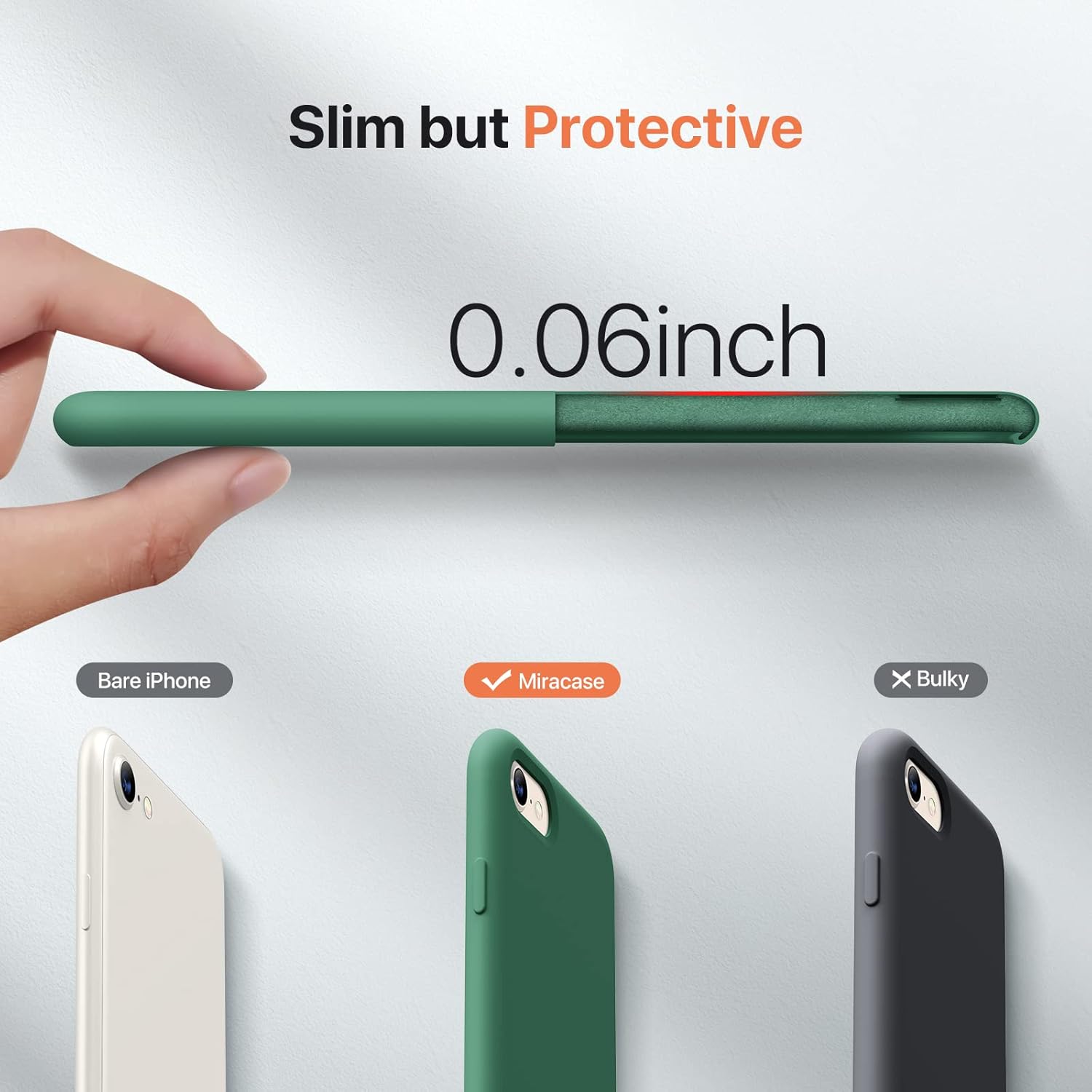
Image 3: Slim Profile. This image illustrates the slim design of the Miracase case, showing it adds only 0.06 inches to the phone's profile compared to a bare iPhone.
4.2. 4-Ply Structure for Enhanced Protection
The case features a robust 4-ply structure for comprehensive protection:
- Soft Microfiber Lining: Protects the edges and back of your phone from scratches.
- Anti-shock Hard PC: Provides a rigid layer for impact dispersion.
- Liquid Silicone: Offers shock absorption, a soft touch, and anti-scratch properties.
- Nano Oil Layer: An outer layer that resists dust and fingerprints.

Image 4: 4-Ply Structure. This exploded view image details the four protective layers of the case: soft microfiber lining, anti-shock hard PC, liquid silicone, and a nano oil layer.
4.3. Raised Camera & Screen Protection
The case incorporates raised bezels to protect critical areas:
- 1.5 mm Raised Bezels over Camera: Helps prevent scratches and direct impact to the camera lenses.
- 1.3 mm Raised Bezels over Screen: Provides additional protection for the screen against drops and surface contact.
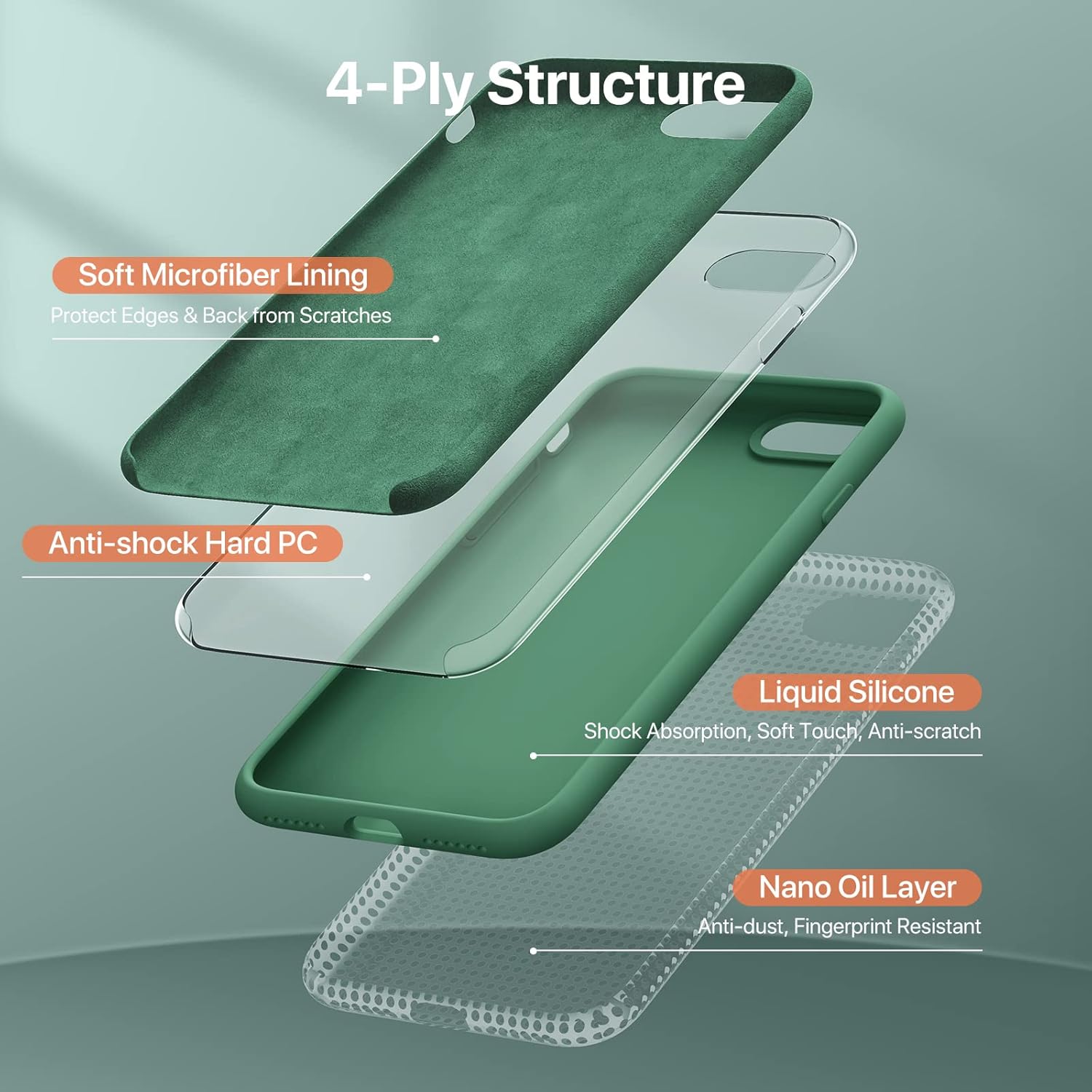
Image 5: Camera & Screen Protection. This image highlights the 1.3mm raised screen bezel and 1.5mm raised camera bezel, designed to protect these vulnerable areas from scratches and impacts.
4.4. Wireless Charging Compatibility
The Miracase Ultra Slim Silicone Case supports wireless charging, allowing you to charge your device conveniently without removing the case.

Image 6: Wireless Charging Support. This image shows an iPhone in the Miracase case being charged wirelessly on a charging pad, demonstrating compatibility.
4.5. Toestelversoenbaarheid
This case is specifically designed for the following iPhone models:
- iPhone SE (3rd Gen 2022)
- iPhone SE (2nd Gen 2020)
- iPhone 7
- iPhone 8
Note: This case is not compatible with the iPhone SE (1st Gen 2016 4.0").

Image 7: Case Compatibility. This image visually confirms compatibility with iPhone 7, iPhone 8, iPhone SE 2020, and iPhone SE3, all featuring a 4.7-inch display.
5. Onderhoud
To keep your Miracase case and screen protector in optimal condition:
- Maak die saak skoon: Wipe the silicone case regularly with a damp cloth to remove dust, dirt, and fingerprints. For stubborn marks, a mild soap solution can be used, followed by rinsing and thorough drying.
- Skoonmaak van die skermbeskermer: Use a microfiber cloth to gently wipe the screen protector. Avoid abrasive materials that could scratch the surface.
- Vermy harde chemikalieë: Do not use strong chemical cleaners, solvents, or alcohol-based solutions on either the case or the screen protector, as these can damage the materials or coatings.
6. Probleemoplossing
If you encounter any issues with your Miracase product, consider the following:
- Case Fit: Ensure the case is correctly aligned and snapped onto your iPhone. Improper installation can lead to buttons not functioning correctly or the case feeling loose.
- Skermbeskermerborrels: Small bubbles during screen protector installation can often be pushed out towards the edges using a soft card or cloth. If large bubbles persist, re-clean the screen and reapply the protector carefully.
- Probleme met draadlose laai: Verify that your wireless charger is functioning correctly and that your iPhone is properly centered on the charging pad. The case is designed to be compatible with wireless charging.
Vir verdere hulp, verwys asseblief na die Waarborg en Ondersteuning-afdeling.
7. Spesifikasies
| Handelsmerk | Miracase |
| Versoenbare telefoonmodelle | iPhone 7, iPhone 8, iPhone SE (2020/2022) |
| Materiaal | Silikoon |
| Kleur | Acacia Green |
| Item gewig | 2.39 onse |
| Spesiale kenmerke | Camera Protector, Ultra Slim Design, Wireless Charging Support, Fingerprint Resistant, Soft Touch, Anti-scratch |
8. Waarborg en Ondersteuning
Miracase offers a Lewenslange vervangingswaarborg for this product. If you experience any issues or damage with your case or screen protector, you are eligible for a replacement.
For warranty claims or any product-related inquiries, please contact Miracase customer support through the Amazon messaging system or via email. Provide your order details and a description of the issue for prompt assistance.