
1. Inleiding
The RingConn Gen 2 Smart Ring is an advanced wearable device designed to monitor various health metrics, including sleep apnea, heart rate, activity, stress levels, and women's health. This manual provides essential information for setting up, operating, and maintaining your device to ensure optimal performance and accurate data collection. The RingConn Gen 2 operates without subscription fees and is compatible with both Android and iOS devices.
2. Wat is in die boks
Upon unboxing your RingConn Gen 2 Smart Ring, verify that all components are present:
- 1 x RingConn Gen 2 Smart Ring
- 1 x magnetiese laaibak
- 1 x 1m/3.3ft USB-C to USB-C Cable
- 1 x Gebruikershandleiding (hierdie dokument)

Image: RingConn Gen 2 Smart Ring, Magnetic Charging Case, and USB-C Cable.
3. Opstelgids
3.1. Sizing Your Ring
The RingConn Gen 2 Smart Ring uses unique sizing standards. It is highly recommended to use a RingConn Gen 2 Sizing Kit to determine your most comfortable and accurate fit before purchasing the final product. This prevents inconvenience and ensures optimal data collection.

Image: Steps for proper sizing and purchase of the RingConn Gen 2 Smart Ring.
3.2. Toepassing aflaai en saambind
- Laai die RingConn-toepassing af: Soek vir "RingConn" in the Apple App Store (for iOS devices) or Google Play Store (for Android devices) and install the application.
- Laai jou ring: Place your RingConn Gen 2 Smart Ring into the magnetic charging case. Connect the charging case to a power source using the provided USB-C cable. Ensure the ring is fully charged before initial use.
- Aktiveer Bluetooth: On your smartphone, enable Bluetooth connectivity.
- Maak die toepassing oop en koppel: Open the RingConn app, create an account or log in, and follow the on-screen instructions to pair your smart ring via Bluetooth. Once paired, the app will display the ring's battery status and connection.
4. Operating Your RingConn Gen 2 Smart Ring
The RingConn Gen 2 Smart Ring continuously monitors various health parameters. Data is synced to the RingConn app for detailed analysis and insights.
4.1. Sleep Apnea Monitoring
The RingConn Gen 2 features advanced AI-powered sleep apnea monitoring. It tracks breathing patterns during sleep and provides real-time Apnea-Hypopnea Index (AHI) data, offering personalized insights into your sleep health. This feature is designed to be lightweight and comfortable for multi-day monitoring.

Image: Sleep Apnea Monitoring features within the RingConn app.
4.2. Comprehensive Health Tracking
Beyond sleep apnea, the RingConn Gen 2 monitors a range of health metrics:
- Hartklop: Deurlopende hartklopmonitering bied insigte in jou kardiovaskulêre gesondheid.
- Aktiwiteitsmonitering: Tracks daily steps, estimated calories burned, and activity intensity.
- Slaapontleding: Provides detailed sleep scores, including awake time, REM, light, and deep sleep stages, and consistency of your sleep schedule.
- Stress Index: Detects and tracks stress moments, offering guidance for recovery.
- Vrouegesondheid: Predicts period and ovulation dates by combining body temperature with collected menstrual data, and provides reminders.
- Bloedsuurstofversadiging (SpO2): Monitor bloedsuurstofvlakke.
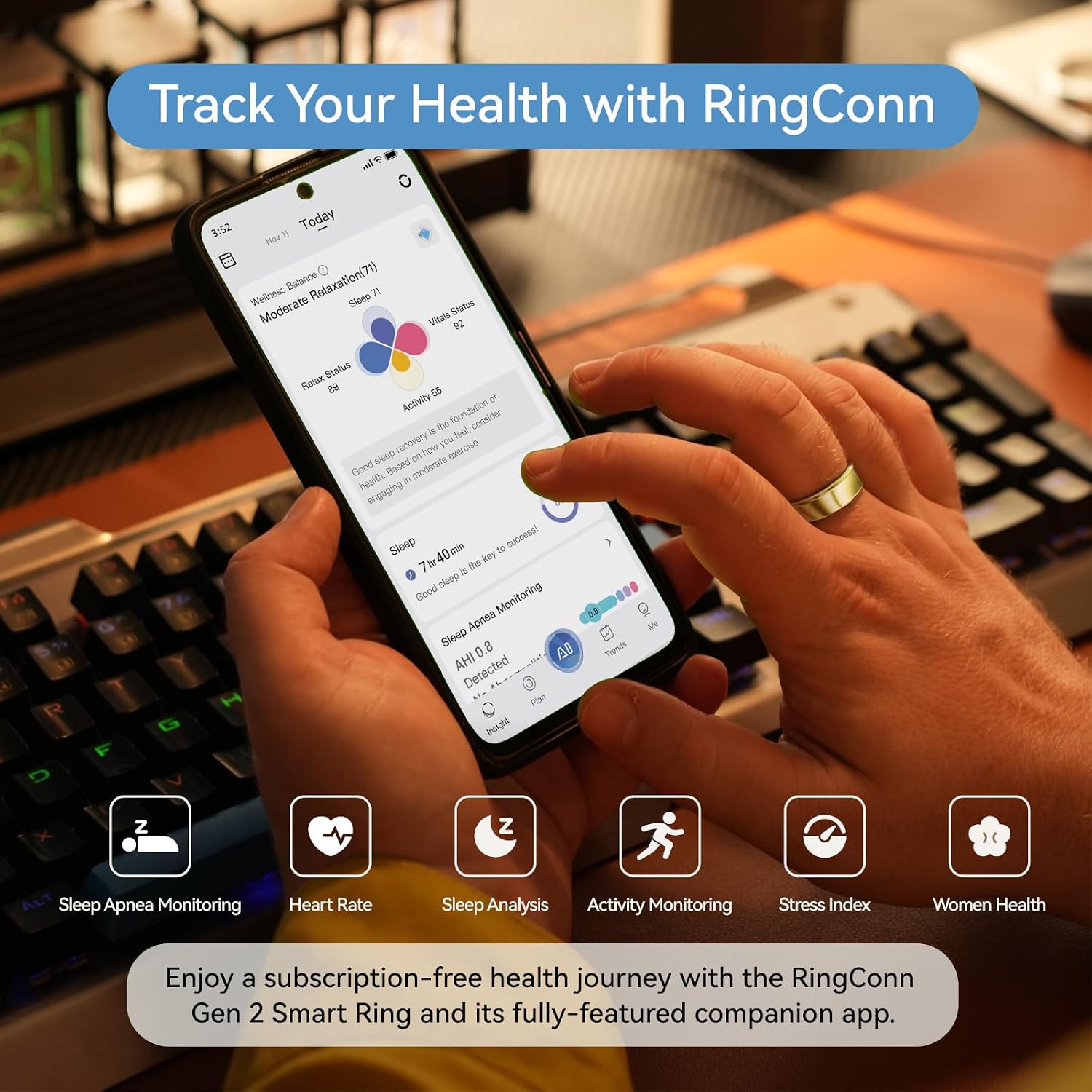
Beeld: Oorview of health tracking features available in the RingConn app.
4.3. Batterylewe
The RingConn Gen 2 offers an extended battery life of up to 10-12 days on a single charge, depending on ring size (larger sizes 12-14 can last up to 12 days). When paired with the smart charging case, the total battery life can exceed 150 days. The ring charges quickly within the case.

Image: Battery life and compatibility information for the RingConn Gen 2 Smart Ring.
4.4. Data Synchronization and Sharing
The RingConn app stores data for 7 days even if the ring is disconnected from your phone. Data is encrypted for privacy. You can share your health data with friends and family through the app, and the app supports OTA (Over-The-Air) updates for continuous improvements and new features.
5. Onderhoud
5.1. Waterdigte Ontwerp
The RingConn Gen 2 Smart Ring features upgraded water resistance up to 100 meters (328 feet). This makes it suitable for daily wear, workouts, swimming, and showering without concern for water damage.

Image: RingConn Gen 2 Smart Ring being worn during swimming, demonstrating its waterproof capability.
5.2. Cleaning Your Ring
To maintain hygiene and sensor accuracy, regularly clean your RingConn Gen 2 Smart Ring. Use a soft, damp cloth to wipe the ring. Avoid harsh chemicals or abrasive materials that could damage the finish or sensors.
6. Probleemoplossing
- Ring Not Connecting to App: Ensure Bluetooth is enabled on your phone and the ring is charged. Close and reopen the app, or restart your phone. If issues persist, try unpairing and re-pairing the device in the app settings.
- Inaccurate Data Readings: Verify that the ring is worn correctly and fits snugly. Ensure the sensors on the inside of the ring are clean. Environmental factors or improper fit can affect accuracy.
- Battery dreineer vinnig: While the ring has a long battery life, frequent data syncing or continuous high-intensity monitoring might slightly reduce it. Ensure the ring is fully charged. If battery life significantly deviates from specifications, contact support.
- Program sinkroniseer nie data nie: The app requires manual opening to sync data. Ensure you open the app regularly to transfer data from the ring to your phone. Data is stored on the ring for up to 7 days.
7. Spesifikasies
| Kenmerk | Detail |
|---|---|
| Model Naam | RingConn Gen 2 |
| Item Modelnommer | RCA-01 |
| Produk afmetings | 11.3 x 4.3 x 4.7 duim |
| Item gewig | 10.8 onse |
| Batterye | 1 CR5 battery benodig (ingesluit) |
| Geheue berging kapasiteit | 2 MB |
| Bedryfstelsel | Wear OS 3.0 (for internal ring operation, compatible with Android/iOS apps) |
| Spesiale kenmerk | Sleep Apnea Monitoring |
| Verbindingstegnologie | Bluetooth |
| Draadlose kommunikasie standaard | Bluetooth |
| Battery sel samestelling | Litium polimeer |
| GPS | Geen GPS nie |
| Vorm | Ronde |
8. Waarborg en Ondersteuning
The RingConn Gen 2 Smart Ring comes with a worry-free 12-month warranty. For technical assistance, troubleshooting, or warranty claims, please contact RingConn customer service. Refer to the official RingConn website or the app for the most current support contact information.
9. Veiligheidsinligting
Read all safety information before using the device to prevent injury or damage. Keep the device away from small children. Do not attempt to disassemble or modify the device. Use only approved charging accessories. Avoid exposing the device to extreme temperatures.


