
1. Inleiding en oorview
This manual provides instructions for the SKMEI Kids Digital Watch, Model 2309. This watch is designed for children, featuring a digital display, durable construction, and water resistance up to 50 meters. It includes functions such as time display (12/24 hour format), date, week, alarm, chronograph, and an LED backlight for visibility in low light conditions.
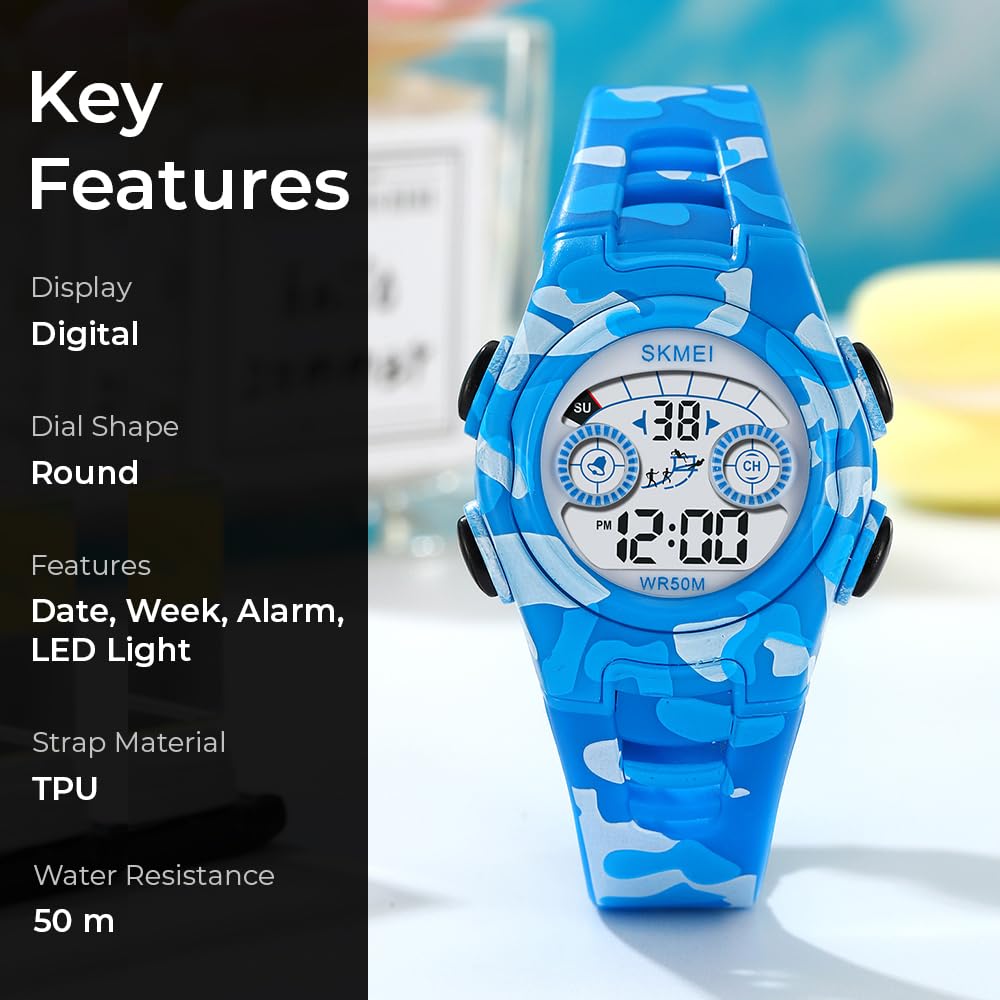
Figuur 1: Voorkant view of the SKMEI Kids Digital Watch Model 2309, highlighting its digital display and blue camouflage strap.
2. Horlosiekomponente
Familiarize yourself with the watch's buttons and display areas.
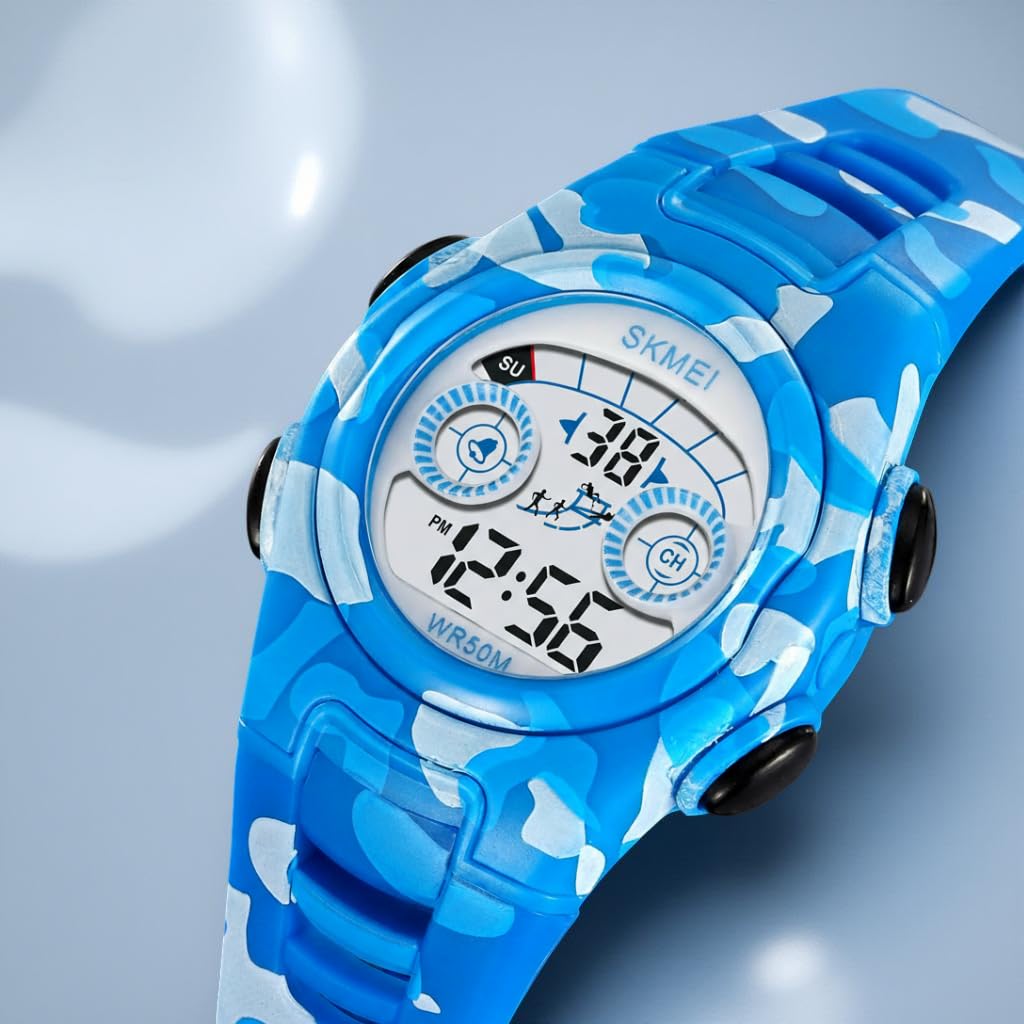
Figuur 2: Kant view illustrating the four control buttons: LIG (links bo), MODUS (links onder), BEGIN (regs bo), en TERUGSTEL (regs onder).
- LIGHT-knoppie (links bo): Aktiveer die LED-agterlig.
- MODE-knoppie (links onder): Blaai deur verskillende vertoonmodusse (Tyd, Alarm, Chronograaf).
- START-knoppie (regs bo): Used to start/stop functions in Chronograph mode and adjust settings.
- RESET-knoppie (regs onder): Used to reset functions in Chronograph mode and select settings.
3. Opstelinstruksies
3.1 Stel tyd en datum in
- Vanuit die normale tydvertoning, druk die MODUS druk die knoppie drie keer om die tydinstellingsmodus te betree. Die sekondes sal flikker.
- Druk die TERUGSTEL button to select the item to be adjusted (seconds, hours, minutes, month, date, day of week).
- Druk die BEGIN button to adjust the flashing item.
- To switch between 12-hour and 24-hour format, adjust the hour past 12 in 12-hour mode (PM will appear) or past 24 in 24-hour mode.
- Sodra alle instellings korrek is, druk die MODUS knoppie om die instellingsmodus te verlaat en terug te keer na normale tydvertoning.
3.2 Stel die alarm in
- Vanuit die normale tydvertoning, druk die MODUS druk twee keer op die knoppie om die alarminstellingsmodus te betree. Die uur sal flikker.
- Druk die TERUGSTEL knoppie om tussen uur- en minuutinstellings te kies.
- Druk die BEGIN knoppie om die flikkerende uur of minuut aan te pas.
- Druk die MODUS knoppie om die alarminstellingsmodus te verlaat.
- Om die alarm aan/af te skakel, druk die BEGIN en TERUGSTEL buttons simultaneously in alarm mode. An alarm icon will appear/disappear.
4. Bedryfsinstruksies
4.1 Gebruik van die LED-agtergrondbeligting
Druk die LIG knoppie (links bo) om die skerm te verlig. Die agtergrondbeligting sal vir 'n paar sekondes aan bly.
4.2 Gebruik van die chronograaf (stophorlosie)
- Vanuit die normale tydvertoning, druk die MODUS button once to enter chronograph mode. The display will show "00:00:00".
- Druk die BEGIN knoppie om tydsberekening te begin.
- Druk die BEGIN knoppie weer om tydsberekening te onderbreek.
- Druk die BEGIN button to resume timing.
- Terwyl dit gepauseer is, druk die TERUGSTEL button to clear the stopwatch to "00:00:00".
- Druk die MODUS button to exit chronograph mode.
4.3 Displaying Date and Day of Week
In normal time display mode, the date and day of the week are typically shown on the screen. If not, a quick press of the BEGIN button might cycle through date/time views depending on the specific watch firmware.
5. Onderhoud
- Waterweerstand: The watch is water-resistant up to 50 meters (5 ATM). This means it is suitable for handwashing, swimming, and exposure to rain. Do not press buttons underwater. Avoid hot water, saunas, or deep diving, as this can compromise the water seal.
- Skoonmaak: Clean the watch with a soft, damp lap. Vermy die gebruik van harde chemikalieë of skuurmateriaal.
- Battery: Die horlosie gebruik 1 C-battery (ingesluit). Batteryvervanging moet ideaal gesproke deur 'n gekwalifiseerde tegnikus uitgevoer word om te verseker dat waterbestandheid gehandhaaf word.
- Berging: Bêre die horlosie op 'n koel, droë plek weg van direkte sonlig en uiterste temperature.

Figuur 3: Agter view of the watch, displaying the model number and water resistance rating.
6. Probleemoplossing
- Skerm is leeg of dof: Die battery is dalk laag of uitgeput. Oorweeg professionele batteryvervanging.
- Tyd is verkeerd: Re-set the time following the instructions in Section 3.1. Ensure the 12/24 hour format is correctly set.
- Knoppies reageer nie: Ensure the watch is not wet. If the issue persists, a soft reset (removing and reinserting the battery) by a professional might be necessary.
- Alarm lui nie: Verify that the alarm is set and activated (check for the alarm icon on the display). Ensure the volume is not muted if applicable (this model does not have volume control, but it's a general troubleshooting tip).
7. Spesifikasies
| Kenmerk | Spesifikasie |
|---|---|
| Modelnommer | 2309 |
| Tipe vertoon | Digitaal |
| Beweging Tipe | Kwarts |
| Materiaal van die saak | Akrielnitril Butadieen Styreen (ABS) |
| Bandmateriaal | Termoplastiese poliuretaan (TPU) |
| Kristal materiaal | Hars |
| Waterweerstand Diepte | 50 meter (5 OTM) |
| Kas deursnee | 34.5 mm |
| Kasdikte | 12.2 mm |
| Band lengte | 23 cm |
| Item gewig | 26.3 gram |
| Spesiale kenmerke | 12/24 hour clock, Alarm, Chronograph, Date-Week, Time, LED Backlight |
| Kragbron | Battery-aangedrewe (1 C-battery ingesluit) |

Figure 4: Watch dimensions for Model 2309.
8. Waarborg en Ondersteuning
Your SKMEI Kids Digital Watch Model 2309 comes with a 9-month Manufacturer Warranty vanaf die aankoopdatum.
For any service-related inquiries or feedback, please contact the SKMEI India Helpline:
- Hulplyn nommer: 1800-889-6251
- Bedryfsure: Monday to Saturday, 9:00 AM to 6:00 PM
Manufacturer and Importer: SKMEI