
CHOETECH B740
CHOETECH Mini Mobile Battery B740 User Manual
Model: B740
1. Inleiding
Dankie vir die aankoopasing the CHOETECH Mini Mobile Battery B740. This compact and powerful portable charger is designed to provide fast and efficient charging for your USB Type-C compatible devices, including smartphones, tablets, and portable gaming consoles. Please read this manual carefully before use to ensure proper operation and to maximize the lifespan of your device.
2. Veiligheidsinligting
Om veilige werking te verseker en skade te voorkom, neem asseblief die volgende voorsorgmaatreëls in ag:
- Moenie die toestel blootstel aan uiterste temperature, direkte sonlig of hoë humiditeit nie.
- Vermy om die toestel te laat val, te stamp of uitmekaar te haal.
- Hou weg van water en ander vloeistowwe.
- Do not use if the device is damaged or shows signs of overheating.
- Hou buite bereik van kinders.
- Gooi die battery weg volgens plaaslike regulasies.

The CHOETECH B740 is equipped with 10 layers of protection for its PCBA circuit, including over-heat, over-voltage, over-charge, and short-circuit protection, ensuring enhanced charging safety.
3. Pakketinhoud
Kontroleer asseblief dat alle items in die pakket teenwoordig is:
- CHOETECH Mini Mobile Battery B740 Main Unit ×1
- USB Tipe-C-kabel ×1
- Instructiehandleiding × 1
4. Produk verbyview en kenmerke
The CHOETECH B740 is a compact and versatile portable power bank designed for convenience and efficiency.

The CHOETECH B740 is available in Black, White, and Light Blue, featuring a compact design and a convenient built-in stand.
4.1 Sleutelkenmerke
- Direct Plug-in Fast Charging: Simply plug the power bank directly into your smartphone's Type-C port for rapid charging. No need for extra cables.
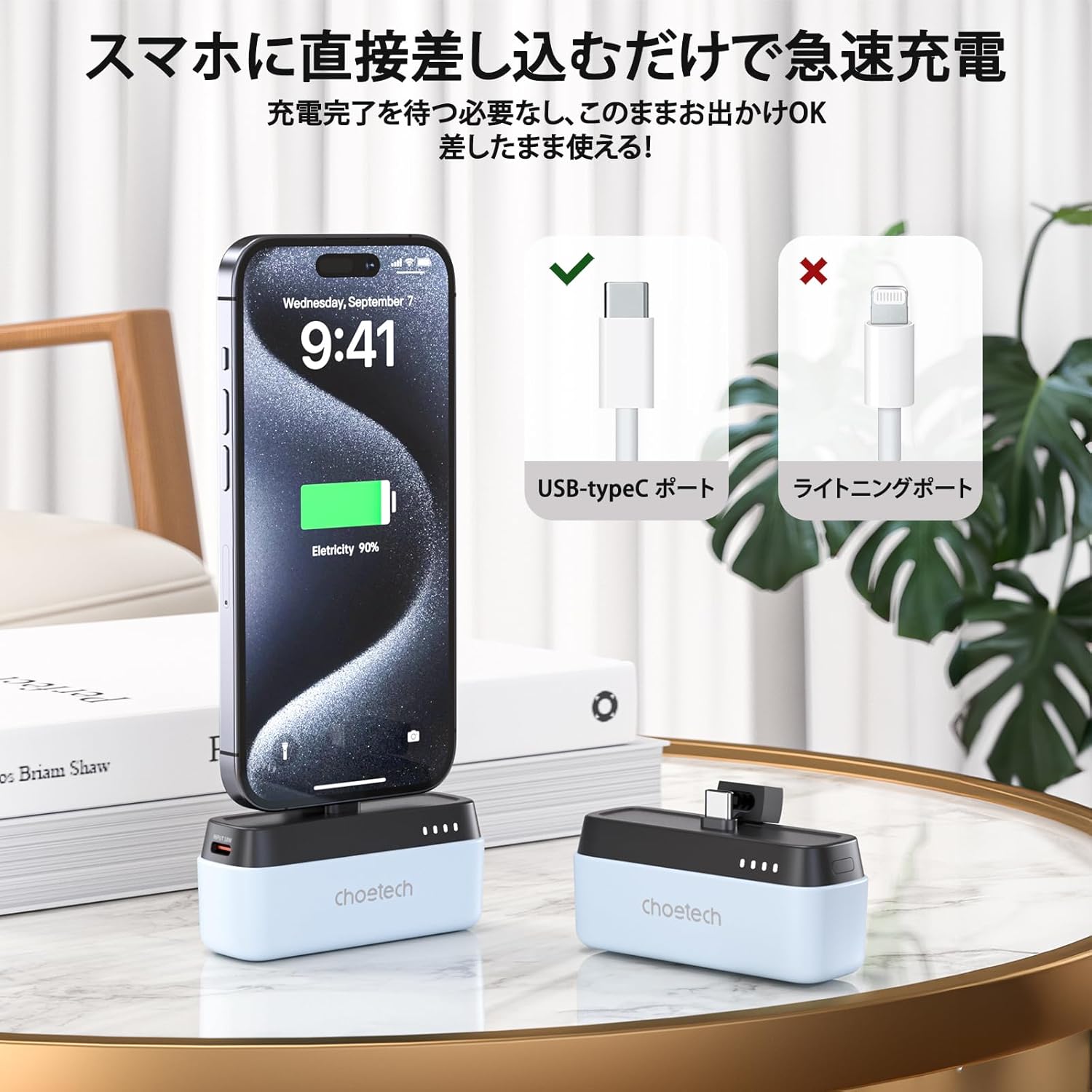
Figure 4.2: Direct Plug-in Charging
The B740 features a direct USB Type-C plug for convenient and fast charging without external cables. - Miniature and Portable Design: Weighing approximately 100g and designed to be as compact as a lipstick, it easily fits into small bags, making it ideal for travel and daily use.

Figure 4.3: Compact Size
Its miniature design allows for easy portability, comparable to the size of a lipstick. - 5000mAh Capacity with PD20W Output: Provides a 5000mAh battery capacity and supports PD20W fast charging, ensuring your devices are quickly powered up.

Figure 4.4: 5000mAh Capacity
The power bank features a 5000mAh battery, providing ample power for on-the-go charging.
Figure 4.5: PD20W Fast Charging
Experience faster and more efficient charging with the PD20W output capability. - Wide USB Type-C Compatibility: Compatible with a broad range of Type-C devices, including iPhone 15/16 series, Samsung, Huawei, iPads, Nintendo Switch, and more.

Figure 4.6: Broad Compatibility
The B740 supports charging for a wide array of USB Type-C enabled devices. - Ingeboude staander: Features a convenient integrated stand, allowing you to watch videos or stream content comfortably while your device charges, in both portrait and landscape orientations.

Figure 4.7: Built-in Stand Functionality
Die geïntegreerde staanplek maak handvrye gebruik moontlik viewterwyl jy laai.
5. Opstelling
Before first use, it is recommended to fully charge your CHOETECH B740 power bank.
- Connect the provided USB Type-C cable to the input port of the power bank.
- Connect the other end of the USB Type-C cable to a compatible USB power adapter (not included) or a computer's USB port.
- The LED indicators will flash to show the charging status. Once all four LEDs are solid white, the power bank is fully charged.
6. Bedryfsinstruksies
6.1 Laai jou toestel
- Ensure your CHOETECH B740 is sufficiently charged.
- Carefully plug the USB Type-C connector of the power bank directly into the Type-C charging port of your smartphone or compatible device.
- Die kragbank sal outomaties jou toestel begin laai. Die LED-aanwysers sal die oorblywende batteryvlak van die kragbank wys.
- Om die laai te stop, koppel eenvoudig die kragbank van jou toestel af.
- Note: If your device has a thick protective case, it may prevent the power bank's connector from fully engaging. Please remove the case if charging issues occur.
6.2 LED-aanwysergids
The CHOETECH B740 features four LED lights to indicate battery status:
- Battery vlak vertoon: The four white LEDs illuminate according to the remaining battery level. During fast charging, the LEDs will glow green.
- Laai aanduiding: During the charging process (from low to high power), the current power level is indicated by flashing LEDs. When all four LEDs are continuously lit, it signifies that the power bank is fully charged.
- Discharge Indication: During the discharge process (from high to low power), the LEDs continuously display the current power level. When discharge is complete, the LEDs will turn off.
- Waarskuwing vir lae battery: One white LED will flash to indicate a low battery level, prompting you to recharge the power bank.
7. Onderhoud
Proper care will extend the life of your power bank:
- Maak die toestel skoon met 'n sagte, droë lap. Moenie harde chemikalieë of skuurmiddels gebruik nie.
- Berg in 'n koel, droë plek wanneer dit nie gebruik word nie.
- Vermy langdurige blootstelling aan direkte sonlig of uiterste temperature.
- Recharge the power bank at least once every three months if not used regularly to maintain battery health.
8. Probleemoplossing
| Probleem | Moontlike oorsaak | Oplossing |
|---|---|---|
| Kragbank laai nie. | Cable not properly connected; faulty cable or adapter; power bank fully discharged. | Ensure cable is securely connected. Try a different USB Type-C cable or power adapter. Allow a few minutes for the power bank to respond if completely drained. |
| Toestel laai nie vanaf kragbank nie. | Power bank low on battery; device not Type-C compatible; thick phone case preventing connection; power bank malfunction. | Recharge the power bank. Verify your device has a Type-C port. Remove phone case. Contact customer support if the issue persists. |
| Stadige laai. | Device not supporting fast charging; cable quality; power bank not fully charged. | Ensure your device supports PD20W. Use the original or a high-quality USB Type-C cable. Fully charge the power bank. |
| LED-aanwysers werk nie. | Kragbank heeltemal ontlaai; interne fout. | Charge the power bank for at least 30 minutes. If still unresponsive, contact customer support. |
9. Spesifikasies
| Kenmerk | Detail |
|---|---|
| Modelnommer | B740 |
| Kleure | Black, White, Light Blue |
| Materiaal | ABS+PC Fireproof V0 material |
| Koppelvlak | USB Tipe-C |
| Laai metode | USB Type-C direct plug-in charging |
| Afmetings (ongeveer) | 81.3 × 34.5 × 28 mm |
| Gewig (ongeveer) | 100.5 g |
| Battery kapasiteit | 5000mAh / 3.7V (18.5Wh) |
| Invoer (USB-C) | 5V≈2A, 9V≈2A (18W) |
| Output (USB-C Plug) | 5V≈2.4A, 9V≈2.22A, 12V≈1.67A (20W) |
| Totale uitset | 20 W (maksimum) |
| Ondersteunde protokolle | QC3.0, QC2.0, PD3.0, PD2.0, AFC, FCP, Apple 2.4A |
| Sertifiserings | PSE, FCC, CE, RoHS |
| Vervaardiger | CHOETECH |
| Land van oorsprong | China |
10. Waarborg en Ondersteuning
This product comes with a 24-month warranty from the date of purchase. If you encounter any issues or have questions regarding your CHOETECH Mini Mobile Battery B740, please contact our customer support team. For faster assistance, please have your model number (B740) and purchase details ready.
Notifying Business Operator Name (PSE Certification): Earth Reborn Co., Ltd.
For more information and support, please visit the official CHOETECH webwebwerf of kontak jou handelaar.
Ask a question about this manual
Ask about setup, troubleshooting, compatibility, parts, safety, or missing instructions. Manuals+ will review the question and use this page’s manual context to help answer it.