
H3C H3C Magic NX15-UK
H3C Magic NX15 AX1500 Dubbelband Gigabit Wi-Fi 6 Router Gebruikershandleiding
Model: H3C Magic NX15-UK
1. Inleiding
The H3C Magic NX15 is a high-performance Gigabit Wi-Fi 6 router designed to provide a fast and reliable internet experience. Featuring a vertical design, full gigabit network ports, and Wi-Fi 6 (802.11ax) technology on the 5GHz band, it ensures high-speed connectivity. Equipped with four high-gain external antennas and EasyMesh compatibility, it offers wide and flexible network signal coverage. Enhanced security is provided through WPA3 encryption. This manual provides essential information for setting up, operating, and maintaining your H3C Magic NX15 router.
2. Pakketinhoud
Kontroleer asseblief die inhoud van die pakket noukeurig. Indien enige items ontbreek of beskadig is, kontak asseblief u kleinhandelaar.
- H3C Magic NX15 AX1500 Dual Band Gigabit Wi-Fi 6 Router
- Kragadapter
- Ethernet kabel
- Quick Installation Guide (this manual)
3. Produk verbyview
Familiarize yourself with the components and interfaces of your H3C Magic NX15 router.
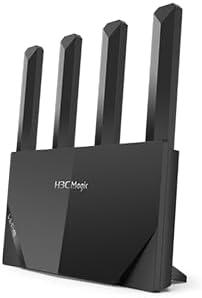
Figuur 3.1: Voorkant view of the H3C Magic NX15 router, showcasing its vertical design and four external antennas.
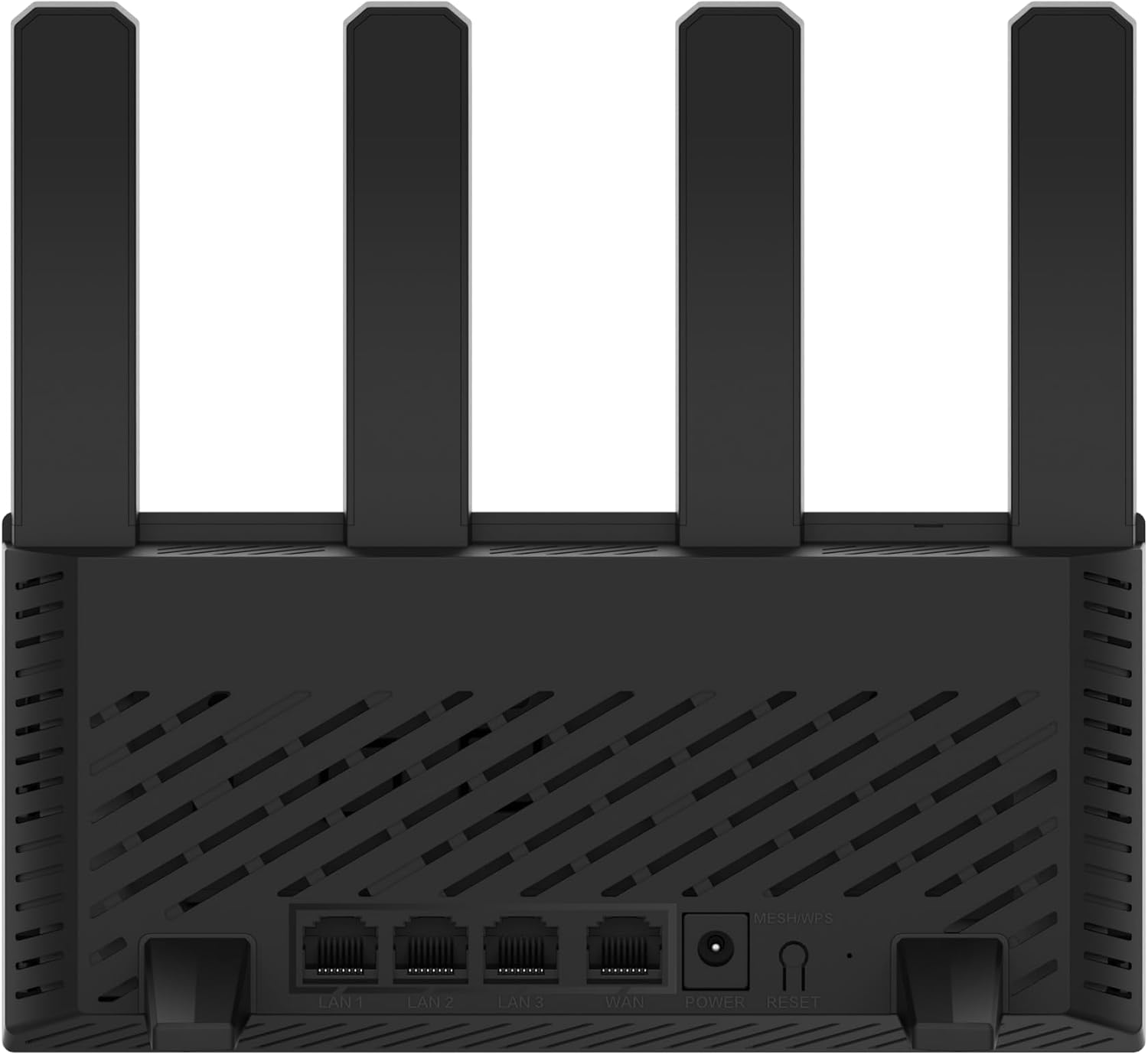
Figuur 3.2: Agter view of the H3C Magic NX15 router, displaying the LAN ports, WAN port, power input, and Reset/WPS button.

Figuur 3.3: Top view of the H3C Magic NX15 router, highlighting the ventilation design for heat dissipation.

Figuur 3.4: Kant view of the H3C Magic NX15 router, showing the sleek profile and additional ventilation slots.
Port and Button Descriptions:
- WAN -poort: Koppel aan jou modem of internetdiensverskaffer (ISP) se netwerk.
- LAN-poorte (LAN1, LAN2, LAN3): Connect to wired devices such as computers, gaming consoles, or smart TVs.
- Kragpoort: Koppel aan die ingeslote kragadapter.
- Herstel/WPS-knoppie:
- Press briefly to activate WPS (Wi-Fi Protected Setup) for easy connection of compatible devices.
- Press and hold for approximately 5-10 seconds to restore the router to factory default settings.
- antennas: Four high-gain external antennas for optimal Wi-Fi signal coverage.
4. Opstelgids
Follow these steps to set up your H3C Magic NX15 router for the first time.
- Pak die router uit: Verwyder die router en alle bykomstighede versigtig uit die verpakking.
- Posisioneer die router: Plaas die router op 'n sentrale plek in jou huis of kantoor, weg van obstruksies en bronne van steuring (bv. mikrogolfoonde, koordlose telefone). Verseker goeie ventilasie.
- Koppel aan krag: Connect the included power adapter to the router's power port and then plug the adapter into a power outlet. Wait for the router to power on and its indicator lights to stabilize.
- Koppel aan Modem: Connect one end of the provided Ethernet cable to the WAN port on your H3C Magic NX15 router and the other end to your modem's LAN port.
- Koppel toestelle (opsioneel): For wired connections, connect an Ethernet cable from one of the router's LAN ports to your computer or other network device.
- Koppel aan Wi-Fi:
- Soek op jou rekenaar of mobiele toestel vir beskikbare Wi-Fi-netwerke.
- Select the Wi-Fi network name (SSID) printed on the label at the bottom of your router.
- Enter the Wi-Fi password (also printed on the router's label) when prompted.
- Toegang tot Router Bestuur Bladsy:
- Maak oop a web blaaier (bv. Chrome, Firefox, Edge).
- Tik die standaard IP-adres in (gewoonlik
192.168.1.1orh3cmagic.com) into the address bar and press Enter. Refer to the router's label for the exact address. - Follow the on-screen instructions to complete the initial setup, including setting a new administrator password and configuring your internet connection type (e.g., PPPoE, DHCP, Static IP).
5. Bedryfsinstruksies
This section details the key features and how to operate your H3C Magic NX15 router.
5.1 Dual-Band Wi-Fi Operation
The H3C Magic NX15 supports dual-band Wi-Fi (2.4GHz and 5GHz) for optimal performance. It features intelligent band steering, which automatically directs your devices to the best available band (2.4GHz for wider coverage, 5GHz for higher speeds) without manual selection.
- 2.4 GHz band: Provides wider coverage and better penetration through walls, suitable for general browsing and devices further from the router.
- 5 GHz band: Offers higher speeds and lower latency, ideal for streaming 4K video, online gaming, and high-bandwidth applications, typically for devices closer to the router.
5.2 Intelligent Management via Mobile App
Manage your router conveniently using the dedicated H3C mobile application. The app allows for easy network settings configuration, network speed optimization, and various other operations.
- Laai die toepassing af: Soek vir the "H3C Magic" app in your device's app store (Google Play Store for Android or Apple App Store for iOS).
- Installeer en begin: Installeer die toepassing en maak dit oop.
- Teken in: Use your router's administrator credentials to log in to the app.
- Bestuur instellings: Vanuit die app kan u:
- Change Wi-Fi names and passwords.
- Monitor gekoppelde toestelle.
- Stel ouerkontroles op.
- Configure guest Wi-Fi networks.
- Optimize network performance.
5.3 EasyMesh for Whole-Home Wi-Fi
The H3C Magic NX15 supports EasyMesh technology, allowing you to expand your Wi-Fi coverage by adding additional compatible H3C mesh units. This creates a seamless whole-home Wi-Fi network, eliminating dead zones in large or complex house types.
- Refer to the EasyMesh setup guide provided with your additional mesh units for detailed instructions on expanding your network.
- Ensure all mesh units are compatible with the EasyMesh standard.
5.4 Network Security Features
The router includes multiple functions to enhance your private network's security:
- WPA3-enkripsie: Provides the latest and strongest Wi-Fi security protocol.
- Access Allowlist/Denylist: Control which devices can connect to your network based on their MAC addresses.
- Gas Wi-Fi: Skep 'n aparte Wi-Fi-netwerk vir gaste, wat jou hoofnetwerk veilig en privaat hou.
- Ouerbeheer: Bestuur internettoegangstye en blokkeer onvanpaste inhoud vir spesifieke toestelle.
These security features can be configured via the router's web management interface or the H3C mobile app.
6. Onderhoud
Proper maintenance ensures the longevity and optimal performance of your H3C Magic NX15 router.
- Plasing: Keep the router in a well-ventilated area, away from direct sunlight, heat sources, and moisture. The stereoscopic heat dissipation design with a large metal heat sink helps maintain stable operation.
- Skoonmaak: Regularly dust the router's exterior and ventilation slots with a soft, dry cloth. Do not use liquid cleaners or aerosols.
- Firmware -opdaterings: Periodically check for and install firmware updates through the router's web management interface or the mobile app. Firmware updates often include performance improvements, new features, and security patches.
- Herlaai: As jy netwerkprobleme ondervind, probeer om die router te herbegin deur die kragadapter vir 10 sekondes uit te skakel en dit dan weer in te prop.
- Sekuriteit: Verander gereeld jou Wi-Fi-wagwoord en router-administrateurwagwoord na sterk, unieke kombinasies.
7. Probleemoplossing
Hierdie afdeling spreek algemene probleme aan wat jy mag teëkom en bied oplossings.
| Probleem | Moontlike oorsaak | Oplossing |
|---|---|---|
| Geen internettoegang nie |
|
|
| Wi-Fi Signal Weak or Unstable |
|
|
| Kan nie toegang tot die routerbestuursbladsy kry nie |
|
|
| Forgot Router Administrator Password | Wagwoord verlore | Press and hold the Reset/WPS button on the router for 5-10 seconds to restore factory default settings. You will then need to reconfigure the router. |
8. Spesifikasies
Detailed technical specifications for the H3C Magic NX15 router.
| Kenmerk | Detail |
|---|---|
| Model Naam | H3C Magic NX15 |
| Item Modelnommer | H3C Magic NX15-UK |
| Handelsmerk | H3C |
| Draadloos standaard | 802.11ax (Wi-Fi 6) |
| Frekwensiebandklas | Dubbelband (2.4GHz en 5GHz) |
| Antennas | 4 High-Gain External Antennas |
| Hawens | Gigabit WAN, Gigabit LAN (x3) |
| Spesiale kenmerke | Access Point Mode, EasyMesh, WPA3 Security, Parental Control, Guest Wi-Fi, App Management |
| Afmetings (Pakket) | 21 x 19.4 x 6.3 cm |
| Gewig (Pakket) | 500 g |
| Vervaardiger | H3C |
| Land van oorsprong | China |
| Eerste Beskikbare Datum | 24 Augustus 2024 |
9. Waarborg en Ondersteuning
The H3C Magic NX15 router comes with a standard manufacturer's warranty. For specific warranty terms and conditions, please refer to the warranty card included in your product packaging or visit the official H3C webwebwerf.
Tegniese ondersteuning:
If you encounter any issues or have questions regarding your H3C Magic NX15 router, please contact H3C technical support.
- Aanlyn ondersteuning: Visit the official H3C support webwebwerf vir algemene vrae, probleemoplossingsgidse en drywer-/firmware-aflaaie.
- Kontakinligting: Refer to the H3C webwebwerf of jou produkdokumentasie vir streekskontaknommers en e-posondersteuning.
Please have your product model number (H3C Magic NX15-UK) and serial number ready when contacting support.
Ask a question about this manual
Ask about setup, troubleshooting, compatibility, parts, safety, or missing instructions. Manuals+ will review the question and use this page’s manual context to help answer it.