
AWEI H22
AWEI Smart Watch H22 User Manual
Model: H22
Inleiding
This manual provides detailed instructions for the setup, operation, and maintenance of your AWEI Smart Watch H22. Please read this manual thoroughly to ensure proper use and to maximize the features of your device. The AWEI H22 is a 1.39-inch smartwatch designed for both men and women, offering fitness tracking, call functionality, and compatibility with Android and iOS devices.
1. Opstelling
1.1 Wat is in die boks
- AWEI Smart Watch H22
- Laai kabel
- Gebruikershandleiding (hierdie dokument)
1.2 Laai die toestel
Before initial use, fully charge your AWEI Smart Watch H22. Connect the charging cable to the watch's charging port and a standard USB power adapter (not included). A full charge typically takes approximately 2.5 hours. The watch is equipped with a 400mAh Lithium Polymer battery.
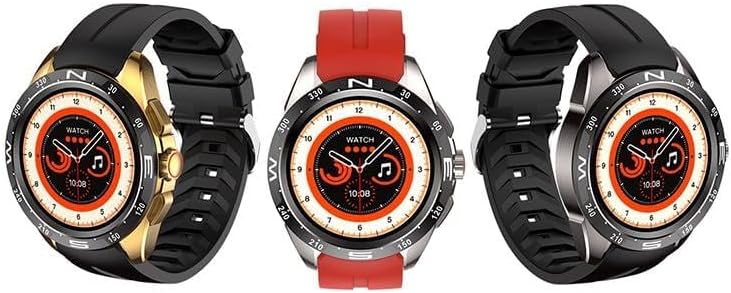
Image: The AWEI Smart Watch H22, showcasing its round display and various strap/bezel color options. This image illustrates the physical appearance of the device.
1.3 App-installasie en -paring
- Laai die toepassing af: Soek vir the official AWEI smartwatch application in your smartphone's app store (compatible with iOS 9.0 and above, and Android 6.0 and above).
- Aktiveer Bluetooth: Maak seker dat Bluetooth op jou slimfoon geaktiveer is.
- Maak die toepassing oop: Launch the AWEI app and follow the on-screen instructions to create an account or log in.
- Koppel die horlosie: Within the app, navigate to the device pairing section. The app will search for available devices. Select "AWEI H22" from the list to initiate pairing.
- Bevestig saambinding: A pairing request may appear on your watch screen. Confirm the pairing on both your watch and smartphone.
Let wel: Vir optimale werkverrigting, maak seker dat jou slimfoon se bedryfstelsel op datum is.
2. Bedryfsinstruksies
2.1 Basiese navigasie
- Raakskerm: Veeg links/regs, op/af om deur spyskaarte en kenmerke te navigeer. Tik om te kies.
- Syknoppie(s): Typically, a short press returns to the previous screen or watch face. A long press may power on/off or access a quick menu. Refer to the watch's on-screen prompts for specific button functions.
- Wrist Flip: Enable the "wrist flip to light up screen" feature in the app settings to automatically activate the display when you raise your wrist.
2.2 Sleutelkenmerke
- Hartslagmonitering: Kry toegang tot die hartklopfunksie op die horlosie om jou huidige hartklop te meet.
- Bloedsuurstofmonitering: Use the blood oxygen feature to check your SpO2 levels.
- Multi-sport modusse: The watch supports various sports modes including Running, Walking, Hiking, Basketball, Badminton, Boating, Climbing, Fitness, Cycling, Football, Yoga, and more. Select a mode before starting an activity to track relevant metrics like exercise time and calories burned.
- Beantwoord/maak oproepe: Once paired via Bluetooth, you can answer incoming calls directly from your watch or dial numbers.
- Musiekbeheer: Control music playback on your smartphone (play, pause, skip tracks) directly from the watch.
- Afgeleë fotografie: Gebruik jou horlosie as 'n afstandsluiter vir jou slimfoon se kamera.
- Aanpasbare skakelaars: Change watch faces from a selection of cloud-based options or upload your own photos via the app.
- Sittende herinnering: Stel herinneringe om beweging aan te moedig na periodes van onaktiwiteit.
- Vroulike fisiologiese siklusopsporing: Monitor and track your physiological cycle through the app.
- Wekker: Set alarms directly on the watch or through the companion app.
3. Onderhoud
3.1 Skoonmaak
Maak jou horlosie en bandjie gereeld skoon met 'n sagte, droë lap. Indien nodig, gebruik 'n effens droë lap.amp lap met sagte seep, en vee dan droog. Vermy harde chemikalieë of skuurmiddels.
3.2 Waterweerstand
The AWEI Smart Watch H22 has an IP68 waterproof rating. This means it is resistant to dust and can withstand immersion in water up to 1.5 meters for 30 minutes. It is suitable for daily use, such as washing hands, face, or during sweaty activities. However, it is not recommended for use in hot water (e.g., hot showers, saunas) or seawater, as this can compromise the waterproof seals.
3.3 Batterysorg
- Vermy om die battery gereeld heeltemal te ontlaai.
- Charge the watch regularly, even if not in constant use, to maintain battery health.
- Bêre die horlosie op 'n koel, droë plek wanneer dit nie vir lang tye gebruik word nie.
4. Probleemoplossing
| Probleem | Moontlike Oplossing |
|---|---|
| Horlosie skakel nie aan nie. | Maak seker dat die horlosie volledig gelaai is. Koppel dit vir ten minste 30 minute aan die laaier. |
| Kan nie met slimfoon koppel nie. |
|
| Inaccurate heart rate/blood oxygen readings. |
|
| Kennisgewings nie ontvang nie. |
|
5. Spesifikasies
| Kenmerk | Detail |
|---|---|
| Modelnommer | H22 |
| Skerm grootte | 1.39 duim |
| Battery kapasiteit | 400 mAh (Litiumpolimeer) |
| Laai tyd | Ongeveer. 2.5 uur |
| Konnektiwiteit | Bluetooth |
| Bedryfstelselversoenbaarheid | iOS 9.0+ / Android 6.0+ |
| Waterweerstandgradering | IP68 |
| Spesiale kenmerke | Heart rate, blood oxygen, female physiological cycle, sedentary reminder, customizable dial, wrist flip screen, time display, remote photo, music control, alarm clock, multiple sports mode detection. |
6. Waarborg en Ondersteuning
Your AWEI Smart Watch H22 comes with a een jaar waarborg from the date of purchase. This warranty covers manufacturing defects under normal use. It does not cover damage caused by misuse, accidents, unauthorized modifications, or failure to follow the instructions in this manual.
For technical support, warranty claims, or any questions regarding your device, please contact AWEI customer service. Refer to the contact information provided with your product packaging or visit the official AWEI webwebwerf vir ondersteuningsbesonderhede.
Bewaar asseblief u aankoopbewys vir waarborgdoeleindes.
Ask a question about this manual
Ask about setup, troubleshooting, compatibility, parts, safety, or missing instructions. Manuals+ will review the question and use this page’s manual context to help answer it.