
1. Inleiding
Thank you for choosing the ExtreLife MF81 MagSafe Wallet. This innovative accessory combines the convenience of a card holder with advanced tracking technology and a versatile stand, designed to enhance your iPhone experience. This manual provides essential information for setup, operation, and maintenance to ensure optimal performance.
2. Sleutel kenmerke
- Apple Vind My Integrasie: Real-time Bluetooth tracking, Play Sound Alert, Left Behind notifications, and Lost Mode for enhanced security. (Note: Android devices are not supported).
- Smart Card Storage: Crafted from luxurious vegan leather, featuring 3 individual card slots that comfortably hold up to 8 cards.
- RFID-blokkeringstegnologie: Provides an extra layer of security against unauthorized scans.
- Adjustable Magnetic Wallet Stand: Robust hinge allows for intuitive and flexible usage in both portrait and landscape modes (0-180° adjustable).
- Sterk Magnetiese Krag: Up to 4200 Gauss, 6X stronger than official magnetic wallets, ensuring a secure and reliable hold.
- Convenient Wireless Charging: Easy to charge using MagSafe or other wireless chargers. Battery lasts up to 4 months on a single charge. (Charger not included).
- Mag-safe Compatibility: Designed for iPhone 17/16/15/14/13/12 series and MagSafe cases.
3. Opstelling en paring
Follow these steps to set up and pair your ExtreLife MF81 MagSafe Wallet with your iPhone:
- Enable Two-Factor Authentication: Ensure Two-Factor Authentication is enabled for your Apple ID in your iPhone Settings.
- Activate Find My and Bluetooth: Turn on the "Find My" app and Bluetooth on your iPhone.
- Power On Wallet: Short press the power button located on the wallet once to turn it on. You will hear a sound indicating it's active.
- Add Item in Find My: In the "Find My" app, tap "Items" at the bottom, then tap the "+" icon and select "Other Supported Item". Your wallet should appear for connection.

Figure 1: Visual guide for pairing your ExtreLife MF81 MagSafe Wallet.
Video 1: Official ExtreLife video demonstrating the features and Find My functionality of the MagSafe Wallet.
4. Bedryfsinstruksies
4.1 Attaching to iPhone
Align the MagSafe Wallet with the back of your compatible iPhone or MagSafe-enabled case. The strong magnets will securely attach the wallet to your device.
4.2 Card Storage
The wallet features 3 individual card slots designed to hold up to 8 cards. Gently slide your cards into the designated slots. The RFID-blocking material protects your card information.

Figure 2: Demonstrating the smart card storage capacity of the wallet.
4.3 Adjustable Stand Function
The wallet's hinge allows it to fold into an adjustable stand. Open the wallet and position it to support your iPhone in either portrait or landscape mode for comfortable viewing at various angles (0-180°).

Figure 3: The adjustable stand feature provides versatile viewhoeke.
4.4 Using Apple Find My
Once paired, you can use the Apple Find My app to:
- Locate Your Wallet: View its real-time location on a map.
- Speel klank: Make the wallet emit a sound to help you find it when nearby.
- Left Behind Notifications: Receive alerts if you accidentally leave your wallet behind.
- Verlore modus: Mark your wallet as lost to prevent unauthorized use and display a message with your contact information to anyone who finds it.

Figure 4: Tracking your wallet using the Apple Find My network.
5. Laai
The ExtreLife MF81 MagSafe Wallet supports wireless charging. Simply place the wallet on a MagSafe charger or any compatible wireless charging pad. The battery is designed to last up to 4 months on a single charge. A charger is not included with the product.

Figure 5: Wireless charging for extended battery life.
6. Verenigbaarheid
The ExtreLife MF81 MagSafe Wallet is compatible with:
- iPhone 17/16/15/14/13/12 series (including Pro, Pro Max, Plus models).
- Official MagSafe cases or other magnetic cases.
Dit is nie compatible with iPhone 13/12 mini models or non-magnetic cases.
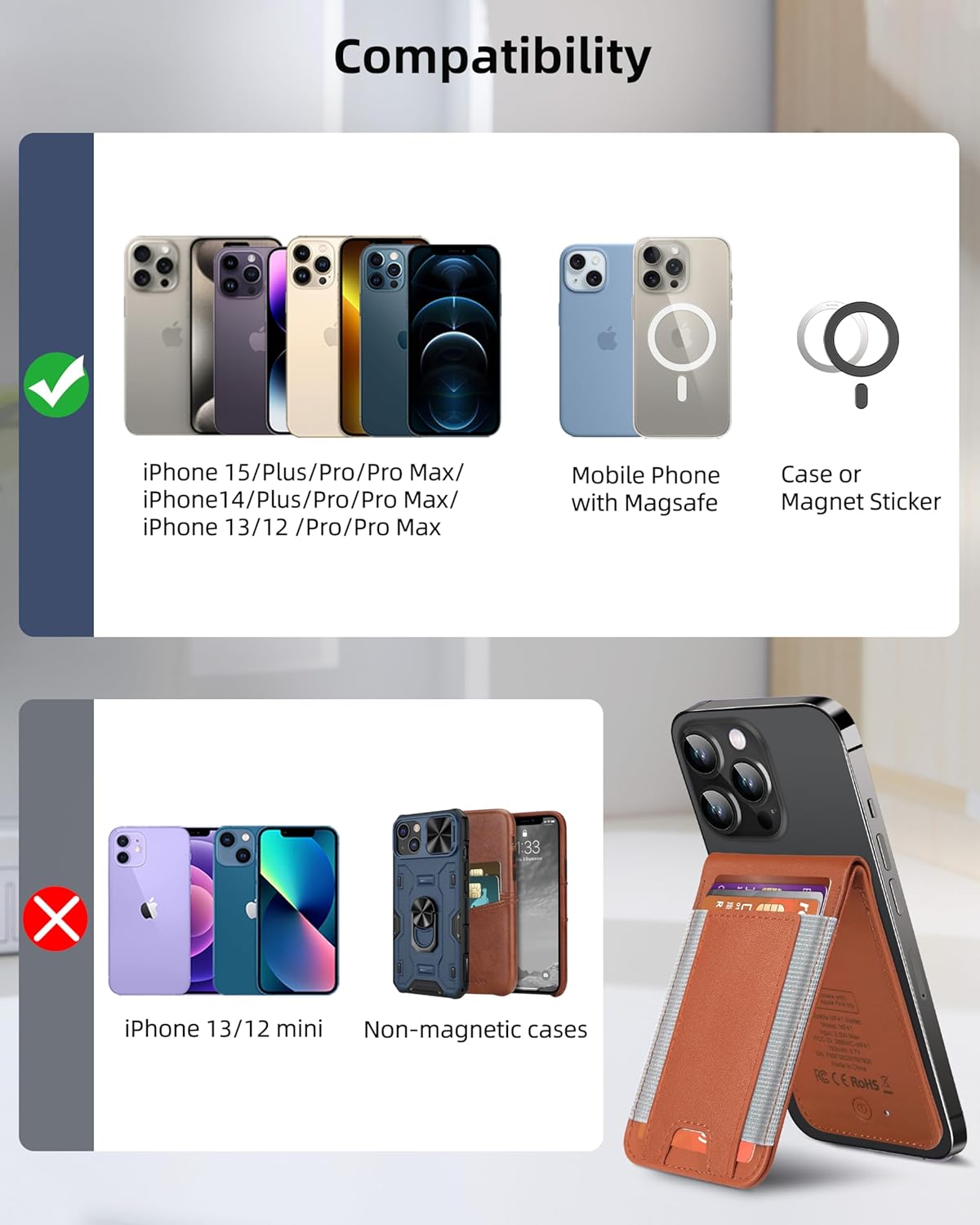
Figuur 6: Verenigbaarheid oorview for the MagSafe Wallet.
7. Onderhoud
To maintain the quality and longevity of your ExtreLife MF81 MagSafe Wallet, please follow these care instructions:
- Skoonmaak: Use a dry cloth to clean the wallet. Avoid using harsh chemicals or abrasive materials.
- Berging: Store the wallet in a cool, dry place away from direct sunlight and extreme temperatures.
- Vermy oorvulling: Do not overfill the card slots, as this may stretch the material and affect its magnetic hold.
8. Probleemoplossing
If you encounter any issues with your ExtreLife MF81 MagSafe Wallet, please refer to the following common solutions:
- Wallet not pairing with Find My:
- Maak seker dat Bluetooth op jou iPhone geaktiveer is.
- Verify Two-Factor Authentication is active for your Apple ID.
- Make sure the wallet is powered on (short press the power button).
- Try restarting your iPhone and repeating the pairing steps.
- Weak Magnetic Connection:
- Maak seker dat jou iPhone of omhulsel MagSafe-versoenbaar is.
- Remove any non-MagSafe accessories or thick cases that might interfere with the magnetic connection.
- Avoid overstuffing the wallet, as this can reduce magnetic strength.
- Find My features (e.g., Play Sound) not working:
- Check the wallet's battery level in the Find My app.
- Ensure the wallet is within Bluetooth range of your iPhone.
- Confirm that the wallet is powered on.
- Laai kwessies:
- Ensure you are using a compatible MagSafe or wireless charging pad.
- Verify the charging pad is properly connected to a power source.
- Adjust the position of the wallet on the charging pad to ensure proper alignment.
If the issue persists, please contact ExtreLife customer support for further assistance.
9. Spesifikasies
| Handelsmerk | ExtreLife |
| Model Naam | Extrelife Magsafe Wallet With Find My (MF81) |
| Modelnommer | BSJMF41BR-US |
| Materiaal | Faux leer |
| Kleur | Bruin |
| Kaart kapasiteit | Up to 8 cards (3 individual slots) |
| Magnetiese krag | Up to 4200 Gauss |
| Batterylewe | Tot 4 maande op 'n enkele lading |
| Laai tipe | MagSafe or Wireless Charger (charger not included) |
| Spesiale kenmerke | Works with Apple Find My, Adjustable Phone Stand, RFID Blocking |
10. Waarborg en Ondersteuning
The ExtreLife MF81 MagSafe Wallet comes with a 1-jaar vervaardigerswaarborg.
For warranty claims, technical support, or any product-related inquiries, please contact ExtreLife Direct customer service. You can typically find contact information on the product packaging or through the seller's store page on Amazon.
Vervaardiger: ExtreLife
Verkoper: ExtreLife Direct