
1. Inleiding
The FLEXISPOT E6 Pro Oval Dual Motor Standing Desk Frame (Model E8) is designed to provide a versatile and ergonomic workspace. This height-adjustable electric desk frame features a robust 3-stage oval leg system and powerful dual motors, allowing for smooth and quiet transitions between sitting and standing positions. The intuitive LED control panel includes memory presets and a convenient USB charging port, enhancing user experience and productivity. This manual provides essential information for the safe assembly, operation, and maintenance of your desk frame.

Figure 1: FLEXISPOT E6 Pro Oval Dual Motor Standing Desk Frame (Black)
2. Veiligheidsinligting
Om veilige werking te verseker en skade te voorkom, volg asseblief die volgende riglyne:
- Ensure the desk is securely assembled according to the provided instructions.
- Do not exceed the maximum weight capacity of 330 lbs (150 kg) to prevent tipping or instability.
- Keep hands and objects clear of moving parts during height adjustments.
- Vermy die plasing van vloeistowwe direk op die beheerpaneel of naby elektriese komponente.
- Regularly inspect all connections and fasteners to ensure they are tight and secure.
- The desk is equipped with an anti-collision system. However, always exercise caution when adjusting height to prevent accidental contact with objects or persons.
3. Vergadering
The FLEXISPOT E6 Pro desk frame is designed for straightforward assembly. Please follow the detailed instructions provided in the separate user manual included with your product. Ensure all components are present before beginning assembly.
3.1 Sleutelkomponente
- Lifting Columns (Legs)
- Voete
- Dwarsbalk
- Beheerkas
- Handset (Control Panel)
- Kragadapter
- Monteer hardeware
3.2 Vergadering verbyview
Typically, assembly involves attaching the feet to the lifting columns, connecting the crossbeam, mounting the control box and handset, and finally securing your chosen desktop (sold separately) to the frame. All necessary tools are usually included. Refer to the specific step-by-step diagrams in your product manual for precise instructions.

Figuur 2: Ontplof view of the FLEXISPOT E6 Pro desk frame components.
4. Bedryfsinstruksies
4.1 Hoogteverstelling
The E6 Pro features a 3-stage oval leg system, offering a broad height adjustment range from 23.6 inches to 48.8 inches. This allows users of various heights, from children to tall adults, to find their optimal ergonomic position.
- Lig lessenaar op: Druk en hou die Pyltjie op knoppie op die beheerpaneel.
- Onderste lessenaar: Druk en hou die Afpyltjie knoppie op die beheerpaneel.
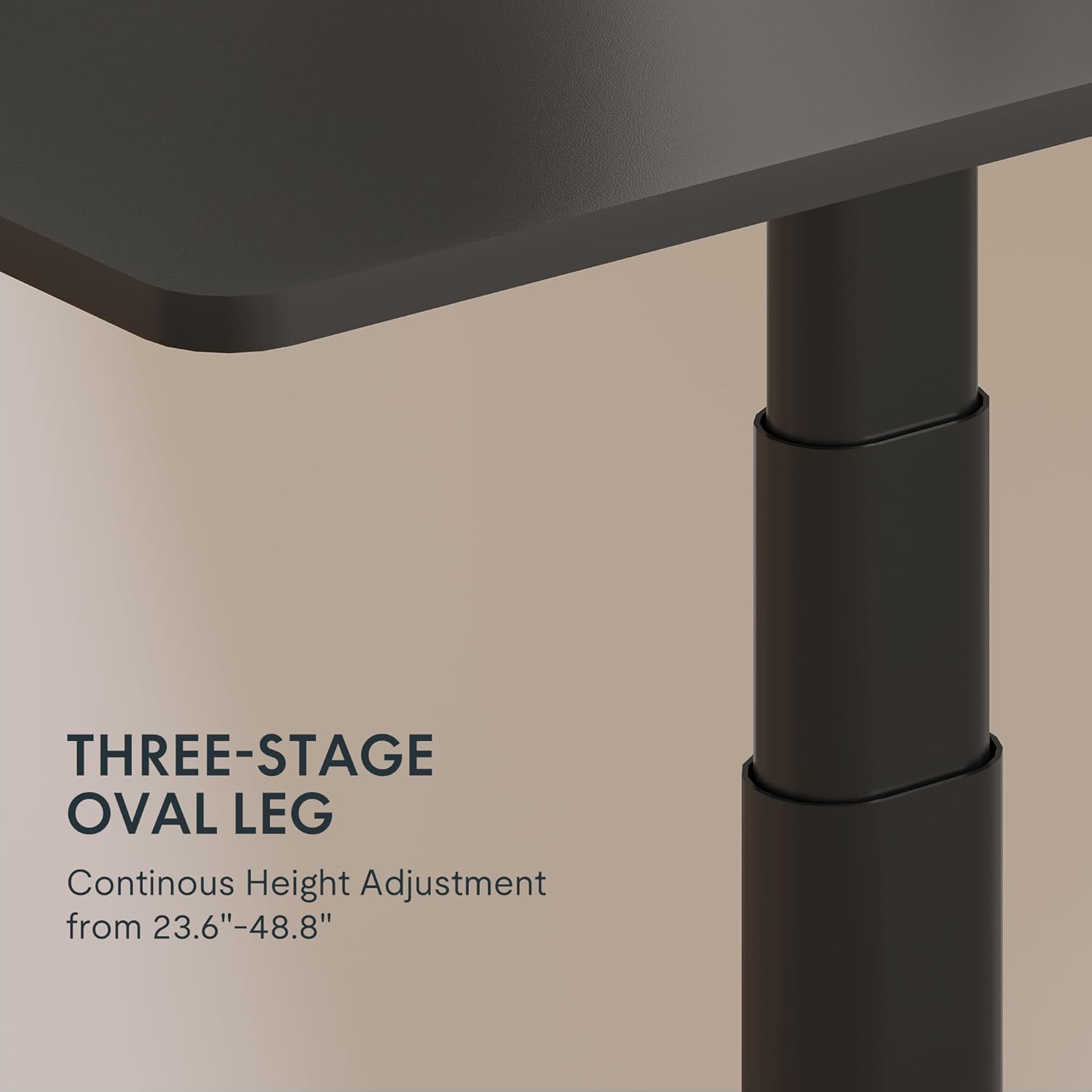
Figure 3: Close-up of the 3-stage oval leg mechanism.
4.2 LED Control Panel with Memory Presets and USB Port
The intuitive LED control panel allows for easy height adjustments and includes programmable memory presets for your preferred sitting and standing heights. It also features a convenient USB port for charging devices.
- Geheuevoorinstellings instel: Adjust the desk to your desired height using the Up/Down arrows. Press the 'M' button, then press one of the numbered preset buttons ('1', '2', '3', of '4') om die huidige hoogte te stoor.
- Recalling Memory Presets: Press any of the numbered preset buttons ('1', '2', '3', of '4') om die lessenaar outomaties na die gestoorde hoogte te skuif.
- USB-laaipoort: Use the integrated USB port to conveniently charge your electronic devices.
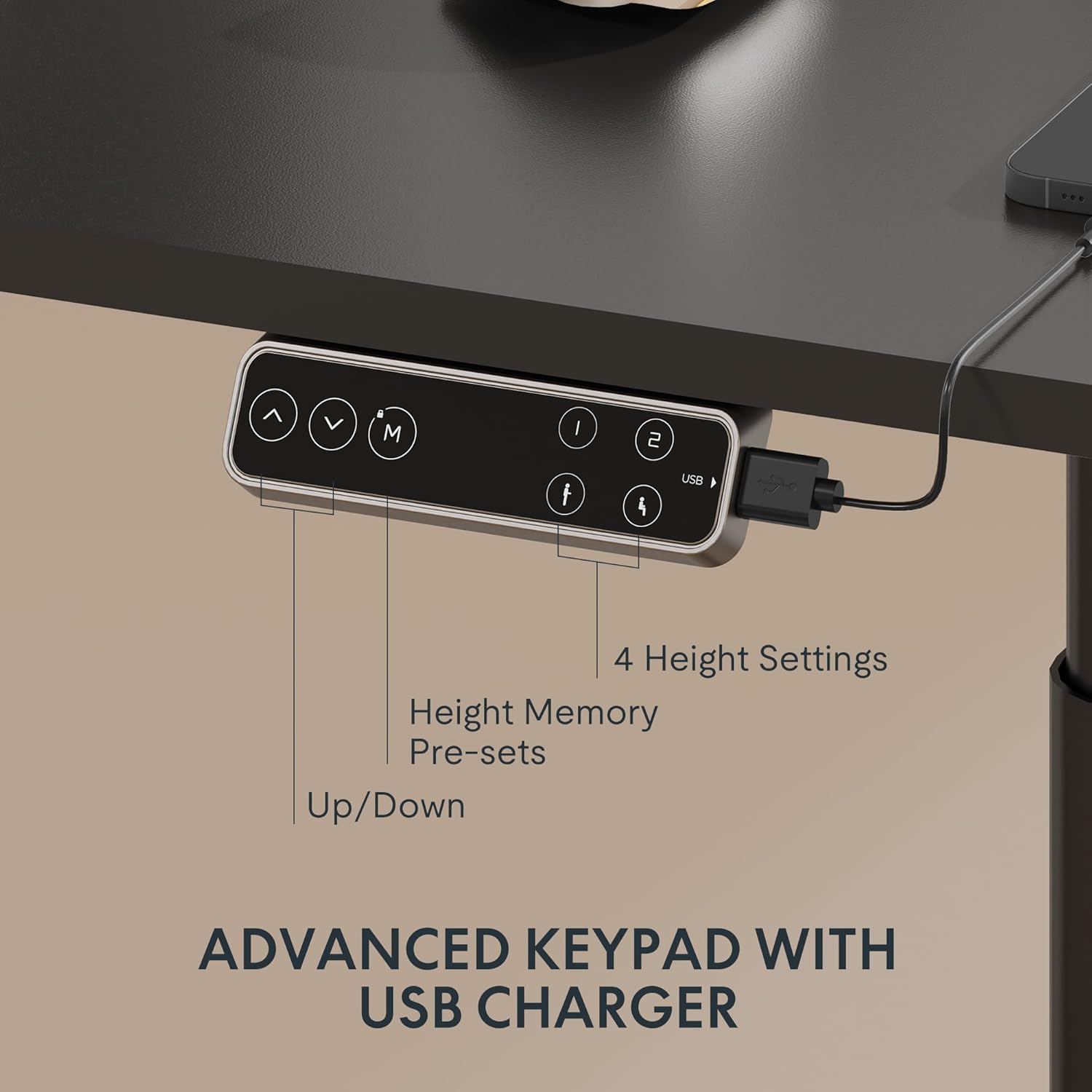
Figure 4: LED Control Panel with memory presets and USB port.
4.3 Dual Motor System
The E6 Pro is equipped with quiet dual motors that operate at less than 45dB, ensuring minimal disturbance in your workspace. These powerful motors can handle up to 330 lbs (150 kg) of weight, providing stable and reliable performance.
4.4 Botsingsbeskermingstelsel
For enhanced safety, the desk features an anti-collision system. If the desk encounters an obstruction during height adjustment, it will automatically stop and reverse slightly to prevent damage or injury. This system is designed to protect both the desk and its surroundings.
5. Spesifikasies
| Kenmerk | Detail |
|---|---|
| Handelsmerk | FLEXISPOT |
| Modelnommer | E8 |
| lessenaar ontwerp | Staande lessenaarraam |
| Been Stages | 3 Stages Oval Leg |
| Hoogteaanpassingsreeks | 23.6" tot 48.8" |
| Motor tipe | Dubbelmotor |
| Gewig kapasiteit | Tot 330 kg (150 lbs) |
| Geraasvlak | Minder as 45dB |
| Beheerpaneel | LED with 4 Memory Presets & USB Port |
| Spesiale kenmerk | Antibotsingstelsel |
| Basis materiaal | Metaal |
| Kleur | Swart raam |
| Vereiste samestelling | Ja |
6. Onderhoud
To ensure the longevity and optimal performance of your FLEXISPOT E6 Pro desk frame, regular maintenance is recommended:
- Skoonmaak: Vee die lessenaar se raam af met 'n sagte, damp lap. Vermy die gebruik van harde chemikalieë of skuurmiddels wat die afwerking kan beskadig.
- Kabelbestuur: Kontroleer en organiseer kabels gereeld om verstrengeling of skade te voorkom, veral tydens hoogteverstellings.
- Bevestigingskontrole: Every few months, inspect all screws and bolts to ensure they are tight. Re-tighten if necessary.
- Gewig verspreiding: Distribute weight evenly across the desktop to prevent undue stress on the frame and motors.
7. Probleemoplossing
If you encounter any issues with your desk frame, please refer to the following common troubleshooting steps:
- Lessenaar beweeg nie: Check all cable connections to ensure they are securely plugged into the control box and power outlet. Verify the power adapter is functioning.
- Ongelyke beweging: Ensure the desk is not overloaded and that weight is evenly distributed. Perform a reset procedure (refer to your specific user manual for reset instructions).
- Foutkodes op vertoon: Consult your user manual for a list of error codes and their corresponding solutions.
- Antibotsingstelsel aktiveer gereeld: Ensure there are no obstructions in the desk's path during movement.
If the problem persists after attempting these steps, please contact FLEXISPOT customer support for further assistance.
8. Waarborg en ondersteuning
FLEXISPOT provides a comprehensive warranty for your peace of mind:
- 5-Year Coverage: Applies to the desk frame and motor.
- 2-Year Coverage: Applies to the control panel and electronics.
For warranty claims, technical support, or any questions regarding your FLEXISPOT E6 Pro desk frame, please visit the official FLEXISPOT webwebwerf of kontak hul kliëntediens direk. Bewaar u aankoopbewys as bewys van aankoop.
9. Produkvideo's
9.1 Why Choose FLEXISPOT E6
Video 1: This official FLEXISPOT video highlights the key features and benefits of the E6 series, including its robust construction and smooth operation.
9.2 Welcome to FLEXISPOT'S Mega Factory
Video 2: An inside look at the FLEXISPOT manufacturing facility, showcasing the precision and quality control involved in producing their products.