
1. Inleiding
This manual provides comprehensive instructions for the installation, operation, and maintenance of your SCS Sentinel MVE0100 swing gate opener and the AAA0045 wireless coding keypad. This system is designed to automate two-leaf swing gates, offering convenience and enhanced security for your property. Please read this manual carefully before installation and use to ensure proper functioning and safety.
The MVE0100 gate opener is suitable for gates up to 4 meters long and weighing up to 400 kg in total (200 kg maximum per leaf). The AAA0045 wireless keypad provides secure access control with a personal code, featuring a range of 50 meters and sensitive touch keys.
2. Veiligheidsinstruksies
Always prioritize safety during installation, operation, and maintenance. Failure to follow these instructions may result in injury or damage to the equipment.
- Ensure all electrical connections are performed by a qualified professional and comply with local regulations.
- Disconnect power before performing any maintenance or repair work.
- Hou kinders en troeteldiere weg van die hekarea tydens werking.
- Do not attempt to repair damaged components yourself. Contact qualified service personnel.
- Maak seker dat die hekpad vry van obstruksies is voordat u dit gebruik.
- Regularly check safety devices such as photocells and obstacle detection for proper function.
3. Pakketinhoud
Verifieer dat alle komponente in die pakket teenwoordig is:
- SCS Sentinel MVE0100 Gate Opener (2 actuators)
- Beheereenheid
- SCS Sentinel AAA0045 Wireless Keypad
- 2 afstandbeheerders
- Mounting Hardware (brackets, screws, etc.)
- Instructiehandleiding (hierdie dokument)
4. Opstelling en installering
The installation process for the MVE0100 gate opener involves three main steps: mechanical installation, electrical connection, and programming. The AAA0045 keypad offers simple wireless installation.
4.1. Mechanical Installation of the Gate Opener
Securely attach the MVE0100 actuators to your swing gate and gate posts. Ensure proper alignment and clearance for smooth operation. Refer to the detailed diagrams in the separate installation guide for precise measurements and mounting points.
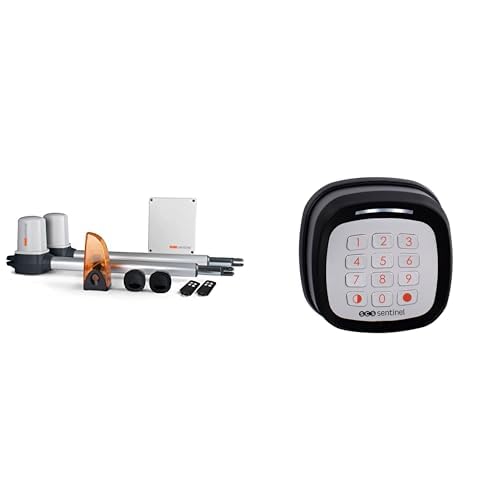
Figuur 1: Example of a gate opener actuator mounted on a gate. This image illustrates the physical component of the MVE0100 system.
4.2. Elektriese aansluiting
Connect the gate opener system to a 24V power supply. All electrical wiring should be done in accordance with the provided wiring diagram and by a qualified electrician to prevent electrical hazards and ensure correct functionality. Connect the control unit, actuators, and any optional accessories like photocells or flashing lights.
4.3. Programming and Synchronization
After mechanical and electrical installation, program the control unit. This involves teaching the system the gate's travel limits and synchronizing the remote controls. Follow the step-by-step instructions in the control unit's specific programming guide. Key programming features include:
- Learning Cycle: The system learns the gate's full opening and closing positions.
- Afstandbeheer-paring: Pair the included remote controls with the control unit.
- Parameter aanpassing: Adjust settings such as opening speed, closing delay, and obstacle sensitivity.
4.4. AAA0045 Wireless Keypad Installation
The AAA0045 wireless keypad is designed for easy surface-mount installation. It operates on 2 CR2032 batteries (not included). Mount the keypad in a convenient location within 50 meters of the gate opener's control unit.
- Insert 2 CR2032 batteries into the keypad.
- Mount the keypad securely to a wall or post using appropriate screws.
- Follow the keypad's specific instructions to program your personal access code and link it to the gate opener's control unit.
5. Bedryfsinstruksies
Your SCS Sentinel gate opener system offers various ways to control your gate.
5.1. Using Remote Controls
Press the designated button on your remote control to activate the gate. A single press typically initiates an open/stop/close cycle. Ensure you are within range (usually up to 50 meters, depending on environmental factors).
5.2. Using the AAA0045 Wireless Keypad
To open the gate using the keypad:
- Enter your personal access code using the sensitive touch keys.
- Press the confirmation key (usually indicated by a checkmark or 'Enter').
- The gate will begin to open.
The keypad supports both total gate opening for vehicles and partial (pedestrian) opening for individuals on foot, bicycles, or scooters. Refer to the keypad's specific manual for programming pedestrian access codes.
5.3. Belangrike kenmerke en funksies
- Total Opening: Both gate leaves open completely.
- Partial (Pedestrian) Opening: One gate leaf opens partially to allow pedestrian access.
- Slowdown at End of Travel: The gate slows down before reaching its fully open or closed position for smoother operation.
- Hindernisopsporing: The system detects obstructions in the gate's path and stops or reverses movement to prevent damage or injury.
- Outomatiese Sluiting: The gate can be programmed to close automatically after a set delay.
- Handmatige vrystelling: In case of power failure, the gate can be manually unlocked and operated. Refer to the control unit manual for the location and operation of the manual release mechanism.
6. Onderhoud
Regular maintenance ensures the longevity and reliable operation of your gate opener system.
- Maandeliks: Check the gate's mechanical components (hinges, wheels, tracks) for wear and tear. Lubricate moving parts as recommended by the gate manufacturer.
- Kwartaalliks: Inspect the gate opener actuators for any signs of damage or loose connections. Clean photocells to ensure they are free from dirt or spiderwebs. Test the obstacle detection safety feature.
- Jaarliks: Have a qualified technician perform a thorough inspection of the entire system, including electrical connections and safety features.
- Keypad Batteries: Replace the CR2032 batteries in the AAA0045 keypad when the indicator light dims or operation becomes unreliable.
7. Probleemoplossing
Indien u probleme met u hekopener ondervind, verwys na die volgende algemene probleme en oplossings:
| Probleem | Moontlike oorsaak | Oplossing |
|---|---|---|
| Gate does not respond to remote/keypad. | No power; remote/keypad batteries low; remote/keypad out of range; remote/keypad not paired. | Check power supply; replace batteries; move closer to the gate; re-pair remote/keypad (refer to programming section). |
| Hek stop of keer onverwags om. | Obstruction detected; safety sensor (photocell) blocked or misaligned. | Clear the gate path; clean and align photocells. |
| Hek maak gedeeltelik oop/toe. | Travel limits not set correctly; mechanical obstruction. | Perform a new learning cycle for travel limits; check for mechanical obstructions. |
| Toetsblok reageer nie. | Low batteries; out of range; incorrect code entered. | Replace CR2032 batteries; move closer to the control unit; ensure correct code entry. |
If the problem persists after attempting these solutions, please contact SCS Sentinel customer support or a qualified technician.
8. Spesifikasies
| Kenmerk | Detail |
|---|---|
| Model (Gate Opener) | MVE0100 |
| Model (Wireless Keypad) | AAA0045 |
| Kragtoevoer | 24 V |
| Maks. Hek Lengte | Up to 4 meters (total for two leaves) |
| Maks. Poortgewig | Up to 400 kg (total for two leaves, 200 kg per leaf) |
| Keypad Range | Tot 50 meter |
| Keypad Batteries | 2 x CR2032 (nie ingesluit nie) |
| ASIN | B0DCPDYRNY |
| Eerste Beskikbare Datum | 9 Augustus 2024 |
9. Waarborg en Ondersteuning
Information regarding the specific warranty period and terms for the SCS Sentinel MVE0100 gate opener and AAA0045 wireless keypad is typically provided with your purchase documentation or on the manufacturer's official webwebwerf. Bewaar asseblief u bewys van aankoop vir waarborgeise.
For technical support, troubleshooting assistance beyond this manual, or to inquire about spare parts, please contact SCS Sentinel customer service. Contact details can usually be found on the product packaging or the official SCS Sentinel webwebwerf.
Note: Spare parts availability information is not provided in the product specifications.