
Welkom
Thank you for choosing the BYTECH BICONIC True Wireless Earbuds. This manual provides essential information on how to set up, operate, maintain, and troubleshoot your new earbuds. Please read this manual thoroughly before use to ensure optimal performance and longevity of your device.
Belangrike veiligheidsinstruksies
- Moenie die oordopjes of laaikas aan uiterste temperature, humiditeit of vloeistowwe blootstel nie.
- Vermy om die toestel te laat val, te stamp of uitmekaar te haal.
- Do not use abrasive cleaners or harsh chemicals to clean the earbuds or case.
- Luister teen matige volumevlakke om gehoorskade te voorkom. Langdurige blootstelling aan harde klanke kan onomkeerbare gehoorverlies veroorsaak.
- Hou buite bereik van kinders en troeteldiere.
- Dispose of the device responsibly according to local regulations. Do not dispose of with household waste.
Wat is ingesluit
Kontroleer asseblief die inhoud van die pakket om seker te maak dat alle items teenwoordig is:
- BYTECH BICONIC True Wireless Earbuds (Left and Right)
- Laaikas
- Laai kabel
- Gebruikershandleiding
Produk verbyview
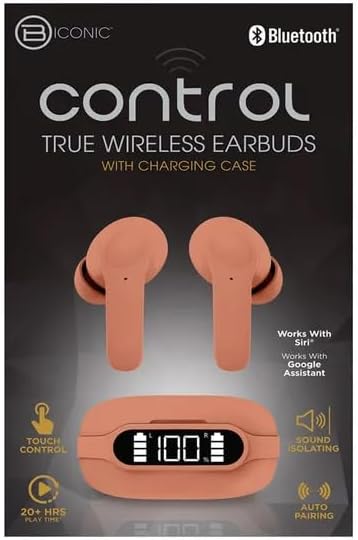
Familiarize yourself with the components of your BYTECH BICONIC True Wireless Earbuds.

Aan die gang
Laai die oordopjes en omhulsel
The BYTECH BICONIC earbuds come with a rechargeable battery in both the earbuds and the charging case. Ensure both are fully charged before first use.
- Plaas die oordopjes in die laaikas en maak seker dat hulle korrek in hul onderskeie gleuwe sit (L vir links, R vir regs).
- Connect the provided charging cable to the charging port on the case and the other end to a USB power source (e.g., computer USB port, wall adapter).
- The digital display on the charging case will show the battery level. Allow sufficient time for a full charge.
- Sodra dit ten volle gelaai is, ontkoppel die laaikabel.
Bluetooth-koppeling
Volg hierdie stappe om jou oorfone met jou Bluetooth-geaktiveerde toestel te koppel:
- Maak seker dat die oorfone gelaai is en in die laaikas is.
- Open the charging case. The earbuds will automatically enter pairing mode, and an indicator light on the earbuds will flash.
- Gaan na die Bluetooth-instellings op jou toestel (slimfoon, tablet, ens.) en skakel Bluetooth aan.
- Soek vir available devices. You should see "BYTECH BICONIC" or a similar name appear in the list.
- Select "BYTECH BICONIC" to connect. Once connected, a voice prompt will confirm the successful pairing, and the indicator lights on the earbuds will stop flashing.
- Die oorfone sal outomaties weer aan die laaste gekoppelde toestel koppel wanneer dit uit die houer gehaal word, mits Bluetooth op die toestel geaktiveer is.
Bedryfsinstruksies
Raak kontroles
The BYTECH BICONIC earbuds feature intuitive touch controls for easy management of your audio and calls.
| Aksie | Funksie |
|---|---|
| Enkele tik (linker/regs oordopje) | Speel/pouse musiek, beantwoord/beëindig oproep |
| Dubbeltik (regteroorknoppie) | Volgende Snit |
| Dubbeltik (linkeroorknoppie) | Vorige Snit |
| Drievoudige tik (linker/regs oordopje) | Aktiveer Stemassistent (Siri/Google Assistent) |
| Langdruk (Linker/Regter Oordop) | Verwerp oproep |
Skakel aan en af
- Krag aan: Die oordopjes sal outomaties aanskakel wanneer dit uit die laaikas verwyder word.
- Skakel af: Plaas die oorfone terug in die laaikas en maak die deksel toe. Hulle sal outomaties afskakel en begin laai.
Onderhoud en versorging
Proper care will extend the life of your BYTECH BICONIC True Wireless Earbuds.
- Skoonmaak: Use a soft, dry, lint-free cloth to clean the earbuds and charging case. Do not use liquids or aerosol cleaners.
- Berging: Wanneer dit nie gebruik word nie, bêre die oordopjes altyd in hul laaihouer om hulle te beskerm en gelaai te hou.
- Vermy uiterste toestande: Do not expose the device to extreme heat, cold, or direct sunlight.
- Waterweerstand: These earbuds are not waterproof. Avoid contact with water or excessive moisture.
Probleemoplossing
Indien u enige probleme met u oorfone ondervind, raadpleeg die volgende algemene oplossings:
| Probleem | Oplossing |
|---|---|
| Oorknoppies koppel nie | Maak seker dat die oorfone gelaai is. Skakel Bluetooth op jou toestel af en aan. Vergeet die toestel in Bluetooth-instellings en koppel weer. |
| Slegs een koptelefoon werk | Plaas albei oorfone terug in die laaikas, maak die deksel toe, wag 'n paar sekondes en haal hulle dan weer uit. Maak seker dat albei gelaai is. |
| Geen klank nie | Check volume levels on both your device and the earbuds. Ensure earbuds are properly connected. Try playing different audio. |
| Laaikas laai nie | Maak seker dat die laaikabel stewig aan beide die omhulsel en die kragbron gekoppel is. Probeer 'n ander USB-poort of kragadapter. |
Tegniese spesifikasies
Detailed specifications for your BYTECH BICONIC True Wireless Earbuds:
| Kenmerk | Detail |
|---|---|
| Modelnommer | BC-AU-BE-144-TN |
| Verbindingstegnologie | Draadloos (Bluetooth) |
| Vormfaktor | In-Ear (Intraurales) |
| Kleur | Kafee |
| Spesiale kenmerke | Rechargeable Battery, Touch Control, Sound Isolating, Auto Pairing |
| Ingesluit komponente | Kabel |
| Estimated Play Time | 20+ Hours (with charging case) |
Waarborginligting en kliëntediens
BYTECH products are designed and manufactured to the highest quality standards. For information regarding warranty coverage, please refer to the warranty card included with your purchase or visit the official BYTECH webwebwerf.
If you require further assistance or have questions not covered in this manual, please contact BYTECH customer support through their official channels. Please have your model number (BC-AU-BE-144-TN) and purchase details ready when contacting support.