
1. Inleiding
The Relaxweex Magic Christmas Wand Wireless Remote Control Outlet provides a convenient way to control your indoor and outdoor lighting. This kit includes a wireless wand remote and an AC outlet receiver, allowing you to turn lights on and off from a distance of up to 100 feet. It is designed for ease of use and versatility, suitable for various decorative lighting applications.
2. Veiligheidsinligting
- Lees alle instruksies voor gebruik.
- Ensure the product is used within its specified electrical ratings (1 Amps, 220 Volts).
- Do not immerse the receiver in water. The product is water-resistant for outdoor use, but not waterproof.
- Keep the wand remote away from excessive heat or direct sunlight.
- Use only the specified battery type (2 AA batteries) for the wand remote. Do not mix old and new batteries or different types of batteries.
- If the wand becomes excessively hot or emits a burning smell, immediately remove the batteries and discontinue use. Contact customer support.
- This product is recommended for ages 15 years and up. Adult supervision is advised when children are using the wand.
3. Pakketinhoud
Verifieer dat alle items in jou pakket teenwoordig is:
- 1 x Magic Light Wand remote control
- 1 x AC outlet wall receiver (Two 3-pin Plugs)
- Sealing plugs (for outdoor use)
- Gebruikersgids

Image 3.1: The Magic Christmas Wand remote and the wireless AC outlet receiver.
4. Opstelling
- Install Batteries in the Wand:
Unscrew the battery compartment cover on the wand remote. Insert 2 AA batteries (not included), ensuring correct polarity. Securely replace the cover. - Koppel die ontvanger aan:
Insert the AC outlet receiver into a standard wall socket. For outdoor use, ensure the socket is weather-protected and use the provided sealing plugs for any unused outlets on the receiver. - Connect Your Lights:
Plug your Christmas lights, lamps, or other electrical decorations into the 3-pin outlets on the receiver. - Initial Pairing (Pre-paired):
The wand remote and receiver are typically pre-paired from the factory. If they do not respond, ensure batteries are correctly installed and the receiver is powered. No manual pairing steps are usually required.

Image 4.1: Visual guide for plugging the receiver into a socket and connecting lights.
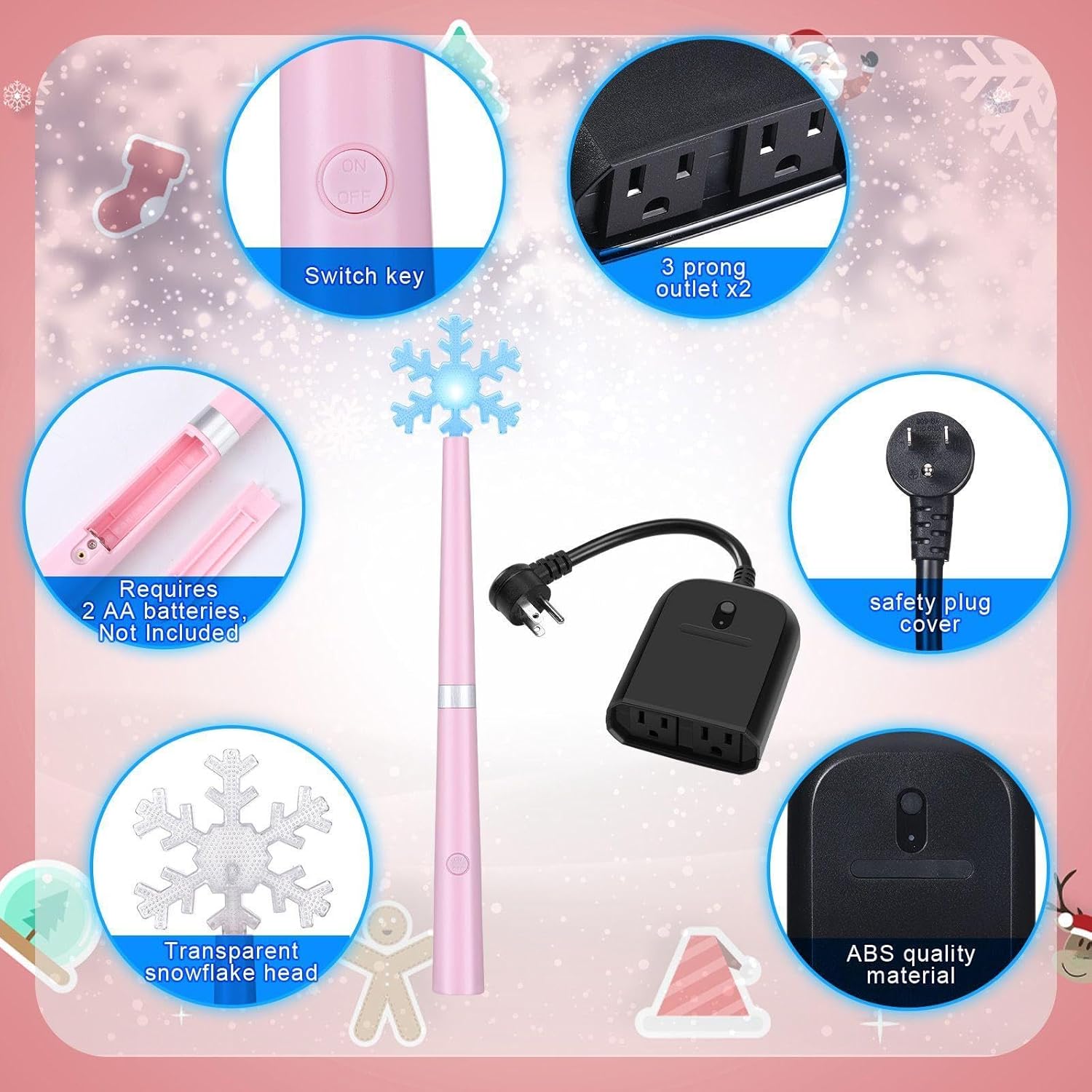
Beeld 4.2: Gedetailleerd view of the wand's battery compartment and the receiver's outlets.
Video 4.1: 'n Oorview of the product components, battery installation in the wand, and connecting the receiver to a power source and lights.
5. Bedryfsinstruksies
- Wireless Control with the Wand:
Point the wand remote towards the receiver and press the button. The wand will light up and play a magical sound, and your connected lights will turn on or off. The wand operates up to 100 feet away. - Manual Control on the Receiver:
The receiver also features a manual ON/OFF button. Press this button to toggle the connected lights directly at the outlet. - Klankbeheer:
To turn off the magical sound effect on the wand, press and hold the wand's button for approximately 3 seconds. Repeat the action to re-enable the sound.

Image 5.1: Demonstrates both manual control via the receiver button and wireless control using the wand remote.

Image 5.2: A child demonstrating the use of the wand remote to activate Christmas tree lights.

Beeld 5.3: Voorbeeldamples of multiple uses for the remote control outlet, including indoor and outdoor light strings.
6. Onderhoud
- Battery vervanging: Replace the 2 AA batteries in the wand remote when the light dims or the remote's range decreases.
- Skoonmaak: Wipe the wand and receiver with a soft, dry cloth. Do not use abrasive cleaners or immerse in liquids.
- Berging: Store the product in a cool, dry place when not in use. Remove batteries from the wand if storing for extended periods to prevent leakage.
- Waterweerstand: The receiver is designed for indoor/outdoor use and is water-resistant (IP20 rating). Ensure sealing plugs are used for unused outlets when outdoors. Protect from heavy rain or direct water spray.
7. Probleemoplossing
| Probleem | Moontlike oorsaak | Oplossing |
|---|---|---|
| Lights do not turn on/off with wand. | Low or dead batteries in wand; receiver unplugged; lights unplugged from receiver; wand out of range. | Replace wand batteries; ensure receiver is plugged in and powered; ensure lights are securely plugged into receiver; move closer to receiver (within 100 ft). |
| Wand becomes hot or smells burnt. | Faulty batteries; internal short circuit. | Immediately remove batteries. Discontinue use and contact customer support. |
| No sound from wand. | Sound feature is turned off. | Press and hold the wand button for 3 seconds to re-enable sound. |
| Lights do not respond to manual button on receiver. | Receiver unplugged; lights unplugged from receiver. | Ensure receiver is plugged in and powered; ensure lights are securely plugged into receiver. |
8. Spesifikasies
- Handelsmerk: Ontspanweek
- Model: Two 3-pin Plugs
- ASIN: B0DCBMWWMY
- Huidige gradering: 1 Amps
- Bedryfsvoltage: 220 Volt
- Kontak Tipe: Normaalweg oop
- Connector Tipe: Prop in
- Materiaal: Akrielnitril Butadieen Styreen (ABS)
- Kringtipe: 2-rigting
- Internasionale Beskermingsgradering: IP20
- Aantal posisies: 2
- Batteries (Wand): 2 AA-batterye benodig (nie ingesluit nie)
- Vervaardiger aanbevole ouderdom: 15 jaar en ouer
- Eerste datum beskikbaar: 6 Augustus 2024
9. Waarborg en Ondersteuning
For warranty information or technical support, please refer to the contact details provided with your purchase or visit the official Relaxweex webwebwerf. Bewaar u bewys van aankoop vir enige waarborgeise.