
1. Inleiding
Dankie vir die aankoopasing the Paladone Gudetama Icon Light. This flexible rubber egg 3D lamp is designed to provide a soft, ambient light. Please read this manual carefully to ensure proper setup, operation, and maintenance of your product.

The Paladone Gudetama Icon Light in its off state, positioned on a shelf. This image illustrates the product's appearance when not in use.
2. Veiligheidsinligting
- Hierdie produk is slegs bedoel vir binnenshuise gebruik.
- Moenie die lig aan water of oormatige vog blootstel nie.
- Hou buite bereik van klein kinders. Dit is nie 'n speelding nie.
- Use only the specified battery type (3x AAA batteries, not included).
- Moenie ou en nuwe batterye, of verskillende tipes batterye meng nie.
- Verwyder batterye as die produk nie vir 'n lang tydperk gebruik word nie.
- Gooi gebruikte batterye verantwoordelik volgens plaaslike regulasies weg.
3. Opstelling
3.1 Battery installasie
- Locate the battery compartment on the underside of the Gudetama Icon Light.
- Maak die batteryvakdeksel oop.
- Insert 3x AAA batteries, ensuring correct polarity (+/-) as indicated inside the compartment.
- Maak die batterykompartement se deksel stewig toe.
3.2 Plasing
Place the Gudetama Icon Light on a flat, stable surface. Ensure it is not near heat sources or in direct sunlight, which could affect its material or battery life.

The Gudetama Icon Light placed on a white shelf, ready for use. This image demonstrates a typical placement for the product.
4. Bedryfsinstruksies
4.1 Turning On/Off and Adjusting Brightness
The Gudetama Icon Light features a touch-sensitive activation. To operate:
- Om aan te sit: Gently press down on the top of the Gudetama figure. The light will illuminate at its lowest brightness setting.
- Om helderheid aan te pas: Press down on the Gudetama figure again to cycle through different brightness levels. The light has multiple intensity settings.
- Om af te sit: Continue pressing until the light turns off.

A hand is shown pressing the top of the Gudetama Icon Light, demonstrating the touch activation method to turn the light on or adjust its brightness.
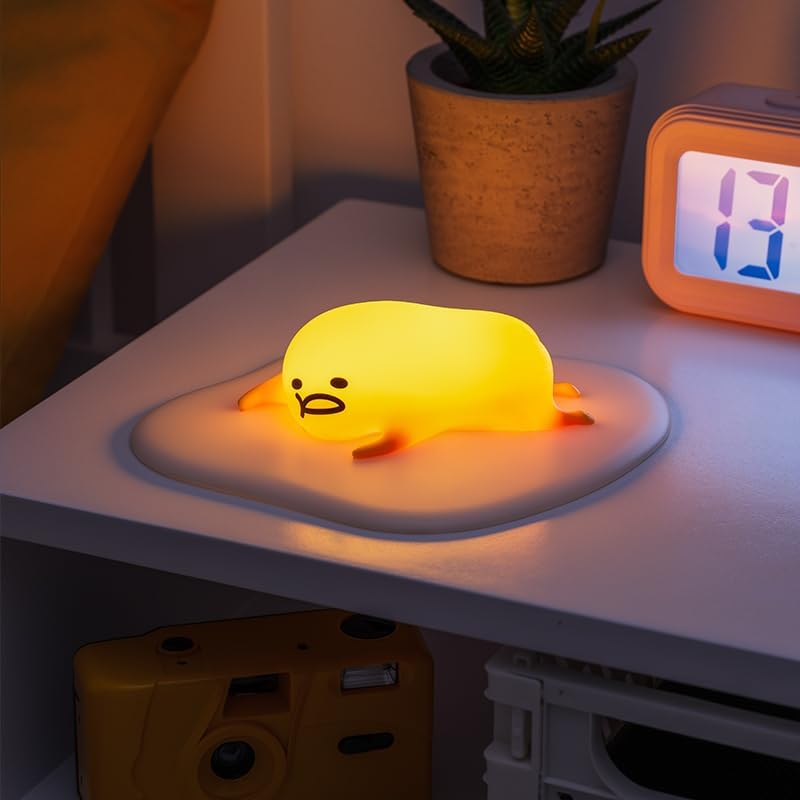
The Gudetama Icon Light fully illuminated, emitting a soft yellow glow. This image shows the product in its operational state.
5. Onderhoud
5.1 Skoonmaak
To clean the Gudetama Icon Light, gently wipe it with a soft, dry cloth. Do not use abrasive cleaners, solvents, or immerse the product in water.
5.2 Batteryvervanging
When the light dims or stops functioning, it is time to replace the batteries. Follow the battery installation steps in Section 3.1.
6. Probleemoplossing
- Lig gaan nie aan nie:
- Maak seker dat batterye korrek met die korrekte polariteit geplaas is.
- Vervang met vars AAA-batterye.
- Lig flikker of is dof:
- Vervang met vars AAA-batterye.
- Touch sensor is unresponsive:
- Ensure your hand is clean and dry.
- Vervang batterye as hulle laag is.
7. Spesifikasies
| Modelnommer | 12897 |
| Afmetings (D x B x H) | 15.9D x 18W x 4.4H sentimeter |
| Item gewig | 0.21 kilogram |
| Kragbron | Battery Powered (3x AAA, not included) |
| Ligbrontipe | LED |
| Beheer metode | Raak / Druk Knoppie |
| Materiaal | Silicone / Rubber |
| Binne/buiteluggebruik | Binneshuise |
8. Waarborg en Ondersteuning
This product is covered by a standard manufacturer's warranty. For specific warranty details, please refer to the packaging or contact your retailer. If you encounter any issues not covered in the troubleshooting section, please contact Paladone customer support through their official website or your point of purchase for assistance.
Vervaardiger: Paladone