
Inleiding
This manual provides instructions for the safe and effective use of your Ashfly Portable Handheld Kids Microscope. Please read this manual thoroughly before operating the device and retain it for future reference.
The Ashfly Portable Handheld Kids Microscope is designed to introduce young scientists to the microscopic world. Featuring a 2-inch LCD screen and 200x magnification, it allows for real-time observation of small objects.
Pakketinhoud
Verifieer dat al die items wat hieronder gelys word, in u pakket teenwoordig is:
- Ashfly Portable Handheld Kids Microscope
- USB-laaikabel
- Lanyard/Wrist Strap
- Gebruikershandleiding (hierdie dokument)

Image: Contents of the Ashfly Portable Handheld Kids Microscope package, including the microscope, USB cable, and wrist strap.
Opstelling
1. Laai die toestel
- Locate the USB charging port on the microscope.
- Connect the provided USB charging cable to the microscope and a compatible USB power source (e.g., computer, wall adapter).
- Die laai-aanwyserliggie sal brand. Wag ongeveer 2-3 uur vir 'n volle lading.
- Sodra dit ten volle gelaai is, ontkoppel die laaikabel.
2. Attaching the Lanyard/Wrist Strap
Thread the lanyard or wrist strap through the designated loop on the microscope to prevent accidental drops during use.
Bedryfsinstruksies
1. Skakel aan/af
- To power on, press and hold the power button (usually marked with a power symbol) for a few seconds until the screen illuminates.
- Om af te skakel, druk en hou die aan/af-knoppie weer in totdat die skerm afskakel.
2. Waarneming van voorwerpe
- Place the object you wish to observe on a flat surface.
- Position the microscope's lens directly over the object.
- Adjust the focus wheel (if present) or move the microscope closer/further from the object until a clear image appears on the 2-inch LCD screen.
- Use the zoom adjustment button (4x zoom) to further magnify the image up to 200x.

Image: A child holding the Ashfly microscope, observing a small object on a surface, demonstrating its handheld operation.
3. Vaslegging van foto's en video's
The microscope supports photo and video functions. It comes with built-in memory for storing observations.
- To take a photo: Press the designated photo capture button (refer to device markings).
- To record a video: Press the designated video record button to start recording, and press it again to stop.

Image: The Ashfly microscope's screen displaying a magnified image of an insect, illustrating its digital imaging capability.
4. Dual-Lens Design
This microscope features a dual-lens design. One side is the digital microscope for recording observations, and the other side is a physical magnifier for quick viewing van voorwerpe.
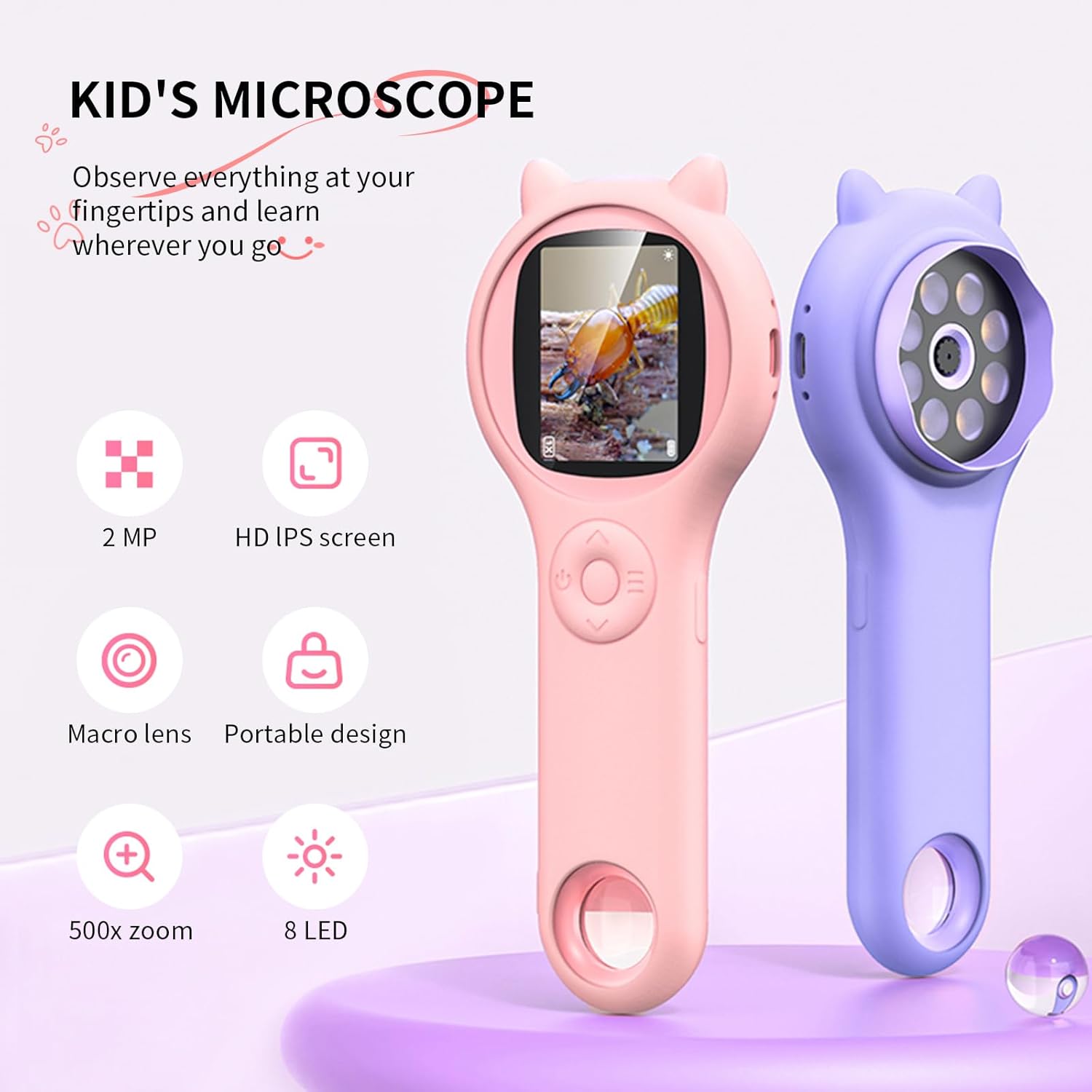
Image: Two Ashfly Kids Microscopes, one pink and one purple, illustrating the compact design and the different lenses/screens on each side.
Onderhoud
- Skoonmaak: Use a soft, dry cloth to clean the exterior of the microscope. For the lens and screen, use a specialized lens cleaning cloth. Do not use abrasive cleaners or solvents.
- Berging: Store the microscope in a cool, dry place away from direct sunlight and extreme temperatures.
- Batterysorg: Om die batterylewe te verleng, vermy om die battery gereeld heeltemal te ontlaai. Laai die toestel gereeld, selfs al word dit nie vir lang tye gebruik nie.
Probleemoplossing
| Probleem | Moontlike oorsaak | Oplossing |
|---|---|---|
| Toestel skakel nie aan nie. | Battery is ontlaai. | Laai die toestel met die meegeleverde USB-kabel. |
| Image on screen is blurry. | Incorrect focus or distance from object. | Adjust the microscope's distance from the object or use the focus wheel (if applicable) until the image is clear. |
| Kan nie foto's/video's neem nie. | Internal memory is full. | Transfer existing photos/videos to a computer to free up space. |
Spesifikasies
| Kenmerk | Detail |
|---|---|
| Model | ASIN B0DBVB3RGT |
| Handelsmerk | Asvlieg |
| Vergroting | Up to 200x (with 4x zoom adjustment) |
| Skerm | 2-inch LCD, 1080P HD digital imaging |
| Ligbron | LED |
| Materiaal | Plastiek |
| Kleur | Pers |
| Kragbron | Battery aangedrewe |
| Objektiewe lens | Achromaties |
Waarborg inligting
Ashfly products are designed for quality and durability. For specific warranty details, please refer to the warranty card included with your product or visit the official Ashfly webwebwerf. Bewaar u aankoopbewys as bewys van aankoop vir waarborgeise.
Kliënte ondersteuning
If you encounter any issues or have questions regarding your Ashfly Portable Handheld Kids Microscope, please contact our customer support team:
- Aanlyn ondersteuning: Besoek die Ashfly Store on Amazon vir algemene vrae en kontakopsies.
- E-pos: Verwys na die produkverpakking of amptelike webwebwerf vir direkte e-posondersteuning.