
Inleiding
Thank you for choosing the Doubc Q13 Wireless Bluetooth 5.3 Earbuds. These earbuds are designed to provide a high-quality audio experience with advanced features such as HiFi stereo sound, ENC noise-cancelling microphones, and IPX7 waterproofing. This manual will guide you through the setup, operation, and maintenance of your new earbuds.

Image: The Doubc Q13 Wireless Bluetooth 5.3 Earbuds in their open charging case, displaying the digital battery indicator.
Pakketinhoud
Kontroleer asseblief die pakket vir die volgende items:
- Doubc Q13 Wireless Earbuds (Left and Right)
- Laaikas
- USB Type-C laaikabel
- Gebruikershandleiding
- Oordoppe (verskeie groottes, tipies S/M/L)
Opstelling
1. Aanvanklike laai
Before first use, fully charge the earbuds and the charging case. Connect the provided USB Type-C cable to the charging port on the case and a power source. The LED display on the charging case will show the battery percentage. 'n Volle lading neem ongeveer 1.5 uur.
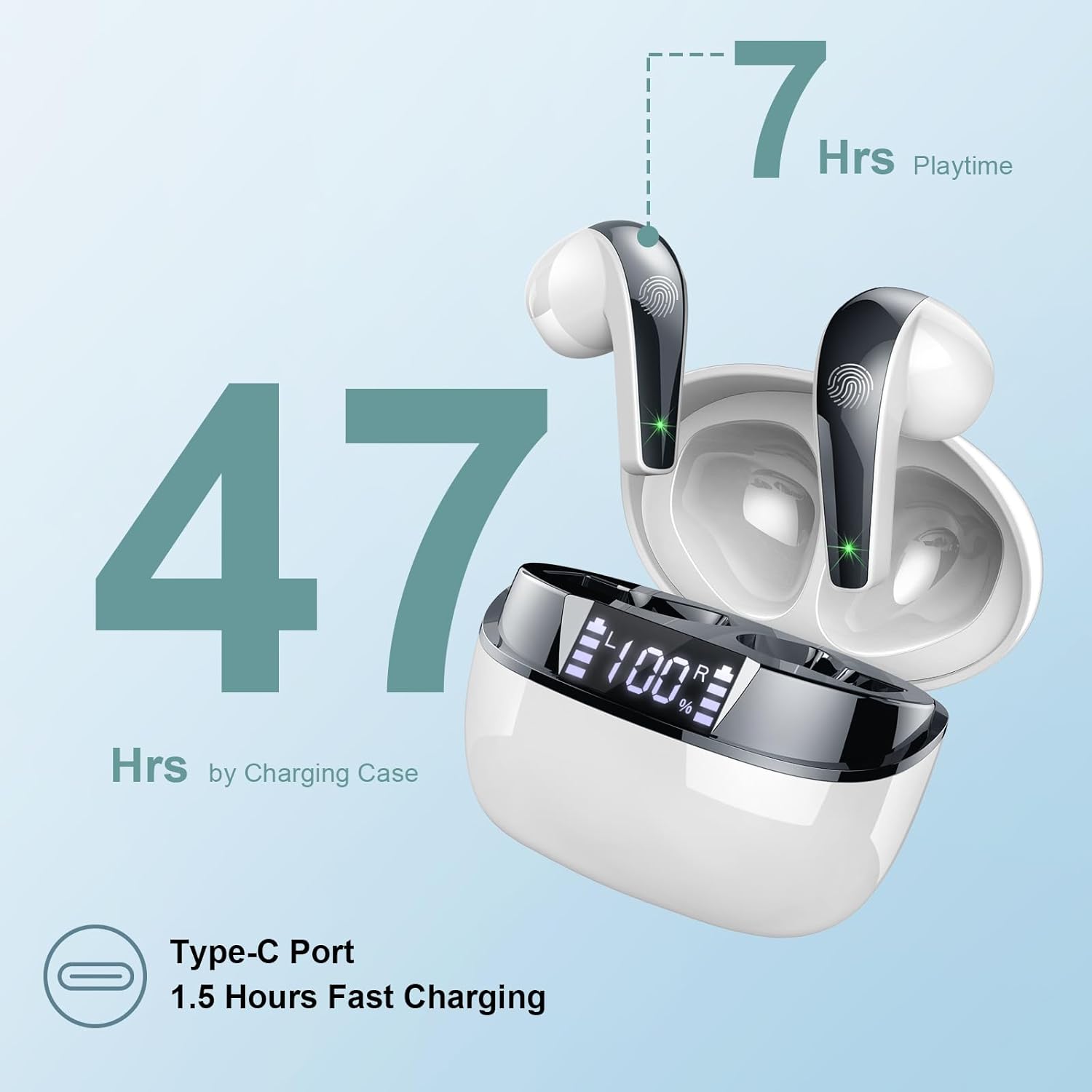
Image: The charging case highlighting 47 hours of total playtime and the Type-C charging port.

Image: A visual representation of the earbuds and charging case, emphasizing 7 hours of music time per charge and 47 hours total with the charging case, along with the dual LED digital display.
2. Koppel met 'n Toestel
- Maak seker dat die oordopjes gelaai is.
- Maak die laaikas oop. Die oorfone sal outomaties in paringsmodus gaan.
- Gaan na die Bluetooth-instellings op jou toestel (slimfoon, tablet, rekenaar).
- Soek vir available devices and select "Q13" from the list.
- Sodra dit gekoppel is, sal jy 'n bevestigingstoon hoor, en die oorfone sal gereed wees vir gebruik.
The Doubc Q13 earbuds feature one-step pairing and wide compatibility with iOS, Android, and Windows devices.

Image: The earbuds in their charging case next to a smartphone displaying Bluetooth settings, showing "Q13" as a discoverable device, illustrating the one-step pairing process.
Bedryfsinstruksies
Raak kontroles
The Doubc Q13 earbuds feature smart touch controls for easy management of music and calls. The touch sensitive area is located on the outer surface of each earbud.

Image: A user wearing an earbud, with icons indicating various touch control functions such as volume adjustment, call management, music playback, and voice assistant activation.
| Aksie | Funksie |
|---|---|
| Enkele tik (L/R) | Speel/Pauseer Musiek, Beantwoord/Beëindig Oproep |
| Dubbeltik (Regs) | Volgende Snit |
| Dubbeltik (links) | Vorige Snit |
| Drievoudige tik (regs) | Volume op |
| Drievoudige tik (links) | Volume af |
| Langdruk (2s) (L/R) | Verwerp oproep, aktiveer stemassistent |
Krag aan/af
- Krag aan: Open the charging case, and the earbuds will automatically power on. Alternatively, long-press the touch area on both earbuds for 3 seconds.
- Skakel af: Place the earbuds back into the charging case and close the lid. They will automatically power off and begin charging. Alternatively, long-press the touch area on both earbuds for 5 seconds.
Onderhoud
Skoonmaak
To ensure optimal performance and charging, regularly clean the charging contacts on both the earbuds and the charging case. Use a cotton swab lightly dampened with alcohol to gently wipe the contacts.

Image: A diagram illustrating the location of charging contacts on the earbuds and inside the charging case, with instructions to clean them if charging issues occur.
Waterweerstand
The earbuds are IPX7 waterproof, meaning they can withstand immersion in water up to 1 meter for 30 minutes. This makes them suitable for workouts and light rain. However, the charging case is not waterproof. Do not expose the charging case to water.

Image: Two earbuds covered in water droplets, visually representing their IPX7 waterproof capability.
Berging
Store the earbuds in their charging case when not in use to protect them and keep them charged. Avoid extreme temperatures and direct sunlight.
Probleemoplossing
Oorfone laai nie
- Maak seker dat die laaikabel stewig aan beide die kas en die kragbron gekoppel is.
- Verify that the charging contacts on both the earbuds and the case are clean and free of debris. Use alcohol to clean them if necessary.
- Check if the charging case itself has sufficient battery charge.
Only One Earbud Has Sound
- Plaas albei oordopjes terug in die laaikas en maak die deksel toe.
- On your phone's Bluetooth settings, manually "forget" or "unpair" the "Q13" device.
- After approximately 10 seconds, open the charging case. The earbuds should automatically re-enter pairing mode.
- Reconnect the earbuds with your phone via Bluetooth.
Image: A diagram illustrating solutions for common issues: cleaning charging contacts for charging problems and re-pairing steps for when only one earbud produces sound.
Oorfone verbind nie
- Maak seker dat Bluetooth op jou toestel geaktiveer is.
- Make sure the earbuds are within the effective range (typically 10 meters) of your device.
- Skakel jou toestel se Bluetooth af en dan weer aan.
- Repeat the pairing process as described in the "Setup" section.
Spesifikasies
| Kenmerk | Detail |
|---|---|
| Modelnommer | V13 |
| Bluetooth weergawe | 5.3 |
| Oudio-bestuurder | 13mm Graphene Audio Driver |
| Frekwensiereeks | 20 Hz - 20,000 XNUMX Hz |
| Speeltyd (oordopjes) | Tot 7 uur (enkele lading) |
| Totale speeltyd (met omhulsel) | Tot 47 uur |
| Laaipoort | USB Tipe-C |
| Laai tyd | Ongeveer 1.5 uur (geval) |
| Waterdigte gradering | IPX7 (slegs oordopjes) |
| Mikrofone | 4 ENC Noise Cancelling Microphones |
| Oordopjesgewig | Ongeveer 3g (elk) |
| Gewig van die laaikas | Ongeveer. 29g |
| Produk afmetings | 2.13 x 1.81 x 1.34 duim (laaikas) |

Beeld: 'n Gedetailleerde view of the 13mm Graphene Audio Driver, emphasizing HiFi Stereo Sound and built-in microphones with noise reduction for HD calling.

Image: A diagram illustrating the benefits of Advanced Bluetooth 5.3 technology, including faster transfer, lower power consumption, more stable connection, and lower latency.

Image: A visual showing the comfortable and lightweight design of the earbuds and charging case, including their dimensions and individual weights (3g per earbud, 29g for the case).
Waarborg en Ondersteuning
The Doubc Q13 Wireless Bluetooth 5.3 Earbuds come with a 3 jaar waarborg, wat gemoedsrus verseker rakende produkgehalte en -prestasie.
For technical support, warranty claims, or any inquiries, please refer to the contact information provided on the product packaging or the official Doubc website. Specific support contact details are not available in this manual.
Belangrike veiligheidsinligting
- Moenie die produk uitmekaar haal of verander nie.
- Hou weg van uiterste temperature en direkte sonlig.
- Avoid exposing the charging case to water.
- Gebruik slegs die meegeleverde laaikabel of 'n gesertifiseerde ekwivalent.
- Gooi die produk verantwoordelik volgens plaaslike regulasies weg.