
Homsee B0DB7WL322
Homsee 63" L-Shaped Electric Standing Desk with Drawers and Shelves
Model: B0DB7WL322 | Brand: Homsee
Inleiding
Thank you for choosing the Homsee 63" L-Shaped Electric Standing Desk. This manual provides essential information for the safe assembly, operation, and maintenance of your new desk. Please read it thoroughly before use and retain it for future reference.
This versatile L-shaped desk is designed to enhance your home office or workspace with its electric height adjustment, ample storage, and durable construction. The reversible design allows for flexible configuration to suit your needs.
Belangrike veiligheidsinligting
- Ensure the desk is fully assembled before use.
- Moenie die maksimum gewigslimiet oorskry nie 330 lbs (150 kg) op die lessenaar.
- Use the height adjustment buttons carefully to avoid collisions with objects or persons.
- Ensure the desk is stable and anchored to the wall if necessary, especially when extended to higher positions.
- Hou kinders en troeteldiere weg van die lessenaar tydens werking.
- Moenie op die lessenaar sit of staan nie.
- Ontkoppel krag voor skoonmaak of instandhouding.
Sleutel kenmerke
- Reversible L-Shape Design: Stel die file cabinet and shelves to either the right or left side.
- Elektriese hoogte verstelling: Smoothly adjust desk height from 29.5" to 43.3" with 3 programmable preset buttons and a collision-avoiding feature.
- Spacious Workspace & Storage: Features a wide desktop, 3 drawers, 2-tier shelves, and 1 compartment behind a door for organized storage.
- Soliede konstruksie: Made of engineered MDF with a sleek, water-resistant, anti-scratch finish and an industrial-grade steel frame.
Opstelling en samestelling
The Homsee L-Shaped Electric Standing Desk comes with detailed installation instructions and all necessary parts and hardware packed in two boxes. We recommend two people for assembly.
Vergadering verbyview Video
Hierdie video bied 'n omvattende oorview of the assembly process for the Homsee Home Office L-Shaped Electric Standing Desk, demonstrating key steps and features.
Detailed Assembly Steps (General)
- Pak uit en identifiseer onderdele: Carefully unpack all components and hardware. Refer to the included parts list to ensure all items are present and undamaged.
- Assemble the Cabinet Base: Follow the instructions to build the base of the L-shaped cabinet, including the drawer and shelf sections.
- Install Drawer Slides and Hinges: Attach the drawer slides to the cabinet panels and hinges to the door as per the manual.
- Konstrueer Laaie: Assemble the drawer boxes and attach the front panels.
- Monteer die lessenaarraam: Attach the electric lifting columns to the desktop frame.
- Connect Desk Frame to Cabinet: Securely attach the adjustable desk frame to the cabinet structure.
- Installeer lessenaarpanele: Place and secure the desktop panels onto the assembled frame and cabinet.
- Verbind elektriese komponente: Connect the motor and control panel cables as instructed.
- Finale aanpassings: Maak seker dat alle skroewe vasgedraai is en dat die lessenaar stabiel is.
Visual Guides for Assembly

Prent: Detailed dimensions of the Homsee L-Shaped Electric Standing Desk, showing overall length, width, and height of both the adjustable and fixed sections.

Prent: Close-up view of the electric lifting column and its connection points, illustrating the sturdy frame design.
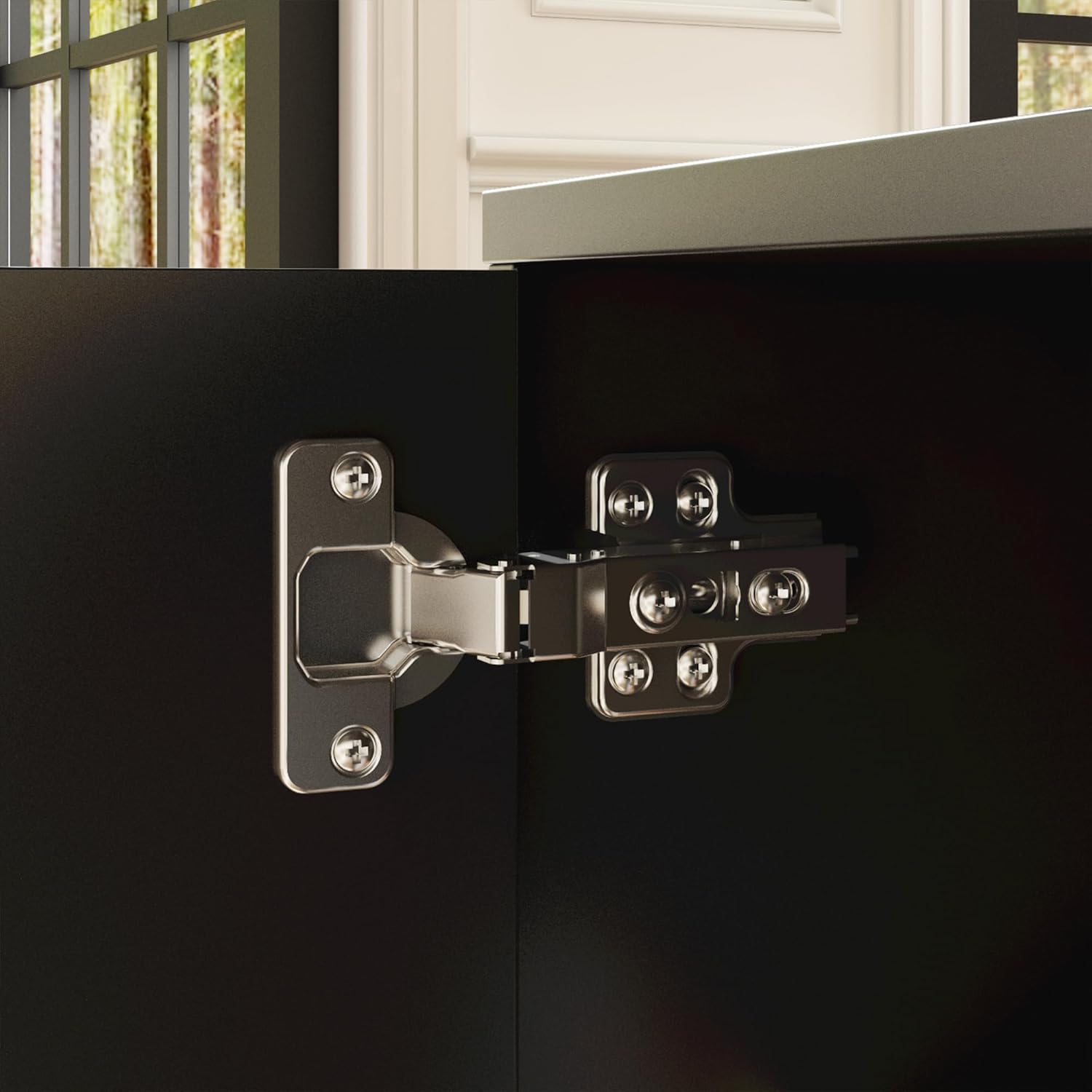
Prent: Gedetailleerd view of a cabinet door hinge, showing its robust construction and attachment to the desk's storage unit.
Bedryfsinstruksies
Elektriese hoogteverstelling
Your Homsee L-Shaped Electric Standing Desk features an intuitive control panel for seamless height adjustments. The desk can be adjusted from 29.5 inches (sitting height) to 43.3 inches (standing height).
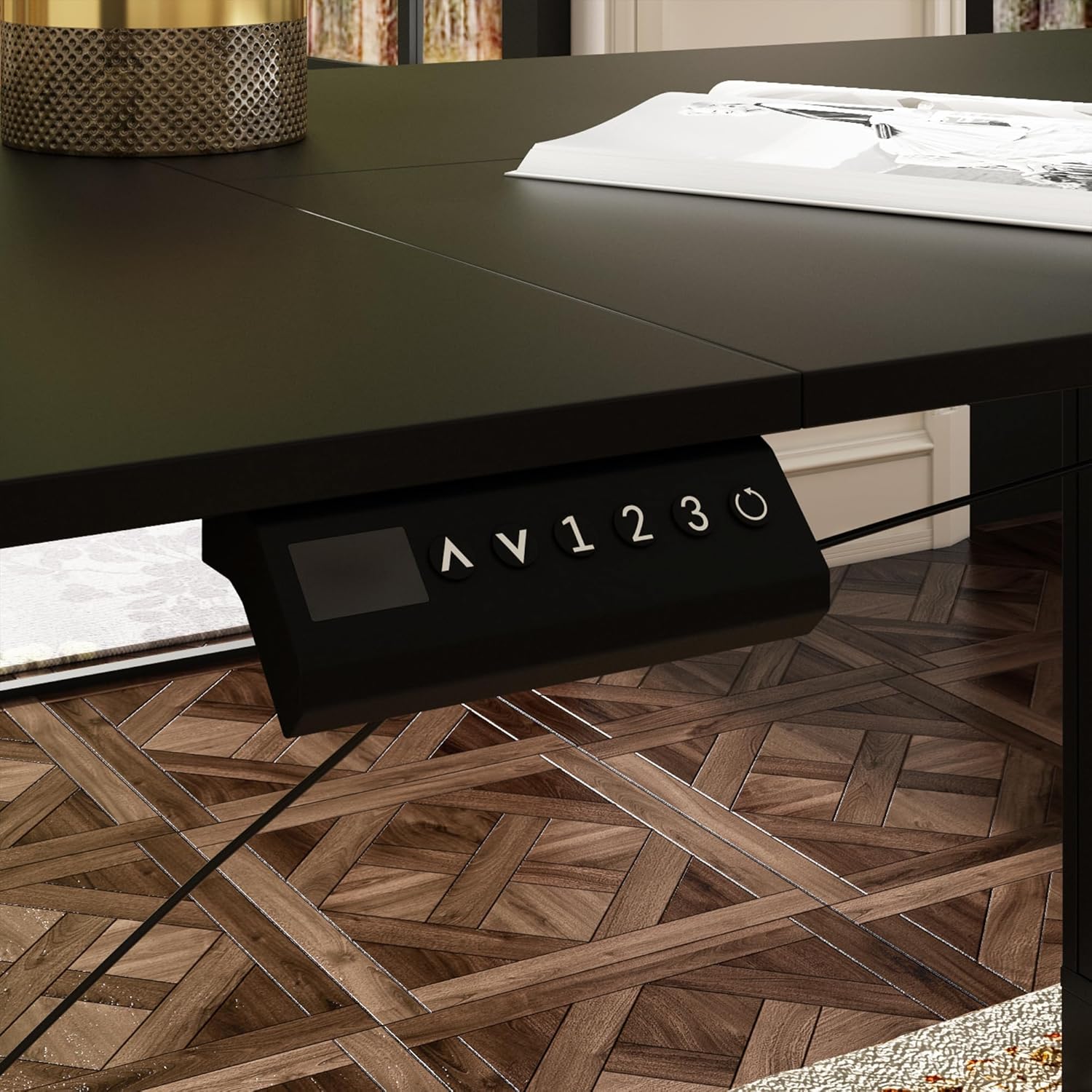
Prent: Close-up of the desk's control panel, showing the up/down arrows, memory presets (1, 2, 3), and a reset button.

Prent: Annotated control panel illustrating the height display, up and down height adjustment buttons, 1-3 gear memory buttons, and the resetting function.
- Hoogte aanpas: Gebruik die Op (^) en Af (v) arrow buttons to manually raise or lower the desk to your desired height. The current height will be displayed on the digital screen.
- Geheuevoorinstellings instel: Om 'n voorkeurhoogte te stoor, verstel die lessenaar na die verlangde vlak en druk dan die M button followed by one of the numbered preset buttons (1, 2 of 3). The height is now saved.
- Gebruik van geheuevoorinstellings: Press a saved numbered preset button (1, 2 of 3) to automatically move the desk to the corresponding saved height.
- Herstel funksie: If the desk encounters an error or needs to be recalibrated, press and hold the Reset (circle arrow) button until the desk moves to its lowest position and resets.
Height Adjustment Demonstration Video
This video demonstrates the electric height adjustment feature, including setting memory presets and the smooth transition between sitting and standing positions.
Bergingskenmerke

Prent: ’n Nabyskoot view of the integrated cabinet, showcasing three drawers, two open shelves, and a closed compartment, providing diverse storage options.

Prent: Illustrates the adjustable shelf within the cabinet, highlighting its flexibility to accommodate items of various sizes.
The cabinet features three smooth-gliding drawers, two open shelves, and a closed compartment, offering versatile storage for office supplies, files, and personal items. The shelves are adjustable to fit different item heights.
Onderhoud
- Skoonmaak: The desk surface is made of engineered MDF with a sleek finish that is water-resistant and anti-scratch. Wipe clean with a soft, damp lap. Vermy harde chemikalieë of skuurmiddels.
- Gereelde tjeks: Kontroleer gereeld alle skroewe en verbindings om te verseker dat hulle styf vas is. Draai weer vas indien nodig.
- Kabelbestuur: Ensure all cables are neatly organized and not pinched or tangled to prevent damage and ensure smooth operation.
Probleemoplossing
- Lessenaar beweeg nie: Check if the power cable is securely plugged into both the desk and the wall outlet. Ensure the control panel cable is properly connected. Try the reset function.
- Ongelyke hoogte: If the desk legs appear uneven, perform a reset by holding the reset button until the desk moves to its lowest position and recalibrates.
- Foutkodes: If the control panel displays an error code, refer to the full product manual for specific code meanings and solutions.
- Geraas tydens werking: A slight motor sound is normal. Excessive or unusual noise may indicate a loose connection or obstruction. Inspect the lifting mechanism and ensure no objects are interfering.
Spesifikasies
| Kenmerk | Detail |
|---|---|
| Handelsmerk | Huissee |
| Model | B0DB7WL322 |
| Vorm | L-vorm |
| Algehele afmetings (L x D x H) | 63"L x 55.1"D x 29.5"H-43.3"H |
| Verstelbare hoogtereeks | 29.5" tot 43.3" |
| Gewig kapasiteit | 330 lbs (150 kg) |
| Materiaal | Engineered Wood (Desktop), Alloy Steel (Base) |
| Kleur | Swart |
| Bergingsopsies | File Cabinet with 3 drawers, 2-tier shelves, 1 enclosed cabinet |
| Hefmeganisme | Elektries |
| Aantal hoogteposisies | 3 (Programmeerbare voorafinstellings) |
| Vergadering benodig | Ja (Aanbeveel 2 persone) |
Waarborg en Ondersteuning
The Homsee L-Shaped Electric Standing Desk comes with a Beperkte waarborg. For specific details regarding warranty coverage, please refer to the warranty card included with your product or contact Homsee customer service.
If you have any questions, require assistance with assembly, or encounter any issues with your product, please do not hesitate to contact Homsee customer support. We are committed to providing solutions and ensuring your satisfaction.
Kontakinligting: Please refer to the contact details provided in your product packaging or visit the official Homsee webwebwerf vir ondersteuning.