
Thomson 145G
Thomson Streaming Stick 4K 145G User Manual
Model: 145G
Inleiding
This user manual provides comprehensive instructions for the setup, operation, maintenance, and troubleshooting of your Thomson Streaming Stick 4K 145G. Please read this manual carefully before using the device to ensure proper functionality and to avoid damage.

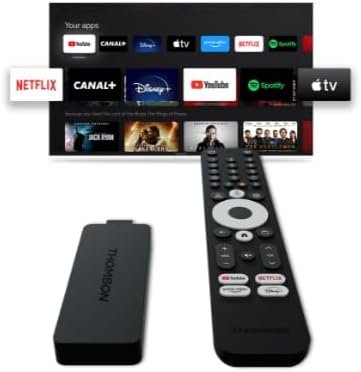
Image: The Thomson Streaming Stick 4K 145G alongside its remote control, illustrating the main components of the product.
Wat is in die boks
Upon unboxing your Thomson Streaming Stick 4K 145G, please verify that all components are present:
- Thomson Streaming Stick 4K 145G
- Afstandbeheer
- Kragadapter
- USB-kabel (vir krag)
- HDMI Extender (optional, may be included)
- Vinnige Begingids
Opstelgids
Follow these steps to set up your Thomson Streaming Stick 4K 145G:
- Connect the Streaming Stick: Plug the Thomson Streaming Stick 4K 145G directly into an available HDMI port on your television. If space is limited, use an HDMI extender if provided.
- Koppel krag: Connect the provided USB cable to the power input port on the streaming stick and then connect the other end to the power adapter. Plug the power adapter into a wall outlet.
- Power On TV and Select Input: Turn on your television and select the HDMI input to which the streaming stick is connected.
- Aanvanklike opstelling: The device will boot up and guide you through the initial setup process on your TV screen. This typically includes:
- Taalkeuse.
- Connecting to your Wi-Fi network.
- Signing in with your Google account (required for Google TV features and app downloads).
- Aanvaarding van terme en voorwaardes.
- Afstandbeheer-paring: The remote control should automatically pair with the device. If not, follow the on-screen instructions or press and hold the Home and Back buttons simultaneously on the remote until pairing is complete.
Beeld: 'n Gedetailleerde view of the Thomson Streaming Stick 4K 145G, highlighting its HDMI connector for TV input and the power input port.
Bedryfsinstruksies
Once set up, you can begin using your Thomson Streaming Stick 4K 145G to access various streaming services and content.
Afstandbeheerfunksies
Maak jouself vertroud met die afstandbeheerknoppies:
- Kragknoppie: Turns the device on or off (standby).
- Google Assistent-knoppie: Aktiveer stemopdragte vir soek en beheer.
- Navigasieblok (Sirkel): Use up, down, left, right to navigate menus.
- OK/Kies-knoppie: Bevestig keuses.
- Terug-knoppie: Keer terug na die vorige skerm.
- Tuisknoppie: Keer terug na die Google TV-tuisskerm.
- Volumeknoppies (+/-): Pas TV-volume aan.
- Demp-knoppie: Mutes TV volume.
- Toepassing-kortpadknoppies: Dedicated buttons for Netflix, Disney+, YouTube, and Prime Video for quick access.

Image: The Thomson Streaming Stick 4K 145G and its remote control, showing the layout of the buttons on the remote.
Navigeer Google TV
The Google TV interface organizes content from your streaming services into a single, personalized experience.
- Tuisskerm: Displays recommended content, installed apps, and your watchlist.
- Toepassings: Access all your installed applications. You can download more from the Google Play Store.
- Biblioteek: Find your purchased movies and TV shows from Google Play.
- Soek: Use the search icon or Google Assistant button to find content by title, genre, or actor.
To stream content, simply select an app or a recommended title from the home screen. Ensure you have an active subscription for paid services.
Onderhoud
Proper maintenance ensures the longevity and optimal performance of your streaming stick.
- Skoonmaak: Use a soft, dry, lint-free cloth to clean the device and remote control. Do not use liquid cleaners or aerosols.
- Ventilasie: Ensure the streaming stick is placed in a well-ventilated area and not covered, as proper airflow prevents overheating.
- Sagteware-opdaterings: The device will automatically check for and install software updates. Ensure it remains connected to the internet for these updates.
- Berging: Wanneer dit nie vir lang tye gebruik word nie, bêre die toestel op 'n koel, droë plek weg van direkte sonlig.
Probleemoplossing
If you encounter issues with your Thomson Streaming Stick 4K 145G, refer to the following common problems and solutions:
| Probleem | Moontlike oorsaak | Oplossing |
|---|---|---|
| Geen krag/Toestel skakel nie aan nie | Power adapter not connected, faulty outlet, or damaged cable. | Maak seker dat die kragadapter stewig in die toestel en 'n werkende muursok ingeprop is. Probeer 'n ander sok. |
| Geen sein op TV nie | Incorrect HDMI input selected, loose HDMI connection, or device not powered on. | Verify the TV is on the correct HDMI input. Re-seat the HDMI cable. Ensure the streaming stick has power. |
| Afstandbeheer reageer nie | Batteries low/dead, remote not paired, or obstruction. | Replace batteries. Re-pair the remote by holding Home and Back buttons. Ensure no obstructions between remote and device. |
| Buffering of swak stroomkwaliteit | Weak Wi-Fi signal, internet speed issues, or network congestion. | Move the device closer to the Wi-Fi router. Restart your router. Check your internet speed. Reduce other network activity. |
| Programme wat vasval of vries | Outdated app, insufficient memory, or software glitch. | Restart the device. Check for app updates in the Google Play Store. Clear app cache (Settings > Apps > [App Name] > Clear cache). |
If the issue persists after trying these solutions, you may need to perform a factory reset (Settings > System > About > Factory reset). Note that a factory reset will erase all data and settings on the device.
Spesifikasies
Key technical specifications for the Thomson Streaming Stick 4K 145G:
- Model Naam: STREAMING STICK 4K THOMSON 145G
- Modelnommer: 145G
- Resolusie: 4K UHD
- Verbinding: Wi-Fi, USB, Ethernet (via adapter), HDMI, IR
- Connector Tipe: HDMI
- Ondersteunde internetdienste: Netflix, Disney+, Prime Video, YouTube, Spotify (and others via Google Play Store)
- Kontroleurstipe: Afstandbeheer
- Vormfaktor: TV-stok
- Kleur: Swart
- Produk afmetings: 1.3 x 9.3 x 3.4 cm
- Gewig: 460 g
- Vervaardiger: Thomson
- Eerste beskikbaar: 8 Augustus 2024
Waarborg en Ondersteuning
For warranty information and technical support, please refer to the documentation included with your purchase or visit the official Thomson support webwebwerf. Bewaar u bewys van aankoop vir waarborgeise.
Vervaardiger: Thomson
Gegarandeerde sagteware-opdaterings tot: Unknown (as per product data)
Ask a question about this manual
Ask about setup, troubleshooting, compatibility, parts, safety, or missing instructions. Manuals+ will review the question and use this page’s manual context to help answer it.