
GOYOJO JT-TP-GY50002
GOYOJO 5000g Precision Electronic Balance User Manual
Model: JT-TP-GY50002
1. Produk verbyview
The GOYOJO Precision Electronic Balance is designed for accurate weighing in various environments, including laboratories, kitchens, and educational settings. It offers a high level of precision and a range of useful functions to simplify weighing tasks.

Image: The GOYOJO Precision Electronic Balance, showing its stainless steel weighing pan and control panel.
Sleutel kenmerke:
- 0.01g Precision Measurement: Ensures detection of even the smallest weight fluctuations, crucial for scientific experiments and quality control.
- Percenttage Funksie: Allows quick and precise weighing of materials relative to each other, ideal for formulations in laboratories or recipes in the kitchen.
- Veelsydige Eenheid Omskakeling: Supports 19 different units (g/kg/ct/T/TAR/dr/PKT/GN/TMR/gsm/tIJ/mo/dwt/oz/lb/tlT/ozt/tIH/%) for diverse applications.
- Tare/Calibration Function: Easily subtracts container weight and allows for accurate calibration.
- Piece Counting Function: Simplifies counting of multiple small items.
- Duursame konstruksie: Features an 185 x 145 mm stainless steel weighing pan, durable ABS casing, and a robust strain gauge sensor for long-term reliability.
- Gebruikersvriendelike ontwerp: Large LCD display for clear readings in various lighting conditions and adjustable feet for precise leveling.
- Wye toepassing: Suitable for laboratories, universities, businesses, industry, jewelers, and kitchen use.

Image: The balance is suitable for various applications including laboratories, industries, kitchens, and schools.

Image: Illustration of the smart load cell technology, highlighting improved efficiency and accuracy with 0.01g readability.

Image: Diagram pointing out key components: adjustable feet, LCD display, power button, counting button, unit conversion button, and tare/calibration button.
2. Opstelling en installering
2.1 Uitpak en plasing
- Carefully remove the balance from its packaging.
- Place the balance on a stable, flat, and vibration-free surface to ensure accurate readings.
- Remove the protective film from the stainless steel weighing pan before first use.
- Adjust the four adjustable feet at the bottom of the balance until the bubble in the level indicator (if present) is centered, ensuring the balance is perfectly level.
2.2 Kragtoevoer
The balance can be powered by either AA batteries or an AC adapter.

Image: The underside of the balance showing the battery compartment and adapter interface.
Using AA Batteries:
- Turn the balance upside down.
- Maak die batteryvakdeksel oop.
- Insert 4 AA batteries (not included), ensuring correct polarity.
- Maak die batterykompartement se deksel toe.
- For battery power, activate the battery control switch (usually a small switch near the battery compartment).
Gebruik van 'n WS-adapter:
- Locate the adapter interface on the side or back of the balance.
- Plug the provided AC adapter into the interface.
- Connect the adapter to a suitable power outlet.
Video: Demonstration of power supply options, initial startup, tare function, unit conversion, and piece counting.
3. Operasie
3.1 Krag aan/af
Druk die AAN/AF button to turn the balance on or off. The display will show "0.00" when ready for use.
3.2 Tarrafunksie
The Tare function allows you to subtract the weight of a container, so only the weight of the contents is measured.
- Place an empty container on the weighing pan. The display will show its weight.
- Druk die TARA/KAL knoppie. Die skerm sal na "0.00" herstel word.
- Add the items you wish to weigh into the container. The display will now show only the net weight of the items.

Image: Visual guide demonstrating how to use the Tare function to zero out the weight of a container.
Refer to the video in Section 2.2 for a visual demonstration of the Tare function.
3.3 Eenheid Omskakeling
The balance supports 19 different weighing units. To switch between units:
- Druk die EENHEID button repeatedly to cycle through the available units: g, kg, ct, T, TAR, dr, PKT, GN, TMR, gsm, tIJ, mo, dwt, oz, lb, tlT, ozt, tIH, %.
- The selected unit will be displayed on the LCD screen.

Image: The balance display illustrating the various units available for conversion.
Refer to the video in Section 2.2 for a visual demonstration of unit conversion.
3.4 Piece Counting Function
This function allows you to count a quantity of items based on a sample weight. Ensure that individual items have a consistent weight (differences within 5%).
- With the balance displaying "0.00", press and hold the PCS button for approximately 3 seconds to enter counting mode.
- The display will show a sample size (e.g., "10", "20", "50", "100"). Press EENHEID om die verlangde s te kiesampdie grootte.
- Place the corresponding number of sample items on the pan (e.g., 10 items if "10" is selected).
- Druk PCS again to confirm the sample. The display will show the number of items.
- You can now add more items, and the balance will count them based on the sample gewig.

Image: The balance display showing the piece counting function in action with paper clips.
Refer to the video in Section 2.2 for a visual demonstration of the Piece Counting function.
3.5 persenttage Funksie
Die persentasietage function allows you to weigh materials as a percentage of a reference quantity.
- Place your reference material on the weighing pan.
- Druk en hou die EENHEID button until "%" appears on the display. The reference material's weight will now be displayed as 100%.
- Add other materials, and their weights will be shown as a percentage of the reference material.

Image: The balance display showing the percentage conversion function, with a beaker indicating 80% of a reference quantity.
3.6 Kalibrasie
To ensure continued accuracy, periodic calibration is recommended. A 5000g calibration weight (not included) is required.
- Ensure the balance is on a stable, level surface and displaying "0.00".
- Druk en hou die TARA/KAL button until "CAL" appears on the display.
- The display will then show the required calibration weight (e.g., "5000.00g").
- Carefully place the 5000g calibration weight in the center of the weighing pan.
- Wait for the display to stabilize and show "PASS" or return to "0.00".
- Remove the calibration weight. The balance is now calibrated.

Image: Step-by-step visual guide for calibrating the electronic balance with a 5000g weight.
4. Onderhoud
- Keep the balance clean. Wipe the weighing pan and casing met 'n sagte, damp lap. Moenie skuurmiddels gebruik of die eenheid in water dompel nie.
- Store the balance in a dry, stable environment away from extreme temperatures, humidity, and direct sunlight.
- Avoid placing heavy objects on the pan when not in use to prevent damage to the sensor.
- If using batteries, remove them if the balance will not be used for an extended period to prevent leakage.
5. Probleemoplossing
| Probleem | Moontlike oorsaak | Oplossing |
|---|---|---|
| Display shows "Lo" or "Err" | Low battery or overload. | Replace batteries or remove excess weight from the pan. |
| Onakkurate lesings | Unstable surface, not level, needs calibration, or air currents. | Place on a stable, level surface. Calibrate the balance. Avoid drafts. |
| Balans skakel nie aan nie | No power, dead batteries, or battery switch off. | Check power adapter connection or replace batteries. Ensure battery control switch is ON if using batteries. |
| Display shows "OUEr" | Oorlading. | Remove some weight from the pan. Do not exceed the maximum capacity of 5000g. |
6. Spesifikasies
| Kenmerk | Detail |
|---|---|
| Modelnommer | JT-TP-GY50002-240727 |
| Handelsmerk | GOYOJO |
| Maksimum kapasiteit | 5000 g (5 kg) |
| Readability / Precision | 0.01g |
| Weeg Eenhede | g, kg, ct, T, TAR, dr, PKT, GN, TMR, gsm, tIJ, mo, dwt, oz, lb, tlT, ozt, tIH, % (19 units) |
| Tipe vertoon | LCD (agterlig) |
| Weegpan Materiaal | Vlekvrye staal |
| Produkafmetings (L x B x H) | 22.5 x 22.5 x 8 cm (8.85 x 8.85 x 3.15 duim) |
| Item gewig | 1.5 kg (1500 gram) |
| Kragbron | 4 x AA batteries (not included) or AC Adapter |
| Spesiale kenmerke | Intelligent, Precise Measurement, Tare, Calibration, Piece Counting, Percentage Funksie |
| Land van oorsprong | China |
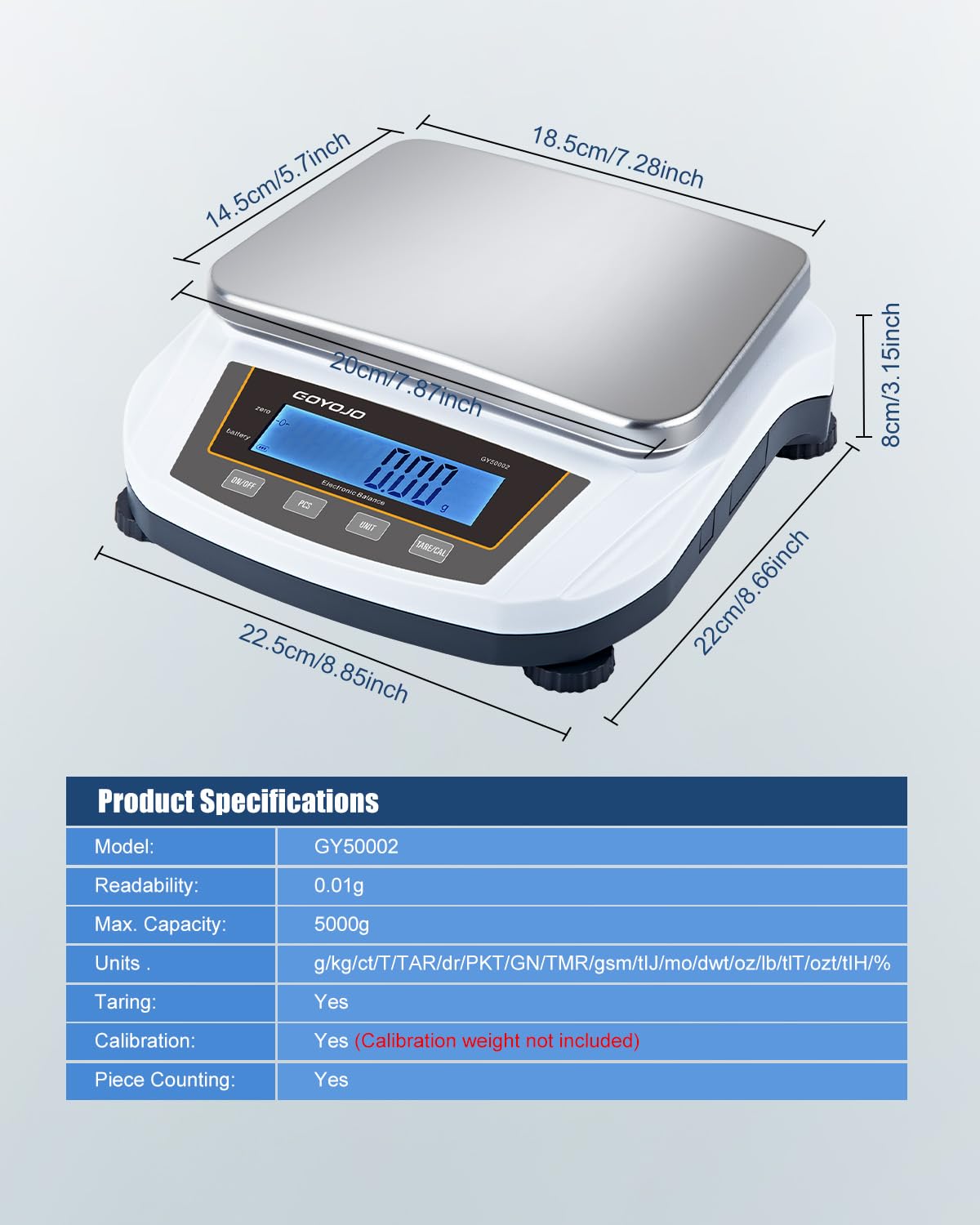
Image: Detailed product specifications including model, readability, capacity, and units.
7. Waarborg en Ondersteuning
GOYOJO offers quality assurance for this product. If you encounter any issues with the balance or charger within one year of purchase, please contact us for assistance or replacement.
For further support, please refer to the contact information provided with your purchase or visit the official GOYOJO webwebwerf.