This manual provides detailed instructions for the proper setup, operation, and maintenance of your Timex UFC Kick TW2V86700 Men's Digital Watch. Please read this manual thoroughly to ensure optimal performance and longevity of your timepiece.
Figure 1: Timex UFC Kick TW2V86700 watch on a wrist, displaying the digital time.
Horlosiekomponente en knoppies
Familiarize yourself with the watch's buttons and display features. While specific button labels may vary, typical digital watch functions include:
MODUS/STEL: Used to cycle through different modes (Time, Stopwatch, Alarm) and to enter setting modes.
BEGIN / STOP: Used to start/stop functions like the stopwatch or to adjust values during setting.
RESET/LAP: Used to reset functions or to view lap times.
LIGHT/INDIGLO: Aktiveer die agtergrondlig vir sigbaarheid in lae ligtoestande.
Figuur 2: Kant view of the watch, highlighting the control buttons on the left and right sides of the case.
Opstelling
Stel tyd en datum in
Druk die MODUS knoppie herhaaldelik totdat die tydinstellingsmodus vertoon word (dikwels aangedui deur flikkerende syfers).
Gebruik die BEGIN/STOP button to adjust the flashing value (e.g., hours, minutes).
Druk die RESET/LAP button to move to the next setting (e.g., minutes, year, month, day).
Herhaal stappe 2 en 3 totdat al die verlangde instellings aangepas is.
Druk die MODUS knoppie om die instellingsmodus te verlaat en terug te keer na die normale tydvertoning.
12/24-uur-formaat
In time setting mode, you may be able to toggle between 12-hour (with AM/PM indicator) and 24-hour formats using the BEGIN/STOP knoppie wanneer die uursyfers flikker.
Bedryfsinstruksies
Gebruik die stophorlosie
Druk die MODUS knoppie totdat die stophorlosiemodus vertoon word.
Druk BEGIN/STOP tydsberekening te begin.
Druk BEGIN/STOP weer om tydsberekening te onderbreek.
Druk RESET/LAP om die stophorlosie na nul terug te stel.
Om rondtetye op te neem, druk RESET/LAP while the stopwatch is running. The lap time will display briefly before returning to the running total.
Stel en gebruik die alarm
Druk die MODUS button until the alarm mode is displayed.
Druk BEGIN/STOP om die uur aan te pas, dan RESET/LAP om na minute te beweeg.
Druk BEGIN/STOP om die notule aan te pas.
Druk MODUS om te bevestig en te verlaat.
To activate/deactivate the alarm, typically a specific button combination or a dedicated button in alarm mode is used. Refer to the on-screen indicators for alarm status.
Using the Indiglo Night-Light
Druk die LIG button (often located on the top left or front of the watch) to illuminate the display for a few seconds.
Onderhoud
Maak jou horlosie skoon
Om jou horlosie skoon te maak, vee dit af met 'n sagte, damp cloth. Avoid using harsh chemicals or abrasive materials, as these can damage the watch case or strap. For plastic straps, mild soap and water can be used. Ensure the watch is dry before storage.
Waterweerstand
The Timex UFC Kick TW2V86700 watch has a water resistance rating of 100 meters (10 ATM). This means it is suitable for swimming, showering, and snorkeling. Do not press any buttons while the watch is submerged in water, as this can compromise the water resistance seal. Avoid exposing the watch to extreme temperature changes.
Battery vervanging
When the display dims or functions become erratic, it may be time to replace the battery. Battery replacement should ideally be performed by a qualified watch technician to ensure proper sealing and maintain water resistance. Refer to the watch back for battery type information (e.g., CR2032).
Figuur 3: Agter view of the watch, showing the stainless steel case back with engravings including water resistance and model number.
Probleemoplossing
Probleem
Moontlike oorsaak
Oplossing
Die skerm is leeg of dof.
Lae of dooie battery.
Vervang die battery.
Tyd is onakkuraat.
Time needs to be reset; watch was exposed to strong magnetic fields.
Reset the time and date according to the "Setting Time and Date" section. Avoid strong magnetic fields.
Knoppies reageer nie.
Horlosie is dalk in 'n geslote modus; interne wanfunksie.
Try pressing all buttons to see if any respond. If not, a battery replacement or professional service may be required.
Water binne-in die horlosie.
Waterbestandheid gekompromitteer (bv. knoppies onder water gedruk, seël beskadig).
Neem die horlosie onmiddellik na 'n gekwalifiseerde tegnikus vir inspeksie en herstelwerk om verdere skade te voorkom.
Spesifikasies
Kenmerk
Detail
Modelnommer
TW2V86700
Handelsmerk
TIMEX
Tipe vertoon
Digitaal
Kyk Bewegingstipe
Kwarts
Materiaal van die saak
Vlekvrye staal
Band Materiaal Tipe
Plastiek
Band kleur
Swart
Tipe sluiting
Gespe
Kristal tipe
Minerale glas
Kas deursnee
51 millimeter
Kasdikte
16.5 millimeter
Bandbreedte
22 millimeter
Item gewig
163 gram
Waterweerstand
100 meter (10 OTM)
Bykomende kenmerke
Second Hand, Indiglo Night-Light
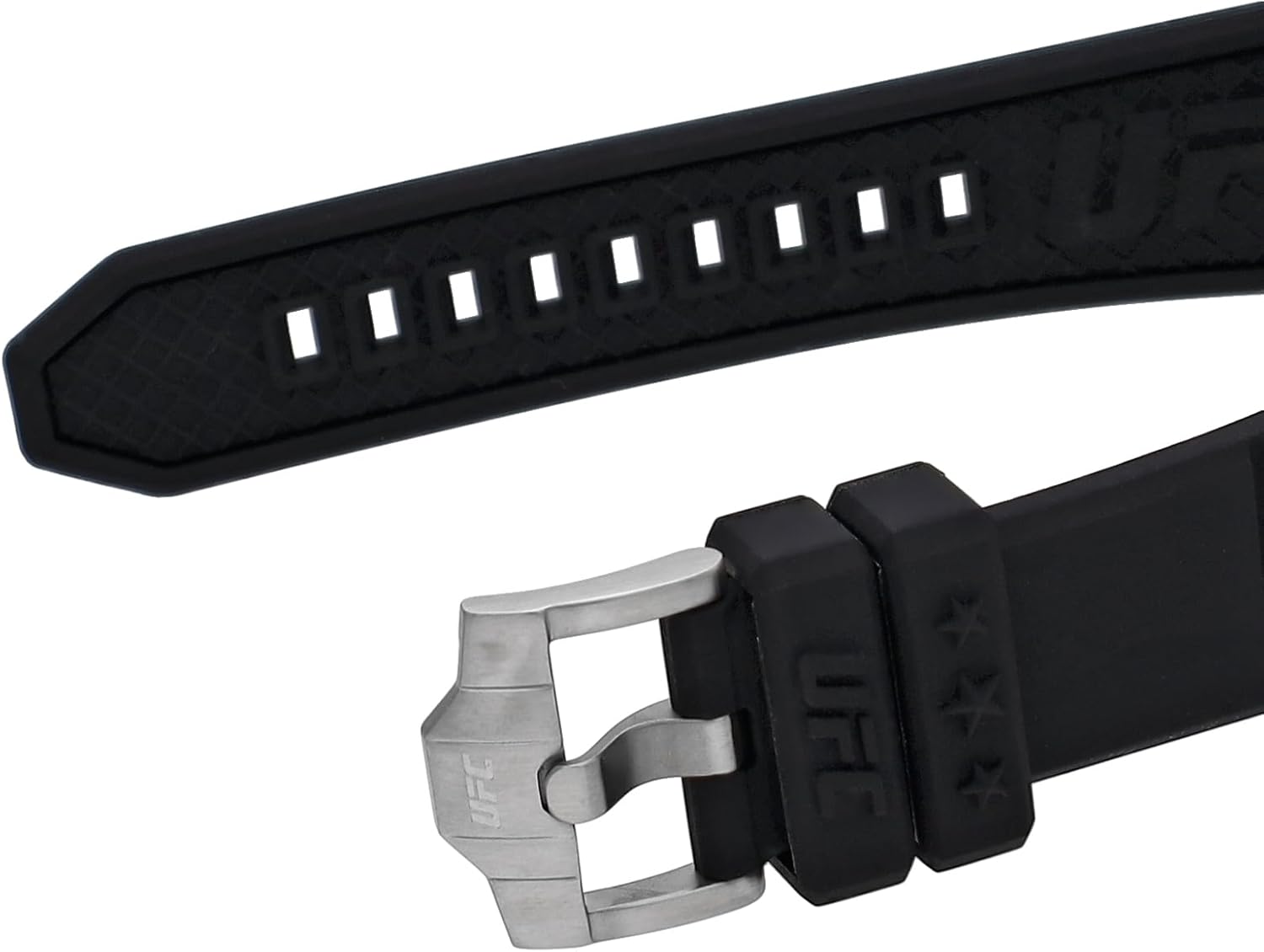
Figure 4: Detail of the watch strap and buckle, featuring the UFC logo.
Waarborg en Ondersteuning
Waarborg inligting
Your Timex watch is covered by a manufacturer's warranty. For specific details regarding the warranty period, coverage, and terms, please refer to the warranty card included with your purchase or visit the official Timex webwebwerf. Bewaar u bewys van aankoop vir waarborgeise.
Kliënte ondersteuning
Should you require assistance with your Timex UFC Kick TW2V86700 watch, including repairs or technical support, please contact Timex customer service. Contact information can typically be found on the official Timex website or in the documentation provided with your watch.