
1. Inleiding
Dankie vir die aankoopasing the Xiaomi Cordless Vacuum Cleaner G20 Lite. This manual provides essential information for the safe and efficient use, maintenance, and troubleshooting of your new vacuum cleaner. Please read this manual thoroughly before first use and keep it for future reference.
2. Veiligheidsinstruksies
To reduce the risk of fire, electric shock, or injury, always follow basic safety precautions when using your vacuum cleaner:
- Lees alle instruksies voordat u die toestel gebruik.
- Moet nie buite of op nat oppervlaktes gebruik nie.
- Moenie toelaat dat dit as speelding gebruik word nie. Noukeurige aandag is nodig wanneer dit deur of naby kinders gebruik word.
- Gebruik slegs soos beskryf in hierdie handleiding. Gebruik slegs aanhegsels wat deur die vervaardiger aanbeveel word.
- Moet nie met beskadigde koord of prop gebruik nie. Indien toestel nie werk soos dit moet nie, laat val, beskadig is, buite gelaat is of in water laat val het, stuur dit terug na 'n dienssentrum.
- Moenie aan koord trek of dra nie, gebruik koord as 'n handvatsel, maak 'n deur op koord toe, of trek koord om skerp kante of hoeke. Moenie die toestel oor die koord laat loop nie. Hou koord weg van verhitte oppervlaktes.
- Moenie die prop uittrek deur aan die koord te trek nie. Om die prop te ontkoppel, gryp die prop vas, nie die koord nie.
- Moenie prop of toestel met nat hande hanteer nie.
- Moenie enige voorwerp in openinge sit nie. Moet nie gebruik met enige opening geblokkeer nie; hou vry van stof, pluis, hare en enigiets wat lugvloei kan verminder.
- Hou hare, los klere, vingers en alle liggaamsdele weg van openinge en bewegende dele.
- Moenie iets optel wat brand of rook nie, soos sigarette, vuurhoutjies of warm as.
- Moet nie gebruik om vlambare of brandbare vloeistowwe, soos petrol, op te tel of in gebiede te gebruik waar hulle teenwoordig kan wees nie.
- Moenie giftige materiaal soos chloorbleikmiddel, ammoniak of dreinreiniger optel nie.
- Moet nie gebruik sonder die stofbeker en/of filters in plek nie.
- Skakel alle kontroles af voordat u die prop ontkoppel.
- Wees ekstra versigtig wanneer jy op trappe skoonmaak.
- Stoor die toestel binnenshuis.
- Moenie die eenheid buite laai nie.
- Gebruik slegs die laaier wat deur die vervaardiger gespesifiseer is.
3. Produk verbyview
The Xiaomi Cordless Vacuum Cleaner G20 Lite is designed for efficient cleaning with its powerful suction and versatile attachments. Key features include:
- Maximum 18,000Pa suction power for thorough cleaning.
- Integrated white LED light on the brush head to illuminate dark areas.
- Gevorderde 5-stage powerful filter system to prevent secondary pollution.
- Large capacity 2200mAh battery providing up to 45 minutes of runtime.
- One-touch dust disposal for easy and hygienic emptying.
- 2-way brush nozzle and extension rod for versatile cleaning.
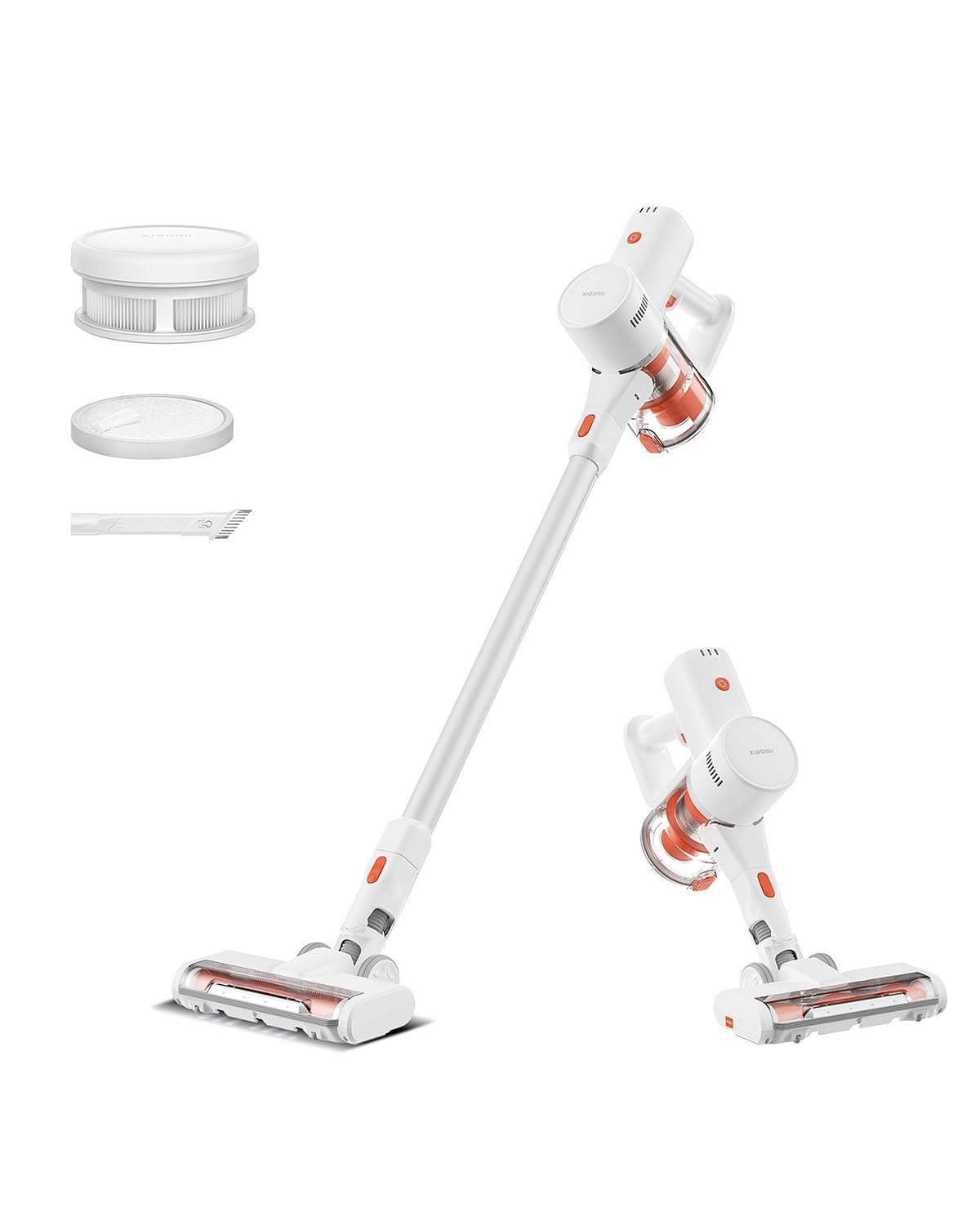
Image: Xiaomi Cordless Vacuum Cleaner G20 Lite, showing the full product assembly.

Image: Illustration of the vacuum cleaner's internal motor, highlighting its 18,000Pa suction power.
Beeld: Deursigtig view of the vacuum cleaner's handle, showing the internal large-capacity battery cells.
4. Opstelling
Volg hierdie stappe om jou stofsuier aanmekaar te sit:
- Pak komponente uit: Carefully remove all parts from the packaging. Ensure all accessories (main unit, extension rod, motorized brush head, 2-way brush nozzle, crevice nozzle, adapter) are present.
- Attach Extension Rod: Connect the extension rod to the main unit until it clicks into place.
- Heg borselkop aan: Connect the desired brush head (motorized brush or 2-way brush nozzle) to the other end of the extension rod. For handheld use, attach the 2-way brush nozzle or crevice nozzle directly to the main unit.
- Laai battery: Before first use, fully charge the vacuum cleaner. Connect the adapter to the charging port on the main unit and plug it into a power outlet. The power indicator lights will show the charging status.

Image: The vacuum cleaner being stored on a wall-mounted charging dock, illustrating convenient storage and charging.
5. Bedryfsinstruksies
Your Xiaomi Cordless Vacuum Cleaner G20 Lite offers versatile cleaning options:
Aan/Af- en Suigmodusse
Press the power button to turn the vacuum on. Press the mode button to cycle through different suction power levels (Standard, Turbo). The power indicator lights will show the current mode and battery level.
Video: A short demonstration of turning the vacuum cleaner on and cycling through its suction modes using the power and mode buttons.
Gebruik aanhegsels
Select the appropriate brush head for your cleaning task:
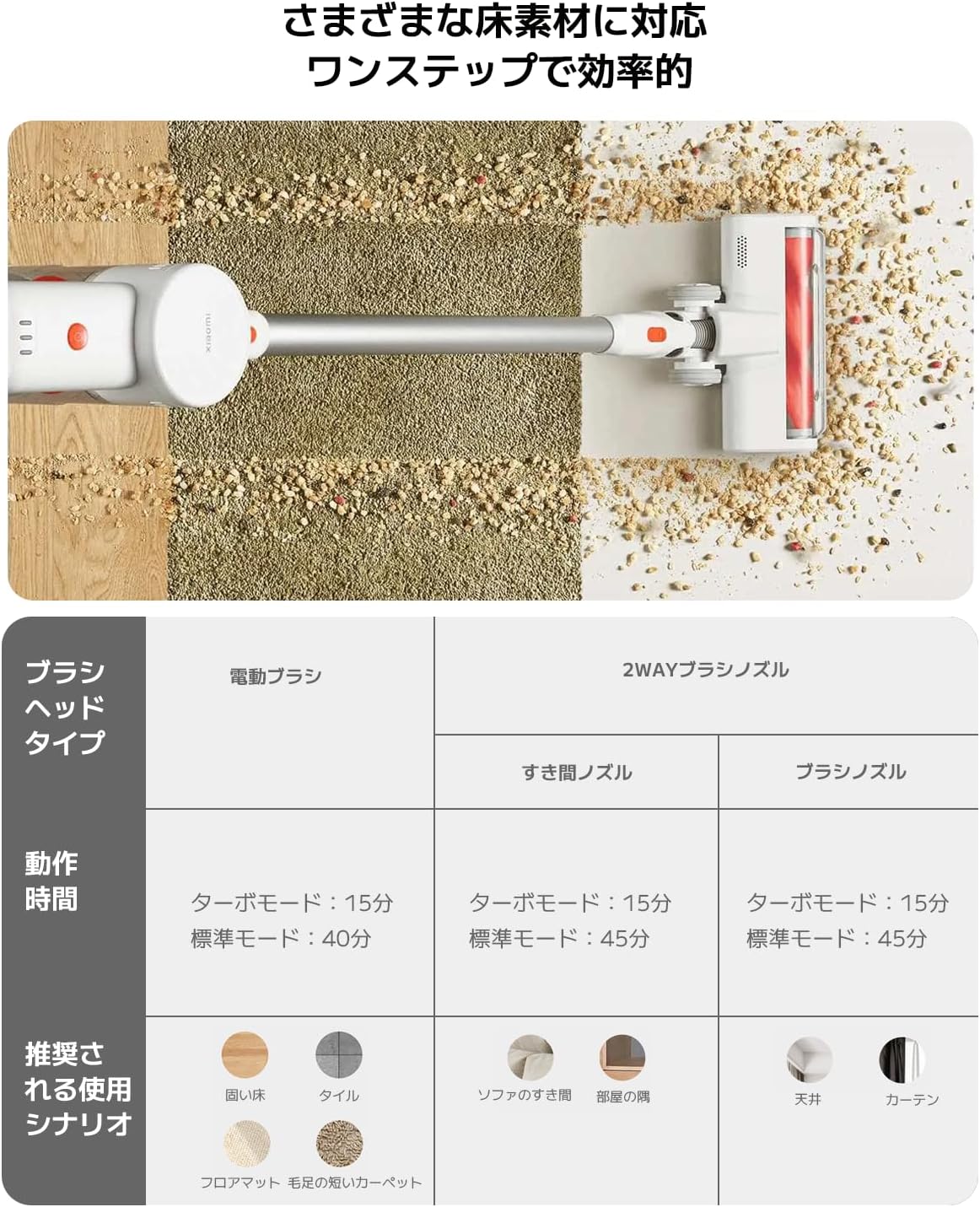
| Borselkoptipe | Operating Time (Standard/Turbo) | Recommended Use Scenario |
|---|---|---|
| Gemotoriseerde borsel | 40 min / 15 min | Hard Floor, Tile, Floor Mat, Short Pile Carpet |
| 2-Way Brush Nozzle (Crevice) | 45 min / 15 min | Sofa Crevices, Room Corners |
| 2-Way Brush Nozzle (Brush) | 45 min / 15 min | Ceiling, Curtains |

Image: Close-up of the vacuum cleaner's motorized brush head, showing the integrated white LED lights illuminating the floor.

Image: A person using the vacuum cleaner with the extension rod to clean high areas, and with a specialized nozzle for narrow gaps and desk surfaces.
6. Onderhoud
Gereelde onderhoud verseker optimale werkverrigting en verleng die lewensduur van jou stofsuier.
Maak die asblik leeg
The vacuum cleaner features a one-touch dust disposal system. Simply press the release button on the dustbin to open the bottom flap and empty collected debris directly into a trash can. Empty the dustbin regularly to maintain suction power.

Image: A hand demonstrating the one-touch dust disposal mechanism, showing debris falling from the dustbin. Also visible is the power indicator light on the handle.
Die skoonmaak van die filters
Die 5-stage powerful filter system requires periodic cleaning. Refer to the diagram below for filter components. Remove the dustbin and separate the filter components. Tap off loose dirt and rinse washable parts under running water. Ensure all filter components are completely dry before reassembling them into the vacuum cleaner.

Beeld: Ontplof view of the vacuum cleaner's main unit, illustrating the components of the 5-stage filter system.
Cleaning Brush Heads
Periodically check brush heads for tangled hair or debris. Use scissors to cut away any tangled hair and remove any obstructions to ensure smooth operation.
7. Probleemoplossing
As jy probleme met jou stofsuier ondervind, raadpleeg die volgende algemene probleme en oplossings:
- Geen krag:
- Kontroleer of die battery gelaai is. Herlaai indien nodig.
- Maak seker dat die kragknoppie stewig ingedruk word.
- Lae suigkrag:
- Maak die asblik leeg.
- Clean the filters. Ensure they are dry before reinstallation.
- Check for blockages in the brush head, extension rod, or main unit.
- Borselkop draai nie:
- Check for tangled hair or debris obstructing the brush roll.
- Ensure the brush head is correctly attached.
- Ongewone geraas:
- Check for any foreign objects caught in the brush head or suction path.
- Maak seker dat alle dele veilig saamgestel is.
Indien die probleem voortduur, kontak asseblief kliëntediens.
8. Spesifikasies
| Spesifikasie | Detail |
|---|---|
| Handelsmerk | Xiaomi |
| Modelnommer | BHR8232US |
| Produk Tipe | Stokskoonmaker |
| Kenmerke | Koordloos |
| Filter tipe | HEPA filter |
| Aanbevole gebruik | Carpet, Hard Floors, Sofa, Curtains, Beds, Tiles, Blankets |
| Kragbron | Battery Powered (Charges via power cord) |
| Kapasiteit | 0.55 liter |
| Kleur | Wit |
| Draagbaar | Ja |
| Binne/buiteluggebruik | Binneshuise |
| Bedryfsvoltage | 21.6 Volt |
| Battery kapasiteit | 215 Watt-hours (2200mAh) |
| Tipe beheerder | Handbeheer |
| Konnektiwiteit | Bluetooth (for potential smart features) |
| Ingesluit komponente | Accessory kit, Adapter |
| Land van oorsprong | China |
| Produk Gewig | 2.4 kilogram |
| Itemafmetings (L x B x H) | 66.2 cm x 32 cm x 13.2 cm |
9. Waarborg en Ondersteuning
Xiaomi products are designed with quality and reliability in mind. For warranty information and customer support, please refer to the details below:
Waarborg inligting
This product comes with a standard manufacturer's warranty. Please retain your proof of purchase for warranty claims. For specific warranty terms and conditions, refer to the documentation included with your product or visit the official Xiaomi webwebwerf.
Kliënte ondersteuning
For technical assistance, troubleshooting, or service inquiries, please contact the Xiaomi Customer Service Center:
- Telefoon: 0120-767-378 (Reception hours: 9:00 - 18:00, excluding year-end and New Year holidays)
- E-pos: diens.jp@ondersteuning.mi.com
Xiaomi Service Center (Akihabara Store)
For in-person support or repairs, you may visit our service center:
- Adres: 4-6-7 Kanda Sakumacho, Chiyoda-ku, Tokyo
- Besigheidsure: 10:00 - 19:00
- Gesluit: Woensdag
- Last Reception: 18:00