
Inleiding
This manual provides comprehensive instructions for the assembly, operation, maintenance, and troubleshooting of your FLEXISPOT 79 x 32 Inch Large Standing Desk. Please read this manual thoroughly before use to ensure proper function and safety. Keep this manual for future reference.

Image: The FLEXISPOT standing desk in an office setting, showcasing its large surface area with multiple monitors and accessories.
Veiligheidsinligting
Always follow assembly instructions carefully. Do not exceed the maximum weight recommendation of 132 pounds to ensure stability and safety. Ensure all connections are secure before operating the desk. Keep children and pets away from the desk during operation.
Pakketinhoud
Verify that all components are present before beginning assembly. Your FLEXISPOT standing desk package typically includes:
- Desktop (79 x 32 inches, may be a splice board design)
- Desk Frame (legs, crossbar, motor)
- Beheerpaneel
- Kragadapter en kabel
- Bekerhouer
- Koptelefoonhaak
- Monteringshardeware (skroewe, gereedskap)
- Instruksie Handleiding
Note: Due to the size and weight, your desk may arrive in multiple packages that could ship and arrive separately.

Image: Illustration showing two separate boxes for the desktop and desk frame, indicating that components may arrive in multiple shipments.
Opstelling en samestelling
Assembly of the FLEXISPOT standing desk is designed to be straightforward. A power drill may be needed for some steps (not included). Follow the detailed instructions provided in the included assembly guide. Ensure all screws are tightened securely, but do not overtighten.
Montagewenke:
- Lê alle onderdele en hardeware uit voordat u begin.
- Ensure the desktop halves (if applicable) are correctly aligned before securing.
- When installing the transmission rod, ensure it slides smoothly into the motor. Tolerances can be tight.
- It is recommended to have a second person assist when flipping the desk over after assembly.
Bedryfsinstruksies
Your FLEXISPOT standing desk features an electric height adjustment system with a multifunctional controller.
Hoogte verstelling:
- The desk height can be adjusted smoothly and quietly from 28.9 inches to 46.5 inches.
- Gebruik die UP en AF buttons on the control panel to manually adjust the desk to your desired height.
Geheuevoorinstellings:
The control panel includes 4 programmable memory presets, allowing you to save and recall your preferred sitting and standing heights with a single touch.
- Verstel die lessenaar tot die verlangde hoogte met die OP/AF-knoppies.
- Druk die M button (or similar memory set button) followed by one of the numbered preset buttons (1, 2, 3, or 4) to save the current height.
- To recall a saved height, simply press the corresponding numbered preset button.
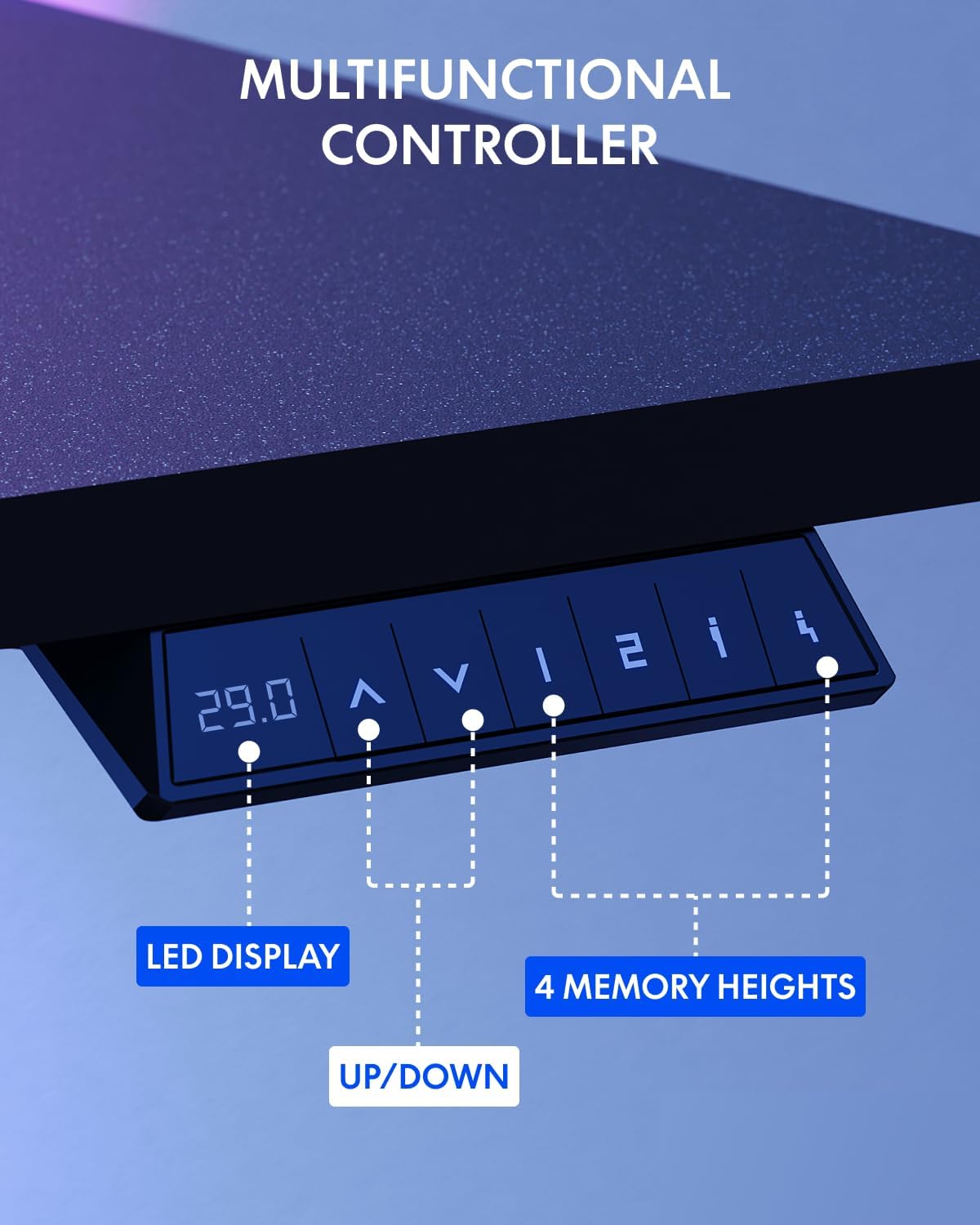
Image: The multifunctional control panel with an LED display and buttons for height adjustment and four memory presets.
Toebehore gebruik:
- The included cup holder can be attached to the side of the desk for convenient beverage access.
- The headphone hook provides a dedicated storage spot for your headphones, keeping your workspace tidy.

Image: Details of the integrated cup holder and headphone hook accessories.
Onderhoud
Gereelde onderhoud verseker die lang lewensduur en optimale prestasie van jou staande lessenaar.
- Skoonmaak: Vee die lessenaar en raam af met 'n sagte, damp lap. Vermy skuurmiddels of harde chemikalieë.
- Gaan verbindings na: Kontroleer gereeld alle skroewe en boute om te verseker dat hulle styf bly. Draai weer vas indien nodig.
- Kabelbestuur: Organize cables to prevent snagging during height adjustments.
Probleemoplossing
If you encounter issues with your FLEXISPOT standing desk, refer to the following common solutions:
| Probleem | Moontlike oorsaak | Oplossing |
|---|---|---|
| Lessenaar beweeg nie | Power cable disconnected, motor error | Check power connections. Unplug and replug the desk. If an error code is displayed, consult customer support. |
| Ongelyke hoogteverstelling | Obstruction, uneven load | Ensure no obstructions are present. Distribute weight evenly on the desktop. Perform a reset if available (refer to specific controller instructions). |
| Lessenaar wiebel | Loose connections, uneven floor | Tighten all assembly screws. Ensure the desk is on a level surface. Adjust foot pads if necessary. |
For persistent issues or error codes not listed, please contact FLEXISPOT customer support.
Spesifikasies
Key specifications for the FLEXISPOT 79 x 32 Inch Large Standing Desk:
- Handelsmerk: FLEXISPOT
- Model: 79 x 32 Inch Large Standing Desk
- Produk afmetings: 32"D x 79"W x 29"H (at minimum height)
- Kleur: Black Frame + Black Top
- Styl: Moderne
- Basis materiaal: Allooi staal
- Top Materiaal Tipe: Gemanipuleerde hout
- Voltooi tipe: Poederbedekt
- Hoogtereeks: 28.9" tot 46.5"
- Maksimum Gewig Aanbeveling: 132 pond
- Spesiale kenmerke: 79" x 32" Large Tabletop, Splice Board, Cup Holder, Headphone Hook, Electric Height Adjustment, 4 Memory Presets
- Vergadering: Vereis
- UPC: 810072869357

Image: Visual representation of the desk's dimensions and adjustable height range.
Waarborg en Ondersteuning
FLEXISPOT provides the following warranty for your standing desk:
- Frame and Mechanical Parts: 5-jaar beperkte waarborg
- Elektronika: 2-jaar beperkte waarborg
For warranty claims, technical assistance, or any questions regarding your product, please contact FLEXISPOT customer support. You can find contact information on the official FLEXISPOT webwebwerf of deur jou aankoopplatform.
Visit the official FLEXISPOT Store for more information and products: FLEXISPOT Store