
Inleiding
Thank you for choosing the Oakcastle HIFI150 Stereo System. This manual provides essential information for setting up, operating, and maintaining your device. Please read it thoroughly before use and retain it for future reference.
Veiligheidsinligting
Om veilige werking te verseker en skade te voorkom, neem asseblief die volgende veiligheidsmaatreëls in ag:
- Moenie die eenheid aan reën, vog of uiterste temperature blootstel nie.
- Moenie die c oopmaak nieasing. Verwys alle diens na gekwalifiseerde personeel.
- Verseker behoorlike ventilasie rondom die eenheid. Moenie enige ventilasie-openinge blokkeer nie.
- Gebruik slegs die kragadapter wat by die eenheid voorsien is.
- Keep the unit away from heat sources such as radiators, stoves, or other heat-producing appliances.
- Maak die eenheid slegs met 'n droë lap skoon.
Pakketinhoud
Kontroleer asseblief dat alle items in u pakket teenwoordig is:
- Oakcastle HIFI150 Stereo System
- Afstandbeheer
- Batterye vir afstandbeheer
- Kragkabel
- Gebruikershandleiding
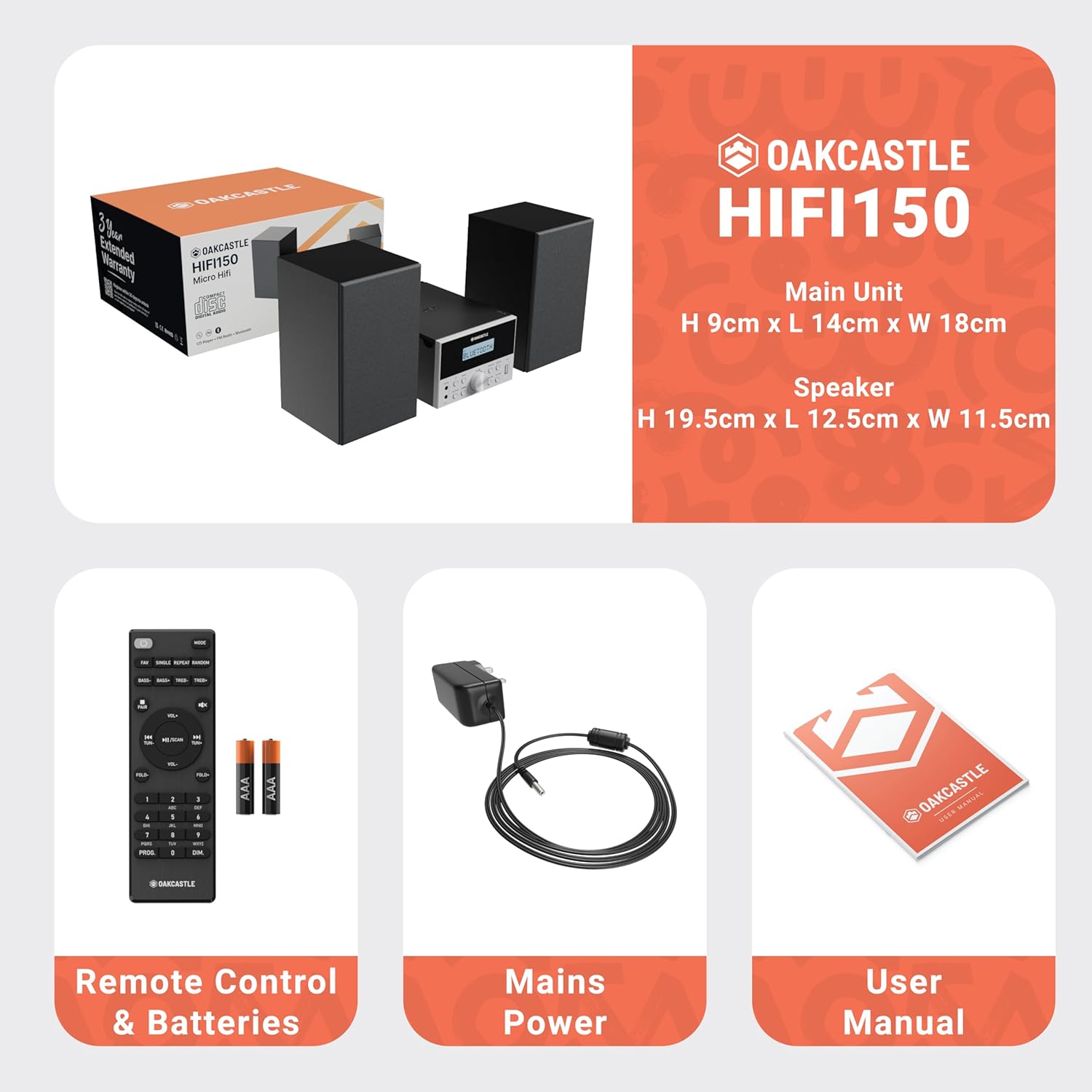
Image: The Oakcastle HIFI150 package contents, showing the main unit, two speakers, remote control with batteries, power adapter, and user manual.
Produk verbyview
The Oakcastle HIFI150 features a compact design with intuitive controls and multiple connectivity options.
Voorpaneelkontroles en skerm

Image: A close-up of the Oakcastle HIFI150 main unit's front panel, highlighting the digital display, central volume knob, mode selection buttons, and front-facing AUX In and USB ports. The display shows 'BLUETOOTH'.
- Vertoon: Shows current mode, track information, and radio frequency.
- Kragknoppie: Skakel die eenheid aan of af.
- Modusknoppie: Cycles through input sources (CD, FM, Bluetooth, AUX, USB).
- Volumeknop: Pas die hoofvolume aan.
- Speel/Pause-knoppie: Controls playback for CD, USB, and Bluetooth.
- Skip/Tune Buttons: Navigates tracks or tunes radio frequencies.
- AUX in hawe: Vir die koppeling van eksterne klanktoestelle via 'n 3.5 mm-kabel.
- USB-poort: Vir die speel van klank files vanaf 'n USB-stasie.
Agterpaneelverbindings
The rear panel includes connections for speakers and power.
Opstelling
1. Koppel die luidsprekers
Connect the included speakers to the speaker terminals on the rear of the main unit. Ensure correct polarity (red to red, black to black) for optimal sound quality.
2. Kragverbinding
Plug the power cable into the AC inlet on the rear of the main unit, then plug the other end into a standard wall outlet.
Bedryfsinstruksies
Krag aan/af
Druk die Krag knoppie op die voorpaneel of afstandbeheerder om die eenheid aan of af te skakel.
Mode seleksie
Druk die Modus button on the front panel or remote control repeatedly to cycle through the available input sources: CD, FM Radio, Bluetooth, AUX, en USB.
Bluetooth werking
- Kies Bluetooth mode using the Mode button. The display will show 'BLUETOOTH' and the unit will enter pairing mode.
- Aktiveer Bluetooth op jou slimfoon of ander Bluetooth-toestel en soek vir beskikbare toestelle.
- Select 'OAKCASTLE HIFI150' from the list. Once connected, the unit will confirm the connection.
- You can now stream audio wirelessly from your device to the HIFI150.
CD speel

Image: The Oakcastle HIFI150 with its top-loading CD player mechanism open, revealing a compact disc placed inside. The display shows 'CD'.
- Maak die deksel van die CD-kompartement oop.
- Place a CD (MP3, CD, WMA, or CD-R format) onto the spindle with the label side facing up.
- Maak die deksel van die CD-kompartement toe.
- Kies CD mode. The unit will read the disc and begin playback automatically.
- Gebruik die Speel/Pause- en Oorslaan-knoppies om terugspeel te beheer.
FM-radio werking

Image: The Oakcastle HIFI150 main unit with its telescopic antenna extended, displaying an FM radio frequency on its screen. The unit is placed between two speakers.
- Kies FM Radio modus.
- Verleng die teleskopiese antenna vir beter ontvangs.
- Outo -skandering: Press and hold the Play/Pause button to automatically scan and save available FM stations (up to 30 presets).
- Handmatige instelling: Use the Skip/Tune buttons to manually adjust the frequency.
- Herroep voorafinstellings: Use the 'FAV/PROG' button on the remote to cycle through saved stations.
USB-weergawe
- Plaas 'n USB -skyf in die USB -poort op die voorpaneel.
- Kies USB mode. The unit will automatically detect and begin playing compatible audio files (MP3, WMA).
- Gebruik die Speel/Pause- en Oorslaan-knoppies om terugspeel te beheer.
AUX-invoer
- Koppel 'n eksterne klanktoestel (bv. MP3-speler, slimfoon) aan die AUX in port on the front panel using a 3.5mm audio cable (not included).
- Kies AUX modus.
- Beheer terugspeel vanaf jou gekoppelde eksterne toestel.
Volumebeheer
Draai die Volumeknop op die voorpaneel of gebruik die VOL +/- knoppies op die afstandbeheerder om die klankvlak aan te pas.
Afstandbeheergebruik
The included remote control provides full functionality for the HIFI150. Ensure batteries are correctly inserted. Point the remote control towards the front panel of the main unit for optimal response.
Onderhoud
Skoonmaak
- Vee die eenheid af met 'n sagte, droë lap.
- Moenie skuurmiddels, wasse of oplosmiddels gebruik nie, aangesien dit die afwerking kan beskadig.
Berging
If the unit is not used for an extended period, unplug it from the power outlet and store it in a cool, dry place.
Probleemoplossing
If you encounter issues with your HIFI150, please refer to the following common problems and solutions:
| Probleem | Moontlike oorsaak | Oplossing |
|---|---|---|
| Geen krag nie | Kragkabel nie gekoppel nie; Kragaansluiting foutief | Maak seker dat die kragkabel stewig gekoppel is; Probeer 'n ander kragaansluiting. |
| Geen klank nie | Volume too low; Incorrect input mode; Speakers not connected | Increase volume; Select correct input mode; Check speaker connections. |
| CD speel nie | CD inserted incorrectly; Disc scratched/dirty; Incorrect format | Reinsert CD correctly; Clean or replace disc; Ensure disc is compatible (MP3, CD, WMA, CD-R). |
| Bluetooth verbind nie | Bluetooth mode not selected; Device too far; Device already connected to another unit | Kies Bluetooth-modus; Beweeg toestel nader; Ontkoppel van ander toestelle en probeer weer. |
| Swak FM-ontvangs | Antenna nie uitgestrek nie; Swak sein | Fully extend the telescopic antenna; Try repositioning the unit. |
Spesifikasies
| Modelnommer | 1000002971 |
| Handelsmerk | Oakcastle |
| Konnektiwiteit | Bluetooth 5.2, USB, AUX |
| Oudio-uitset | 20 W |
| Ondersteunde media | CD, MP3, WMA, CD-R, USB |
| Radio | FM Radio with 30 Presets |
| Versoenbare toestelle | MP3-speler, slimfoon, tablet |
| Kabinetmateriaal | Hout |
| Kleur | Swart |
| Itemafmetings (L x B x H) | 13.7 x 17.8 x 9 cm |
| Item gewig | 2 kilogram |
Waarborg en Ondersteuning
The Oakcastle HIFI150 comes with an extended 3-year warranty. Registration is required to activate the full warranty period. Please refer to the warranty card included in your package or visit the official Oakcastle website for registration details and support information.
For technical assistance or further inquiries, please contact Oakcastle customer support through their official channels.