
Flashpoint R2 Nano
Flashpoint R2 Nano Touchscreen TTL Wireless Flash Trigger User Manual
For Panasonic and Olympus Cameras
1. Inleiding
The Flashpoint R2 Nano Remote is a compact and advanced wireless flash trigger designed for Panasonic and Olympus camera systems. It offers precise control over your flash settings through an intuitive touchscreen interface and OLED display, enhancing your photography experience with seamless integration and reliable performance.
Sleutel kenmerke sluit in:
- Naatlose integrasie: Full TTL compatibility with Olympus/Panasonic cameras for optimal exposure.
- Ultimate Reliability: Stable 2.4 GHz radio frequency with 32 channels, ensuring consistent triggering up to 328 feet (100 meters).
- Hoëspoed-sinchronisasie (HSS): Achieve sync speeds up to 1/8000s for creative effects and motion freezing.
- Intuïtiewe raakskermbeheer: Responsive interface for quick and easy adjustments.
- Versatile Group Control: Manage up to 16 groups (A-F, 0-9) independently for complex lighting setups.
2. Wat is in die boks
Upon unboxing your Flashpoint R2 Nano, please verify that all components are present:
- Flashpoint R2 Nano Remote
- USB-C-laaikabel
- Bergsak
- Gebruikershandleiding (hierdie dokument)
3. Produk verbyview
Familiarize yourself with the components and controls of your R2 Nano remote.
Figuur 3.1: Voorkant en Sykant View of the R2 Nano with Key Components Labeled.
- Raakskerm: Main interface for settings and control.
- Kies Skakel: For navigating menus and adjusting values.
- Krag skakelaar: Skakel die toestel aan/af.
- Toetsknoppie: Aktiveer 'n toetsflits.
- Installing/Detaching Button: Releases the remote from the hotshoe.
- Montagegleuf: Connects to the camera's hotshoe.
- USB-C-laaipoort: For battery charging.

Figure 3.2: R2 Nano Touchscreen Interface Details.
- Channel (CH): Displays the current wireless channel (e.g., CH6).
- Group (A, B, C, etc.): Indicates the active flash groups.
- Uitsetkragvlak: Shows the flash power setting (e.g., +0.0, 1/128).
- Parameters - / +: Touch controls for decreasing/inkrasing-waardes.
- Sinkroniseringmodusse: Icons indicating sync modes (e.g., HSS, front curtain, rear curtain).
- Modelleer L.amp: Icon for modeling lamp status.
- Battery aanwyser: Toon huidige batteryvlak.
4. Opstelling
4.1 Laai die battery
The R2 Nano is equipped with a built-in rechargeable lithium battery. Before first use, fully charge the device.
- Locate the USB-C charging port on the side of the R2 Nano.
- Koppel die meegeleverde USB-C-laaikabel aan die poort.
- Koppel die ander kant van die kabel aan 'n USB-kragadapter (nie ingesluit nie) of 'n rekenaar se USB-poort.
- The battery indicator on the screen will show charging status. A full charge from 0% to 100% typically takes approximately 2 hours.

Figure 4.1: Charging the R2 Nano via USB-C.
4.2 Montering aan kamera
The R2 Nano features an easy-mounting, durable hotshoe design for secure attachment to your camera.
- Maak seker dat jou kamera afgeskakel is.
- Slide the R2 Nano's mounting slot onto your camera's hotshoe.
- Druk liggies totdat dit in plek klik, wat 'n veilige verbinding verseker.
- To detach, press the Installing/Detaching Button and slide the remote off.

Figure 4.2: Mounting the R2 Nano on a Camera Hotshoe.
5. Bedryfsinstruksies
5.1 Aan-/afskakel
- To power on, press and hold the Power Switch until the screen illuminates.
- To power off, press and hold the Power Switch until the screen turns off.
5.2 Navigasie deur die raakskerm-koppelvlak
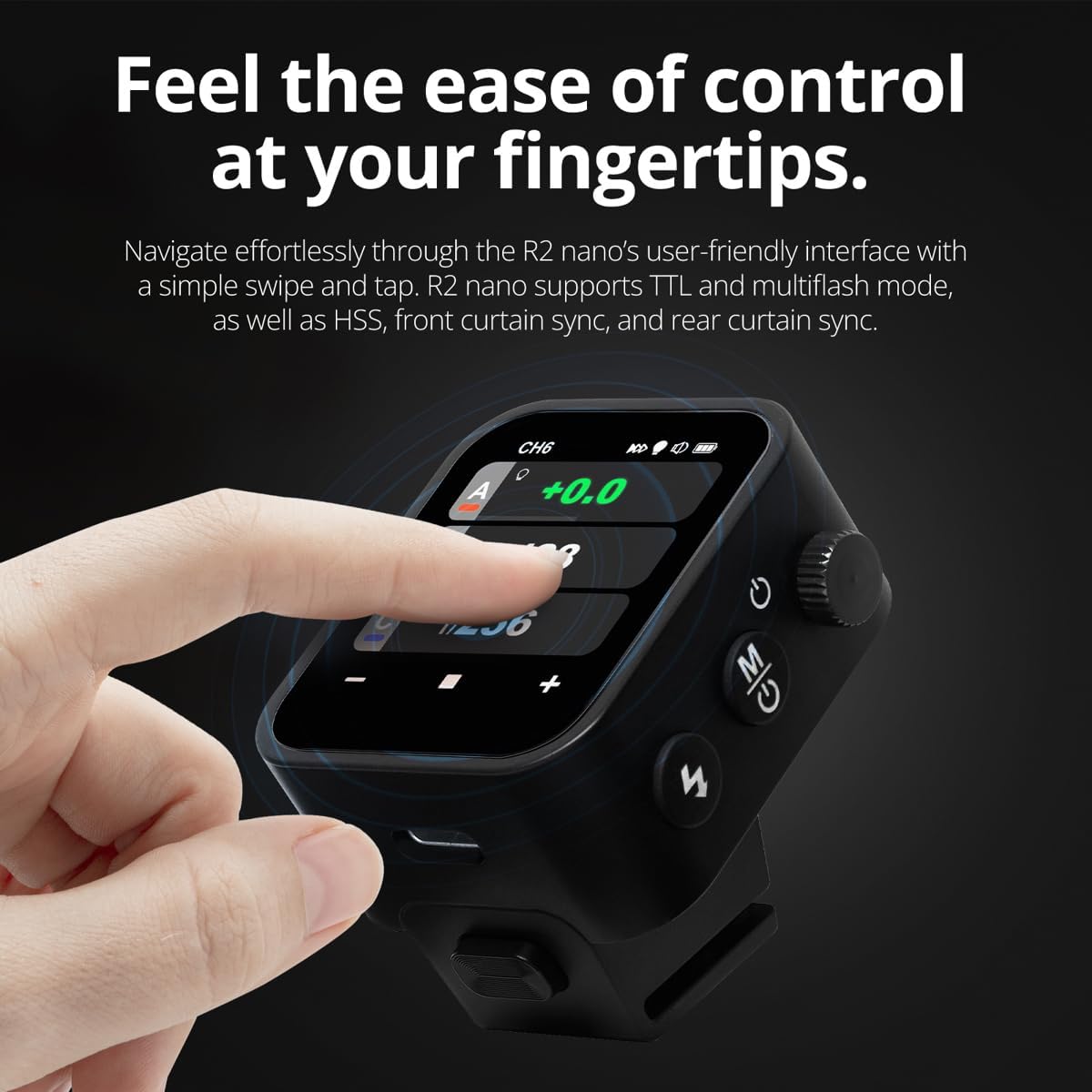
The R2 Nano features a responsive touchscreen and a select dial for intuitive control.

Figure 5.1: High Definition OLED Screen Interface.
- Aanrakingsinteraksie: Tap on a group (A, B, C, etc.) to select it for adjustment. Tap on parameters like power level to modify them.
- Kies Skakel: Rotate the dial to scroll through options or adjust values. Press the dial to confirm selections.
- Parameter aanpassing: Use the on-screen '-' and '+' buttons or the Select Dial to change flash power, exposure compensation, or other settings.

Figure 5.2: Touchscreen Interaction for Settings Adjustment.
5.3 Kanale en groepe instel
To avoid interference and control multiple flashes, set appropriate channels and groups.
- Access the channel settings through the touchscreen menu. Select a channel from 1 to 32. Ensure your flash units are set to the same channel.
- Assign flash units to different groups (A-F, 0-9) to control them independently. The R2 Nano allows control of up to 16 groups.
5.4 Flash Modes (TTL, Manual, Multi-flash)
The R2 Nano supports various flash modes to suit different shooting scenarios.
- TTL (Deur-die-lens): Automatically adjusts flash output for correct exposure. Ideal for fast-paced shooting where lighting conditions change frequently.
- Handleiding (M): Allows precise control over flash power output (e.g., 1/1 to 1/256). Suitable for consistent lighting setups and creative control.
- Multi-flash (Stroboscopic): Vuur 'n reeks vinnige flitse tydens 'n enkele blootstelling af om verskeie bewegings van 'n onderwerp vas te lê.
5.5 Sync Modes (HSS, Front Curtain, Rear Curtain)
Select the appropriate sync mode based on your shutter speed and desired effect.
- HSS (Hoëspoed-sinchronisasie): Enables flash synchronization at shutter speeds faster than the camera's native sync speed (up to 1/8000s). Useful for overpowering ambient light or using wide apertures in bright conditions.
- Voorgordyn-sinchronisasie: The flash fires at the beginning of the exposure. This is the standard sync mode.
- Agtergordyn-sinkronisasie: The flash fires just before the second curtain closes. This creates a streaking effect behind moving subjects, giving a sense of motion.
6. Onderhoud
Proper maintenance ensures the longevity and optimal performance of your R2 Nano remote.
- Skoonmaak: Use a soft, dry cloth to clean the exterior of the device. For the touchscreen, use a microfiber cloth specifically designed for electronics. Avoid using harsh chemicals or abrasive materials.
- Berging: When not in use, store the R2 Nano in its provided storage bag to protect it from dust and scratches. Store in a cool, dry place away from direct sunlight and extreme temperatures.
- Batterysorg: Om die battery se gesondheid te handhaaf, vermy om die battery gereeld volledig te ontlaai. As dit vir lang tydperke gestoor word, laai die battery elke paar maande tot ongeveer 50%.
- Hotshoe Contacts: Keep the hotshoe contacts clean and free of debris to ensure reliable communication with your camera.
7. Probleemoplossing
If you encounter issues with your Flashpoint R2 Nano, refer to the following common problems and solutions.
| Probleem | Moontlike oorsaak | Oplossing |
|---|---|---|
| Toestel skakel nie aan nie. | Battery is leeg. | Laai die toestel met die USB-C-kabel. |
| Flash units not firing. | Verkeerde kanaal- of groepinstellings. | Ensure the R2 Nano and flash units are set to the same channel and correct groups. |
| Flash units not firing. | Remote not securely mounted. | Ensure the R2 Nano is fully seated in the camera's hotshoe. |
| Inconsistent flash triggering. | Omgewingsinmenging. | Change the wireless channel to one with less interference. Ensure no obstructions between remote and flash. |
| Raakskerm reageer nie. | Tydelike sagtewarefout. | Power off the device, wait a few seconds, then power it back on. |
| HSS werk nie. | Camera or flash not set to HSS mode. | Verify HSS is enabled on both the R2 Nano and your compatible flash unit. Ensure camera shutter speed is above sync speed. |
8. Spesifikasies
| Kenmerk | Detail |
|---|---|
| Model | Flashpoint R2 Nano |
| Verenigbaarheid | Panasonic and Olympus Cameras |
| Draadlose frekwensie | 2.4 GHz |
| Kanale | 32 |
| Groepe | 16 (AF, 0-9) |
| Wireless Range | Tot 100 meter (328 voet) |
| Sinchroniseer spoed | Tot 1/8000s (HSS) |
| Vertoon | Touchscreen OLED |
| Battery | Ingeboude herlaaibare litiumbattery |
| Laaipoort | USB-C |
| Produk afmetings | 5.25 x 4.25 x 2.5 duim |
| Item gewig | 6.4 onse |
| Vervaardiger | Vlampunt |
| Datum Eerste Beskikbaar | 19 Junie 2024 |
9. Waarborg en Ondersteuning
Flashpoint products are designed for reliability and performance. For warranty information, technical support, or service inquiries, please refer to the official Flashpoint webwebwerf of kontak u gemagtigde handelaar.
Bewaar asseblief u aankoopbewys vir enige waarborgaansprake.