
SPC Discovery 2 ME
SPC Discovery 2 ME Smartphone User Manual
Model: 25246256D
1. Inleiding
This manual provides essential information for the safe and efficient use of your SPC Discovery 2 ME smartphone. Please read this guide thoroughly before operating the device to ensure proper functionality and to prevent damage.
2. Veiligheidsinligting
- Batteryveiligheid: Do not disassemble, puncture, or modify the battery. Use only approved chargers and cables. Avoid extreme temperatures.
- Waterweerstand: Hierdie toestel is nie waterbestand nie. Vermy blootstelling aan vloeistowwe.
- Gehoorbeskerming: Vermy langdurige luister op hoë volumevlakke om gehoorskade te voorkom.
- Bestuur veiligheid: Do not use your phone while driving. Follow local laws and regulations regarding mobile device use.
- Mediese toestelle: Maintain a safe distance between the phone and medical implants like pacemakers. Consult your physician and medical device manufacturer for specific guidelines.
- Beskikking: Dispose of the device and battery responsibly according to local regulations. Do not dispose of with household waste.
3. Pakketinhoud
Verifieer dat alle items in u produkpakket teenwoordig is:
- SPC Discovery 2 ME Smartphone
- USB-C na USB-C kabel
- SIM -uitwerperhulpmiddel
- Vinnige Begingids (indien van toepassing)
Note: A power adapter is not included and must be purchased separately. For optimal charging, use an 18W USB Power Delivery (PD) compatible charger.
4. Toesteluitleg
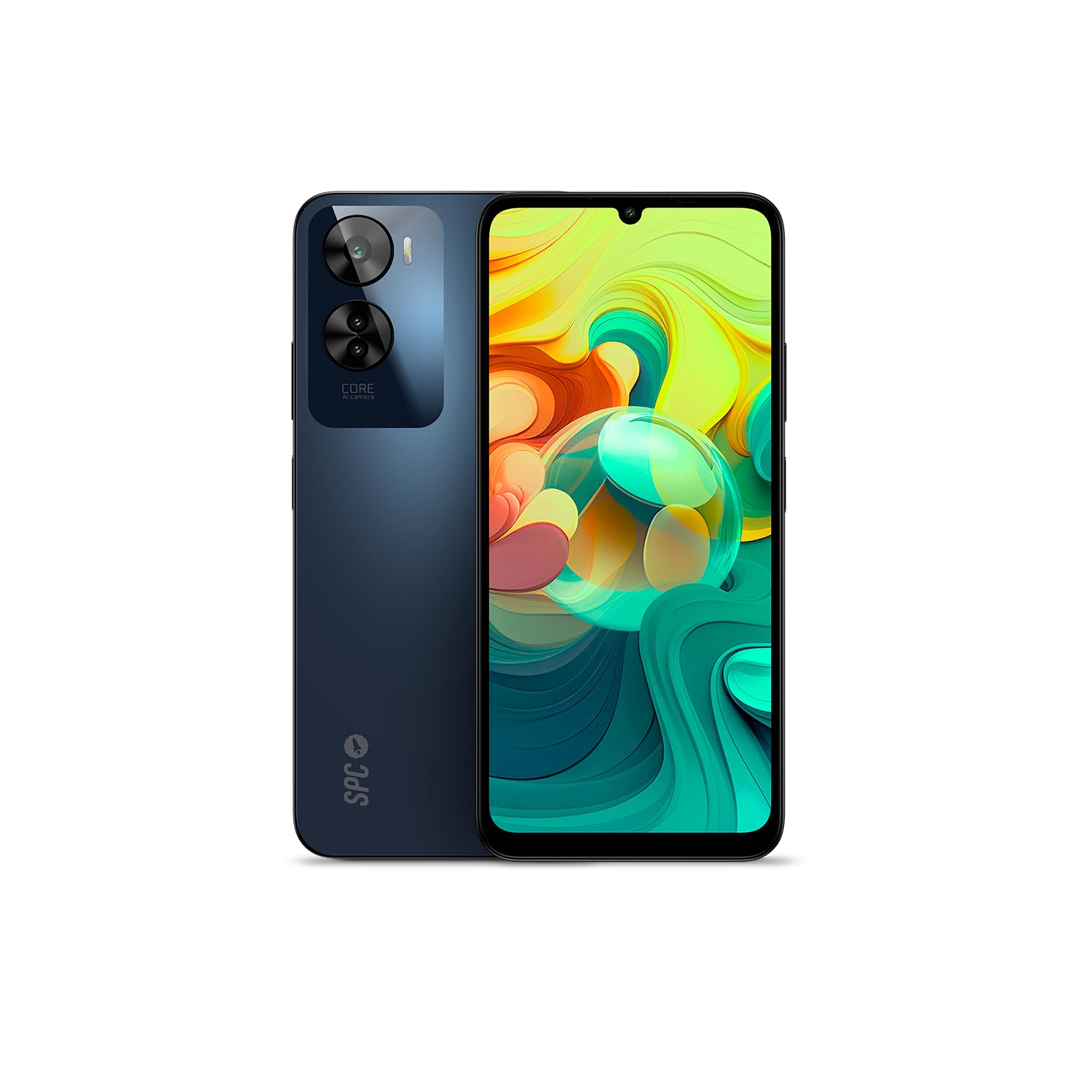
Figuur 4.1: Voorkant view of the SPC Discovery 2 ME, showing the display and front camera.

Figuur 4.2: Terug view of the SPC Discovery 2 ME, highlighting the triple camera module and fingerprint sensor.

Figuur 4.3: Hoekig view of the SPC Discovery 2 ME, showing both front and back, and side buttons.
- Voorste kamera: Geleë in die boonste middel van die skerm.
- Vertoon: 6.75-inch HD+ IPS InCell screen.
- Volume knoppies: Aan die regterkant van die toestel.
- Aan/uit-knoppie/vingerafdruksensor: On the right side, below the volume buttons.
- USB-C-poort: Aan die onderkant vir laai en data-oordrag.
- 3.5 mm oudio-aansluiting: Vir oorfone.
- SIM/MikroSD-kaartlaai: On the left side of the device.
- Drievoudige agterkamera: Located on the upper left of the back panel.
5. Opstelling
5.1. SIM- en MicroSD-kaarte insit
- Locate the SIM/MicroSD card tray on the left side of the phone.
- Insert the SIM ejector tool into the small hole on the tray and press firmly until the tray pops out.
- Place your Nano-SIM card(s) and/or MicroSD card into the designated slots on the tray. Ensure the gold contacts face downwards. The device supports dual SIM and MicroSD expansion up to 512GB.
- Plaas die laai versigtig terug in die foon totdat dit vasklik.
5.2. Aanvanklike aanskakeling en basiese opstelling
- Press and hold the Power button on the right side of the device until the SPC logo appears.
- Volg die aanwysings op die skerm om die aanvanklike opstelling te voltooi:
- Kies jou taal.
- Koppel aan 'n Wi-Fi-netwerk.
- Review en aanvaar die bepalings en voorwaardes.
- Meld aan met jou Google-rekening of skep 'n nuwe een.
- Set up screen lock (PIN, pattern, password) and biometric security (fingerprint, facial recognition).
6. Bedryfsinstruksies
6.1. Basiese navigasie
- Raakgebare: Tik om te kies, swiep om te blaai, knyp om te zoem.
- Tuisskerm: Kry toegang tot programme, widgets en kennisgewings.
- Kennisgewingpaneel: Swiep af vanaf die bokant van die skerm na view kennisgewings en vinnige instellings.
- App-laai: Vee opwaarts van die onderkant van die skerm om toegang tot alle geïnstalleerde toepassings te verkry.
6.2. Oproepe maak en boodskappe stuur
- Oproepe: Maak die "Telefoon"-app oop, voer die nommer in en tik op die oproepikoon.
- Boodskappe: Open the "Messages" app, tap the new message icon, enter the recipient and your message.
- Dubbele SIM: If using two SIM cards, you can select which SIM to use for calls or messages from the respective app settings.
6.3. Kameragebruik
The SPC Discovery 2 ME features a triple AI camera system, including a 50MP main sensor.
- Maak die "Kamera"-toepassing oop.
- Kies die verlangde modus (Foto, Video, Portret, Makro, ens.).
- Tik die sluiterknoppie om 'n beeld vas te lê of video-opname te begin/stop.
- Use the AI scene detection for optimized settings.
- For close-up shots, switch to Macro mode.
6.4. NFC for Contactless Payments
Your device supports NFC (Near Field Communication) for secure contactless payments.
- Maak seker dat NFC in jou foon se instellings geaktiveer is (Instellings > Verbonde toestelle > Verbindingsvoorkeure > NFC).
- Set up your preferred payment app (e.g., Google Pay) and add your credit/debit cards.
- Om 'n betaling te maak, ontsluit jou foon en hou die agterkant van die toestel naby die kontaklose betaalterminaal.
6.5. Biometric Unlock
The device offers both fingerprint and facial recognition for secure unlocking.
- Vingerafdruksensor: Located on the side power button. Register your fingerprints via Settings > Security & privacy > Device unlock > Fingerprint unlock.
- Gesigsherkenning: Register your face via Settings > Security & privacy > Device unlock > Face unlock. Ensure good lighting when setting up and using this feature.
6.6. Batterybestuur
The 5000 mAh battery provides extended usage. For optimal battery life:
- Charge your device using the provided USB-C cable and an 18W PD compatible charger.
- Vermy om die battery gereeld heeltemal te ontlaai.
- Aktiveer batteryspaarmodus wanneer die battery laag is.
- Maak ongebruikte programme toe wat in die agtergrond loop.
7. Onderhoud
- Skoonmaak: Gebruik 'n sagte, pluisvrye lap om die skerm en liggaam skoon te maak. Vermy skuurmiddels of harde chemikalieë.
- Sagteware-opdaterings: Regularly check for and install system updates (Settings > System > System update) to ensure optimal performance and security. The device runs on Android 14.
- Berging: Manage your 256GB internal storage by regularly deleting unnecessary files or moving them to the expandable MicroSD card (up to 512GB).
8. Probleemoplossing
| Kwessie | Moontlike Oplossing |
|---|---|
| Toestel kan nie aangeskakel word nie. | Maak seker dat die battery gelaai is. Koppel dit vir ten minste 15 minute aan 'n laaier en probeer dan weer om dit aan te skakel. |
| Battery raak vinnig leeg. | Reduce screen brightness, close background apps, disable unused features like GPS or Bluetooth, or enable battery saver mode. |
| Programme stort vas of vries. | Clear the app's cache (Settings > Apps > [App Name] > Storage & cache > Clear cache). If the issue persists, restart the device. |
| Kan nie aan Wi-Fi koppel nie. | Restart your router and phone. Forget the network and reconnect. Ensure Wi-Fi is enabled on your device. |
| Vingerafdruksensor werk nie. | Maak seker dat jou vinger skoon en droog is. Registreer jou vingerafdrukke weer in instellings. |
9. Spesifikasies
| Kenmerk | Detail |
|---|---|
| Model Naam | Discovery 2 ME |
| Modelnommer | 25246256D |
| Bedryfstelsel | Android 14 |
| Vertoon grootte | 6.75 duim |
| Vertoon resolusie | 1600 x 720 (HD+) |
| Herlaaitempo | 90 Hz |
| SVE-spoed | 1.6 GHz (Okta-kern) |
| RAM | 6 GB (expandable up to 14 GB virtual RAM) |
| Interne berging | 256 GB |
| Uitbreidbare berging | MicroSD tot 512 GB |
| Agterkamera-resolusie | 50 Megapixels (Hoof) |
| Battery kapasiteit | 5000 mAh (Litium-ioon) |
| Laai | 18W Fast Charge (USB PD) |
| Konnektiwiteit | 4G, Bluetooth, Wi-Fi, NFC |
| Hawens | USB Tipe-C, 3.5 mm-aansluiting |
| Spesiale kenmerke | Dual SIM, Integrated GPS, Expandable Memory, USB OTG Support, Biometric Unlock (Fingerprint, Facial Recognition) |
10. Waarborg en Ondersteuning
Your SPC Discovery 2 ME smartphone is covered by a standard manufacturer's warranty. For detailed warranty terms and conditions, please refer to the warranty card included in your package or visit the official SPC webwebwerf.
For technical support, troubleshooting assistance, or service requests, please contact SPC customer support through their official channels. Contact information can typically be found on the SPC webwebwerf of in die vinnige begingids.