
GN HEARING TV Streamer +
Resound TV Streamer+ User Manual
Model: TV Streamer +
1. Inleiding
The Resound TV Streamer+ is an innovative device designed to enhance your television viewing experience by wirelessly transmitting audio directly to your compatible Resound Nexia hearing aids. This allows for exceptional voice clarity and personalized volume control, ensuring you can fully enjoy your favorite programs and movies.
Sleutel kenmerke sluit in:
- Only compatible with Resound Nexia hearing aids.
- Instant voice clarity for better understanding.
- Auracast compatibility for improved sound quality.
- Audio streaming up to 7 meters away.
- Wireless audio streaming from TV to compatible hearing aids.
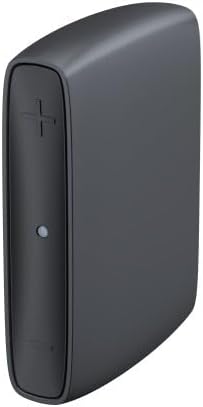
Image 1: The Resound TV Streamer+ device, a compact black unit with a plus sign button and an indicator light on the front.

Image 2: The Resound TV Streamer+ packaging, showing the device on a white background with "TV-Streamer+" text.
2. Opstelling
Follow these steps to set up your Resound TV Streamer+:
- Pak die toestel uit: Carefully remove the TV Streamer+ and all accessories from its packaging.
- Koppel aan krag: Plug the power adapter into the TV Streamer+ and then into a wall outlet. The indicator light on the device should illuminate.
- Connect to TV Audio Output:
- Optiese kabel (aanbeveel): Connect one end of the optical cable to the optical audio output port on your TV and the other end to the optical input port on the TV Streamer+.
- RCA Cables (if optical is not available): Connect the red and white RCA cables to the corresponding audio output ports on your TV and the other ends to the RCA input ports on the TV Streamer+.
- Pair with Hearing Aids:
- Ensure your Resound Nexia hearing aids are turned on and within range (within 7 meters) of the TV Streamer+.
- Press and hold the pairing button on the TV Streamer+ (refer to the device diagram for exact location, usually a small button on the back or side) until the indicator light starts blinking rapidly.
- Open and close the battery doors of your hearing aids (or turn them off and on if rechargeable) to put them into pairing mode.
- The hearing aids should automatically connect to the TV Streamer+. The indicator light on the streamer will turn solid blue or green when connected.
- Toets verbinding: Play audio on your TV and confirm that the sound is streaming to your hearing aids. Adjust the TV volume as needed.
3. Bedryfsinstruksies
Once connected, the Resound TV Streamer+ provides a seamless audio experience:
- Automatic Streaming: When the TV Streamer+ is on and connected to your TV, and your hearing aids are within range, audio will automatically stream to your hearing aids.
- Volumebeheer: You can adjust the volume of the streamed audio directly through your hearing aid controls or via the Resound Smart 3D app on your smartphone. The TV's volume control will typically not affect the streamed audio volume to your hearing aids.
- Switching Programs: If you wish to switch between streamed audio and your hearing aids' regular microphone input, you can usually do so via your hearing aid program button or the Resound Smart 3D app.
- Auracast Compatibility: The device leverages Auracast technology for enhanced sound quality and a stable wireless connection, allowing for a richer audio experience.
4. Onderhoud
To ensure the longevity and optimal performance of your Resound TV Streamer+, follow these maintenance guidelines:
- Skoonmaak: Wipe the device regularly with a soft, dry cloth. Do not use liquid cleaners, sprays, or abrasive materials.
- Berging: Bêre die toestel op 'n koel, droë plek weg van direkte sonlig en uiterste temperature.
- Vermy vog: Hou die toestel weg van water en hoë humiditeit.
- Hanteer versigtig: Vermy om die toestel te laat val of om dit aan sterk impakte te onderwerp.
5. Probleemoplossing
If you encounter issues with your Resound TV Streamer+, try the following solutions:
| Probleem | Moontlike oorsaak | Oplossing |
|---|---|---|
| No audio streaming to hearing aids. |
|
|
| Swak klank kwaliteit. |
|
|
| Cannot pair hearing aids. |
|
|
Indien die probleem voortduur, kontak asseblief kliëntediens.
6. Spesifikasies
| Kenmerk | Detail |
|---|---|
| Handelsmerk | GN HEARING |
| Vervaardiger | GN HEARING |
| Model Naam | TV Streamer + |
| Deelnommer | 22926500 |
| Verbindingstegnologie | Bluetooth |
| Vormfaktor | TV-stok |
| Kleur | Houtskoolgrys |
| Video-kodek | H.264, H.265/HEVC |
| Global Trade Item Number (GTIN) | 05708296321216 |
| Eerste Beskikbare Datum | 2 Julie 2024 |
7. Waarborg en Ondersteuning
For warranty information, please refer to the documentation included with your purchase or contact your point of sale. GN HEARING provides support for its products.
If you require technical assistance, have questions about your device, or need to report a problem, please contact GN HEARING customer support through their official webwebwerf of die kontakinligting wat saam met jou produk verskaf word.
Please have your model name (TV Streamer +) and part number (22926500) ready when contacting support.
Verwante Dokumente - TV Streamer +
 |
ReSound Smart Fit 1.17 Update: Enhanced Features for Hearing Aid Fittings Discover the new features in ReSound Smart Fit 1.17, including support for ReSound Nexia, TapControl, and improved fitting experiences for hearing care professionals. |
 |
GN ReSound TV Streamer+ Quick Guide: Setup and Pairing Get started with your GN ReSound TV Streamer+ with this quick guide. Learn how to connect the device, pair your hearing aids, and understand its features. Includes manufacturer details. |
 |
ReSound Unite TV 2 Handleiding: Draadloze Audio Streaming voor Hoortoestellen Gedetailleerde handleiding voor de ReSound Unite TV 2, een audio streamer die geluid van uw TV, stereo of computer rechtstreeks naar uw ReSound hoortoestellen stuurt. Leer installeren, pairen, streamen en problemen oplossen. |
 |
ReSound Gehoorapparaat-apps Gebruikersgids: Smart 3D, Smart, Control, Relief Omvattende gebruikersgids vir ReSound-gehoorapparaat-mobiele toepassings, insluitend ReSound Smart 3D, ReSound Smart, ReSound Control en ReSound Relief. Leer hoe om jou gehoorapparate te installeer, te gebruik en aan te pas. |
 |
ReSound Slim Gehoorapparate Konnektiwiteitsgids Hierdie gids bied omvattende instruksies vir die koppeling van ReSound Smart Hearing Aids met jou Apple- en Android-toestelle. Dit gee besonderhede oor die opstelproses vir naatlose integrasie en optimale gebruik van ReSound se gevorderde mobiele toepassings. Verken hoe om jou gehoorapparate te koppel, instellings te bestuur en funksies te benut wat ontwerp is om jou gehoorervaring en daaglikse lewe te verbeter. |
 |
ReSound Unite™ Mini Microphone User Guide Comprehensive user guide for the ReSound Unite™ Mini Microphone. Learn how to stream audio from TVs, computers, and other devices directly to your hearing instruments for enhanced clarity and convenience. |
Ask a question about this manual
Ask about setup, troubleshooting, compatibility, parts, safety, or missing instructions. Manuals+ will review the question and use this page’s manual context to help answer it.