
DVT-C9F24992D65E215A7DD6011D34514A46
Instruksie Handleiding
Tucus-afstandbeheerder vir JVC RM-SUXQ30UW RM-SUXQ30US UX-Q30S UX-Q30B UX-Q30P UX-Q30B UX-Q30W Mikro kompakte komponent stereo-stelsel
Model: DVT-C9F24992D65E215A7DD6011D34514A46 | Brand: Generic
Inleiding
This manual provides essential information for the setup, operation, and maintenance of your new Tucus replacement remote control. This remote is designed to be compatible with various JVC Micro COMPACT COMPONENT Stereo Systems, including models RM-SUXQ30UW, RM-SUXQ30US, UX-Q30S, UX-Q30B, UX-Q30P, and UX-Q30W. While it is a replacement remote and not the original device's remote, common functions are expected to operate normally. Please review this guide thoroughly to ensure proper use and longevity of your remote control.
Opstelling
1. Battery Installasie
The remote control requires two (2) AA batteries (not included) for operation. Follow these steps to install them:
- Vind die batterykompartement aan die agterkant van die afstandbeheer.
- Skuif die batteryklepdeksel afwaarts of na buite om dit oop te maak.
- Plaas twee AA-batterye in en maak seker dat die positiewe (+) en negatiewe (-) terminale korrek in lyn is met die merke binne-in die kompartement.
- Skuif die batteryklepdeksel terug in plek totdat dit stewig klik.

Figure 1: Back of the remote control showing the battery compartment cover.
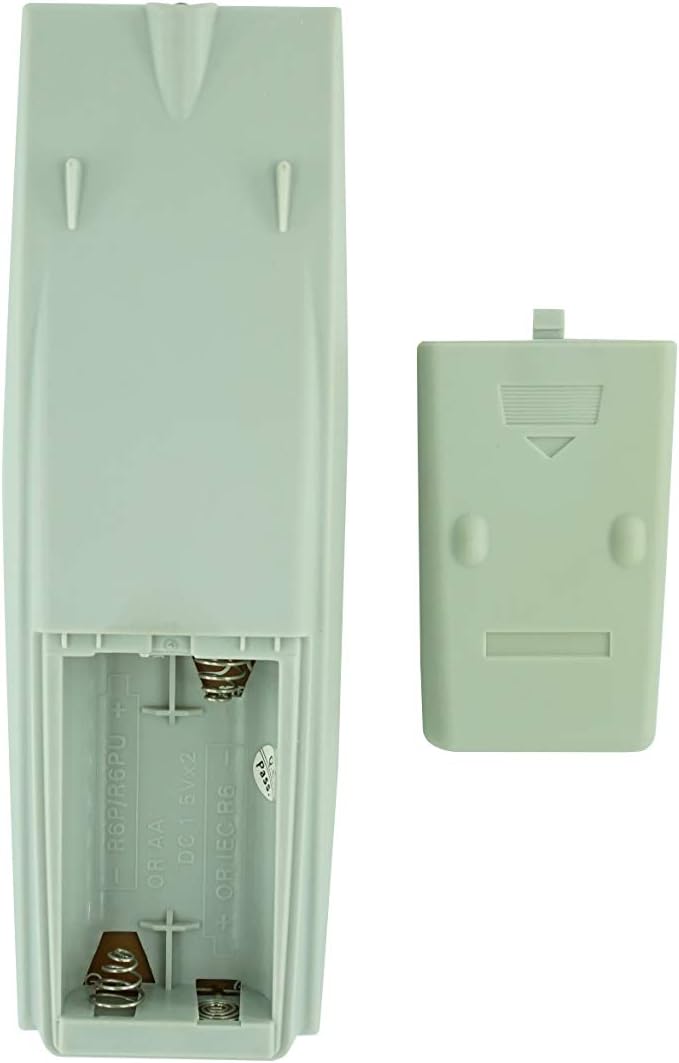
Figuur 2: Batterykompartement met verwyderde deksel, gereed vir batteryplasing.
2. Aanvanklike gebruik
Once batteries are installed, the remote control is ready for use. Point the remote directly at your JVC Micro COMPACT COMPONENT Stereo System. No additional programming is typically required for this replacement remote for the listed compatible models.
Bedryfsinstruksies
This remote control provides access to the primary functions of your JVC stereo system. Below is a general overview of common button functions. Please note that while the functionality is guaranteed, the exact button layout may differ slightly from your original remote.

Figuur 3: Voorkant view van die afstandbeheerder met knoppie-uitleg.
Sleutel funksies:
- STANDBY/AAN: Powers the stereo system on or off.
- UITSTALLING: Changes or shows display information.
- KLOK/TIMER: Accesses clock and timer settings.
- SLAAP: Sets a sleep timer for automatic power off.
- Nommerknoppies (0-9, +10): Direct input for track numbers, radio frequencies, etc.
- BAS / HOË TONE: Pas bas- en diskantvlakke aan.
- Navigation (UP, DOWN, LEFT, RIGHT, SET): Gebruik vir kieslysnavigasie en -keuse.
- Playback Controls (PLAY/PAUSE, STOP, FAST FORWARD, REWIND, SKIP): Beheer die afspeel van media.
- Source Selection (CD, TAPE, FM/AM, AUX/MD): Kies die klankinvoerbron.
- FM MODE / REV.MODE: Toggles FM stereo/mono or tape reverse mode.
- AUTO PRESET: Automatically scans and saves radio stations.
- PRGM / RANDOM / REPEAT: Controls program, random, and repeat playback modes.
- PTY SEARCH / PTY SELECT: For Program Type search and selection on radio.
- DISPLAY / TA/News / Info: Provides additional display information or traffic/news announcements.
- AHB PRO: Activates or deactivates Active Hyper-Bass PRO.
- VOLUME (+/-): Verstel die hoofvolumevlak.
For specific advanced functions, please refer to the original instruction manual of your JVC Micro COMPACT COMPONENT Stereo System.
Onderhoud
Maak die afstandbeheer skoon
Om die afstandbeheerder se voorkoms en funksionaliteit te behou, maak dit gereeld skoon:
- Vee die oppervlak af met 'n sagte, droë lap.
- Vir hardnekkige vuiligheid, effens dampMaak die lap skoon met water of 'n sagte, nie-skurende skoonmaakmiddel. Moenie die skoonmaakmiddel direk op die afstandbeheerder spuit nie.
- Vermy die gebruik van harde chemikalieë, oplosmiddels of skuurmiddels, aangesien dit die afwerking of interne komponente van die afstandbeheerder kan beskadig.
Battery vervanging
Vervang batterye wanneer die afstandbeheerder se reaksie traag word of ophou werk. Vervang altyd albei batterye gelyktydig met nuwes van dieselfde tipe (AA). Moenie ou en nuwe batterye, of verskillende tipes batterye, meng nie.
Berging
Indien die afstandbeheerder nie vir 'n lang tydperk gebruik gaan word nie, verwyder die batterye om lekkasie en moontlike skade aan die afstandbeheerder te voorkom.
Probleemoplossing
- Afstandsbediening reageer nie:
- Kontroleer of die batterye korrek met die korrekte polariteit (+/-) geplaas is.
- Vervang ou batterye met nuwes.
- Ensure there are no obstructions between the remote control and the stereo system's infrared receiver.
- Maak seker dat jy binne die effektiewe reikwydte van die afstandbeheerder is.
- Some buttons not working or unexpected behavior:
- This remote is a replacement and while common functions are supported, the button layout or specific advanced functions might not perfectly match your original remote. Refer to the button layout image in the Operating Instructions section.
- Ensure the stereo system is powered on and set to the correct input source.
- Remote appears damaged:
- If the remote has been dropped or exposed to liquids, internal damage may have occurred. In such cases, replacement may be necessary.
Spesifikasies
| Handelsmerk | Generies |
| Vervaardiger | TUCUS |
| Modelnommer | DVT-C9F24992D65E215A7DD6011D34514A46 |
| Versoenbare modelle | JVC RM-SUXQ30UW, RM-SUXQ30US, UX-Q30S, UX-Q30B, UX-Q30P, UX-Q30W Micro COMPACT COMPONENT Stereo SYSTEM |
| Materiaal tipe | Ander |
| Kragbron | 2 x AA-batterye (nie ingesluit nie) |
| ASIN | B0D79958PW |
| Datum Eerste Beskikbaar | 17 Junie 2024 |
Waarborg inligting
This product comes with a 3-month warranty from the date of purchase. This warranty covers manufacturing defects and ensures the remote control functions as intended for compatible models. Please retain your proof of purchase for any warranty claims.
Kliënte ondersteuning
If you have any questions regarding the compatibility or functionality of this remote control, or if your specific device model is not listed, please contact the seller directly for assistance. The seller stocks a wide range of remote controls and parts and can confirm suitability for your needs.
For general inquiries or to provide feedback, please refer to the contact information provided by your retailer or the seller.
Ask a question about this manual
Ask about setup, troubleshooting, compatibility, parts, safety, or missing instructions. Manuals+ will review the question and use this page’s manual context to help answer it.