
Inleiding
Dankie vir die aankoopasing the Kenko Digital Camera KC-ZM08. This compact digital camera is designed for ease of use, allowing you to capture everyday moments with its 5x optical zoom, touch panel operation, and various convenient features. Please read this manual thoroughly before using the camera to ensure proper operation and to maximize your enjoyment of its capabilities. Keep this manual in a safe place for future reference.
Pakketinhoud
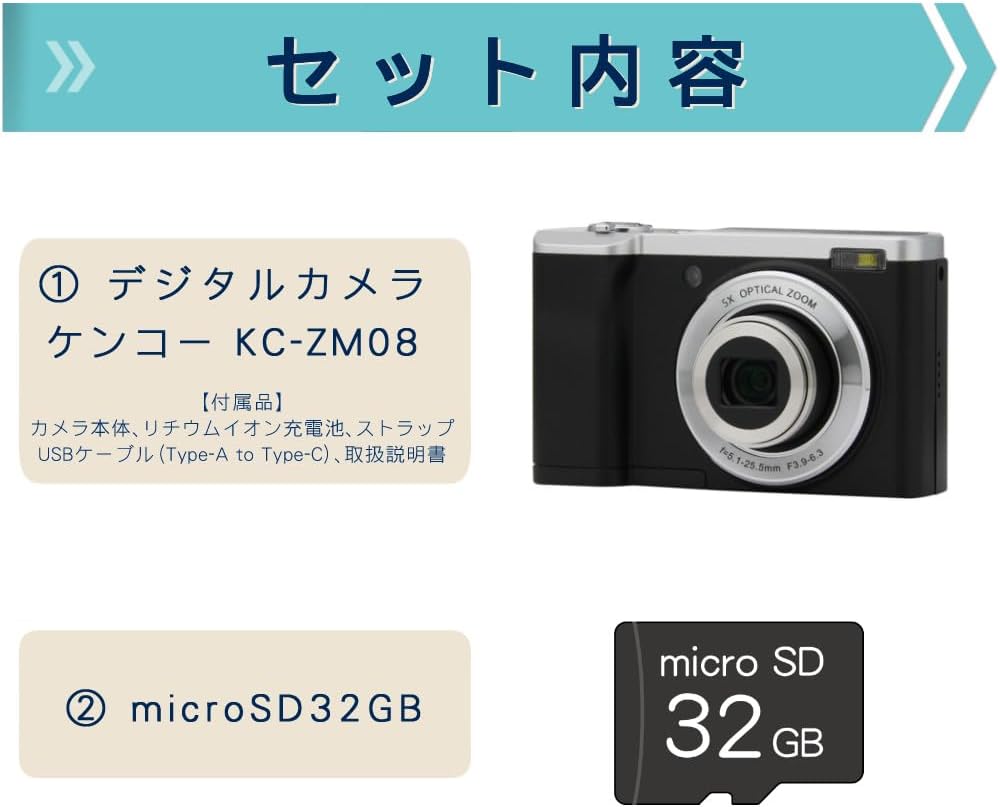
This package includes the Kenko Digital Camera KC-ZM08 and a 32GB microSD card, providing everything you need to start capturing photos and videos.
- Kenko Compact Digital Camera KC-ZM08
- Herlaaibare litiumioonbattery
- Polsband
- USB-kabel (tipe-A tot tipe-C)
- Instruksie Handleiding
- microSD Card (32GB)
Sleutel kenmerke
5x optiese zoom

The camera features a 5x optical zoom lens, covering a versatile range from wide-angle 28mm to telephoto 142mm (35mm equivalent). This allows for capturing a wide variety of scenes, from expansive landscapes to distant subjects.
Intuitive Touch Panel Operation

Easily change modes and settings with the responsive touch panel LCD monitor. This intuitive interface simplifies camera operation, making it quick and effortless to adjust your shooting preferences.
Convenient Rear Camera for Selfies

Switch to the rear camera with a single button press for easy selfies. You can capture both photos and videos while viewing yourself on the monitor, ensuring you get the perfect shot.
Shortest Shooting Distance: Approx. 10cm

When shooting at wide-angle, you can get as close as approximately 10cm to your subject, allowing for detailed close-up photography (with the front lens).
Built-in LED Flash and Constant Light

The camera not only has a built-in flash for still images but also features a constant LED light, which is convenient for video recording in low-light conditions.
Slow Motion Video-opname

Easily capture slow-motion videos to add a creative touch to your recordings.
Time-lapse-skiet
The camera supports time-lapse shooting, automatically capturing images at set intervals to create dynamic time-lapse videos.
Self-Timer Function
Utilize the self-timer for group photos with friends and family, or for convenient self-portraits.
Webkameravermoë
Koppel die kamera via USB aan jou rekenaar om dit as 'n webcam for video calls and live streaming.
Digital Image Stabilization (for Video)
Reduce camera shake during video recording with the built-in digital image stabilization feature, ensuring smoother footage.
Opstelgids
- Laai die battery: Insert the rechargeable lithium-ion battery into the camera. Connect the camera to a USB power source using the provided USB Type-A to Type-C cable. The charging indicator will show the charging status. Ensure the battery is fully charged before first use.
- Voeg microSD-kaart in: Open the card slot cover and gently insert the provided 32GB microSD card until it clicks into place. Ensure the card is inserted in the correct orientation.
- Heg polsband aan: Securely attach the wrist strap to the camera to prevent accidental drops.
- Krag aan: Druk en hou die kragknoppie in om die kamera aan te skakel.
- Aanvanklike instellings: Volg die aanwysings op die skerm om die datum, tyd en taal in te stel.
Bedryfsinstruksies
Neem Foto's
- Kies fotomodus: Press the 'MODE' button to select the photo shooting mode.
- Raam jou skoot: Gebruik die LCD-skerm om jou beeld saam te stel.
- Fokus: Druk die ontspanknop saggies halfpad af om te fokus. Die fokusraam sal groen word wanneer fokus bereik is.
- Vasvang: Druk die sluiterknoppie heeltemal af om die foto te neem.
Opname van video's
- Kies videomodus: Press the 'MODE' button to select the video recording mode.
- Begin opname: Press the shutter button to start recording. A red indicator will appear on the screen.
- Stop opname: Druk weer die ontspanknoppie om op te neem.
Gebruik die raakpaneel
Tap icons on the LCD screen to navigate menus, change settings like image size, ISO, exposure, and picture quality (Super Fine, Fine, Normal). Swipe to browse through captured media in playback mode.
Switching to Rear Camera
Locate the dedicated button for switching between the front and rear cameras. Press this button to activate the rear camera for convenient selfies or vlogging.
Afspeelmodus
Druk die terugspeelknoppie om view your captured photos and videos. Use the navigation buttons or touch screen to scroll through your media.
Onderhoud
- Maak die lens skoon: Use a soft, lint-free cloth specifically designed for camera lenses to gently wipe away dust or smudges. Do not use harsh chemicals.
- Maak die liggaam skoon: Vee die kameraliggaam af met 'n sagte, droë lap. Vir hardnekkige vuiligheid, liggiesampMaak die lap met water skoon en vee dit dan droog.
- Batterysorg: Bêre die battery op 'n koel, droë plek wanneer dit nie gebruik word nie. Vermy dit om die battery vir lang tye heeltemal te ontlaai.
- Berging: When storing the camera for a long time, remove the battery and microSD card. Store the camera in a dry, well-ventilated area away from direct sunlight and extreme temperatures.
Probleemoplossing
| Probleem | Moontlike oorsaak/oplossing |
|---|---|
| Kamera skakel nie aan nie. | Die battery is dalk leeg. Laai die battery volledig. Maak seker dat die battery korrek geplaas is. |
| Kan nie foto's neem/video's opneem nie. | microSD card may be full or not inserted correctly. Check card status or replace. Ensure sufficient battery charge. |
| Beelde is vaag. | Ensure the lens is clean. Check focus by pressing the shutter button halfway. Hold the camera steady during shooting. |
| Touch screen is unresponsive. | Restart the camera. Ensure the screen is clean and dry. |
Spesifikasies
| Kenmerk | Detail |
|---|---|
| Model Naam | KC-ZM08 |
| Handelsmerk | Kenko |
| Optiese zoom | 5x |
| Digitale zoom | 2x |
| Fotosensortegnologie | CMOS |
| Effektiewe stilresolusie | 56 MP |
| Video-opname-resolusie | 1080p |
| Minimum brandpuntsafstand | 28 mm |
| Maksimum brandpuntsafstand | 142 mm |
| Beeldstabilisasie | Digital (for video) |
| Versoenbaar File Formate | JPEG, MP4 |
| Vertoon grootte | 2.8 duim |
| Flits tipe | Built-in (Auto, Always On) |
| Konnektiwiteit | USB |
| Battery Tipe | Litium-ioon |
| Produk Gewig | 148 grams (excluding accessories, battery) |
| Afmetings | Ongeveer. 100 x 62 x 32 mm |
Waarborg en Ondersteuning
The Kenko Digital Camera KC-ZM08 comes with a 1-year manufacturer's warranty. For technical support, troubleshooting assistance, or warranty claims, please refer to the contact information provided in the separate warranty card or visit the official Kenko webwebwerf.
Bewaar asseblief u aankoopbewys vir waarborgdoeleindes.
Produkvideo's
Kenko Digital Camera KC-ZM08 Overview
Hierdie video bied 'n algemene oorsigview of the Kenko Digital Camera KC-ZM08, highlighting its compact design and ease of use for everyday photography and casual walks.
Digital Camera KC-ZM08 Features
'n Kort videovertoningasing various features of the KC-ZM08 digital camera.