
Inleiding
Welcome to the KIDYWOLF Kidyprint Instant Print Camera user manual. This guide provides essential information for the safe and effective use of your new instant camera. The Kidyprint is designed to allow children to capture and instantly print their memories, fostering creativity and exploration.
Produk verbyview
The KIDYWOLF Kidyprint is an instant print camera for children, featuring thermal printing technology that produces black and white images without the need for ink cartridges. It includes a range of creative tools to enhance the photography experience.
- Thermal Printing System: Prints black and white images instantly without ink or cartridges.
- Kreatiewe kenmerke: Equipped with 21 filters, an 8Mpx selfie camera, and a 2.4-inch LCD screen for viewing en navigasie.
- Duursame en draagbare ontwerp: Lightweight, robust, and rechargeable via USB-C. Includes a safety neck strap for secure carrying.
- Ingesluit bykomstighede: Comes with thermal paper rolls (including sticker and colored options), magnetic frames, and stickers for photo customization.

The camera's intuitive interface allows for easy navigation and photo capture, making it suitable for young users.
Opstelling
1. Uitpak en aanvanklike inspeksie
Verwyder alle komponente versigtig uit die verpakking. Verifieer dat alle items wat hieronder gelys word, teenwoordig en onbeskadig is:
- KIDYWOLF Kidyprint Camera
- USB-C-laaikabel
- Thermal Paper Rolls (standard, sticker, colored)
- Magnetic Photo Frames
- Nekband
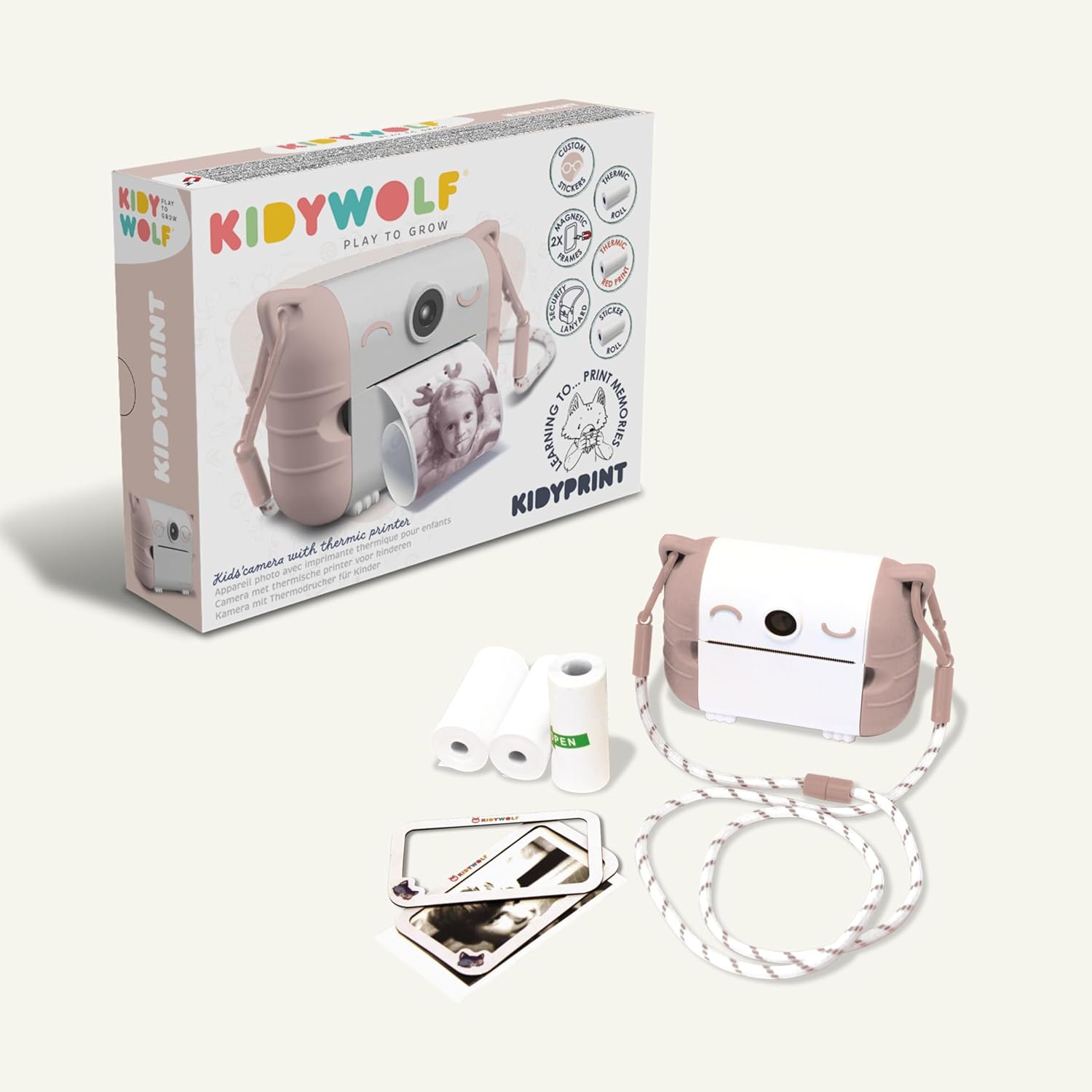
2. Laai die kamera
Before first use, fully charge the camera. Connect the provided USB-C cable to the camera's charging port and plug the other end into a compatible USB power adapter (not included) or computer. The charging indicator light will show the charging status.
3. Inserting Thermal Paper
- Locate the paper compartment on the camera.
- Maak die kompartement se deksel oop.
- Insert a roll of thermal paper, ensuring the paper feeds correctly.
- Close the compartment cover, leaving a small portion of paper extended.
4. Bevestig die nekband
Attach the safety neck strap to the designated attachment points on the camera. Ensure it is securely fastened to prevent accidental drops.
Bedryfsinstruksies
1. Skakel aan/af
Press and hold the power button (usually marked with a power symbol) to turn the camera on or off. The 2.4-inch LCD screen will illuminate upon startup.
2. Neem foto's
Point the camera at your subject. Use the 8Mpx selfie camera for self-portraits. Press the shutter button to capture an image. The camera will display a preview op die skerm.

3. Navigating Menus and Applying Filters
Use the navigation buttons (up, down, left, right, OK) to browse through the camera's menu options. Select from 21 available filters to add creative effects to your photos before printing.
4. Druk foto's
After capturing or selecting an image, press the print button. The camera will instantly print the image in black and white using its thermal printing system. Allow the print to fully emerge before tearing it off.

5. Viewing Photos and Connectivity
Access the gallery mode to view previously captured images. The camera supports HDMI and USB connectivity for transferring photos to compatible devices like TVs, computers, smartphones, or tablets.

Onderhoud
1. Skoonmaak van die kamera
Use a soft, dry cloth to clean the exterior of the camera. Do not use liquid cleaners or solvents. For the lens and screen, use a specialized lens cleaning cloth.
2. Replacing Thermal Paper
When the paper roll is depleted, replace it with a new KIDYWOLF thermal paper roll. Follow the instructions in the 'Inserting Thermal Paper' section.

3. Batteryversorging
The camera uses an Alkaline battery. To prolong battery life, avoid fully discharging the camera frequently. Recharge the camera using the USB-C cable when the battery level is low. Store the camera in a cool, dry place when not in use for extended periods.
4. Waterweerstand
The KIDYWOLF Kidyprint camera is nie waterdig nie. Avoid exposure to water or excessive moisture to prevent damage.
Probleemoplossing
- Kamera skakel nie aan nie: Ensure the battery is charged. Connect the camera to a power source using the USB-C cable and try again.
- Swak drukgehalte: Check if the thermal paper is correctly inserted and not damaged. Ensure the camera lens is clean.
- Papier vas: Open the paper compartment and carefully remove any jammed paper. Reinsert a new roll if necessary.
- Skerm reageer nie: Try restarting the camera by holding the power button. If the issue persists, contact customer support.
Spesifikasies
| Handelsmerk | KINDERWOLF |
| Model | KIDYPRINTPAR |
| Kleur | Roos |
| Skerm | 2.4 duim LCD |
| Verbindingstegnologie | HDMI, USB |
| Video-resolusie | 720p |
| Battery samestelling | Alkalies |
| Produkafmetings (L x B x H) | 23.8 x 5.5 x 17.5 cm |
| Produk Gewig | 610 gram |
| Beeldstabilisasie | Geen |
| Burst Mode Speed | 30 FPS |
| ISO-reeks | 100-3200 |
| Ondersteun File Formaat | JPEG |
| Waterweerstandvlak | Nie waterdig nie |
| Versoenbare toestelle | TV, computer, smartphone, tablet |
Waarborg en Ondersteuning
Waarborg inligting
The KIDYWOLF Kidyprint camera comes with a 2 jaar vervaardiger se waarborgHierdie waarborg dek defekte in materiaal en vakmanskap onder normale gebruik. Bewaar asseblief u bewys van aankoop vir waarborgeise.
Kliënte ondersteuning
For any questions, technical assistance, or warranty claims, please contact KIDYWOLF customer service. Our team is available to provide reactive support and ensure your satisfaction.