
1. Inleiding
The AVMATRIX S4 Plus is a versatile video switcher equipped with a 10.1-inch IPS FHD real-time monitoring screen. This integrated display allows users to simultaneously monitor 4 input channels, Preview (PVW), and Program (PGM) feeds without requiring an external monitor, enhancing convenience during live productions. It is designed for various live streaming applications, supporting multiple device connections and advanced video production features.
2. Sleutel kenmerke
- Integrated 10.1-inch IPS FHD Display: Real-time monitoring of 4 input channels, PVW, and PGM.
- Meervoudige toestelverbinding: 2x HDMI and 2x SDI inputs for cameras, gaming consoles, computers, and camcorders.
- Virtual Live Studio Capabilities: Chroma Key and Luma Key for real-time post-production and scene switching.
- Advanced Transitions: Includes WIPE, DIP, and MIX effects for dynamic live streaming.
- Flexible Output Options: 2x HDMI PGM output, 1x HDMI multiview output, and 1x Type-C output, assignable from various sources.
- Direkte opname: SD card and USB interface for direct PGM signal recording up to 32Mbps (MP4/TS formats).
- Dual Live Streaming Methods: LAN port for IP streaming (RTMP(S), RTSP, SRT) and USB Type-C for capturing PGM video/audio to platforms like OBS, vMIX, ZOOM, Teams, Skype, and Twitch.
- Web Beheer koppelvlak: Afstandbeheer via web browser for encode, stream, and record settings.
3. Opstelling
3.1 Uitpak en Komponente
Nadat u die verpakking oopgemaak het, maak seker dat alle komponente teenwoordig is:
- S4 PLUS Video Switcher
- Kragtoevoer
- USB-kabel (Tipe AC)
- Tally connector (DB-15)

Figuur 3.1: oorview of the AVMATRIX S4 Plus Video Switcher with its main features.
3.2 Koppel toestelle
The S4 Plus offers a rich interface for connecting various video and audio sources. Refer to the diagram below for port identification and connection examples.

Figure 3.2: Rear panel connections including SDI, HDMI, LAN, USB, and audio ports.
- Video-insette: Connect up to two HDMI sources and two SDI sources (e.g., cameras, computers) to the respective input ports.
- Klankinsette: Use the MIC/LINE inputs for external audio sources.
- Krag: Connect the provided power supply to the DC 12V input.
- Netwerk: Connect an Ethernet cable to the LAN port for web control and IP streaming.
- USB: Use the USB Type-C port for direct streaming to a computer or the USB REC port for recording to an external drive.
3.3 Aanvanklike aanskakeling
After connecting all necessary devices, power on the switcher. The integrated 10.1-inch display will show the multiview interface, allowing you to see all input sources, PVW, and PGM feeds.

Figure 3.3: The 10.1-inch display showing the multiview layout with various inputs and outputs.
4. Bedryfsinstruksies
4.1 Switching and Transitions
The S4 Plus allows for seamless switching between input sources and applying various transition effects. Use the dedicated buttons and T-bar for manual or automatic transitions.
- Select an input for Preview (PVW) and another for Program (PGM).
- Use the T-bar or AUTO button to execute transitions (WIPE, DIP, MIX).
4.2 Opname
Record your PGM output directly to an SD card or USB disk. The switcher supports MP4/TS formats with an encoding bit rate up to 32Mbps.

Figure 4.1: SD card slot and USB REC port for direct program recording.
4.3 Regstreekse stroom
The S4 Plus supports two primary methods for live streaming:
- Ethernet Streaming: Connect the LAN port to your network for IP streaming via RTMP(S), RTSP, and SRT protocols.
- USB Type-C Streaming: Connect the USB Type-C port to a computer to capture PGM video and audio for streaming on platforms like OBS, vMIX, ZOOM, Teams, Skype, and Twitch. Compatible with Windows, Linux, and Mac.
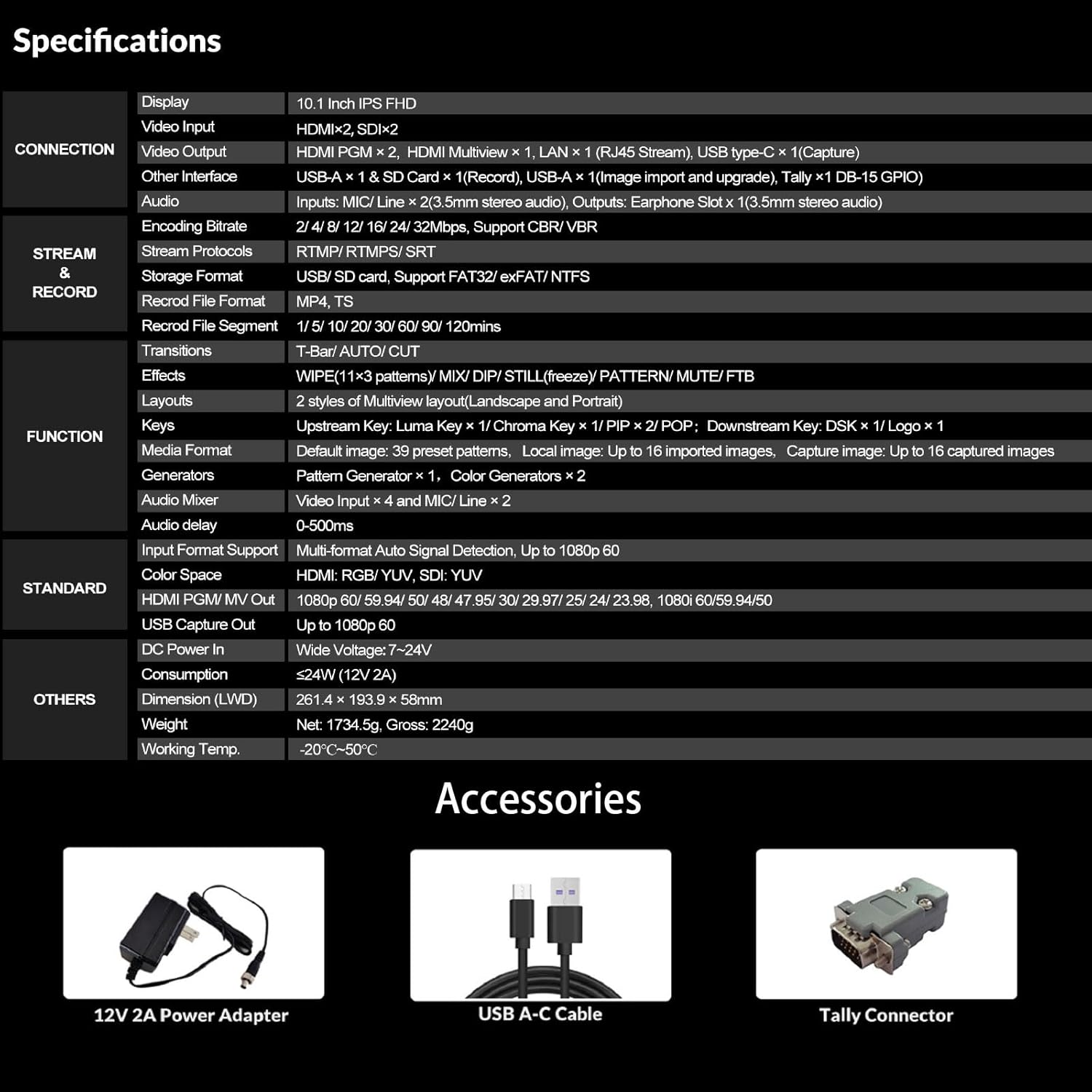
Figure 4.2: Live streaming setup showing Ethernet and USB connections to popular platforms.
4.4 Special Effects (Chroma Key / Luma Key)
Create immersive virtual live studios using the built-in Chroma Key and Luma Key features for real-time background removal and post-production.

Figure 4.3: Enhanced Chroma Key technology for precise background removal.
4.5 oudiomenger
The integrated audio mixer allows for precise control over audio levels from various inputs, ensuring high-quality sound for your production.
4.6 Web Beheer koppelvlak
Access the device's IP address in a web browser to remotely control settings such as encoding, streaming, and recording. This provides flexible management options.
5. Onderhoud
To ensure the longevity and optimal performance of your AVMATRIX S4 Plus Video Switcher, follow these maintenance guidelines:
- Hou die toestel skoon en stofvry. Gebruik 'n sagte, droë lap vir skoonmaak.
- Avoid exposing the switcher to extreme temperatures, humidity, or direct sunlight.
- Verseker behoorlike ventilasie om oorverhitting te voorkom.
- Regularly check cable connections for secure fit.
- Update firmware as recommended by AVMATRIX for new features and bug fixes.
6. Probleemoplossing
If you encounter issues with your AVMATRIX S4 Plus, refer to the following common troubleshooting steps:
- Geen krag: Ensure the power adapter is securely connected and the power outlet is functional.
- No Video Input: Verify that input sources are correctly connected and powered on. Check cable integrity and ensure input resolution/frame rate is supported.
- Geen oudio nie: Check audio cable connections, input levels on the audio mixer, and ensure the correct audio channel is selected.
- Stroomprobleme: Verify network connectivity, streaming settings (RTMP server URL, stream key), and ensure your computer's firewall is not blocking the streaming software.
- Recording Failure: Check if the SD card or USB disk has sufficient free space and is formatted correctly (FAT32/NTFS). Ensure the recording bit rate is compatible with your storage device.
For further assistance, please contact AVMATRIX customer support.
7. Spesifikasies
| Kenmerk | Beskrywing |
|---|---|
| Vertoon | 10.1 Inch IPS FHD |
| Video-invoer | HDMI x 2, SDI x 2 |
| Video-uitset | HDMI PGM x 2, HDMI Multiview x 1, LAN x 1 (RJ45 Stream), USB Type-C x 1 (Capture) |
| Ander koppelvlak | USB-A x 1 & SD Card x 1 (Record), USB-A x 1 (Image import and upgrade), Tally x 1 DB-15 GPIO |
| Oudio | Inputs: MIC/Line x 2 (3.5mm stereo audio), Outputs: Earphone Slot x 1 (3.5mm stereo audio) |
| Enkodering Bitrate | 2/4/8/12/16/24/32Mbps, support CBR/VBR |
| Stream Protocols | RTMP/RTMP(S)/RTSP/SRT |
| Stoorformaat | USB/SD card, Support FAT32/exFAT/NTFS |
| Rekord File Formaat | MP4, TS |
| Oorgange | T-Bar/AUTO/CUT |
| Effekte | WIPE (11x3 patterns), MIX, DIP, STILL (freeze), PATTERN, MUTE, FTB |
| Uitlegte | 2 style van Multiview layout (Landscape and Portrait) |
| Sleutel | Upstream Key: Luma Key x 1 / Chroma Key x 1 / PIP x 2 / POP; Downstream Key: DSK x 1 / Logo x 1 |
| Media-formaat | Default image: 39 preset patterns, Local image: Up to 16 imported images, Capture image: Up to 16 captured images |
| Kragopwekkers | Pattern Generator x 1, Color Generators x 2 |
| Oudiomenger | Video Input x 4 and MIC/Line x 2 |
| Oudio Vertraging | 0-500ms |
| Input Format Support | Multi-format Auto Signal Detection, Up to 1080p 60 |
| Kleurruimte | HDMI: RGB/YUV, SDI: YUV |
| HDMI PGM/MV Out | 1080p 60/59.94/50/48/47.95/30/29.97/25/24/23.98, 1080i 60/59.94/50 |
| USB-opname uit | Tot 1080p 60 |
| GS-krag in | Wye Voltage (7~24V) |
| Verbruik | ≤24W (12V 2A) |
| Dimensie (LWD) | 261.4 x 193.9 x 58 mm |
| Gewig | Netto: 1734.5g, bruto: 2240g |
| Werk Temp. | -20°C~50°C |
8. Waarborg en ondersteuning
8.1 Waarborginligting
The AVMATRIX S4 Plus Video Switcher comes with a 2-year warranty. Please retain your proof of purchase for warranty claims.
8.2 Kliëntediens
If you have any questions or require technical assistance, please contact AVMATRIX customer support. We are always at your service.
For additional resources and product information, visit the official AVMATRIX Store: AVMATRIX Store on Amazon
9. Amptelike Produkvideo
Hierdie video bied 'n oorview of the AVMATRIX 6-channel SDI/HDMI multi-camera video switcher, demonstrating its features and capabilities. While the video title mentions a 6-channel switcher, it showcases general functionality relevant to AVMATRIX video switchers, including unboxing and interface overview.